What Is an SPF Record and How Do You Set One Up?
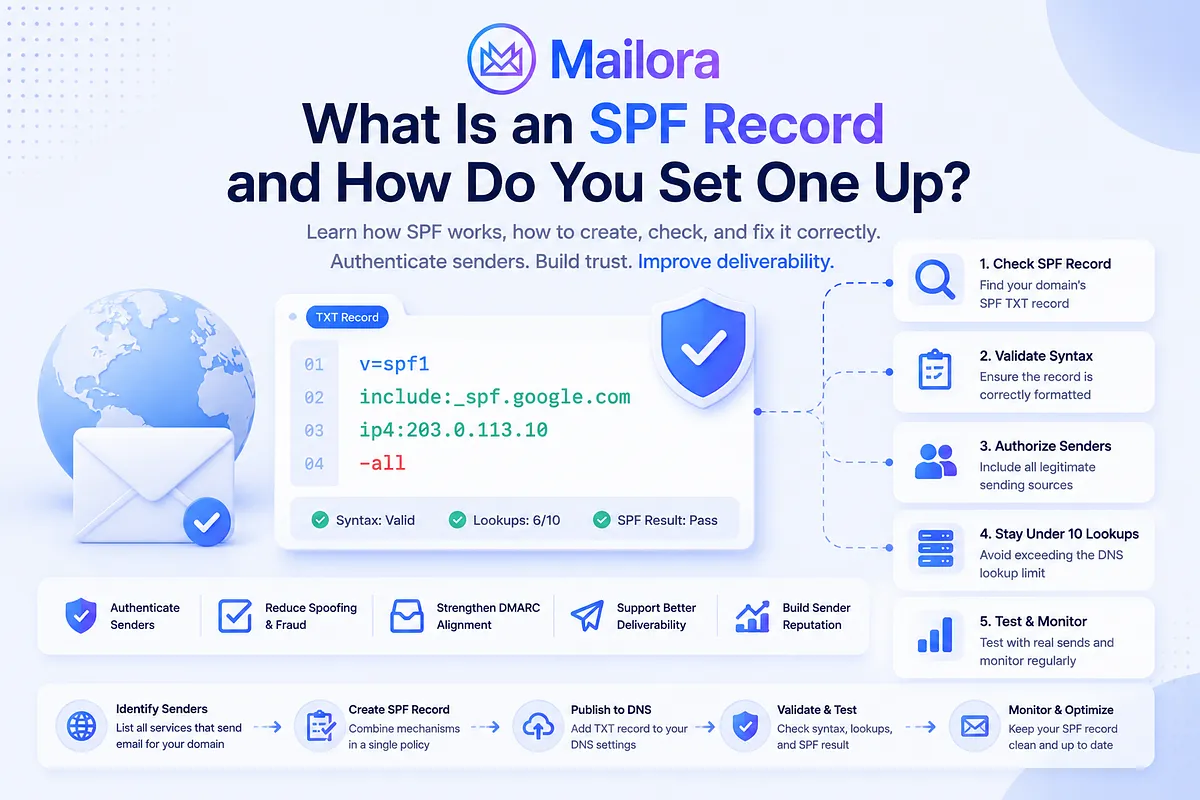
Key Takeaways
|
An SPF (Sender Policy Framework) record is a DNS TXT record that specifies which servers and IP addresses are authorized to send email for a domain.
When a receiving mail server gets a message, it checks the sending IP against the SPF record for the SMTP envelope sender, commonly associated with the Return-Path address. This domain can differ from the visible From address. For example, if an email shows billing@example.com but uses bounce@mail.example.net as its Return-Path, SPF checks mail.example.net.
If the IP is authorized, SPF can return Pass. Otherwise, it can return Fail, SoftFail, Neutral, or another result depending on the policy and evaluation.
SPF is an important authentication layer, but it does not guarantee inbox placement. This guide covers how SPF works, how to create and check a record, and how to troubleshoot common errors.
What Does an SPF Record Look Like?
A basic SPF record looks like this:
| v=spf1 include:_spf.google.com ~all |
Each part has a specific role:
Part | Meaning |
| v=spf1 | Identifies the record as an SPF version 1 policy |
| include: | Tells the receiving server to evaluate another domain's SPF policy |
| _spf.google.com | Example domain containing the authorized sender information |
| ~all | Returns SoftFail for sources that do not match another mechanism |
The exact SPF record you need depends on which services actually send email for your domain.
SPF Record vs. SPF Policy
An SPF record is the DNS TXT record published for a domain, whereas an SPF policy is the set of rules contained in that record that tells receiving servers which sending sources are authorized and what result to return for sources that do not match.
For example:
| v=spf1 ip4:192.0.2.10 -all |
The complete string is the SPF record. The mechanisms and qualifiers inside it make up the policy.
SPF Record Examples
The following examples use documentation IP addresses and placeholder domains. Your actual SPF record will depend on the email services and infrastructure authorized to send for your domain.
Use case | Example SPF record | What it does |
| No email sending | v=spf1 -all | Indicates that no IP address is authorized to send email for the domain. |
| Single IPv4 address | v=spf1 ip4:192.0.2.10 -all | Authorizes one IPv4 address to send email. |
| Multiple IPv4 addresses | v=spf1 ip4:192.0.2.10 ip4:192.0.2.20 -all | Authorizes multiple IPv4 addresses independently. |
| Third-party email provider | v=spf1 include:spf.example.com -all | Authorizes sending sources covered by the provider's SPF policy. |
| Multiple sending services | v=spf1 ip4:192.0.2.10 include:_spf.provider1.example include:spf.provider2.example -all | Authorizes a direct sending IP and two third-party providers in one SPF policy. |
[Caption: Common SPF record examples for different email sending setups.]
| Important: All authorized sending sources must be included in one SPF record for the domain. Do not publish a separate SPF TXT record for each email provider, because multiple SPF records can cause an SPF PermError. |
SPF Record Syntax
An SPF record uses a defined syntax to tell receiving mail servers which sending sources are authorized to send email for a domain. Each record starts with the SPF version and then uses mechanisms, qualifiers, and modifiers to define how those sources should be evaluated. Understanding these components makes it easier to create, troubleshoot, and maintain an SPF record without introducing authentication or lookup-limit errors.
SPF Mechanisms
Mechanisms define the conditions under which a sending IP matches the SPF policy.
Mechanism | What it does | Example | DNS lookup count? |
| ip4 | Authorizes an IPv4 address or network | ip4:192.0.2.10 | No |
| ip6 | Authorizes an IPv6 address or network | ip6:2001:db8::1 | No |
| include | Checks whether the sending source is authorized by another domain's SPF policy | include:_spf.example.com | Yes |
| a | Authorizes IP addresses associated with a domain's A/AAAA records | a | Yes |
| mx | Authorizes IP addresses associated with a domain's MX records | mx | Yes |
| exists | Matches when a specified domain resolves | exists:%{i}.example.com | Yes |
| ptr | Performs a reverse-DNS-based check | ptr:example.com | Yes, but deprecated |
[Caption: SPF mechanisms, their functions, examples, and DNS lookup impact.]
An include does not simply copy another domain's SPF record into yours. The referenced SPF policy is evaluated according to SPF rules, and its DNS lookups can contribute to the 10-lookup limit
SPF Qualifiers
A qualifier determines the result when a mechanism matches.
Qualifier | Result | Meaning |
| + | Pass | The sending source is authorized |
| - | Fail | The sending source is not authorized |
| ~ | SoftFail | The source is probably unauthorized, but the policy does not request a hard failure |
| ? | Neutral | The policy makes no assertion about the source |
[Caption: SPF qualifiers determine the authentication result for matching sources.]
A qualifier is optional. If you omit it, + is assumed. For example, ip4:192.0.2.10 is equivalent to +ip4:192.0.2.10.
The all Mechanism
The all mechanism matches every IP address that reaches it. Its qualifier determines the final SPF result:
SPF term | Result | What it means |
| -all | Fail | Reject or treat as unauthorized according to the receiver's policy |
| ~all | SoftFail | Likely unauthorized, but not an explicit hard failure |
| ?all | Neutral | Makes no assertion |
| +all | Pass | Authorizes every IP address |
[Caption: SPF qualifiers determine the authentication result for matching sources.]
How Does an SPF Record Work?
When an email is delivered, the receiving mail server checks whether the system that connected to it is authorized to send mail for the relevant domain. SPF evaluation generally follows these steps:
- The sending mail server establishes an SMTP connection and attempts to deliver the message. The recipient's server can see the connecting IP address, which is the address SPF evaluates.
- SPF evaluates the domain used by the SMTP envelope sender, commonly associated with the Return-Path address. This domain can be different from the visible From: address that the recipient sees in their email client.
- The server queries DNS for the SPF policy published for that envelope-sender domain. An SPF policy is published as a DNS TXT record beginning with v=spf1.
- The receiving server processes the mechanisms in the SPF record from left to right. It checks whether the connecting IP matches an authorized source, such as an ip4, ip6, include, a, or mx mechanism. The first mechanism that matches determines the SPF result.
- A mechanism can use a qualifier such as +, -, ~, or ? to specify the result. For example, ip4:192.0.2.10 produces Pass when the connecting IP matches, while -all produces Fail for an IP that did not match any earlier mechanism.
- The evaluation produces a result such as Pass, Fail, SoftFail, Neutral, None, TempError, or PermError. A Pass means the sending IP is authorized by the SPF policy; a Fail means it is not authorized under the policy. Other results can indicate that no SPF record exists, the DNS lookup temporarily failed, or the SPF record itself has an error.
- The receiving system can combine SPF with DKIM, DMARC, sender reputation, IP reputation, recipient engagement, and other filtering signals when deciding whether to accept, reject, quarantine, or otherwise filter the message
How to Create an SPF Record: Step-by-Step Guide
Creating an SPF record starts with identifying every service authorized to send email for your domain. From there, you can build a single SPF policy, publish it in DNS, and validate that it is syntactically correct and within the DNS lookup limit. The following steps walk through the process from sender identification to testing.
Step 1: Identify Every Legitimate Sending Service
Start by making a complete list of every system that sends email using your domain. Look beyond your primary mailbox provider because marketing, transactional, CRM, and automation platforms may send mail on your behalf. This may include:
- Google Workspace
- Microsoft 365
- Marketing automation platforms
- Transactional email providers
- CRM and sales automation tools
- Other third-party email services
Check both your current infrastructure and any services that send automated messages such as password resets, invoices, notifications, or marketing campaigns.
Every legitimate sending source that needs SPF authorization must be represented in the record. Missing even one provider can cause its messages to fail SPF.
Step 2: Collect Each Provider's SPF Requirements
Once you know which services send email, check each provider's documentation to determine how it expects you to authorize its sending infrastructure. A provider may ask you to add:
- An include: mechanism
- An ip4: address or network
- An ip6: address or network
- Another supported SPF mechanism
For example, a provider might instruct you to add:
| include:_spf.example.com |
Use the mechanism provided by the service rather than guessing or copying an SPF record from another domain. Provider infrastructure can change, so using its current documentation also reduces the risk of maintaining outdated IPs or includes.
Step 3: Build One SPF Record
Combine the authorized sending sources into one SPF policy for the domain. For example, if your organization sends mail from one dedicated IPv4 address and two third-party providers, the record might look like:
| v=spf1 ip4:192.0.2.10 include:_spf.provider1.example include:spf.provider2.example -all |
The IP addresses and domains above are examples. Use the exact values supplied by your email providers.
Do not create a separate SPF record for each service. Multiple SPF records for the same domain can cause an SPF PermError. Instead, consolidate all legitimate sending sources into a single v=spf1 record.
Step 4: Choose Your SPF Policy
The all mechanism determines the result for a sending IP that does not match any of the authorized mechanisms earlier in the record. During implementation, some organizations use:
| ~all |
This returns SoftFail for unauthorized sources while the sending inventory is being verified. Once you have confirmed that all legitimate senders are included and the record is working correctly, you may choose:
| -all |
This returns Fail for sources that are not authorized by the policy. The appropriate policy depends on your sending environment and authentication strategy. Don't switch to -all simply because it is common practice; first make sure you have identified every legitimate sending source.
Step 5: Publish the Record in DNS
Once your SPF policy is ready, publish it as a TXT record in the DNS settings for your domain. For a root domain such as:
| example.com |
the DNS host or name is commonly represented as:
| @ |
The exact field names depend on your DNS provider. Some providers automatically append the domain name, while others may display the full hostname. The TXT value should contain your complete SPF policy, for example:
| v=spf1 ip4:192.0.2.10 include:spf.example.com -all |
Make sure you publish the complete record as a single TXT record and do not create separate SPF records for individual providers. After saving the change, allow time for the updated record to become visible across DNS. The timing depends on your DNS provider and the record's TTL.
Step 6: Validate the Record
Publishing the SPF record does not confirm that it is configured correctly. Validate the record against your actual sending setup and check that:
- The SPF record is visible in DNS: Confirm that the published TXT record can be retrieved publicly.
- The syntax is valid: Check for formatting errors, invalid mechanisms, or other syntax problems.
- Only one SPF record exists: Multiple SPF records for the same domain can result in an SPF PermError.
- Every legitimate sender is authorized: Confirm that your email providers, platforms, and direct sending IPs are covered.
- The DNS lookup limit is not exceeded: Count the mechanisms that trigger DNS lookups, including nested include statements.
- The sending IP produces the expected result: Test an actual sending path to confirm that the IP is evaluated against the correct SPF record.
Validation is important because an SPF record can look correct in DNS while still failing during real email authentication. Testing the actual sending infrastructure confirms that the policy works as intended.
How to Check an SPF Record
You can check an SPF record by querying the domain's DNS records directly or using an SPF testing tool. A proper check should go beyond confirming that a v=spf1 record exists. You also need to verify that it authorizes your current sending infrastructure and can be evaluated without errors.
1. Look Up the Domain's TXT Records
Start by querying the DNS TXT records for the domain you want to check. You can use a DNS lookup tool or your DNS provider's management interface. Look for a TXT record beginning with:
| v=spf1 |
If no SPF record appears, the domain may not have SPF configured. However, make sure you are checking the correct domain used for the SPF evaluation, particularly if your email provider uses a different envelope-sender or Return-Path domain.
2. Confirm the SPF Version
A valid SPF policy should begin with:
| v=spf1 |
This identifies the record as an SPF version 1 policy. Check that the version identifier appears at the beginning and that the rest of the record follows valid SPF syntax. A missing or malformed v=spf1 identifier can prevent the record from being recognized as a valid SPF policy.
3. Check Authorized Sending Sources
Next, compare the mechanisms in the SPF record with your actual email infrastructure. Ask:
- Do we still use this provider?
- Does this IP still send our email?
- Are all legitimate sending platforms included?
- Is anything in the record obsolete or no longer required?
- Have we recently added a new email service that is missing?
For example, if your SPF record contains an include: for a marketing platform you stopped using months ago, that mechanism may no longer be necessary. Conversely, a new transactional provider that is missing from the record can cause its messages to fail SPF.
An SPF record can be syntactically valid but operationally incorrect, so this step should always be checked against your current sending setup.
4. Check for Multiple SPF Records
Confirm that your domain publishes only one SPF record. If your DNS lookup returns multiple TXT records beginning with v=spf1, you have conflicting SPF policies. SPF does not combine them automatically, and the evaluation can return a PermError.
For example, instead of publishing separate records for Google Workspace and another email provider, combine the required mechanisms into a single SPF policy.
5. Check the DNS Lookup Count
Review the SPF record for mechanisms that can trigger DNS lookups, including:
- include
- a
- mx
- exists
- redirect
Remember that nested include statements can consume additional lookups even when they are not visible in the top-level record.
The complete SPF evaluation must stay within the 10-DNS-lookup limit. Exceeding that limit can result in an SPF PermError, even when every individual mechanism is otherwise valid.
6. Test the SPF Authentication Result
Finally, test the actual sending path rather than relying only on the DNS record. Confirm that the actual sending IP is authorized by the SPF policy for the domain being evaluated. A record can be visible, correctly formatted, and free of lookup-limit errors while a particular sending service still fails SPF because its IP is not authorized.
Testing the actual authentication result helps confirm that the SPF policy works as expected in real email delivery, not just in the DNS record.
Does SPF Improve Email Deliverability?
SPF can support email deliverability, but it does not guarantee that messages will reach the inbox. Its primary purpose is authentication: SPF helps receiving systems verify that the sending IP is authorized to send email for the domain being evaluated.
A valid SPF record can strengthen your domain's authentication signals and help receiving systems distinguish authorized senders from unauthorized sources. It also gives DMARC an authentication signal that can be aligned with the visible From domain, but SPF is only one part of the delivery decision.
Your emails can still land in spam even when SPF passes because mailbox providers also consider factors such as:
- DKIM and DMARC authentication and alignment
- Sending IP and domain reputation
- Blocklist status
- Spam complaints and engagement
- Sending volume and consistency
- Inbox placement across different mailbox providers
This is why checking whether SPF simply passes or fails is not enough. You need to understand how SPF fits into the rest of your sending infrastructure and whether other deliverability signals are creating problems.
Mailora is an email deliverability intelligence platform that brings authentication, reputation, blocklist, and inbox placement signals together so you can understand what is affecting your email performance. Mailora monitors SPF, DKIM, and DMARC, sender reputation, blocklist status, and inbox placement across providers. Instead of checking each signal separately, you get a clearer view of where a deliverability issue is coming from and what needs attention. Test your email deliverability with Mailora to see how your sending setup performs across the signals that matter for inbox placement. |
FAQs
Can I have two SPF records?
No. A domain should publish one SPF policy. If multiple SPF records exist, SPF evaluation can return a PermError. Combine the authorized sending mechanisms into a single record instead.
What is the SPF 10-lookup limit?
SPF limits the number of DNS-based lookups required during evaluation to 10. Mechanisms such as include, a, mx, and exists, as well as redirect, can contribute to the limit. Exceeding it can result in a PermError.
Do IP4 and IP6 count toward the SPF lookup limit?
No. ip4 and ip6 mechanisms do not require DNS lookups and therefore do not consume the SPF DNS lookup limit.
Should I use ~all or -all?
It depends on your sending configuration and deployment stage. ~all produces SoftFail for sources that do not match the policy, while -all produces Fail. Before using a hard-fail policy, make sure your SPF record accurately covers all legitimate sending sources.
Does SPF improve email deliverability?
Correct SPF configuration helps receiving systems verify whether a sending IP is authorized by the SPF domain. However, SPF alone does not guarantee inbox placement. Deliverability also depends on authentication, alignment, sender reputation, sending behavior, recipient engagement, and other filtering signals.
Stay in the loop
Deliverability insights, product updates, and early access to new features. No spam, unsubscribe anytime.
By subscribing, you agree to our Privacy Policy. Unsubscribe anytime.