SPF Failed for IP: What It Means and How to Fix It
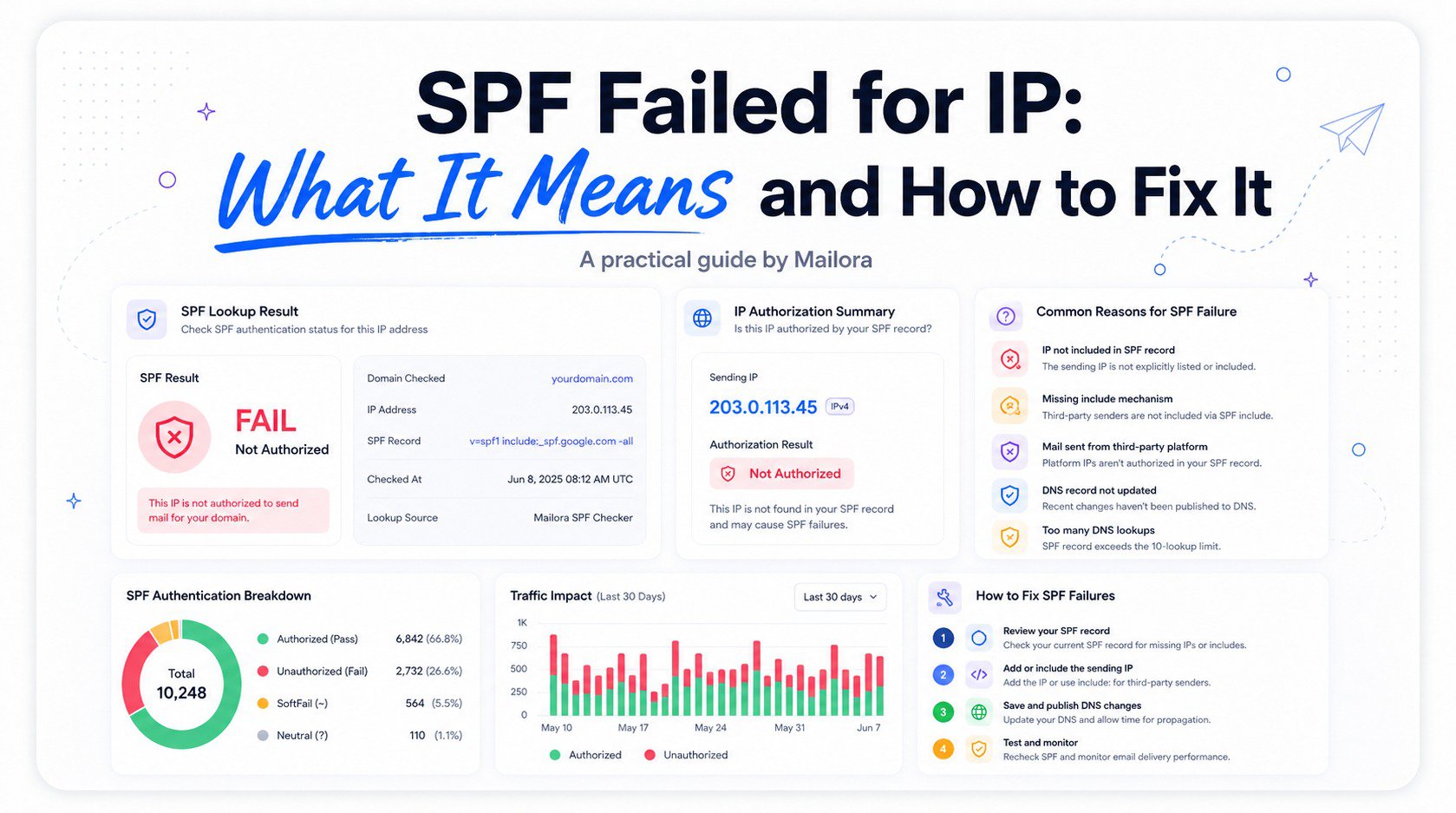
An "SPF failed for IP" message, whether it shows up in a bounce notification, a DMARC aggregate report, or a mail server log, points to a specific and usually fixable problem: a sending IP address wasn't found among the sources authorized in the domain's SPF record. It's one of the more common authentication errors and can lead to email delivery failure, often appearing right after a new tool gets added to a sending stack.
What "SPF Failed for IP" Means
SPF works by publishing a list of IP addresses and ranges authorized to send mail on behalf of a domain, then having receiving mail servers check the actual sending IP against that list. When a message arrives from an IP address that isn't included, the check fails, and depending on the qualifier used, that failure is reported and handled differently by receivers.
An SPF failed for IP result usually means the record is syntactically valid and evaluated correctly. It simply doesn't include the IP that actually sent the mail. This is fundamentally different from a syntax error in the SPF record itself, which produces a different kind of failure, such as a permanent error or permerror.
Common Reasons an IP Isn't Authorized
| Cause | Why It Happens | Typical Fix |
|---|---|---|
| New sending platform | Tool added without updating SPF | Add the platform's include mechanism |
| Infrastructure change | ESP expands IP ranges without notice | Confirm the platform uses include, not hardcoded IPs |
| Shadow IT | Team adopts a tool outside central process | Audit and add missing sources |
| Outdated record after migration | Old platform never removed, new one never added | Reconcile the full list of active sending sources |
A newly added sending platform is the most frequent cause of an SPF failed for IP result. Whenever an organization starts using a new email service provider, marketing automation tool, or help desk platform, that platform's sending IPs need to be explicitly added to the SPF record. If this step gets missed during onboarding, every message from that tool will produce an SPF failed for IP result until the record is updated. This is a prime example of how a wrong domain or missing bounce subdomain configuration can create authentication problems.
SPF Softfail vs Hard Fail vs Permerror
The specific way an SPF failed for IP result gets handled depends heavily on the qualifier configured on the domain's SPF record. A softfail (~all) tells receiving servers to treat unauthorized IPs with suspicion but generally doesn't result in outright rejection. A hard fail (-all) is a stronger signal, explicitly telling receiving servers that mail from unauthorized IPs can be rejected outright.
A permerror is a different category of result entirely, indicating the SPF record itself couldn't be properly evaluated, often due to exceeding the 10 DNS lookup limit or a syntax issue. This isn't about a specific IP not being authorized; it reflects a structural problem with the record itself. In SPF terminology, a temperror may instead indicate temporary DNS retrieval issues, while a permerror is a permanent error caused by technical reasons in the record or its evaluation.
How to Add a Missing IP or Include Correctly
Once the unauthorized IP or sending source has been identified, typically through DMARC aggregate reports or a sending platform's own documentation, follow this sequence:
- Identify the sending platform's official SPF include value from its documentation, rather than guessing at a specific IP address. Confirm whether the platform sends through IPv4 senders, IPv6, or a forwarding server on your behalf.
- Add the include mechanism to your existing SPF record, keeping it within the single-record rule. Check the domain's specific DNS records, including the DNS TXT record and return-path domain, before making changes.
- Check the domain's total DNS lookup count before publishing, since each additional include contributes to the 10-lookup limit. Review redirects, nested includes, and any CIDR error caused by an incorrectly formatted IP range or prefix length.
- Publish the updated record, allow time for propagation based on the record's TTL, and test with a genuine send from the newly authorized platform.
Avoiding This Error With Future Sending Changes
The most reliable way to prevent a recurring SPF failed for IP result is establishing a simple process: whenever a new tool that sends email on the domain's behalf gets adopted, updating the SPF record becomes a required step in onboarding, not an afterthought discovered only after mail starts failing. Reviewing DMARC aggregate reports periodically also serves as an ongoing safety net, since any sending source generating consistent failures will show up clearly in that data. An SPF analyzer can help check the order of mechanisms, lookup limits, listed ranges, and default result before changes are published.
Frequently Asked Questions
Does an SPF failed for IP error mean my email won't be delivered at all?
Not necessarily. The actual outcome depends on the qualifier used in the domain's SPF record. Under a softfail, mail is more likely to still be delivered but with reduced trust. Under a hard fail, rejection becomes more likely and may contribute to an email delivery failure.
How do I find out which IP caused an SPF failed for IP result?
DMARC aggregate reports are typically the most reliable source, since they list the specific sending IPs mailbox providers observed along with the SPF result for each one. These reports can also reveal whether mail came from the original sender, a forwarding server, or another system sending on the domain's behalf.
Can adding too many sources to my SPF record cause problems?
Yes. Each include mechanism contributes to the 10 DNS lookup limit, and exceeding that limit causes the entire record to fail with a permerror, regardless of whether the specific sending IP would have otherwise been authorized. Similar issues can arise from malformed or incorrectly formatted records, a meta server fault, or a current community server fault affecting an external SPF service.
Should I remove old sending platforms from my SPF record if I'm no longer using them?
Yes, this is good practice. Removing unused includes reduces unnecessary DNS lookups and keeps the record easier to audit, lowering the odds of a future SPF failed for IP surprise. In such circumstances, review the domain | duocircle configuration, forwarding paths, and any SPF records associated with a separate bounce subdomain.
Learn how Mailora helps you monitor SPF authorization across every sending source, so a missing IP gets flagged before it causes a deliverability problem.
Stay in the loop
Deliverability insights, product updates, and early access to new features. No spam, unsubscribe anytime.
By subscribing, you agree to our Privacy Policy. Unsubscribe anytime.