How to Improve Email Deliverability in 2026
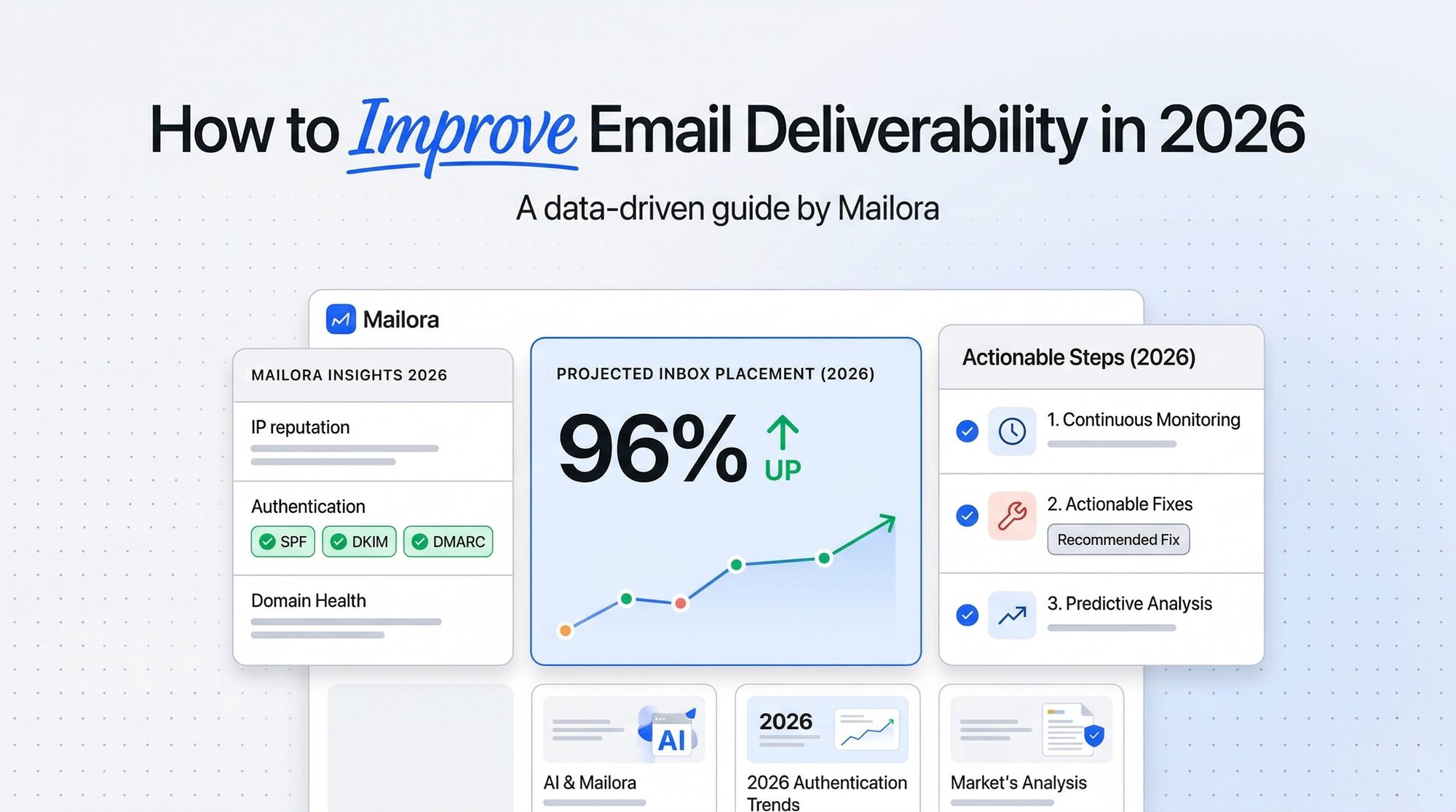
Email deliverability in 2026 is no longer about hitting “send” and seeing a 99 percent delivery rate.
It is about where your emails land.
If your campaigns are accepted but end up in spam or promotions, you are not dealing with a sending problem. You are dealing with a deliverability problem.
To improve email deliverability today, you need to manage identity, reputation, engagement, and sending behavior as one system. This guide explains exactly how to do that, with a practical framework you can apply immediately.
What Does It Mean to Improve Email Deliverability?
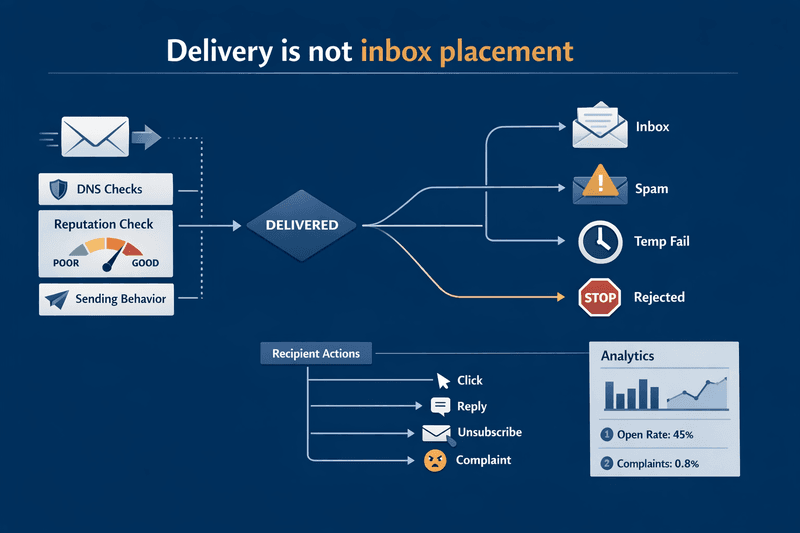
To improve email deliverability, you need to understand the difference between delivery and inbox placement.
- Delivery rate tells you if the receiving server accepted your email
- Inbox placement tells you where it actually landed
An email can be delivered and still go to spam.
That is why improving deliverability means ensuring your messages consistently reach the inbox, not just the server.
Modern mailbox providers evaluate more than authentication. They analyze engagement, complaint rates, sending patterns, and infrastructure consistency before deciding where your emails go.
Delivery vs Inbox Placement
| Metric | What it tells you | What it misses |
|---|---|---|
| Delivery rate | Whether a receiving server accepted the message | Folder placement, complaint risk, engagement quality |
| Hard bounce rate | Whether addresses or domains are invalid or blocked | Reputation decline that still results in acceptance |
| Inbox placement | Whether messages landed in inbox versus spam | Why placement changed |
| Spam complaint rate | Whether recipients actively signaled low relevance | Hidden technical issues that have not yet triggered complaints |
| Open rate | A rough visibility signal | True user behavior in Apple Mail environments |
| Click and reply rate | Stronger evidence of useful engagement | Technical auth failures or DNS drift |
Email deliverability best practices in 2026 focus on three core pillars: Identity, Reputation, and Behavior. If your authentication (Identity) is perfect but your sending frequency (Behavior) is erratic, your placement will suffer. Improvement means synchronizing these elements into a single, visible operating model.
A lifecycle team sees normal delivery rate after an ESP migration, but Gmail performance drops. Authentication passes, so the team assumes the infrastructure is healthy. The real issue is that a new click tracking domain, changed sending pool, and no engagement segmentation altered how Gmail evaluated the stream. The lesson is simple: accepted mail is not the same as inbox mail—and “better email” is usually about operations, not a single setting.
Pros and Cons of Using Open Rate as a Deliverability Proxy
| Approach | Pros | Cons |
|---|---|---|
| Open rate as primary KPI | Easy to report, historically familiar | Distorted by privacy protections, weak for root cause analysis |
| Open rate as secondary KPI | Useful when paired with clicks, replies, complaints | Still not enough to explain placement shifts |
Apple explicitly states that Mail Privacy Protection prevents senders from seeing whether a recipient opened an email. That makes clicks, replies, complaints, unsubscribes, and provider placement data more useful for diagnosis.
The Four Pillars That Actually Improve Email Deliverability
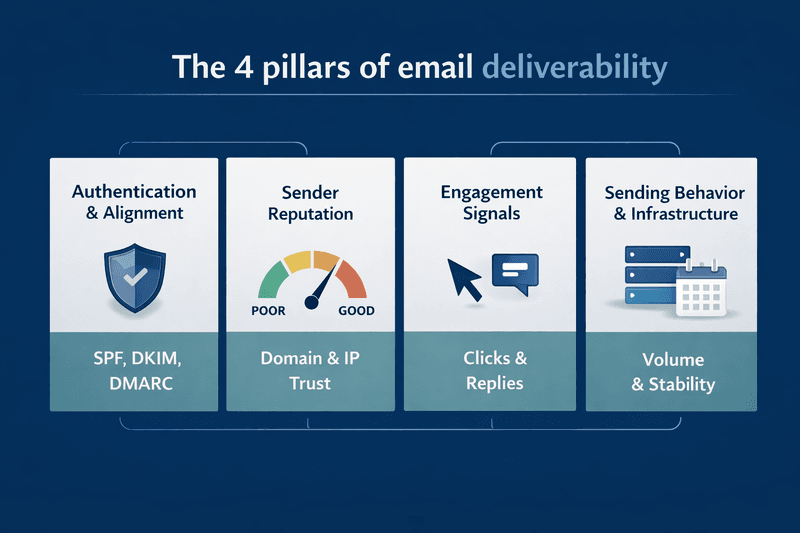
To improve inbox placement, you must treat deliverability as a four-part system. If one pillar leans, the entire program risks a collapse.
1. Authentication and Alignment
Identity is the foundation of trust. While most senders know the acronyms, few maintain perfect alignment across all sending streams.
- SPF (Sender Policy Framework): Lists the IP addresses authorized to send on your behalf.
- DKIM (DomainKeys Identified Mail): Provides a cryptographic signature that proves the email was not tampered with in transit.
- DMARC (Domain-based Message Authentication, Reporting, and Conformance): Tells providers what to do if SPF or DKIM fails (none, quarantine, or reject).
Why alignment matters: To satisfy gmail sender requirements and yahoo bulk sender requirements, your "From" address domain must match the domain found in your DKIM signature or SPF record. If you use a third-party tool like a support desk or a CRM that sends on your behalf without proper alignment, providers may flag those messages as spoofing, even if your main marketing stream is healthy.
2. Sender Reputation
Your reputation is a rolling calculation of your trustworthiness.
- Domain Reputation: This is now the primary signal. It follows your brand across different ESPs and IP addresses.
- IP Reputation: Still vital for high-volume senders. If you are on a shared IP, your neighbors' bad habits can hurt you. If you are on a dedicated IP, your consistency is your only defense.
- Complaint Rates: This is the kill switch. Gmail and Yahoo now strictly enforce a 0.3 percent spam complaint threshold. Crossing this limit can result in immediate, program-wide spam placement.
3. Engagement Signals
In 2026, mailbox providers use AI to monitor how users interact with your mail.
- Positive Signals: Clicks, replies, "Mark as Not Spam," and moving messages to folders.
- Negative Signals: Deleting without opening, marking as spam, and long-term inactivity.
- The Inactivity Trap: Sending to thousands of ghost subscribers who have not clicked in a year tells Gmail that your content is no longer relevant, lowering your overall domain trust.
4. Sending Behavior and Infrastructure
Consistency is the hallmark of a professional sender. Providers look for normal patterns.
- Volume Spikes: Sending 1 million emails on a Tuesday when you usually send 10,000 looks like a hijacked account.
- Infrastructure Drift: This occurs when you add new subdomains, change link-tracking providers, or migrate ESPs without a proper warm-up period. Every change is a reputation event.
Comparison Insight: Domain Reputation vs IP Reputation
| Dimension | Domain reputation | IP reputation |
|---|---|---|
| What it reflects | Overall trust in the sending brand and domain family | Trust in the specific sending address |
| What affects it | All streams, complaints, alignment, cross team behavior | Volume, bounce patterns, complaint history on that IP |
| Why it matters now | More durable signal for modern mail programs | Still important, but less protective if domain trust is weak |
| Common mistake | Assuming a new IP fixes a domain problem | Assuming a strong IP can rescue poor domain practices |
Pillar Audit Table
| Pillar | What to audit | Common failure signal | Leading indicator |
|---|---|---|---|
| Authentication | SPF, DKIM, DMARC, alignment, ARC where needed | Accepted mail still folders badly or fails policy | DMARC reports, auth dashboards |
| Reputation | Complaints, bounce mix, blocklists, PTR, TLS | Provider specific spam or temp fails | Complaint rise, DNS drift |
| Engagement | Clicks, replies, unsubscribes, inactivity | Spam placement after segmentation weakens | Falling click to delivery ratio |
| Behavior and infrastructure | Volume spikes, domain changes, ESP changes, tracking changes | Performance drop after operational change | Sudden variance by provider |
Pros and Cons of Moving DMARC Toward Enforcement
| Approach | Pros | Cons |
|---|---|---|
| Stay at p=none | Visibility without immediate risk | Does not actively stop abuse, weak long term posture |
| Move toward enforcement | Better brand protection, clearer policy, stronger sender governance | Can break overlooked senders if source inventory is incomplete |
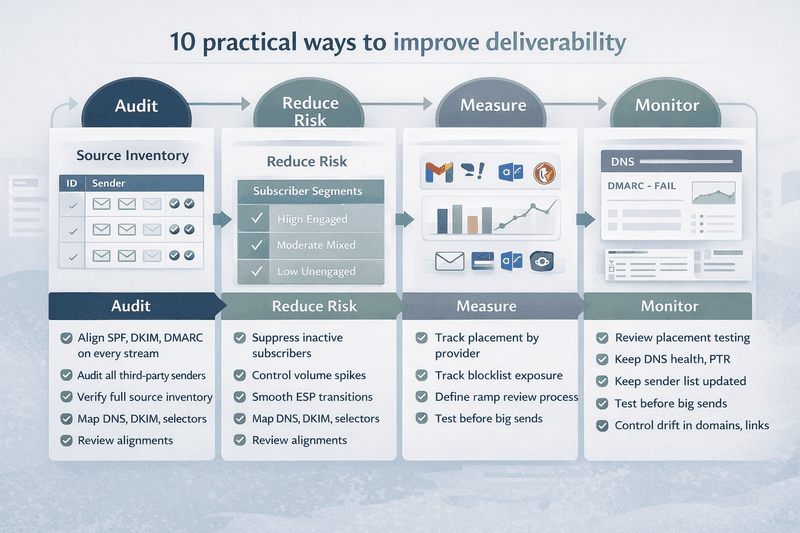
10 Practical Ways to Improve Email Deliverability Without Guesswork
Follow these email deliverability tips to move from reactive firefighting to proactive management.
1. Align SPF, DKIM, and DMARC on Every Stream
Audit your shadow IT. Marketing often has a clean DNS, but what about your billing system, your transactional API, or your customer support tool? Every stream must pass alignment to protect your primary domain reputation.
2. Move DMARC from Monitoring to Enforcement
Do not stay at p=none forever. Use DMARC reports to identify legitimate senders, then move to p=quarantine or p=reject. This prevents bad actors from spoofing your domain, which inherently increases your trust score with providers.
3. Audit All Third-Party Senders
Create a Source Inventory. If you cannot name every platform sending mail from your domain, you cannot fix emails going to spam. Remove outdated platforms that still have DNS permissions.
4. Remove Inactive Subscribers Regularly
List size is a vanity metric; list health is a deliverability metric. Implement an automated sunset policy. If a user has not clicked or replied in 90 to 180 days (depending on your cycle), stop mailing them.
5. Reduce Sudden Volume Spikes
If you have a major product launch, warm up to the volume. Split the send over 48 hours instead of two hours. Controlled growth is the best way to increase email deliverability during peak seasons.
6. Monitor Placement Across Providers
Your Total Open Rate hides the truth. You need to see that you have 85 percent inboxing at Microsoft but only 12 percent at Gmail. This allows you to diagnose provider-specific technical blocks.
7. Segment by Engagement
Send your most important content to your most engaged users first. This primes the pump with positive engagement signals, making it more likely that your mail to less engaged segments will also hit the inbox.
8. Avoid Infrastructure Drift
When you change an ESP or an email API service, you are not just changing a vendor; you are changing your reputation profile. Always use a dedicated Migration Plan that includes IP and domain warming.
9. Track Blocklist Exposure
Not all blocklists are created equal. Focus on the big ones like Spamhaus and Barracuda. If you appear on these, it is a symptom of a deeper list-acquisition or security problem.
10. Test Before Major Campaigns
Use email deliverability rate testing tools like Mailora or GlockApps. Send a test to a seed list to see exactly where your mail lands across different providers before you commit your entire audience to the send.
Improvement Table
| Action | Why it matters | Proof of completion |
|---|---|---|
| Align auth on every stream | Prevents hidden failure paths | All live senders mapped and passing |
| Move DMARC carefully toward stronger policy | Reduces abuse and clarifies governance | Legitimate sources accounted for |
| Suppress inactive users | Reduces complaint and ignore risk | Engagement based suppression live |
| Smooth send volume | Reduces reputation shocks | No abrupt unexplained spikes |
| Monitor by provider | Exposes provider specific failure | Weekly provider level trend view |
| Test before important sends | Catches placement risk before scale | Pre send test and review completed |
An ecommerce brand doubles weekly send volume ahead of a launch, changes click tracking, and uses a partially warmed subdomain. Authentication still passes. Delivery rate stays high. Gmail inbox placement drops because the change looked like new behavior from a stream that had not earned equivalent trust. The fix is not “better copy.” The fix is controlled ramp, segmentation, and monitoring.
Pros and Cons of Aggressive Inactivity Suppression
| Approach | Pros | Cons |
|---|---|---|
| Aggressive suppression | Faster reputation cleanup, less wasted volume | Can reduce short term audience size |
| Loose suppression | Preserves audience size temporarily | More silent users, more complaint risk, weaker signals |
Gmail and Yahoo Requirements, Why Emails Still Go to Spam, and How to Fix the Right Problem
The requirements introduced in 2024 have become the industry standard. Failure to meet these is no longer a deliverability hit; it is a total block.
- Authentication is Mandatory: Bulk senders (5,000+ messages per day) must have SPF, DKIM, and DMARC.
- One-Click Unsubscribe: You must include the List-Unsubscribe header and a visible "Unsubscribe" link in the body. If a user finds it hard to leave, they will click "Spam," and your reputation will die.
- Spam Rate Threshold: You must keep your spam rate in Google Postmaster Tools below 0.1 percent, with a hard ceiling at 0.3 percent.
Requirements summarized from current Google and Yahoo sender guidance.
| Requirement | Gmail | Yahoo | Operational meaning |
|---|---|---|---|
| SPF or DKIM for all senders | Required | Minimum required | Every sender must authenticate |
| SPF, DKIM, DMARC for bulk senders | Required | Effectively required for bulk mail with valid DMARC and pass | Bulk programs need full identity control |
| Alignment to visible From domain | Required for bulk sender compliance | Required for DMARC pass | Hidden auth is not enough |
| One click unsubscribe for promotional mail | Required | Easy unsubscribe required, visible body link expected | Reduce friction before complaints happen |
| Low complaint rate | Required for mitigation eligibility | Below 0.3 percent | Relevance is a deliverability control |
| Valid forward and reverse DNS | Required | Required | Basic infrastructure trust |
| TLS and correct message format | Required | RFC compliance required | Technical hygiene still matters |
One Click Unsubscribe Must Be Implemented Correctly
For Gmail promotional mail, one click unsubscribe means header based implementation that matches RFC 8058, not just a body link. Google says marketing and promotional messages need one click unsubscribe, while transactional messages are excluded. RFC 8058 requires the right headers and a valid DKIM signature that covers them.
List-Unsubscribe: https://example.com/unsubscribe/abc123
List-Unsubscribe-Post: List-Unsubscribe=One-Click
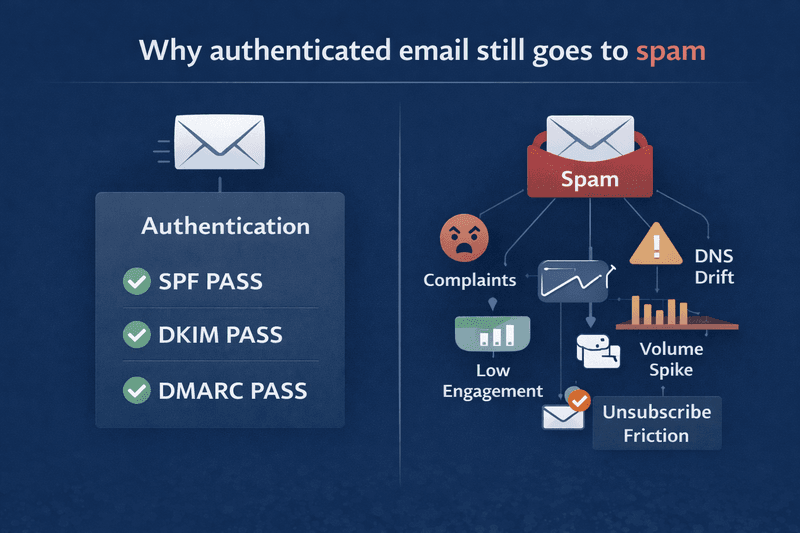
Why Your Emails Still Go to Spam
If you are trying to improve email deliverability and your auth is "green," but you're still hitting spam, look at these four factors:
1. Authentication passes, but reputation is weak
Passing auth only tells the provider you are who you claim to be. It does not prove recipients want the mail. Complaints and poor engagement can still drive spam placement.
2. Engagement quality dropped
If too many recipients ignore, delete, or complain, the provider sees the stream as low value. Apple privacy changes also mean you may not notice the problem if you rely on opens.
3. Infrastructure changed
A new ESP, new IP pool, new tracking domain, new subdomain, or new From domain can all change trust patterns. The Mailora brief explicitly lists ESP changes, volume increases, and cross domain sending complexity as real causes of decline.
4. Unsubscribe friction drives complaints
If leaving the list is harder than marking spam, recipients will choose spam. Google and Yahoo both connect low complaints with successful delivery. FTC and ICO guidance also reinforce that marketing email must provide a valid way to opt out and that opt out requests must be honored.
5. Message class is mixed up
When promotional and transactional traffic share the same domain, cadence, or reputation pool without discipline, higher risk promotional behavior can damage essential mail.
Troubleshooting Guide
| Symptom | Likely cause | What to check next | First fix |
|---|---|---|---|
| Gmail spam rise after volume jump | Behavior shock, complaint rise | Postmaster spam rate, send ramp, segment mix | Reduce spike, send to engaged users first |
| Yahoo spam rise with valid auth | Complaint threshold or weak relevance | Complaint rate, unsubscribe friction, segment quality | Tighten targeting, simplify unsubscribe |
| Auth passes but spam persists | Reputation or behavior issue | Provider placement, complaints, clicks, replies | Fix audience and send discipline |
| Sudden failure after ESP migration | Drift in domains, IPs, headers, tracking | SPF, DKIM selectors, return path, link domain | Reconcile infrastructure and ramp carefully |
| DMARC errors after new tool launch | Missing or misaligned sender | Source inventory and DMARC reports | Add or correct auth path |
| Good total metrics but one provider collapses | Provider specific issue | Provider breakout view | Diagnose that provider separately |
Myth Corrections
- Myth: SPF, DKIM, and DMARC guarantee inbox placement.
Reality: They establish trust and policy, but providers still evaluate complaints, engagement, DNS, TLS, format, and behavior. - Myth: Open rate is the best deliverability KPI.
Reality: Apple Mail Privacy Protection makes opens unreliable as a standalone measure. - Myth: Spam words are the main reason email goes to spam.
Reality: Modern placement decisions are broader and usually driven more by trust and recipient response than by a simplistic word list. - Myth: A body unsubscribe link is enough.
Reality: Gmail requires proper one click headers for promotional traffic. - Myth: DMARC should go straight to reject.
Reality: Enforcement should follow a verified source audit, not replace it.
Compliance Considerations
In the United States, CAN SPAM requires truthful headers and subject lines, a way to opt out, and a valid physical postal address. The FTC says commercial email must provide a clear opt out method and honor requests within 10 business days. In the United Kingdom, ICO guidance under PECR says direct marketing by electronic mail to individuals generally requires consent or the soft opt in, and senders must stop when people unsubscribe. These are legal obligations, not just deliverability best practices.
For example, a retention team says, “Our auth is green, so Gmail must be wrong.” A closer review shows that promotional mail shares a domain with important account messages, unsubscribe is slow, and a large dormant segment was mailed after months of silence. The provider is not confused. The stream sent low trust signals.
Pros and Cons of Moving DMARC to Stronger Enforcement
| Approach | Pros | Cons |
|---|---|---|
| Stronger policy after audit | Better abuse control, cleaner governance, stronger brand protection | Requires source discovery and careful rollout |
| Stronger policy before audit | Faster apparent progress | High risk of breaking legitimate senders |
How to Measure Deliverability Improvement
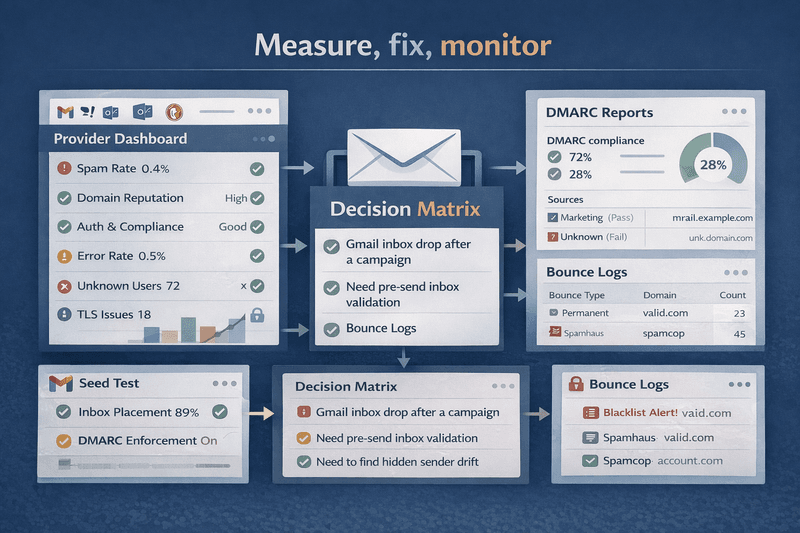
Measure inbox placement by provider, complaint rate, authentication health, bounce class, and trend direction over time. Do not rely on delivery rate or open rate alone. Use a layered measurement model:
- Provider dashboards: Google Postmaster Tools for spam rate, reputation, authentication, compliance status, and delivery errors.
- Inbox placement tests: useful for checking where mail lands before or during campaigns.
- DMARC reporting: useful for source discovery, alignment control, and abuse visibility.
- Bounce and rejection logs: useful for SMTP level failure diagnosis.
- Engagement trends: clicks, replies, unsubscribes, complaints, and inactivity by segment.
Google says Postmaster Tools data is not real time and typically updates within 24 hours or longer. That matters because many teams expect instant feedback from changes that providers do not expose instantly.
Measurement Method Comparison
| Method | Best for | What it misses |
|---|---|---|
| Delivery rate | Basic send acceptance | Inbox versus spam |
| Seed based inbox tests | Folder placement snapshots | Full audience behavior |
| Google Postmaster Tools | Gmail reputation, spam rate, auth, compliance | Non Gmail providers |
| DMARC reports | Source discovery and alignment | Inbox placement |
| Bounce logs | SMTP level failures | Soft reputation decline |
| Click and reply data | Real user interest | Technical failure causes |
Fixing vs Monitoring
A one time fix solves a current fault. Monitoring prevents the next one. That distinction matters because many deliverability programs improve briefly after cleanup, then decay when new tools, domains, or message streams are added. The Mailora brief explicitly separates fixing from monitoring and positions ongoing visibility as the brand difference.
Implementation Framework
Phase 1: Stabilize Identity
- Inventory all senders.
- Verify SPF, DKIM, DMARC, alignment, DNS, TLS.
- Separate promotional from transactional mail where necessary.
Phase 2: Reduce Reputation Risk
- Suppress inactive recipients.
- Smooth volume ramps.
- Simplify unsubscribe.
- Review complaint hot spots by provider.
Phase 3: Validate Placement
- Run placement tests before key campaigns.
- Compare provider results to internal metrics.
- Review Gmail Postmaster trends after large changes.
Phase 4: Monitor Drift
- Monitor DMARC reports for unknown sources.
- Track domain reputation and complaint trends.
- Scan for new link domains, subdomains, and tools.
- Review provider results after every infrastructure change.
Tool Comparison: Mailora vs GlockApps
The comparison below sticks to what is publicly documented.
| Dimension | Mailora | GlockApps | What it means |
|---|---|---|---|
| Publicly described focus | Deliverability testing, reputation monitoring, predictive analytics, multivariate content testing | Inbox Insight tests, DMARC Analytics, Uptime Monitor | Mailora frames a broader intelligence layer, while GlockApps publicly documents explicit testing and monitoring modules |
| Publicly described diagnostics | Message headers, auth headers, placement results, bounce codes, link domains, attachment metadata | Inbox or spam placement via seed workflows, repeat tests, DMARC compliance data, uptime and blacklist monitoring | Both support diagnosis, but the public emphasis differs |
| Publicly described testing workflow | Sends tests, runs diagnostics, generates reports | Manual seed list tests, proxy address tests, automatic tests | GlockApps documentation is very explicit about workflow options |
| Publicly described monitoring | Reputation monitoring and retained reports | Automatic tests, alerts, DMARC alerts, uptime checks | Both support ongoing oversight, not just one time tests |
| Public privacy and data handling details | DPA availability, SCC support, encryption in transit, encryption at rest, role based access, retention windows | Not verified in the public sources reviewed here | Mailora publishes more accessible public data handling detail in the reviewed sources |
Comparison based on current public documentation reviewed from Mailora and GlockApps.
Decision Matrix
| Situation | Best first view | Why |
|---|---|---|
| Gmail inbox drop after a campaign | Google Postmaster Tools | Shows spam rate, auth, reputation, compliance |
| Need pre send inbox validation | Placement test | Checks folder outcome before scale |
| Need to find hidden sender drift | DMARC reports plus source inventory | Shows who is sending under the domain |
| Need repeated testing on a schedule | GlockApps automatic tests | Public docs describe recurring tests and alerts |
| Need a broader deliverability intelligence layer | Mailora | Public docs describe testing, monitoring, predictive analytics, and diagnostic data |
Pros and Cons of Seed Tests vs Provider Dashboards
| Method | Pros | Cons |
|---|---|---|
| Seed tests | Useful before important sends, fast signal on folder placement | Limited view of actual subscriber behavior |
| Provider dashboards | Strong for reputation and compliance trends | Limited provider coverage, delayed data |
| Best practice | Use both together | Requires discipline and interpretation |
ROI Impact Analysis
There is no universal deliverability ROI benchmark that can be applied across all programs. Revenue impact depends on list quality, message mix, purchase cycle, margin, and the share of revenue driven by email. What can be stated safely is this: better inbox placement protects the value of mail you already produce, reduces wasted send volume, lowers the chance of blocked campaigns, and helps keep transactional and lifecycle traffic stable. Do not model ROI from open rate alone because Apple Mail Privacy Protection weakens that input.
Enterprise vs SMB Perspective
For smaller programs, the biggest wins usually come from complete authentication, clear consent, volume consistency, and removing inactive recipients. For larger programs, the challenge is governance across multiple ESPs, multiple domains, multiple business units, and multiple message classes. The Mailora brief specifically highlights multiple domains, agencies, ESP changes, and performance volatility as core realities for this topic.
For SMB teams using an all-in-one stack (for example, a small business CRM plus campaigns and automations), it’s common to see deliverability risk emerge when keap customers (or similar all-in-one users) add more tools without tightening source control, segmentation, and unsubscribe handling.
FAQ
What is email deliverability?
Email deliverability is the ability to get wanted messages accepted and placed where recipients are likely to see them, ideally the inbox rather than spam. It is broader than delivery rate, and it’s foundational to long-term email marketing performance.
How is deliverability different from delivery rate?
Delivery rate measures whether a server accepted the message. Deliverability asks where the message landed and whether the provider trusted it enough to place it well.
How can I improve email deliverability in 2026?
To improve email deliverability, you must focus on the "Intelligence" layer: move beyond basic DNS records and start monitoring provider-specific reputation, engagement quality, and infrastructure consistency.
Why do emails go to spam even when authentication passes?
Because authentication is only one layer. Providers also evaluate complaint rate, recipient response, sending consistency, unsubscribe quality, DNS, TLS, and message format.
Does DMARC alone improve email deliverability?
No. DMARC helps with policy, alignment, and abuse visibility, but it does not replace relevance, reputation, or sending discipline.
Do open rates still measure deliverability accurately?
Not by themselves. Apple Mail Privacy Protection prevents senders from reliably knowing whether the recipient opened the email, which weakens open rate as a primary deliverability KPI.
What do Gmail and Yahoo require from bulk senders?
At a practical level, they require strong authentication, alignment, low complaints, easy unsubscribe for relevant mail, valid DNS, and correct message formatting. Google also ties support and mitigation to compliance status, and Yahoo explicitly states a spam complaint target below 0.3 percent.
Is one click unsubscribe required for transactional mail?
Google says one click unsubscribe is required for marketing and promotional messages, not transactional messages such as password resets or receipts.
Should I move DMARC straight to reject?
Not unless you have fully audited legitimate senders. Move toward stronger policy only after you know every approved source and alignment path.
How often should I suppress inactive subscribers?
There is no single verified time threshold that fits every program. Base suppression on send frequency, complaint history, click decline, buying cycle, and message type.
Can seed tests alone prove deliverability health?
No. Seed tests are useful, but they do not replace provider dashboards, DMARC visibility, bounce analysis, and real audience response data.
When should I use Mailora or GlockApps?
Use the choice to match the job. GlockApps publicly documents seed list, proxy, and automatic test workflows plus DMARC Analytics and Uptime Monitor. Mailora publicly describes a broader deliverability intelligence scope with testing, reputation monitoring, predictive analytics, multivariate content testing, and detailed diagnostics.
Do Gmail sender requirements apply to Google Workspace inboxes?
Google says the sender guidelines apply when sending to personal Gmail accounts, not to messages sent to Google Workspace accounts.
Can an email API service improve email deliverability?
An email API service provides the infrastructure, but you still need to manage your domain reputation and engagement signals to ensure high placement.
Improve Email Deliverability and Send With Confidence
Improving deliverability is not a one time clean up. It is operating discipline: complete identity control, stable sending behavior, strong subscription practices, fast response to complaints, and continuous monitoring after every meaningful change. That is also the core positioning in the Mailora brief, and it’s how modern teams create exceptional brand experiences through a channel people still check every day.
If your team needs to verify inbox placement, inspect authentication and alignment, monitor reputation signals, and catch drift before a major campaign, Mailora is a deliverability intelligence platform with testing, monitoring, predictive analytics, multivariate content testing, and diagnostic visibility into headers, placement results, bounce codes, and link domains.
Run a deliverability test before your next important send, then fix what the data actually shows, using expert insights, lightweight free tools where appropriate (Postmaster, DMARC reporting viewers, header analyzers), and a documented operational process rather than scattered tips or one-off expert tips from a single conference talk.
Stay in the loop
Deliverability insights, product updates, and early access to new features. No spam, unsubscribe anytime.
By subscribing, you agree to our Privacy Policy. Unsubscribe anytime.