How to Measure and Improve Inbox Placement
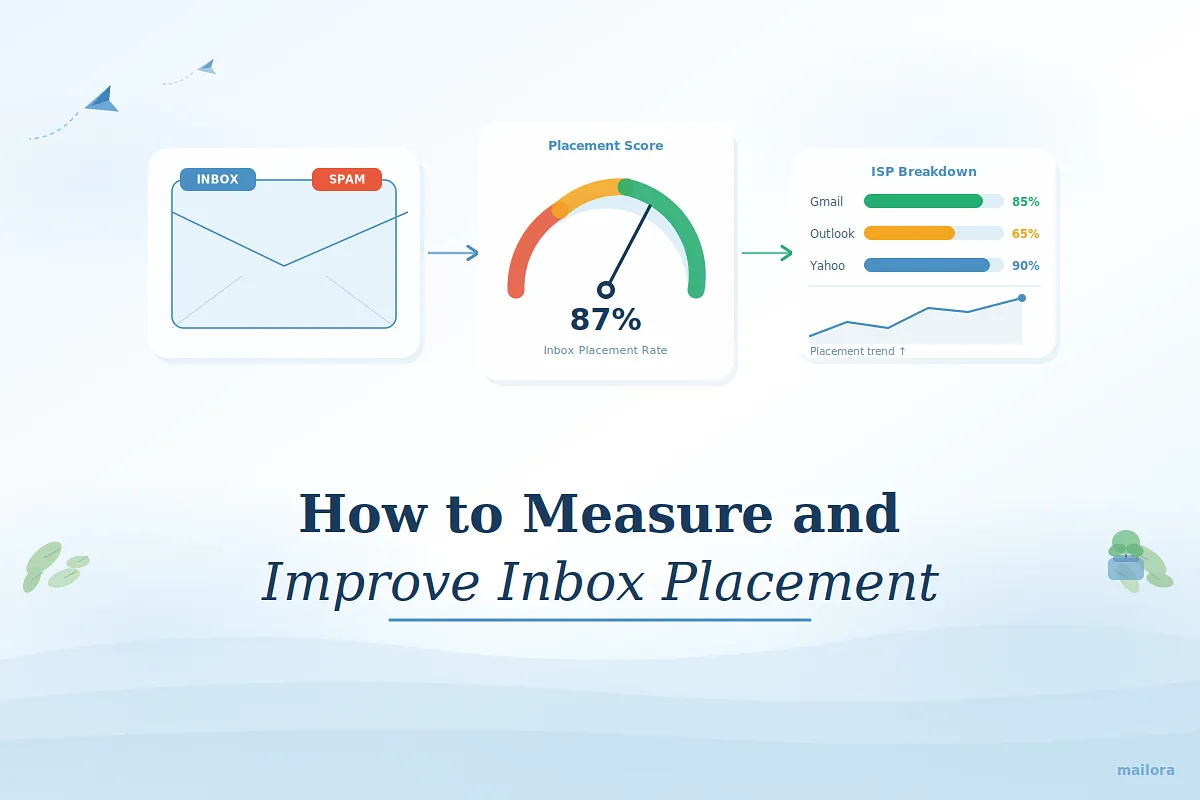
Key takeaways:
- Delivery does not equal inbox visibility: An email can be accepted by the server yet still land in spam or promotions
- Inbox placement measures where your email lands: It tracks inbox, spam, and tab placement after the ISP accepts your message
- Authentication is necessary but not sufficient: SPF, DKIM, and DMARC verify identity but do not guarantee inbox placement
- Reputation, engagement, and sending behavior drive filtering decisions: Complaints, inactivity, volume spikes, and inconsistent cadence affect placement
- Accurate measurement requires structured testing: Seed testing and ISP-level monitoring reveal placement gaps that delivery metrics miss
- Consistent testing and disciplined sending stabilize placement: Controlled changes, engagement-focused segmentation, and monitoring help prevent sudden drops.
Most email teams know inbox placement matters. The problem is measuring it accurately. Your dashboard shows strong delivery rates, yet Gmail, Outlook, and Yahoo behave very differently, and engagement drops without a clear explanation.
Delivery metrics rarely reveal what mailbox providers actually did with your message. An email can be accepted by the receiving server and still be filtered into spam or secondary tabs, leaving senders with incomplete signals about what’s really happening.
This is why inbox placement needs to be treated as a measurable performance layer, not an assumption. Without structured testing and the right metrics, it becomes difficult to diagnose filtering changes or understand why placement shifts across providers.
In this post, we’ll break down how to calculate inbox placement rate, what signals influence placement decisions, and how to measure and improve it with disciplined testing.
What inbox placement really means
Inbox placement describes where your email lands after the receiving server accepts it.
When you send an email, the receiving server first decides whether to accept it. If it passes that step, the email is technically delivered. But the process does not stop there.
Mailbox providers then run additional filtering checks to decide where the message should appear.
Your email may be placed in:
- the primary inbox
- a tab like Promotions or Updates
- the spam folder
This decision is based on several trust signals, including:
- your sending reputation
- how recipients engage with your emails
- spam complaints
- consistency in your sending behavior
If these signals look weak, the email may be filtered to spam even though it was accepted by the server.
According to Validity’s 2025 report, spam placement rates nearly doubled in 2024, highlighting how aggressively mailbox providers are filtering email.
Yet many email teams never see this filtering happening because they measure the wrong metric: email deliverability.
Inbox placement vs email deliverability
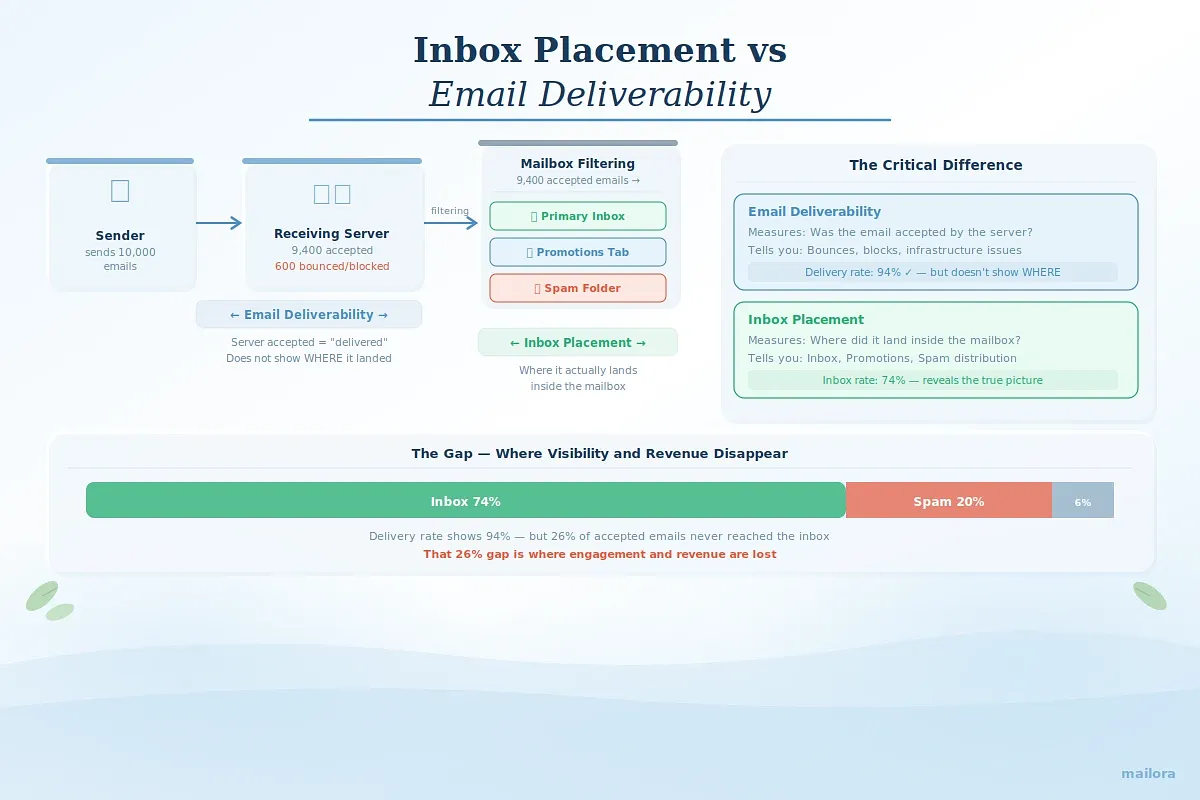
Email deliverability measures whether the receiving mail server accepted your message. It helps you spot hard bounces, blocks, or infrastructure issues.
Inbox placement tells you where the email ended up after it was accepted: Inbox, Promotions, Updates, or spam.
That difference matters because a message can be delivered and still be effectively invisible. Delivery is a transport result. Placement is a filtering outcome.
Why authentication alone isn’t enough
Authentication helps mailbox providers verify that your email is legitimate. But it only answers one question: Are you allowed to send from this domain?
To authenticate email, senders typically configure:
- SPF (Sender Policy Framework): Confirms your sending server is authorized
- DKIM (DomainKeys Identified Mail): Verifies the message was not altered in transit
- DMARC (Domain-based Message Authentication, Reporting and Conformance): Aligns SPF and DKIM and defines what happens if checks fail
These protocols confirm your identity. But inbox placement depends on more than identity.
After authentication passes, mailbox providers still evaluate whether your email deserves to reach the inbox. They look at additional signals built over time.
Inbox placement ultimately depends on three layers:
- Identity: Your authentication setup and technical configuration.
- Reputation: Your sending history with each provider (complaints, bounces, spam trap hits, and consistency).
- Behavior: How recipients react to your emails (opens, clicks, replies, deletions, and spam reports).
Authentication opens the door. Reputation and engagement determine whether your message stays in the inbox.
Because each provider weighs these signals differently, placement can vary widely between Gmail, Outlook, and other mailbox providers.
Once you understand what inbox placement means, the next step is measuring it correctly. The simplest way to do that is by calculating your inbox placement rate.
How to calculate inbox placement rate
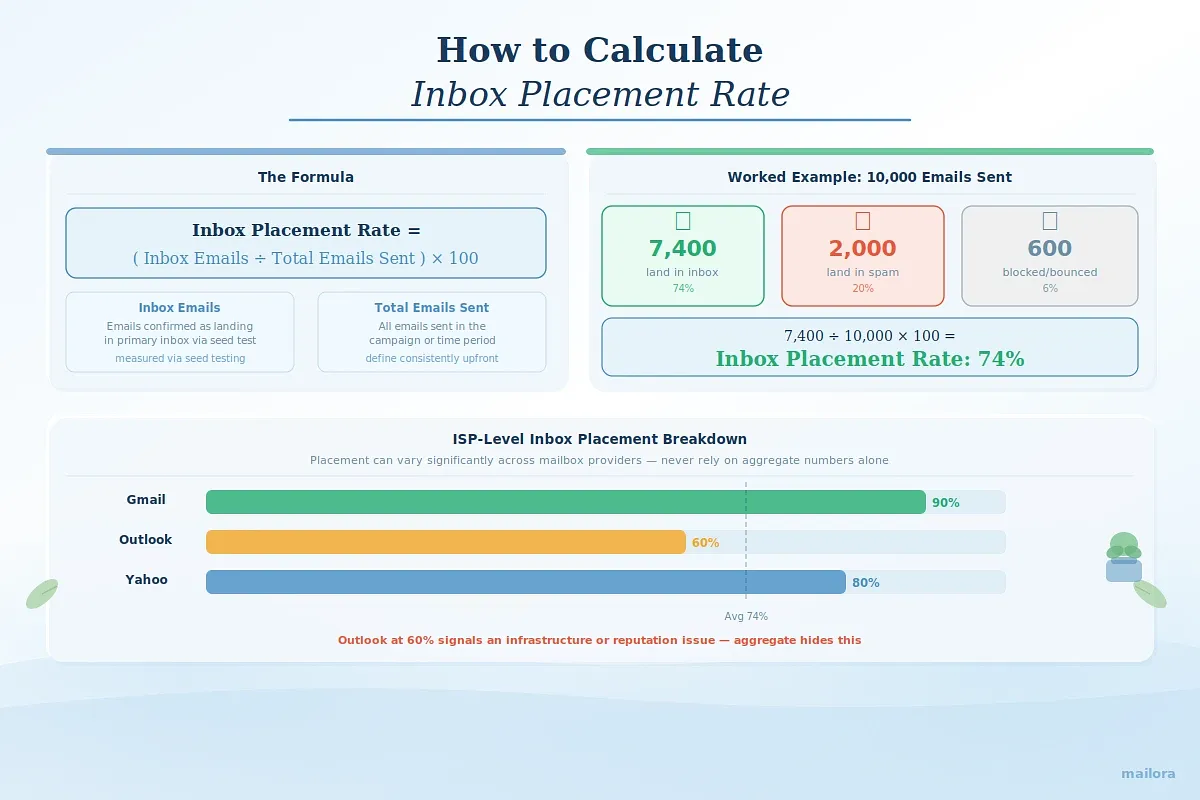
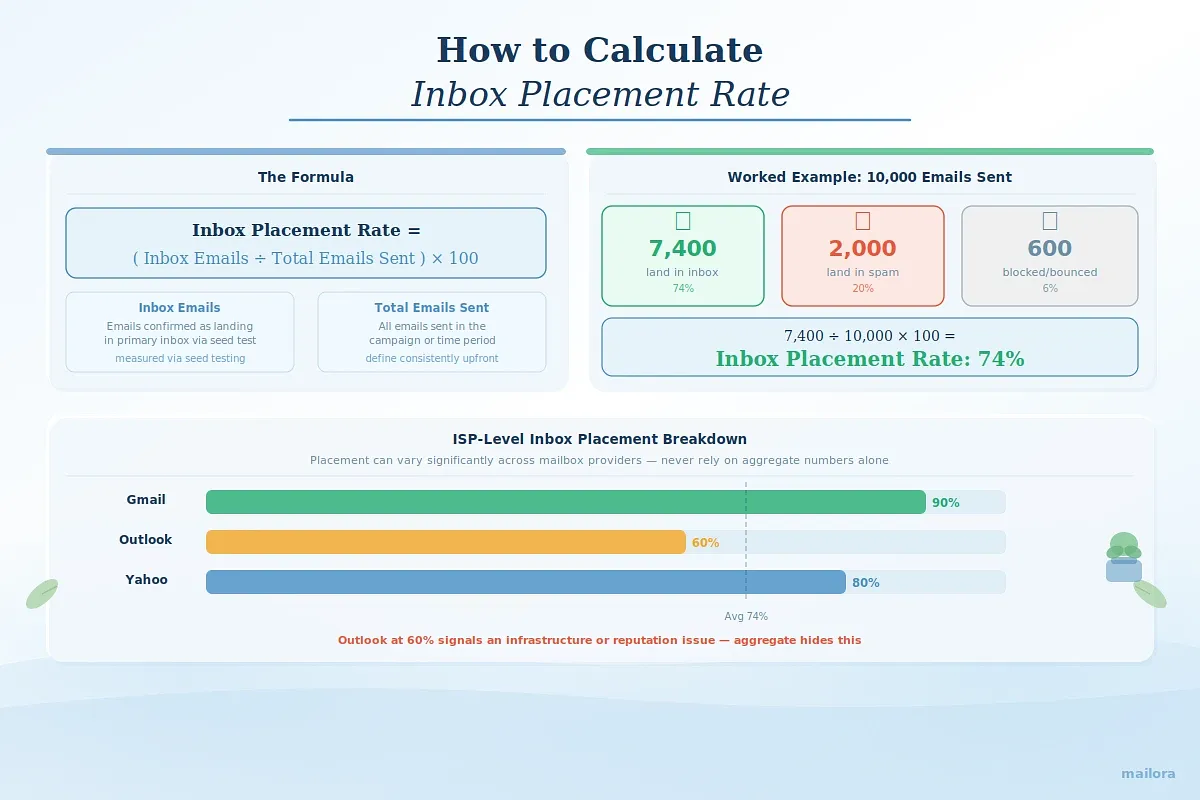
Teams should define upfront whether inbox placement rate is measured against total emails sent or total accepted emails, and use that method consistently.
The formula looks like this:
Inbox placement rate = (Inbox emails ÷ Total emails sent) × 100
For example, if you send 10,000 emails and:
- 7,400 land in the inbox
- 2,000 land in spam
- 600 are blocked
Your inbox placement rate would be:
7,400 ÷ 10,000 × 100 = 74%
Your delivery rate might still show 99%, but your actual inbox placement is 74%.
That 25% gap is where visibility and revenue disappear.
Key metrics that influence inbox placement rate
Inbox placement does not exist in isolation. Several related metrics help explain why emails land in certain folders.
These signals provide deeper context behind your placement rate:
1. Spam placement rate: Percentage of delivered mail landing in spam
2. Inbox vs promotions distribution (Gmail-specific nuance): Promotions isn’t spam, but it affects engagement
3. ISP-level performance: Gmail, Outlook, Yahoo can behave very differently
4. Engagement signals: Open rates (trend-based, not absolute), clicks, replies, complaint rates
5. Volume and consistency trends: Sudden spikes often correlate with placement volatility
These signals help diagnose what might be influencing placement changes. But to actually observe inbox vs spam outcomes, you need dedicated testing.
Tools and methodologies for inbox placement rate measurement
There are three primary ways to measure email inbox placement. Each provides a different level of visibility.
1. Seed testing (Inbox placement testing)
This is the most common methodology. Here’s how it works:
- You send a campaign to a list of test email addresses (Gmail, Outlook, Yahoo, etc.)
- The system monitors where those emails land
- Results are aggregated into inbox vs spam placement percentages
This shows placement across major ISPs.
Limitation: Seed accounts are not real customers. They don’t open, click, reply, or ignore emails the way real users do, and thus cannot perfectly predict real-world behavior.
2. Delivery rate monitoring
Delivery rate shows the percentage of emails accepted by receiving servers. You can monitor it through your email service provider dashboard. It indicates:
- Hard bounces
- Blocked sends
- Major infrastructure problems
Limitations: Delivery rate does not tell you inbox vs spam. A message can be “delivered” and still be filtered into spam or buried in tabs.
3. Engagement trend analysis
Some teams attempt to infer inbox placement by watching:
- Open rate trends (directional, not absolute)
- Click-through rates
- Complaint rates
- ISP-level performance differences
Limitation: Engagement metrics lag behind. You notice the problem only after performance declines.
What an inbox placement test actually measures
An inbox placement test evaluates how mailbox providers currently classify your email at the filtering stage.
It tells you:
- How much mail lands in the inbox versus spam
- Which mailbox providers show the largest placement gaps
- Whether placement changed after infrastructure, content, or volume updates
- Whether filtering varies across domains, regions, or mailbox types
However, inbox placement tests do not explain why recipients ignored an email, and they do not guarantee long-term performance. They simply show where your email is currently being placed.
So what influences inbox placement?
4 Factors that influence inbox placement
Inbox placement is a filtering decision. Mailbox providers weigh four signal groups:
1. Sender reputation and authentication
Mailbox providers evaluate identity and sending history first. Complaints, bounces, spam trap hits, and inconsistent patterns influence how aggressively your mail is filtered.
Keep authentication aligned and monitored. Identity is the baseline; reputation drives placement.
2. Engagement patterns and signals
Inbox providers monitor how users react to your emails. They track opens, clicks, replies, forwards, deletes, and spam reports. They also watch negative behavior, like ignoring emails repeatedly, deleting without reading, or moving messages to spam.
This explains why:
- Gmail may perform well (strong engagement base)
- Outlook underperforms (lower engagement density)
3. Content quality and structure
Content affects placement in two ways:
- Spam filtering: These filters look for risk patterns. This includes aggressive phrasing, misleading subject lines, mismatched links, broken HTML, heavy image weight, or weird formatting.
- Recipient response: Recipients react to clarity. If the email looks noisy, salesy, or irrelevant, engagement drops
4. Sending patterns and behavior
Mailbox providers reward stable sending. Sudden shifts in volume, cadence, domains, or IPs raise filtering risk.
For example:
- Scaling from 5,000 to 200,000 emails overnight
- Long inactivity followed by large blasts
- Frequent domain or IP switching
Consistency builds reputation. Sudden expansion creates filtering pressure.
Strategies for optimizing inbox placement
You cannot control inbox algorithms directly, but can control how you send, what you send, and who you send to. Here’s how to improve your chances of landing in the inbox.
1. Content optimization
- Start with alignment. The subject line must match the body. Misleading framing increases complaints and spam moves.
- Keep the structure clean. Avoid bloated HTML, broken tags, mismatched link domains, and image-heavy layouts that hide text.
- Maintain consistency in branding. Stable “from” names, recognizable domains, and predictable formatting build familiarity.
- Keep the copy direct. Overuse of urgency language, aggressive sales framing, or excessive punctuation increases filtering pressure.
2. Engagement enhancement
Engagement strongly influences inbox placement.
Improve it by:
- Segmenting your audience by interest or behavior
- Sending targeted campaigns instead of mass blasts
- Using personalization where it makes sense
- Testing subject lines carefully
- Adjusting send times based on audience behavior
3. Technical optimization and authentication
Technical setup must be correct before anything else works.
Ensure that:
- SPF is properly configured
- DKIM is aligned with your sending domain
- DMARC policy is active and monitored
Industry-specific inbox placement strategies
Different industries face different placement risks. Strategy should adapt accordingly.
1. E-commerce and retail
E-commerce brands usually send often. Promotions, discounts, product drops, and seasonal campaigns increase sending frequency.
That creates two risks:
- Engagement fatigue
- Rising spam complaints
Strategies for product-focused emails:
- Segment aggressively by recency and behavior
- Control promotional density
- Stabilize volume patterns
- Monitor ISP-level performance separately
2. B2C and professional services
Professional services often send newsletters, updates, reminders, or educational content.
The biggest risk here is low engagement. If emails feel generic or overly formal, recipients ignore them.
Top tips for B2C email inbox placement:
- Personalize by lifecycle stage or service interest
- Keep subject lines clear and specific
- Encourage replies when possible
- Maintain consistent and moderate frequency
2. Publishers and media
Publishers and media brands rely heavily on engagement.
Open rates and clicks directly affect inbox placement because content-based emails depend on reader interaction.
Techniques for content-heavy campaigns:
- Track engagement closely
- Remove or re-engage inactive subscribers
- Optimize send frequency based on reader behavior
- Keep layouts clean and easy to scan
Advanced inbox placement optimization
Once authentication, reputation, engagement, and testing are stable, you can move into advanced optimization.
AI and machine learning applications
Mailbox providers score sender behavior with machine learning. You can use similar analysis to spot risk early. AI-driven analysis can help you:
- Detect early signs of reputation decline
- Identify patterns behind placement drops
- Predict risk before large campaigns
- Spot ISP-specific trends (for example, Gmail declining while Outlook stays stable)
This helps you move from “Why did placement drop?” to “What signals suggest it might drop next?” It assists in understanding patterns faster and acting earlier.
Cross-channel placement correlation
User behavior across channels can influence email engagement, which then affects placement.
For example:
- If paid ads drive low-intent traffic that signs up but never engages, email engagement drops.
- If social or content marketing attracts high-interest subscribers, engagement improves.
Cross-channel analysis helps you connect these signals.
Ways to troubleshoot inbox placement issues
Even with good practices, placement can drop. Let’s break down the placement problems and how to fix them.
5 Common inbox placement problems
1. Sudden Gmail drop
If Gmail inbox rate falls while other providers remain stable, check engagement trends first. Gmail weighs user interaction heavily. A spike in unengaged sends, a reactivation push, or a subject line pattern shift can trigger filtering.
Fix: Pause large sends. Suppress inactive users. Send only to highly engaged segments for a few campaigns to rebuild positive signals.
2. Outlook filtering shift
Outlook is more sensitive to infrastructure and reputation signals. Sudden filtering often follows authentication misalignment, IP reputation decline, or volume inconsistency.
Fix: Verify authentication alignment and recent infrastructure changes.
3. Post-migration drop
Changing ESPs, domains, or IPs often causes short-term placement drops. This often happens because inbox providers treat new infrastructure cautiously.
Fix: Warm up the new domain or IP gradually. Send to engaged subscribers first, and increase volume slowly over days or weeks.
4. Volume spike issues
If placement drops after a sudden increase in volume, reduce sending.
Fix: Increase volume in stages and monitor placement daily during expansion.
5. New domain or IP
New domains and IPs have no reputation history. That is why most inbox providers treat it cautiously.
Fix: Follow a structured warm-up plan. Send small amounts first, while maintaining consistent frequency.
Inbox placement testing best practices
Inbox placement testing must follow a consistent methodology.
- Test before major campaigns: Run tests before large promotions, infrastructure changes, or seasonal spikes. Do not wait for engagement to drop.
- Keep variables controlled: Change one factor at a time. If you modify subject line, content, domain, and volume together, identifying the root cause becomes difficult.
- Test across key ISPs: Placement often differs between Gmail and Outlook. Make sure your test includes the inbox providers that matter most to your audience.
- Maintain consistent volume during testing: Test under normal sending conditions, not during abnormal expansion or pauses
- Test regularly: Placement is not static. Run tests consistently, say weekly or before important campaigns.
Analysis and reporting
A test only creates value when analyzed correctly.
While reviewing results, focus on:
- Inbox rate by ISP
- Spam placement rate
- Sudden changes compared to previous tests
- Differences between segments
Look for patterns instead of individual results.
For example: If Gmail inbox rate drops from 90% to 70% over two tests, that signals a trend. If one test shows a small dip but the next test recovers, it may be temporary filtering.
Also compare placement with engagement data.
If placement drops and open rates drop together, the issue is likely filtering. If placement stays stable but engagement drops, the problem may be content relevance.
Turn inbox placement into a measurable metric
Inbox placement is the result of reputation, engagement, sending behavior, and infrastructure decisions.
The challenge is that most email programs still rely on delivery rate to judge performance. But delivery only tells you whether the server accepted your email. It does not show where it actually landed.
That’s why inbox placement needs to be treated as a measurable metric.
With structured testing, you can detect filtering shifts early, understand how different mailbox providers treat your emails, and correct problems before they affect engagement or revenue.
For teams that want structured inbox placement testing across major mailbox providers, Mailora helps turn placement into a measurable operational signal.
Mailora is built specifically for disciplined inbox placement testing. It gives you clear visibility into how your emails perform across major mailbox providers, so you can identify filtering changes before they impact campaigns.
👉 See where your emails actually land with Mailora and catch filtering issues before they impact campaigns.
FAQs
1. How can I ensure that my emails land in the primary inbox rather than promotions or spam?
You cannot force placement, but you can improve your chances.
Focus on:
- Strong authentication (SPF, DKIM, DMARC)
- Sending to engaged subscribers
- Clear, relevant subject lines
- Consistent sending patterns
- Low spam complaint rates
2. What are the most effective tools for monitoring inbox placement?
The most effective approach is structured inbox placement testing using seed-based monitoring across major ISPs.
Good inbox placement tools should provide:
- Inbox vs spam distribution
- ISP-level breakdown
- Trend tracking over time
- Controlled testing conditions
3. How frequently should I conduct inbox placement tests?
It depends on your sending volume and risk exposure.
As a baseline:
- High-volume senders: Weekly or bi-weekly
- Moderate-volume programs: Monthly
- Before and after major changes: Always test
4. Can inbox placement be improved without changing content quality?
Yes, but only if the issue is technical or behavioral.
Inbox placement can improve if the issue is caused by:
- Volume spikes
- Poor segmentation
- Inactive subscribers
- Infrastructure misalignment
5. What steps should I take if my emails consistently land in spam folders?
Start by isolating the cause.
- Verify SPF, DKIM, and DMARC alignment
- Review recent changes in volume or frequency
- Suppress unengaged recipients
- Check reputation signals through postmaster tools
- Run a controlled inbox placement test
Stay in the loop
Deliverability insights, product updates, and early access to new features. No spam, unsubscribe anytime.
By subscribing, you agree to our Privacy Policy. Unsubscribe anytime.