Key Takeaways
|
Testing SPF is the process of checking whether a domain's Sender Policy Framework (SPF) record is published correctly and can be evaluated successfully by receiving mail servers. A valid SPF record tells receiving servers which IP addresses and sending services are authorized to send email on behalf of a domain.
An SPF test can reveal more than whether a record exists. It can identify invalid syntax, multiple SPF records, unauthorized sending sources, and DNS lookup-limit problems that can cause SPF evaluation to return a PermError.
In this guide, you'll learn what an SPF test checks, how to validate an SPF record step by step, how to interpret SPF results, and how to fix common SPF failures.
What Does an SPF Test Check?
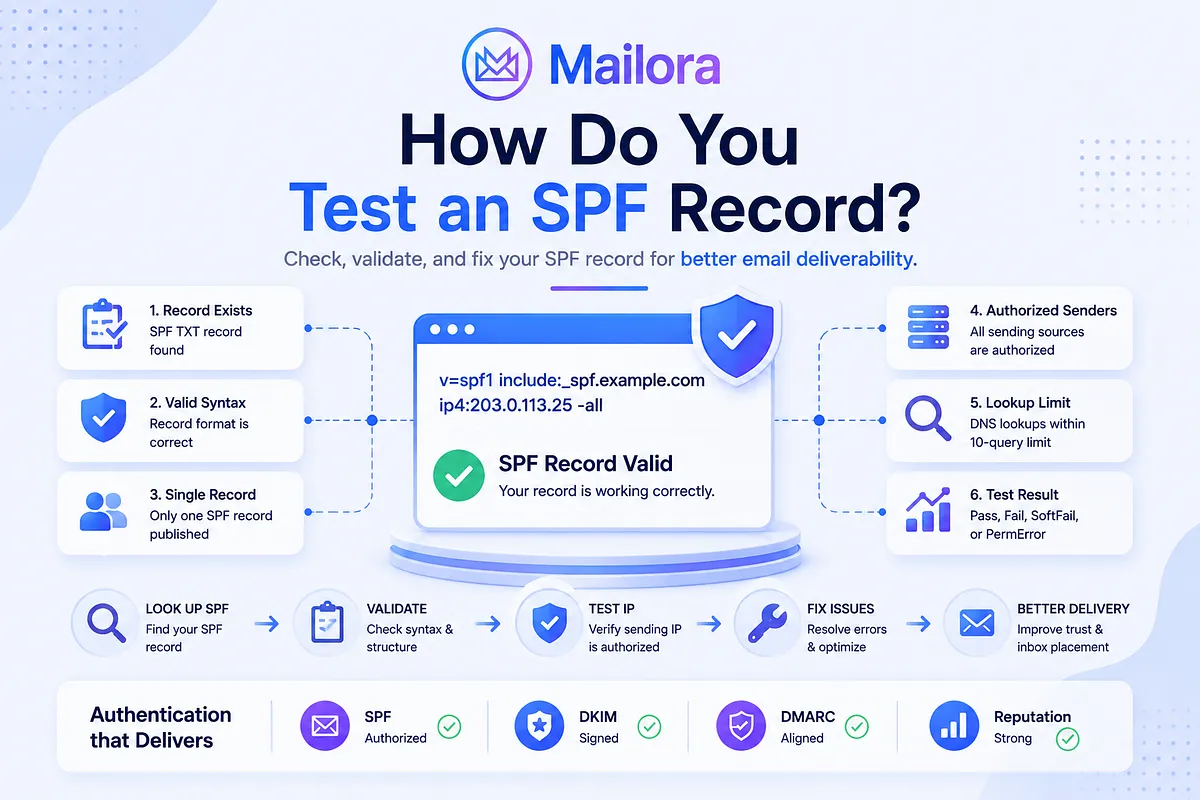
An SPF test checks whether a domain's SPF configuration can be found, parsed, and successfully evaluated. A thorough test typically checks the following:
1. SPF Record Exists
The test first checks whether the domain has a TXT record containing an SPF policy beginning with v=spf1. If no applicable SPF record is found, the test returns None. This tells you that there is no SPF policy available for the receiving server to evaluate.
2. SPF Syntax Is Valid
The test checks whether the published SPF record follows valid SPF syntax. This includes the v=spf1 version declaration, recognized mechanisms, valid qualifiers, and correctly formatted values. Syntax problems can prevent the policy from being evaluated correctly and may result in an SPF error.
3. Only One SPF Record Is Published
The test checks whether the domain has more than one SPF policy. If multiple SPF records beginning with v=spf1 are published for the same domain, SPF evaluation can return PermError. The test should flag this rather than treating the records as separate policies that can simply be evaluated independently.
4. Authorized Sending Sources
An SPF test can evaluate whether a specific sending IP is authorized by the domain's SPF policy. This is where the test becomes more useful than a simple DNS lookup. For example, if your SPF record authorizes Google Workspace but the message is being sent from an IP that isn't covered by the policy, the SPF evaluation can return Fail.
The important distinction is that the test checks authorization for the sending IP being evaluated. It doesn't simply check whether a provider's name appears somewhere in the record.
5. SPF DNS Lookup Limit
The test evaluates the SPF policy and follows DNS-dependent mechanisms such as include, a, mx, exists, and redirect. It checks whether the evaluation stays within SPF's 10-DNS-lookup limit. Nested include statements are important because they can introduce additional DNS lookups. If the evaluation exceeds the limit, the SPF result can be PermError.
6. SPF Record and DNS Response
The test also evaluates how the SPF record is returned through DNS. This is useful for identifying problems with the published TXT data, including malformed or conflicting SPF records.
A long SPF record isn't automatically invalid, so this check should focus on whether the DNS response can be interpreted correctly rather than treating record length itself as an SPF failure.
How to Test an SPF Record
Testing an SPF record is more than looking up a TXT record and checking whether it starts with v=spf1. You need to verify that the published policy is valid, matches your current sending infrastructure, stays within SPF's evaluation limits, and correctly authorizes the IP addresses sending your mail.
The following steps walk you through the process from finding the published SPF record to validating the result against your actual sending path.
Step 1: Find Your Domain's SPF Record
Start by looking up the domain's TXT records. You're looking for a TXT value beginning with:
| v=spf1 |
For example:
| v=spf1 include:example.com -all |
Make sure you're checking the domain actually used for SPF authentication. This is important because the domain visible in the From: header is not necessarily the same domain used for the SMTP envelope or Return-Path.
Step 2: Check the SPF Record Syntax
Once you've found the record, inspect its structure. Check that:
- The record begins with v=spf1
- Mechanisms are spelled correctly
- IP addresses are valid
- Qualifiers are correctly formatted
- There are no accidental characters or malformed values
- The record ends with an intentional policy mechanism such as -all, ~all, or another appropriate qualifier
For example:
| v=spf1 ip4:192.0.2.10 include:example.com -all |
A syntax check alone, however, does not prove that the record correctly represents your sending infrastructure.
Step 3: Check for Multiple SPF Records
Confirm that the domain does not publish multiple independent SPF policies. If you find more than one TXT record beginning with v=spf1, investigate before making changes.
Don't simply delete one because it looks older. First determine which sending services each record authorizes, then consolidate the legitimate mechanisms into one SPF policy.
Step 4: Verify Your Sending Services
Create an inventory of every service that sends email using the domain. Check whether the SPF policy authorizes each legitimate sender. For example, your organization might use:
- Microsoft 365 for employee mailboxes
- A marketing platform for newsletters
- A transactional provider for password resets
- Another platform for application notifications
Each service may have different SPF requirements. At the same time, remove authorization for providers you no longer use. Keeping obsolete include: statements increases unnecessary DNS dependencies and makes the record harder to maintain.
Step 5: Test the DNS Lookup Count
Next, evaluate the DNS-query-causing mechanisms in the SPF policy. Start with visible mechanisms such as:
- include:
- a
- mx
- exists
- redirect=
Then follow the referenced records where necessary. An include: can introduce additional lookups through its own SPF policy, so counting only the mechanisms visible in your primary record can produce a misleading result.
If evaluation requires more than the permitted 10 DNS lookups, SPF can return PermError. Do not solve this by randomly deleting mechanisms. First identify which sending services are actually required, then simplify the SPF dependency chain carefully.
Step 6: Run an SPF Validation Test
After reviewing the record manually, run it through an SPF validation tool. The result can help identify Whether:
- An SPF record exists
- The syntax is valid
- Multiple SPF records are present
- The lookup limit is exceeded
- A particular sending IP is authorized
- Which SPF result is returned
Pay attention to the actual error rather than treating every failed test as the same problem. An SPF Fail, for example, means something different from a PermError.
Step 7: Test From the Actual Sending Path
DNS validation is useful, but it does not replace testing the actual sending path. If possible, send a message through the service you're trying to validate and inspect the authentication results received by the destination mail server.
This lets you confirm that:
- The actual sending IP is the one you expected.
- The correct domain is being evaluated.
- SPF passes or fails as expected.
- Other authentication mechanisms, such as DKIM, are also working.
This is particularly important when third-party services or forwarding systems are involved.
How to Read SPF Test Results
An SPF test result tells you how the receiving server evaluated the sending IP against the domain's published SPF policy. The result can range from a successful authorization to an error that points to a problem with the record itself. Understanding the difference between these results helps you identify whether you need to change your SPF configuration, investigate the sending source, or simply retry a temporary DNS failure.
SPF Result | What It Means | What to Do |
| Pass | The sending IP is authorized by the SPF policy. | No SPF correction is required for that evaluation. |
| Fail | The sending IP is not authorized by the SPF policy. | Verify the sender and add the legitimate sending source if appropriate. |
| SoftFail | The sending IP is not authorized, but the policy uses a soft-fail qualifier. | Review the sending source and SPF policy. |
| Neutral | The SPF policy makes no assertion about the sending IP. | Determine whether this is intentional. |
| None | No applicable SPF record was found. | Publish an SPF record if the domain should use SPF. |
| PermError | The SPF policy could not be evaluated correctly. | Check syntax, duplicate records, and lookup-limit issues. |
| TempError | A temporary DNS or evaluation problem occurred. | Retry and investigate DNS availability if the issue persists. |
[Table: SPF Test Results: What Each Result Means and How to Respond]
The result should always be interpreted in context. A Pass means SPF authentication passed for that evaluation; it does not mean the email is guaranteed to reach the inbox.
Common SPF Test Failures: How to Fix Them
An SPF test can return an error even when a domain has an SPF record published. The failure usually points to a problem with the record itself, the sending infrastructure it authorizes, or the way the SPF policy is evaluated. Identifying the specific failure helps you make the right fix instead of changing a working part of the record unnecessarily.
1. No SPF Record Found
An SPF test returns None when it cannot find an applicable SPF record for the domain being evaluated. This usually means the domain does not publish an SPF TXT record, or you're testing a domain that isn't actually used for SPF authentication.
For example, you may check the domain in the visible From: address and find no SPF record, while the actual SMTP envelope sender uses a different domain with its own SPF policy.
How to fix it:
- First, confirm which domain is being used for SPF authentication.
- Then check its DNS TXT records for a record beginning with v=spf1.
- If the domain should use SPF but no record exists, publish a valid SPF record that authorizes the legitimate sending sources.
Don't publish an SPF record simply to make the test return Pass. Make sure it represents the services that actually send email for the domain.
2. Multiple SPF Records
An SPF test can return PermError when a domain publishes multiple independent SPF records. For example, a domain might have one record for Google Workspace:
| v=spf1 include:google.com ~all |
and another for a marketing platform:
| v=spf1 include:sendgrid.net ~all |
These records aren't evaluated as two separate authorization policies that can be combined automatically. A domain should have one SPF policy containing the legitimate sending mechanisms.
How to fix it: Review each existing SPF record and identify which sending services it authorizes then consolidate the required mechanisms into one SPF record. For example:
| v=spf1 include:google.com include:sendgrid.net ~all |
The final record should reflect your actual sending infrastructure. Don't merge records blindly or keep obsolete mechanisms simply because they already exist.
3. Too Many DNS Lookups
SPF evaluation is limited to 10 DNS-query-causing mechanisms and modifiers. If an SPF test follows the record's DNS dependencies and exceeds that limit, the result can be PermError.
This problem is common with domains that use several email platforms. A single include: may point to another SPF record that contains additional include: statements, creating a chain of nested lookups. For example:
| v=spf1 include:provider-a.example include:provider-b.example ~all |
The two visible include: mechanisms don't necessarily represent the full lookup count. The records they reference may introduce additional DNS queries.
How to fix it: Identify which mechanisms and nested records are consuming the lookups, and remove obsolete providers and unnecessary mechanisms. If the sending infrastructure is complex, simplify the SPF dependency chain rather than removing legitimate sending sources just to get below the limit.
After making the change, run the SPF test again and confirm that the complete evaluation stays within the limit.
4. Missing Sending Provider
An SPF test can return Fail when the sending IP isn't authorized by the domain's SPF policy. One common reason is that a legitimate sending service was never added to the record.
For example, a company might use Microsoft 365 for employee email and a separate transactional email provider for application notifications. If the SPF record only authorizes Microsoft 365, messages sent through the transactional provider may fail SPF.
The important distinction is that the provider can be completely legitimate while its sending IP is still unauthorized.
How to fix it: Compare your SPF record against your actual sending infrastructure. Make a list of the services that send email using the domain and verify that each one is authorized where required.
If a legitimate provider is missing, add the SPF mechanism specified in its documentation then send a test message through that service and verify the resulting SPF authentication.
5. Obsolete include: Statements
An SPF record can continue to authorize services long after your organization has stopped using them.
For example, you may have migrated from one marketing platform to another but left the old provider's include: statement in your SPF record. The old entry may not cause an immediate SPF failure, but it adds an unnecessary dependency to the policy.
Over time, unused entries can make the record harder to understand and maintain. They can also contribute to DNS lookup consumption.
How to fix it: Review every include: statement against your current sending infrastructure. If a provider no longer sends email for your domain, remove its authorization after confirming that no remaining mail flow depends on it.
This is also a good opportunity to check whether other obsolete mechanisms, IP addresses, or services remain in the record.
6. Invalid SPF Syntax
An SPF test can fail when the published record contains invalid or malformed syntax. Since receiving servers need to parse the record before they can evaluate it, even a small formatting error can prevent the policy from working as intended. Common problems include:
- Missing or incorrect v=spf1
- Misspelled mechanisms
- Invalid IP addresses
- Incorrect mechanism formatting
- Malformed qualifiers
- Accidental characters or spacing errors
For example, a typo in an include: mechanism can prevent the referenced policy from being evaluated correctly.
How to fix it: Compare the published record against valid SPF syntax and check each mechanism individually. If the record was recently edited, compare it with the previous working version to identify what changed.
After correcting the record, run the SPF test again rather than assuming the change resolved the problem. Also allow for DNS propagation before judging the new result.
Best Practices for Successful SPF Testing
SPF testing should be part of your regular email infrastructure checks, not something you do only after an authentication failure. SPF records can change as you add sending platforms, remove providers, or update DNS, so periodic testing helps catch configuration problems before they affect legitimate mail. These practices can help keep your SPF policy accurate, maintainable, and within the limits of SPF evaluation.
Best Practice | Why It Matters |
| Test after major infrastructure changes | Adding, removing, or migrating an email-sending service can change which sources need to be authorized. Re-test SPF after these changes to confirm legitimate senders still pass. |
| Keep one SPF record per domain | Multiple SPF records can cause PermError. Consolidate legitimate sending mechanisms into a single SPF policy. |
| Stay below the 10-DNS-lookup limit | Nested include: statements and other DNS-query-causing mechanisms can consume the lookup allowance. Test the complete evaluation path rather than counting only the mechanisms in the main record. |
| Remove unused includes | Old providers create unnecessary DNS dependencies and can make the SPF record harder to maintain. Remove authorization for services that no longer send email for the domain. |
| Maintain an authorized-sender inventory | Knowing which platforms and services send email for each domain makes it easier to identify missing or obsolete SPF mechanisms when troubleshooting. |
| Test the actual authentication domain | The domain evaluated by SPF isn't necessarily the same as the visible From: domain. Check the SMTP envelope sender or Return-Path when troubleshooting a real message. |
| Test the actual sending path | A DNS lookup confirms what is published, but testing a real message confirms that the actual sending IP is authorized and that SPF passes as expected. |
| Monitor SPF alongside DKIM and DMARC | SPF is only one part of email authentication. Reviewing SPF, DKIM, and DMARC together provides a more complete view of authentication and alignment. |
| Re-test after DNS changes | DNS updates can affect what receiving servers see. Validate the published record after changes and confirm that the updated policy evaluates correctly. |
[ Table: SPF Testing Best Practices for Reliable Email Authentication]
Once SPF is validated, you can also monitor the broader deliverability picture rather than relying on one-time authentication checks. Mailora is an email deliverability intelligence platform that helps teams track inbox placement, sender reputation, authentication, blacklist status, spam analysis, and deliverability performance over time. Its automated monitoring can schedule recurring deliverability tests, while detailed analysis provides SPF/DKIM/DMARC validation, blacklist checks, spam analysis, provider-level placement data, and historical trends in one place. |
How SPF Affects Email Deliverability
SPF helps receiving mail systems determine whether a sending IP is authorized to send email for a domain. A successful SPF evaluation can contribute to trust in the sending identity, while SPF failures can indicate unauthorized sending or configuration problems. However, SPF alone does not guarantee inbox placement.
Email authentication involves several related mechanisms. DKIM provides a cryptographic signature, while DMARC builds on SPF and/or DKIM and evaluates alignment with the visible From: domain.
For example, a message can pass SPF but still encounter deliverability problems because of:
- Poor sender reputation
- Spam complaints
- Invalid or misleading content
- Blocklists
- Poor engagement
- Other authentication issues
SPF is therefore one part of a broader email authentication and deliverability strategy. Testing SPF helps confirm that your domain is authorizing legitimate sending sources, but authentication is only one part of email deliverability. Your emails can pass SPF and still encounter inbox placement or sender reputation problems.
If you want to see how your emails are actually being delivered, Mailora can help. Mailora is an email deliverability intelligence platform that helps you understand how your emails are performing across inbox providers, domains, and ESPs.
Instead of relying on basic pass/fail checks, Mailora brings together deliverability signals such as inbox placement, sender reputation, and authentication to help you identify potential issues and understand what to fix.
If you've verified your SPF configuration but want to check the broader health of your email delivery, run a free email deliverability test with Mailora.
See where your emails actually land and get clear recommendations to help improve deliverability.
FAQs
How do I know if my SPF record is valid?
A valid SPF record should use correct SPF syntax, begin with v=spf1, contain valid mechanisms, have only one SPF policy for the domain, stay within the DNS lookup limit, and correctly authorize your legitimate sending sources.
How do I check my SPF record?
Use a DNS lookup tool to inspect the domain's TXT records and identify the record beginning with v=spf1. You can then use an SPF validator to evaluate the policy in more detail.
How do I fix an SPF lookup limit error?
Identify the mechanisms and nested include: statements consuming DNS lookups. Remove obsolete or unnecessary sending services and simplify the SPF dependency chain while retaining all legitimate senders.
Can I have two SPF records?
You should not publish two independent SPF policies for the same domain. Multiple SPF records can cause SPF evaluation to return PermError. Legitimate sending sources should generally be represented in one SPF policy.
Does SPF testing improve email deliverability?
Testing does not directly improve deliverability. It helps identify SPF configuration problems that could contribute to authentication and deliverability issues. Fixing those problems can improve the reliability of your email authentication.
Does SPF need to align with DMARC?
SPF does not have to be the mechanism that provides DMARC alignment because DMARC can also achieve alignment through DKIM. If SPF is being used for DMARC authentication, the SPF-authenticated domain must align with the visible From: domain according to the applicable DMARC alignment mode.
Stay in the loop
Deliverability insights, product updates, and early access to new features. No spam, unsubscribe anytime.
By subscribing, you agree to our Privacy Policy. Unsubscribe anytime.