DKIM Failure: Why DKIM Signatures Fail (and How to Fix Them)
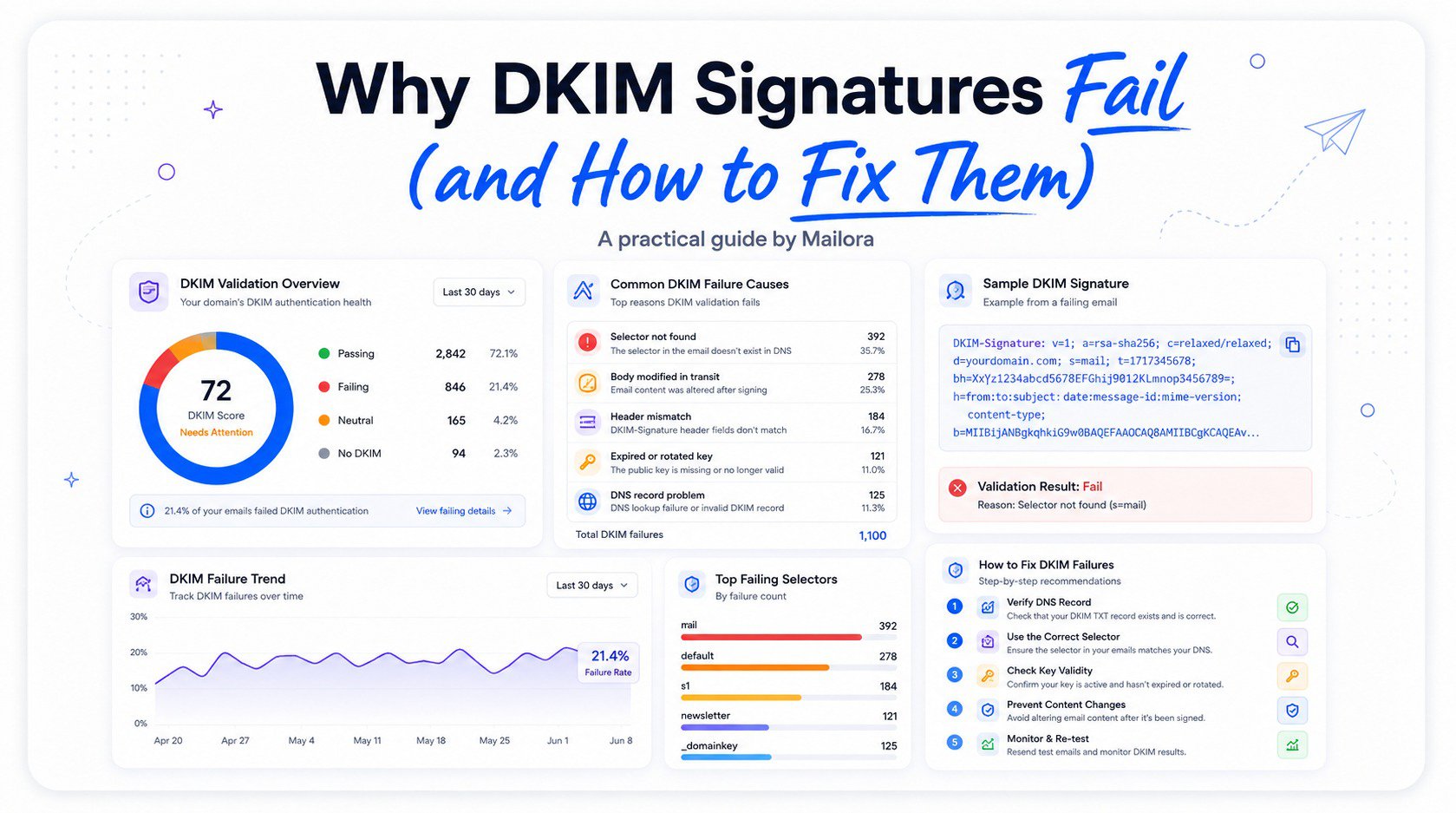
DKIM is often described as one of the more reliable authentication protocols, and in a technical sense it is: the cryptographic verification either matches or it doesn't. But "reliable" doesn't mean DKIM failure doesn't happen. It occurs regularly, for reasons ranging from a simple DNS misconfiguration to something as mundane as a mailing list modifying a message in transit. Common DKIM issues can affect any organization, including those using Office365, third-party senders, or an email security gateway.
How DKIM Verification Works
DKIM works by generating a cryptographic hash of specific parts of an outgoing message, typically the body and a defined set of headers, and signing that hash with a private key controlled by the sending domain. This signature is added to the message as a DKIM-Signature header, also called a dkim signature header, which includes the domain claiming responsibility for the message (d=), the selector identifying which specific public key to use (s=), and the signature itself. Together, the private key and public key form the key pair values used during the authentication process.
When the message arrives, the receiving server extracts the domain and selector, looks up the corresponding public key in DNS, and uses it to verify the signature against the message content. If the computed hash matches, DKIM passes. If the message was altered in any way after signing, even a single character, the hash won't match, and DKIM failure results. This dkim authentication check may also be performed by an email security gateway before the mail reaches the recipient's inbox.
Common Causes of DKIM Failure
| Cause | What Happens | How It's Usually Caught |
|---|---|---|
| Missing/incorrect DNS record | Public key doesn't match private key used to sign | DNS lookup at the selector location returns nothing or a mismatch |
| Expired or rotated keys | New key signs mail before DNS is updated | Verification fails during the transition window |
| Message modification in transit | Content changes after signing, breaking the hash | Authentication-Results header shows a signature mismatch |
| Selector mismatch | Signature references a selector with no matching record | DNS lookup for that specific selector fails |
Missing or incorrect DNS records are among the most straightforward causes of DKIM failure. This can happen due to a typo during manual DNS entry, a DNS record that wasn't fully propagated before mail started flowing, or a key that was regenerated on the sending platform's side without the corresponding DNS record being updated. A query dkim check can confirm whether the dkim dns record exists, whether the dkim public key is published correctly, and whether the public key matches the expected signing configuration.
Expired or rotated keys cause DKIM failure when a sending platform updates its signing key as part of routine security practice, but the new public key hasn't yet been published, or the old key was removed from DNS before all messages signed with it had been delivered. Organizations should protect their private keys and document their dkim configurations, particularly when managing a custom domain - office 365 setup.
Message modification in transit is a more nuanced cause, and one of the more common sources of confusion, since it doesn't reflect any problem with the original signing process at all. Automatic signatures, disclaimers, and complicated html signatures added after signing can all cause a dkim fail.
How Forwarding and Mailing Lists Cause DKIM Failure
This category deserves particular attention because it's frequently misunderstood as an authentication problem when it's actually an expected side effect of how forwarding and mailing list software work.
When a message is forwarded, some forwarding services modify the message in ways that break the original DKIM signature, such as adding a prefix to the subject line or appending a forwarding notice. Since DKIM verification depends on the message matching exactly what was originally signed, even a minor addition invalidates the signature, causing DKIM failure for that forwarded copy, despite the original message having been signed correctly. This can happen whether the message was sent directly by an employee or on their behalf through another mail service.
Mailing lists present a similar, often more pronounced version of this issue, since list software commonly modifies subject lines and adds footer text as part of normal list distribution. Security tools may also post banners, warnings, or user-reported email notices into a message, creating another possible source of signature failure.
Diagnosing a DKIM Failure Step by Step
- Examine the raw message headers of a failing message, looking specifically at the Authentication-Results header, which most receiving mail servers add to indicate the DKIM verification outcome. Look for a detailed error message explaining whether the failure involved the body hash, selector, domain, or public key.
- Confirm the DNS record referenced by the signature's selector and domain actually exists and resolves correctly.
- Compare the message's DKIM-Signature header against what would be expected for a properly signed message from that sending platform.
- Consider whether the message passed through any forwarding or list distribution system between the original send and the point of failure, including an Office365 tenant, email security gateway, or other intermediary.
- Check whether the failure is isolated to one sending source or affects multiple sources, which can help distinguish a local configuration problem from a broader delivery or security issue.
Preventing Future DKIM Failure
Ongoing prevention comes down to a few consistent practices: coordinating key rotation carefully, monitoring DMARC aggregate reports regularly to surface DKIM alignment and verification issues across all sending sources, avoiding unnecessary message modification after signing, and maintaining clean, updated DNS records whenever a sending platform changes. Organizations should also review dkim configurations for custom domains, secure private keys against insider threats, and use an analyzer or monitoring tool to provide real-time insights into authentication changes.
Frequently Asked Questions
Does a DKIM failure always mean a message was tampered with maliciously?
No. Most DKIM failure cases result from legitimate causes like DNS misconfiguration, key rotation timing, or message modification through forwarding and mailing lists, rather than malicious tampering. A dkim authentication check helps identify what changed, but it does not by itself prove that a data breach or attack occurred.
Can a message still be delivered successfully if DKIM fails?
Often yes, particularly if SPF passes and aligns, since DMARC only requires one of SPF or DKIM to pass and align, not both. However, a DKIM failure still reduces overall trust signals and is worth investigating, especially when critical data or sensitive mail is involved.
Why does forwarding an email so often cause DKIM failure?
Because DKIM verifies the message content and headers exactly as they were when signed. Many forwarding systems modify the message in some way, which invalidates the original signature even though no malicious change occurred. The same issue can affect auto signatures, disclaimers, and other post-delivery modifications.
How often should DKIM keys be rotated to avoid DKIM failure during transitions?
There's no single universal standard, but many organizations rotate keys on an annual basis. The critical part of rotation isn't the frequency itself but ensuring the new key is fully published and verified before the old one is removed. This is especially important for Office365 and other platforms where a custom domain - office 365 configuration may use multiple selectors.
Learn how Mailora helps you monitor DKIM verification and DNS configuration continuously across every sending source, so a DKIM failure gets caught and diagnosed before it affects deliverability. With ai-powered solutions, security behavior management, and email incident response 24x7, Mailora helps teams investigate authentication problems before they become a larger mail security issue.
Stay in the loop
Deliverability insights, product updates, and early access to new features. No spam, unsubscribe anytime.
By subscribing, you agree to our Privacy Policy. Unsubscribe anytime.