A Detailed Guide to Email Authentication in 2026
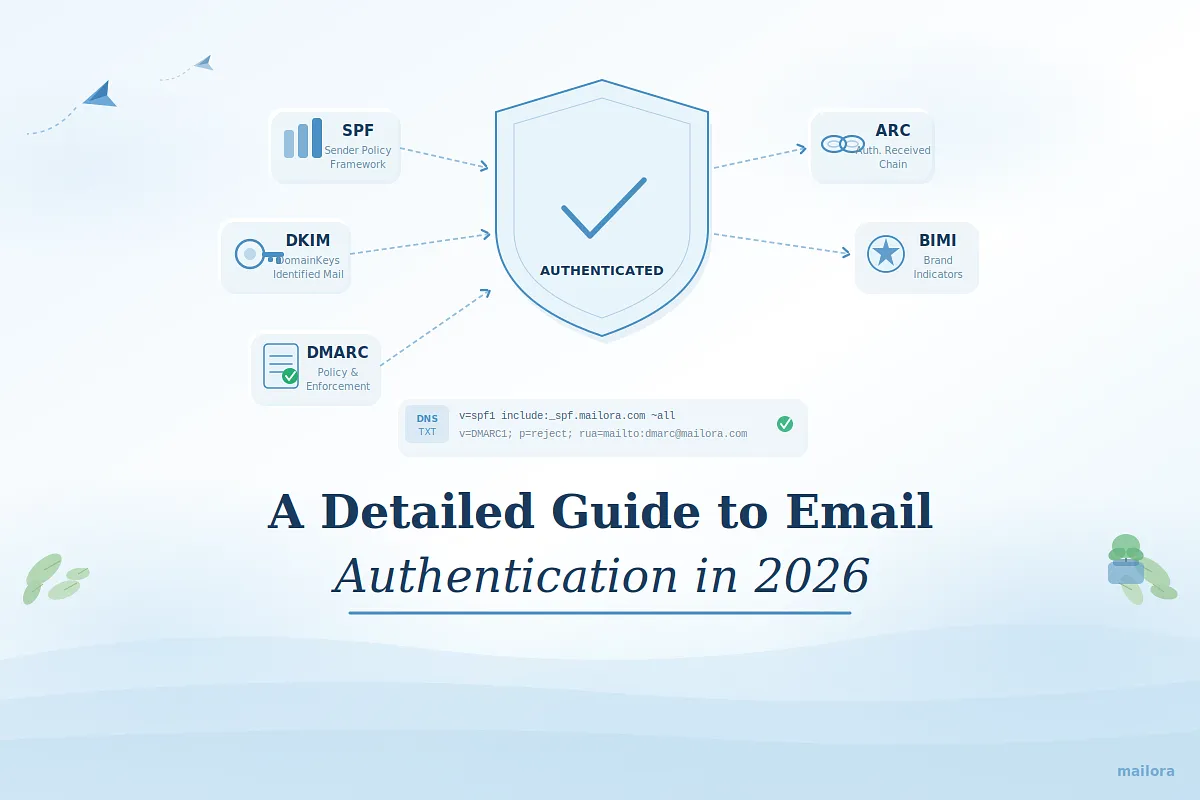
Email authentication is a foundational component of modern email infrastructure. It allows receiving mail systems to verify that a message was sent by an authorized sender on behalf of a sender domain. Email authentication refers to the framework of protocols that verify sender identity and message integrity in modern email systems.
Without reliable authentication, mailbox providers have limited signals to determine whether an email originates from a legitimate sender or from a spoofed domain. Over time, this uncertainty can affect domain trust, message classification, and overall inbox visibility across mailbox providers.
To address this, the email ecosystem relies on a set of standardized authentication protocols called SPF, DKIM, and DMARC. They allow sending domains to publish verification rules that receiving systems can evaluate during message processing.
Additional standards such as Authenticated Received Chain (ARC) and Brand Indicators for Message Identification (BIMI) extend this framework to support forwarding environments and brand trust signals within the inbox.
For teams that rely on email as a core revenue or communication channel, authentication is not simply a technical configuration. It is a structural layer of deliverability infrastructure that helps mailbox providers interpret sender identity, enforce domain protection policies, and maintain consistent message placement over time.
This guide explains what email authentication is, how the major authentication protocols work, and how professional senders implement and monitor authentication across their sending infrastructure.
Quick Overview
Email Authentication Protocols at a Glance
Email authentication relies on several complementary standards:
- SPF authorizes sending infrastructure
- DKIM verifies message integrity with cryptographic signatures
- DMARC enforces alignment and defines policy for authentication failures
- ARC preserves authentication results through forwarding chains
- BIMI enables verified brand logos in supported inbox interfaces
Together these protocols help mailbox providers verify sender identity, prevent domain spoofing, and build trust in legitimate email communication.
What is email authentication?
Email authentication is a set of technical protocols that verify whether an email message was sent by an authorized sender for a specific domain. It allows receiving mail systems to confirm the sender’s identity and check that the message has not been altered during transmission.
Authentication works by using DNS-based standards such as SPF, DKIM, and DMARC, which publish rules about who can send email for a domain and how messages should be validated. Mailbox providers evaluate these authentication signals when classifying messages, helping prevent domain spoofing while supporting trusted email delivery.
Email Authentication Standards and How to Adopt Them
Email authentication relies on a set of standardized protocols that help receiving mail systems verify sender identity, validate message integrity, and enforce domain-level policies.
The core authentication framework used by most email programs includes SPF, DKIM, and DMARC, while ARC and BIMI support additional scenarios such as message forwarding and brand trust in the inbox.
Below is a breakdown of the key authentication standards, how they function within the email ecosystem, and why they matter for professional senders.
SPF (Sender Policy Framework)
Sender Policy Framework (SPF) is an email authentication protocol that allows a domain owner to specify which mail servers are authorized to send email on behalf of their domain.
This authorization is published as a DNS TXT record that lists approved sending IP addresses or hosts. Receiving mail servers check this record to determine whether the sending server is permitted to send messages for the domain.
How it works
- Publishing Authorized Sending Sources: Domain owners create an SPF record in their DNS that lists the mail servers or services allowed to send email for the domain. This typically includes ESPs, transactional platforms, and internal mail servers.
- Receiving Server Verification: When a message is received, the receiving mail system checks the sender’s domain and retrieves its SPF record from DNS to review the list of approved sending sources.
- IP Address Validation: The receiving server compares the sending IP address with the authorized list in the SPF record. If the IP address matches an approved source, the SPF check passes.
- Authentication Result Evaluation: The SPF result (pass, fail, softfail, or neutral) becomes one of the signals mailbox providers use when evaluating the legitimacy of the message.
Why it is important
- Prevents Unauthorized Sending Infrastructure: SPF helps ensure that only approved mail servers can send messages using your domain identity.
- Reduces Domain Spoofing Risks: By limiting who can send mail for your domain, SPF makes it harder for malicious actors to impersonate your brand.
- Provides Foundational Identity Verification: Mailbox providers use SPF as an early verification signal to confirm that the sending infrastructure is legitimate.
DKIM (DomainKeys Identified Mail)
DomainKeys Identified Mail (DKIM) is an email authentication protocol that uses cryptographic signatures to verify that an email message was authorized by the sending domain and has not been altered during transit. Each message is signed with a private key, while the corresponding public key is published in the sender’s DNS records so receiving servers can validate the signature.
How it works
- Message Signing at the Sending Server: Before sending the email, the mail server generates a digital signature using a private cryptographic key associated with the sending domain.
- Signature Added to Email Headers: The generated DKIM signature is inserted into the email headers along with a selector that identifies which public key should be used for validation.
- Public Key Retrieval from DNS: When the email arrives, the receiving mail server retrieves the public key from the sender’s DNS records using the selector referenced in the DKIM header.
- Signature Validation: The receiving system uses the public key to confirm that the message content matches the signature. If the message has been modified or the signature does not match, the DKIM check fails.
Why it is important
- Verifies Message Integrity: DKIM confirms that the message content has not been altered during transmission.
- Confirms Domain Authorization: Only systems with access to the private signing key can generate valid DKIM signatures for the domain.
- Supports Reputation Tracking: Mailbox providers often associate sending reputation with the DKIM signing domain, helping evaluate sender behavior over time.
DMARC (Domain-based Message Authentication, Reporting & Conformance)
Domain-based Message Authentication, Reporting & Conformance (DMARC) is an email authentication protocol that builds on SPF and DKIM by adding domain alignment, policy enforcement, and reporting. It allows domain owners to instruct receiving mail systems how to handle messages that fail authentication checks and provides visibility into authentication results across the email ecosystem.
How it works
- Domain Alignment Verification: For DMARC to pass, either SPF or DKIM must authenticate successfully and align with the domain used in the visible From header.
- Policy Evaluation by Receiving Servers: The domain publishes a DMARC policy in DNS specifying how authentication failures should be handled.
- Enforcement Actions: Receiving mail systems apply the policy defined by the sender domain, which may instruct them to monitor, quarantine, or reject messages that fail authentication.
- Reporting and Visibility: DMARC generates aggregate and forensic reports that show how receiving servers are evaluating messages sent from the domain.
Why it is important
- Enforces Authentication Policies: DMARC gives domain owners control over how authentication failures are handled by receiving systems.
- Prevents Domain Impersonation: With enforcement policies in place, unauthorized senders attempting to use the domain can be blocked or quarantined.
- Provides Operational Visibility: DMARC reports help organizations identify misconfigured senders, unauthorized infrastructure, and authentication failures.
ARC (Authenticated Received Chain)
Authenticated Received Chain (ARC) is an email authentication standard designed to preserve authentication results when messages are forwarded through intermediary systems such as mailing lists or forwarding services. It allows receiving mail systems to review how the message was authenticated earlier in the delivery chain.
How it works
- Authentication Results Recorded by Intermediaries: When a message passes through an intermediary server, that system records the authentication results it observed.
- ARC Headers Added to the Message: The intermediary adds ARC headers that contain a cryptographically signed record of those authentication results.
- Chain of Trust Created: Each subsequent intermediary can add additional ARC entries, creating a verifiable chain of authentication records.
- Evaluation by the Final Receiving Server: The receiving mailbox provider reviews the ARC chain to determine whether the message was originally authenticated before forwarding occurred.
Why it is important
- Maintains Authentication Context During Forwarding: Forwarding can break standard authentication checks, but ARC preserves earlier validation results.
- Supports Complex Email Ecosystems: Organizations that rely on mailing lists, forwarding services, or distribution systems benefit from ARC’s preserved authentication history.
- Improves Trust Signals for Forwarded Messages: Mailbox providers can evaluate the message based on its original authentication status rather than only the final sending infrastructure.
BIMI (Brand Indicators for Message Identification)
Brand Indicators for Message Identification (BIMI) is an email standard that allows verified brands to display their logo alongside authenticated messages in supported inbox interfaces. It relies on DNS records that reference the brand logo and requires a properly enforced DMARC policy for eligibility.
How it works
- Publishing a BIMI DNS Record: The domain publishes a BIMI record in DNS that points to the location of the brand’s logo file.
- Authentication and DMARC Verification: Mailbox providers check whether the message passes authentication and whether the domain has an enforced DMARC policy.
- Logo Retrieval by Inbox Providers: If the requirements are met, the mailbox provider retrieves the logo referenced in the BIMI record.
- Display Within the Inbox Interface: Supported inbox providers display the verified logo next to the message, helping recipients visually recognize the brand.
Why it is important
- Strengthens Brand Recognition in the Inbox: BIMI allows recipients to easily identify messages from legitimate brands through consistent visual branding.
- Builds Recipient Trust: A visible logo reinforces the credibility of authenticated senders.
- Encourages Strong Authentication Practices: Because BIMI requires DMARC enforcement, it promotes adoption of mature authentication frameworks.
SPF vs DKIM vs DMARC vs ARC vs BIMI
Protocol | Primary Purpose | What It Verifies | Role in Email Authentication |
| SPF (Sender Policy Framework) | Sender authorization | Confirms that the sending server is allowed to send email for a domain | Identifies approved sending infrastructure through DNS records |
| DKIM (DomainKeys Identified Mail) | Message integrity | Verifies the message was signed by the sending domain and not altered in transit | Uses cryptographic signatures to authenticate the message content |
| DMARC (Domain-based Message Authentication, Reporting & Conformance) | Policy enforcement | Ensures SPF or DKIM passes and aligns with the visible From domain | Defines how receivers handle authentication failures and provides reporting |
| ARC (Authenticated Received Chain) | Authentication preservation | Maintains authentication results when emails are forwarded | Helps mailbox providers evaluate messages that pass through intermediaries |
| BIMI (Brand Indicators for Message Identification) | Brand trust signal | Confirms brand ownership for displaying logos in supported inboxes | Adds visual brand indicators once strong authentication (DMARC) is in place |
How Email Authentication Works
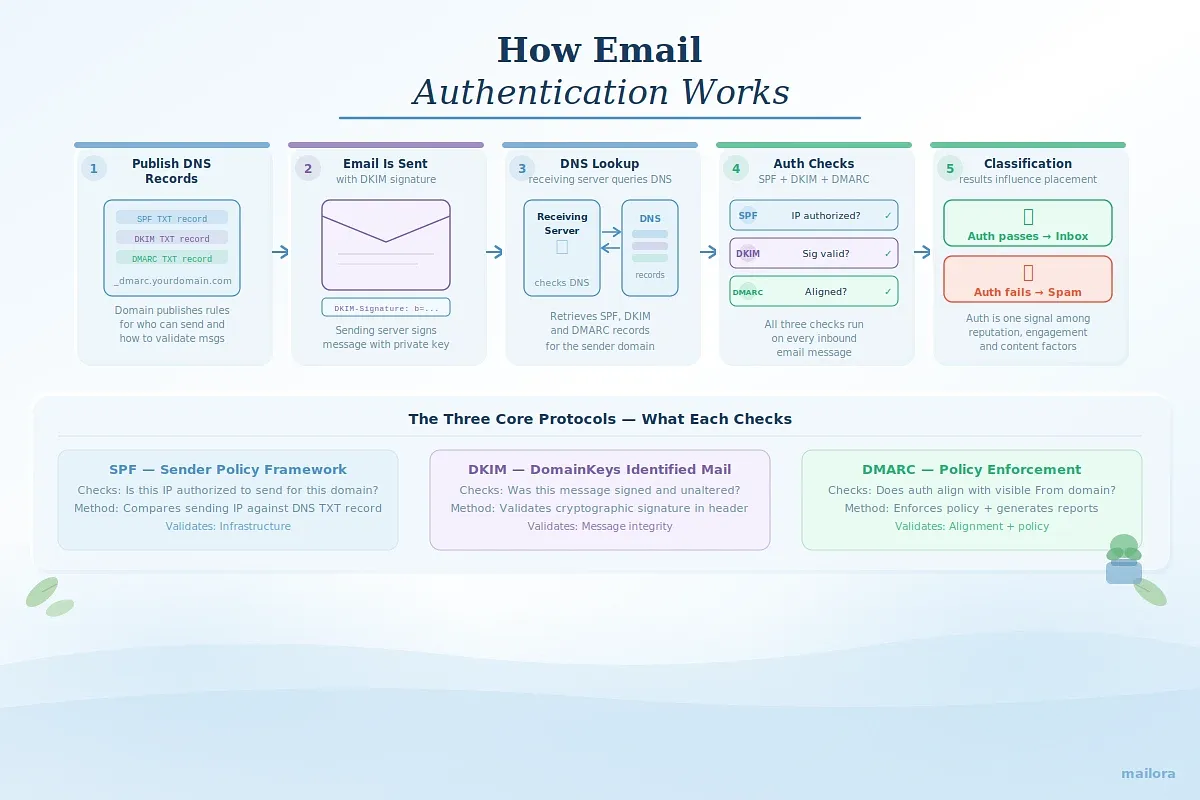
Email authentication works by allowing receiving mail systems to verify whether a message was sent by an authorized domain and whether the message content remained unchanged during transmission. This verification happens through DNS records that publish authentication rules for the domain.
The process typically follows these steps:
- Authentication Records Are Published in DNS
The sending domain publishes authentication records such as SPF, DKIM, and DMARC in its DNS. These records define which servers can send email for the domain, how messages should be signed, and how authentication failures should be handled.
- The Email Message Is Sent
When an email is sent from a mail server or email platform, the message may include authentication elements such as a DKIM signature that confirms the domain authorized the message.
- Receiving Servers Retrieve Authentication Records
When the message arrives, the receiving mail server checks the sender’s domain and performs DNS lookups to retrieve the relevant authentication records.
- Authentication Checks Are Performed
The receiving system evaluates the message using SPF, DKIM, and DMARC rules. These checks confirm whether the sending server is authorized, whether the message signature is valid, and whether the authenticated domain aligns with the domain shown in the visible From header.
- Results Influence Message Classification
The authentication results become one of the signals mailbox provider filtering systems use when classifying the message. Successful authentication strengthens sender credibility, while failures may reduce trust depending on the domain’s DMARC policy and other reputation signals.
Insert this block there:
Related authentication guides
If you want to explore each protocol in more detail, see our related guides:
- DKIM vs SPF: What’s the Difference and Do You Need Both?
- How Does DMARC Work?
- What Is SPF Email?
- DMARC Reports Explained: How to Read, Analyze, and Use Them
How to Implement Email Authentication
Implementing email authentication involves configuring DNS records that allow mailbox providers to verify your sending identity and validate message integrity. For most organizations, this process includes setting up SPF, DKIM, and DMARC, which together form the core authentication framework for modern email programs.
The steps below outline how outbound teams typically implement these protocols.
Step 1: Publish an SPF Record
- Identify All Authorized Sending Sources
Start by identifying every system that sends email using your domain. This may include ESPs, CRM platforms, marketing tools, transactional systems, and internal mail servers.
- Create the SPF DNS Record
Publish a TXT record in your domain’s DNS that lists the authorized sending infrastructure. This record tells receiving mail systems which IP addresses or hosts are permitted to send email on behalf of your domain.
- Avoid Multiple SPF Records
A domain should have only one SPF record. If multiple systems send email for the domain, their entries must be combined into a single record.
- Monitor DNS Lookup Limits
SPF records can only include up to 10 DNS lookups. Exceeding this limit may cause SPF checks to fail, so the record should be reviewed regularly as new sending tools are added.
Step 2: Configure DKIM Signing
- Generate a DKIM Key Pair
DKIM requires a cryptographic key pair consisting of a private key used for signing messages and a public key published in DNS for verification.
- Publish the Public Key in DNS
Add the DKIM public key as a TXT record in your domain’s DNS. The record is associated with a selector that helps receiving servers identify the correct key.
- Enable DKIM Signing in Your Sending Platform
Configure your email platform or sending server to sign outgoing messages using the private key. This ensures every message carries a DKIM signature that can be verified by receiving systems.
- Rotate DKIM Keys Periodically
Key rotation is recommended to maintain security and prevent long-term exposure if a signing key becomes compromised.
Step 3: Deploy a DMARC Policy
- Publish a DMARC Record in DNS
Create a DMARC TXT record that defines your authentication policy and reporting configuration. This record specifies how receiving mail systems should handle messages that fail authentication.
- Start With Monitoring Mode
Most organizations begin with the p=none policy to collect authentication reports without enforcing rejection or quarantine.
- Review Authentication Reports
DMARC aggregate reports provide insight into how receiving systems evaluate your domain’s authentication results. These reports help identify misconfigured sending sources.
- Move Toward Policy Enforcement
Once authentication issues are resolved and alignment is consistent, the DMARC policy can be strengthened to quarantine or reject unauthenticated messages.
Step 4: Verify Domain Alignment
- Align Authentication With the Visible From Domain
For DMARC to pass, either SPF or DKIM must authenticate and align with the domain shown in the visible From header.
- Review Third-Party Sending Tools
Many email platforms send messages using their own infrastructure or domains. Ensure these services are correctly authenticated and aligned with your domain.
- Audit Sending Infrastructure Regularly
Organizations often add new sending tools over time. Periodic audits help confirm that every authorized sender is properly authenticated.
Implementing these authentication protocols ensures mailbox providers can reliably verify your sending identity. For teams that rely on email as a core communication channel, maintaining correct authentication configuration is a foundational step toward protecting domain trust and maintaining consistent inbox visibility.
How to Test Email Authentication
Testing email authentication helps verify that your SPF, DKIM, and DMARC configurations are correctly implemented and functioning as expected. Because authentication relies on DNS records and message validation, testing ensures mailbox providers can successfully verify your domain when emails are sent.
1. Check Authentication DNS Records
- Verify SPF, DKIM, and DMARC Records
Start by confirming that the authentication records for your domain are correctly published in DNS. This includes checking the SPF record, DKIM public keys, and the DMARC policy record.
- Confirm Syntax and Configuration
Authentication records must follow precise formatting rules. Even small syntax errors can cause authentication checks to fail, so records should be validated for accuracy.
- Ensure Records Are Publicly Accessible
Mailbox providers rely on DNS lookups to retrieve authentication rules. If the records cannot be retrieved, authentication checks will fail.
2. Send a Test Email and Review Authentication Results
- Send a Message to a Test Inbox
Send an email from your authenticated domain to a mailbox where message headers can be inspected.
- Check SPF, DKIM, and DMARC Status
Review the message headers to confirm whether SPF, DKIM, and DMARC checks pass or fail. Most mailbox providers include authentication results within the header data.
- Verify Domain Alignment
Ensure that either SPF or DKIM aligns with the domain shown in the visible From header, which is required for DMARC to pass.
3. Use an Email Authentication Testing Tool
- Run an Authentication Check
Authentication testing tools analyze your domain’s DNS records and message headers to confirm whether SPF, DKIM, and DMARC are properly configured.
- Identify Configuration Issues
These tools can highlight common issues such as missing records, multiple SPF entries, incorrect DKIM selectors, or misconfigured DMARC policies.
- Validate Authentication Across Mailbox Providers
Checking DNS records confirms configuration, but it does not always show how mailbox providers interpret authentication signals during real message processing. Running an inbox placement test helps verify whether SPF, DKIM, and DMARC pass correctly when the email is evaluated by filtering systems.
Mailora’s deliverability testing analyzes authentication results alongside inbox placement, spam classification signals, and blocklist status across major mailbox providers. This gives sending teams a clearer view of whether authentication infrastructure is functioning as expected before a campaign is launched.
4. Monitor DMARC Authentication Reports
- Review Aggregate Reports
DMARC aggregate reports provide daily summaries of authentication results from participating mailbox providers.
- Identify Failing Senders
These reports help identify sending sources that are not properly authenticated or aligned with your domain.
- Detect Unauthorized Sending Activity
DMARC reports can also reveal potential domain spoofing attempts or previously unknown sending infrastructure.
Regular authentication testing helps ensure that your domain’s identity verification framework remains reliable as sending infrastructure evolves. By validating SPF, DKIM, and DMARC configurations and reviewing authentication results over time, organizations can maintain consistent domain trust and avoid authentication-related delivery issues.
If you want a structured framework for evaluating authentication together with placement and reputation signals, see our guide on how to test email deliverability
Why Is Email Authentication Important?
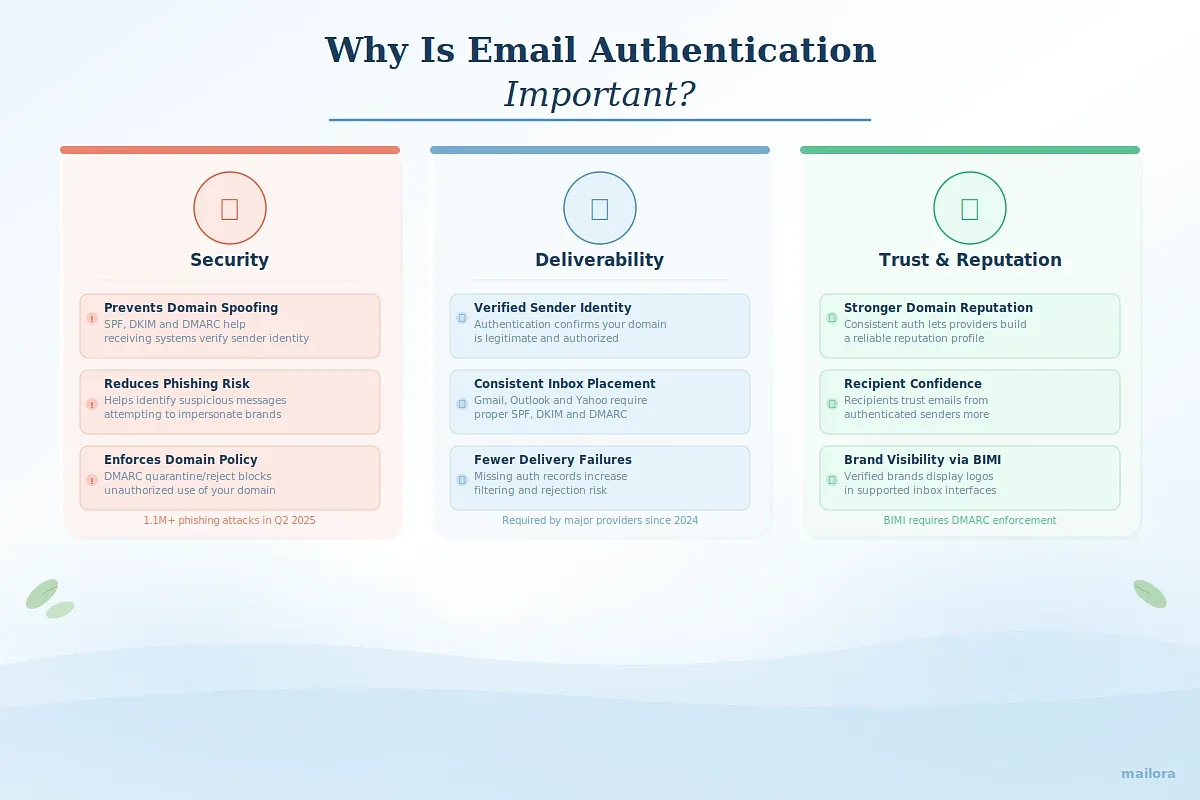
Email authentication plays a critical role in protecting domain identity, maintaining sender credibility, and supporting consistent email performance across mailbox providers. Without proper authentication, receiving mail systems cannot reliably verify who is sending a message on behalf of a domain, which introduces uncertainty into how messages are evaluated and classified.
For organizations that rely on email as a core communication or revenue channel, authentication serves as a foundational layer of email infrastructure.
1. Security
Email authentication helps protect domains and recipients from spoofing and phishing attacks.
- Prevents Domain Spoofing: Without authentication protocols, malicious actors can send messages that appear to originate from your domain. SPF, DKIM, and DMARC help receiving systems verify whether the sender is authorized to use the domain identity.
- Reduces Phishing Risks: Authentication standards allow mailbox providers to identify suspicious messages that attempt to impersonate legitimate organizations. This helps reduce the success rate of phishing campaigns that rely on forged sender identities.
The scale of the threat remains significant. According to the APWG Phishing Activity Trends Report Q2 2025, 1,130,393 unique phishing attacks were detected globally, the largest quarterly total since Q2 2023.
By verifying the legitimacy of sending domains, authentication protocols help mailbox providers detect spoofed messages earlier and limit the effectiveness of large-scale phishing campaigns that rely on domain impersonation.
- Enforces Domain Protection Policies: With DMARC enforcement policies such as quarantine or reject, domain owners can instruct receiving mail systems to block or isolate messages that fail authentication checks.
- Improves Visibility Into Unauthorized Senders: DMARC reporting provides insight into who is sending email using your domain, helping organizations detect unauthorized infrastructure or potential abuse.
2. Deliverability
Authentication is one of the signals mailbox providers evaluate when determining how messages should be categorized and where they should appear in the inbox folders.
- Establishes Verified Sender Identity: Authentication confirms that the domain sending the message is legitimate and authorized to use the associated sending infrastructure.
- Supports Consistent Inbox Placement: Major mailbox providers have strengthened bulk sender requirements in recent years, making correct SPF, DKIM, and DMARC configuration essential for maintaining reliable inbox placement.
- Provides Trust Signals for Message Classification: Mailbox provider filtering systems evaluate authentication alongside other signals such as engagement patterns and sender reputation when classifying incoming messages.
- Reduces Authentication-Related Delivery Failures: Misconfigured or missing authentication records can cause messages to be treated as suspicious, increasing the likelihood of filtering or rejection.
3. Trust and Reputation
Authentication contributes to long-term sender reputation and helps establish credibility with both mailbox providers and recipients.
- Strengthens Domain Reputation Signals: Consistent authentication allows mailbox providers to associate sending behavior with a verified domain identity, which supports reputation tracking over time.
- Improves Recipient Confidence: When authentication is correctly implemented, recipients are more likely to trust that the message genuinely originates from the stated sender.
- Supports Brand Recognition in the Inbox: Protocols such as BIMI allow verified brands to display their logos in supported inbox environments, reinforcing visual brand identity for authenticated messages.
This added visibility helps recipients immediately recognize legitimate communications from trusted senders. The branding layer matters because email remains a primary channel for brand communication.
By combining authentication with visible brand indicators, organizations can strengthen credibility and reduce confusion between legitimate messages and impersonation attempts
- Demonstrates Responsible Email Infrastructure: Maintaining proper authentication configuration signals that an organization follows established email standards and protects its domain from misuse.
Email Authentication Best Practices
Maintaining reliable authentication requires ongoing monitoring and periodic configuration updates.
The following best practices help ensure that authentication remains accurate, secure, and aligned with modern mailbox provider expectations.
1. Implement SPF, DKIM, and DMARC Together
SPF, DKIM, and DMARC are designed to work together. SPF verifies sending infrastructure, DKIM validates message integrity, and DMARC enforces alignment and policy decisions.
Implementing only one or two protocols limits the effectiveness of authentication. Deploying all three ensures mailbox providers can verify sender identity and apply domain-level policies correctly.
2. Start DMARC in Monitoring Mode Before Enforcement
Starting with a monitoring policy allows organizations to collect authentication reports without affecting message delivery.
DMARC reports reveal misconfigured sending sources, alignment failures, and unknown senders that may be using the domain. Understanding how DMARC works makes these reports much easier to interpret because the protocol determines how SPF and DKIM alignment, policy enforcement, and authentication outcomes are evaluated before they appear in your reports.
Once legitimate sending sources are authenticated and aligned, the policy can be strengthened to quarantine or reject unauthenticated messages.
3. Maintain Domain Alignment
For DMARC to pass, either SPF or DKIM must authenticate and align with the domain shown in the visible From header.
Many ESPs, CRM tools, and marketing platforms send messages through shared infrastructure. Ensure these services authenticate and align correctly with your domain.
Using consistent domains across marketing, transactional, and operational email helps simplify authentication management.
4. Monitor DMARC Reports Regularly
DMARC aggregate reports show how mailbox providers evaluate authentication results for your domain. Reports can reveal previously unknown infrastructure or external systems attempting to send email using your domain.
Addressing configuration issues early helps prevent authentication failures from affecting message classification or domain trust.
5. Keep SPF Records Within DNS Lookup Limits
SPF records allow a maximum of ten DNS lookups. Exceeding this limit can cause SPF checks to fail during message evaluation. As sending tools change over time, outdated entries may remain in the SPF record. Regular cleanup helps maintain an efficient configuration.
Reducing unnecessary third-party sending sources simplifies SPF management and reduces the risk of exceeding lookup limits.
How Authentication Supports Email Deliverability
Email authentication directly influences how mailbox providers evaluate and trust your messages. When protocols like SPF, DKIM, and DMARC are correctly configured, they give receiving servers clear proof that your emails are legitimate and authorized by the domain they claim to come from. This verification reduces the risk of spoofing and allows mailbox providers to confidently process your messages instead of flagging them as suspicious.
Authentication also creates consistency across your sending infrastructure. When every legitimate email source is properly authenticated and aligned with your domain, mailbox providers can build a reliable reputation profile for your sending domain. This reputation is one of the most important signals used in inbox placement decisions.
Authentication confirms domain identity, but it does not guarantee inbox placement on its own. Mailbox providers evaluate authentication signals together with reputation, engagement patterns, and message classification behavior.
This is where inbox visibility becomes critical. Tools like Mailora allow teams to test real email sends and see how authentication results interact with spam filtering and placement decisions across Gmail, Outlook, and Yahoo. Instead of relying only on pass-fail checks, senders can understand how their infrastructure actually performs in live mailbox environments. Beyond authentication testing, Mailora provides a complete deliverability platform with features for inbox placement testing, reputation monitoring, blocklist detection, predictive analytics, and detailed diagnostics across major mailbox providers.
FAQs
1. What is email authentication in simple terms?
Email authentication is a set of technical protocols that verify whether an email is genuinely sent from the domain it claims to come from. It helps mailbox providers confirm that the sender is authorized to use that domain, reducing the risk of spoofing, phishing, and domain abuse.
2. What are the main email authentication protocols?
The core email authentication protocols are SPF, DKIM, and DMARC. SPF verifies authorized sending servers, DKIM confirms message integrity through cryptographic signatures, and DMARC enforces policy and reporting based on SPF and DKIM alignment. Additional standards like ARC and BIMI support forwarding trust and brand identity.
3. Do SPF, DKIM, and DMARC improve inbox placement?
They do not directly guarantee inbox placement, but they are foundational trust signals for mailbox providers. Proper authentication helps providers verify sender legitimacy, build domain reputation, and confidently process messages. Without authentication, emails are far more likely to be filtered or blocked.
4. Can email authentication prevent phishing or spoofing?
Email authentication significantly reduces spoofing risks. DMARC policies allow domain owners to instruct receiving servers to quarantine or reject unauthorized emails claiming to come from their domain. This helps protect recipients and preserves domain reputation.
5. How can I check if my domain has proper email authentication?
You can check authentication by reviewing DNS records for SPF, DKIM, and DMARC or by using deliverability testing tools. These tools analyze headers, validate authentication alignment, and show whether mailbox providers recognize the authentication signals correctly.
Stay in the loop
Deliverability insights, product updates, and early access to new features. No spam, unsubscribe anytime.
By subscribing, you agree to our Privacy Policy. Unsubscribe anytime.