Email Validator Explained: What it Does, Limits, and Fixes
Key Takeaways
|
Introduction
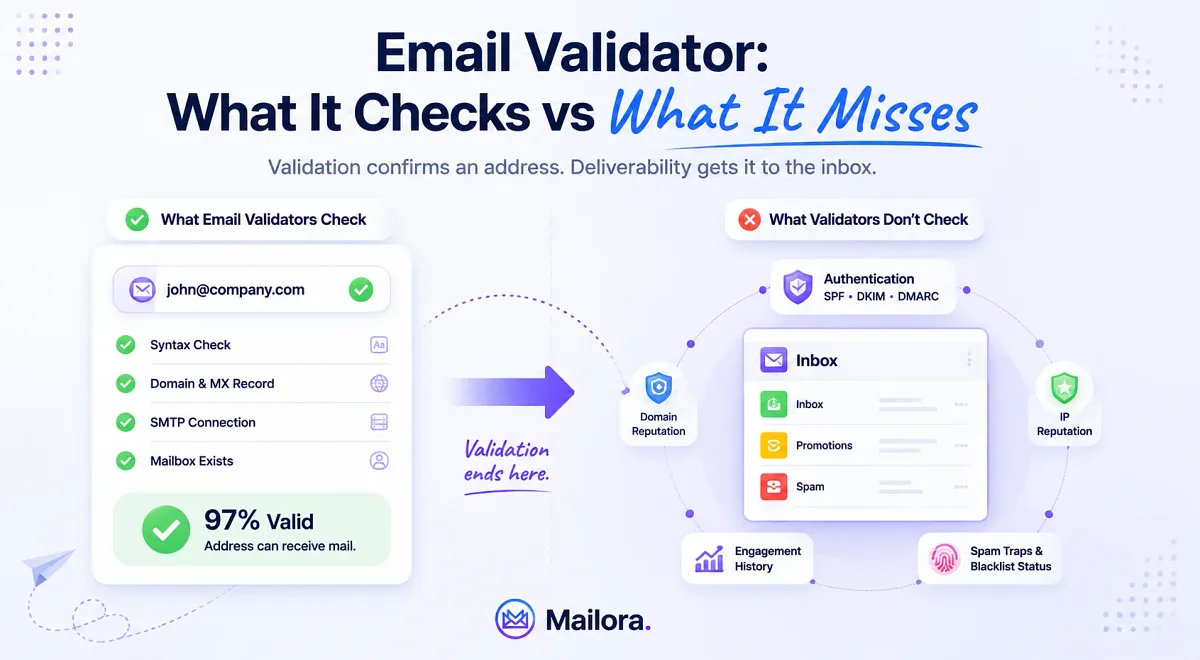
An email validator confirms an address exists and can accept mail, but it tells you nothing about whether Gmail trusts your sending domain, whether your DMARC policy is actually enforced, or whether last month's campaign already dented your reputation with the major mailbox providers.
Those are different questions, answered at a different layer, and the gap between them is where "the list was 97% valid and 40% still went to spam" stories come from.
This guide breaks down exactly what email validators do, how the major tools compare at a practitioner level, and where validation ends and deliverability intelligence begins.
What is an Email Validator?
An email validator is a tool that checks whether an email address is formatted correctly, belongs to a real domain, and can receive mail. Most validators perform syntax checks, verify DNS and MX records, and simulate an SMTP connection to determine whether a mailbox exists.
Email validation helps reduce bounce rates and protect sender reputation, but it does not guarantee inbox placement or email deliverability.
Email Validation vs Email Verification
The terms email validation and email verification are often used interchangeably, and in most marketing conversations they mean roughly the same thing: checking whether an email address is real and able to receive mail.
Here’s the difference between email validation and email verification:
- Email validation usually refers to the broader process of checking the quality and structure of an address, including syntax checks, domain verification, typo detection, disposable-email filtering, and overall list hygiene.
- Email verification is often used more narrowly to describe the live mailbox-level check, particularly the SMTP handshake that tests whether the recipient server will accept mail for that address.
Most modern tools combine both processes into a single workflow, which is why a lot of teams get confused between email validation and email verification.
Here’s a quick side-by-side comparison between both validation and verification:
Aspect | Email Validation | Email Verification |
| Primary focus | List hygiene and address quality | Confirming mailbox existence |
| What it checks | Syntax, domain, MX records, disposable emails, role accounts, typo detection | SMTP-level mailbox response |
| Technical depth | Broader screening process | More mailbox-specific |
| Uses SMTP handshake? | Sometimes | Yes, typically |
| Goal | Clean and maintain healthy email lists | Confirm whether the address can receive mail |
| Common outputs | Valid, invalid, risky, disposable, role-based | Mailbox exists / mailbox unreachable |
| Helps reduce | Bounce rates, poor-quality signups, stale data | Hard bounces from nonexistent inboxes |
| Does it test deliverability? | No | No |
| Checks SPF, DKIM, or DMARC? | No | No |
| Predicts inbox placement? | No | No |
[Table: Quick comparison between email validation and email verification]
Validation and verification improve list quality. They help you avoid sending to inactive addresses, reduce bounce rates, and maintain healthier databases over time, but they stop at the mailbox layer and do not measure:
- Inbox placement
- Sender reputation
- Authentication alignment
- Spam-folder placement
- How mailbox providers evaluate your infrastructure.
How Does an Email Validator Work?
When you run an email address through a validator, the tool basically moves through a series of technical checks to test whether the email address can actually receive incoming emails.
It usually tests the health and reachability of the address step by step, starting from the formatting of the address itself all the way to how the recipient’s mail server responds during an SMTP conversation.
1. Syntax Validation
The first step of email validation is checking whether the email address is even formatted correctly. The validator looks for obvious structural problems, such as:
- Missing or multiple @ symbols
- Invalid characters
- Broken domains
- Extra spaces from copy-pasting
- Formatting that violates standard email rules defined under RFC 5321 and RFC 5322.
A surprising number of bad addresses fail here before any deeper check even starts. Large email lists collect formatting issues constantly, especially lists built through manual imports, spreadsheet uploads, offline events, CRM migrations, or copied lead databases. Something as small as a trailing space or typo can turn a valid address into a guaranteed hard bounce.
Syntax validation acts as the first cleanup layer before the validator even attempts to contact a mail server.
2. Domain and MX Record Verification
Next, the validator checks whether the domain itself exists and is configured to receive email.
For example, if someone enters name@company.com, the validator checks:
- Does company.com resolve properly?
- Does it publish MX (Mail Exchange) records pointing to a working mail server?
If the domain has no mail server configured, the address cannot receive mail, regardless of whether the mailbox itself exists.
Domain verification eliminates domains that are inactive, misspelled, expired, or never configured for email in the first place. A user may have entered a perfectly formatted address, but if the infrastructure behind the domain cannot accept mail, the address is still undeliverable.
Validators also use this stage to catch typo domains that appear legitimate at first glance like:
- gamil.com
- yahho.com
- outlok.com
These are common list-quality problems that quietly increase bounce rates over time if they are not filtered out early.
3. SMTP Handshake Simulation
This is the step most people mean when they talk about “email verification.”
The validator opens a connection to the recipient’s mail server and walks through the early stages of an SMTP conversation using commands like:
- HELO
- MAIL FROM
- RCPT TO
The important detail is that the validator never sends a real email to the recipient. It simply checks how the mail server responds when asked whether the address can receive mail.
The validator is simply reading the server’s response:
- A 250 response usually means the mailbox can accept mail
- A 550 response typically means the address does not exist or is blocked.
This is how validators identify many invalid or inactive mailboxes without ever delivering a message. SMTP handshake simulation makes modern validators far more useful than simple formatting checkers. It allows them to identify mailboxes that technically look real but are no longer active, disabled, or unreachable.
At the same time, this is where validation starts running into real-world limitations because not every mailbox provider exposes mailbox status cleanly. Some providers intentionally mask responses to prevent abuse, scraping, or directory harvesting, while others throttle verification requests or return intentionally vague responses.
That is why validation results are sometimes classified as:
- Valid
- Invalid
- Risky
- Unknown, or
- Accept-all
rather than as a simple yes-or-no answer.
4. Disposable Email Detection
Validators also flag temporary or disposable email services like:
- Mailinator
- Guerrilla Mail
- 10MinuteMail
- and similar throwaway providers.
These addresses are technically valid, but they rarely represent real long-term users and often create low engagement, spam complaints, or poor-quality signups.
Disposable addresses are especially common in:
- Free trials
- Coupon signups
- Gated-content downloads
- Low-intent lead generation campaigns.
Someone may use the address once to access an ebook or trial and never interact again. From a deliverability perspective, those addresses add list volume without adding meaningful engagement, which eventually weakens sender reputation over time.
For high-volume senders, filtering disposable emails is less about “can this inbox receive mail” and more about protecting overall list quality.
5. Role-Based Address Detection
Addresses like:
- info@
- support@
- sales@
- admin@
are usually shared inboxes rather than personal mailboxes.
Validators flag these because they tend to perform differently from normal subscribers. Shared inboxes often generate lower engagement and higher complaint rates, especially in marketing campaigns.
The issue is not that these addresses are invalid. Many are completely legitimate business inboxes.
The problem is often behavioral because shared inboxes are usually monitored by multiple people, receive large volumes of email already, and are less likely to behave like engaged subscribers. Marketing emails sent to role accounts often go unread, get ignored, or trigger complaints because the recipient never personally opted in.
For outbound sales teams, these addresses may still be useful. For newsletter engagement and deliverability health, they usually carry more risk than value.
6. Catch-All Domain Detection
Some domains are configured to accept every incoming email address, whether the mailbox actually exists or not.
That means:
- john@domain.com
- random123@domain.com
- doesnotexist@domain.com
can all return a successful SMTP response.
These are called catch-all domains, and they create one of the biggest limitations in email validation. The validator can confirm the domain accepts mail, but it cannot reliably confirm whether the specific mailbox is real.
Catch-all domains are one of the main reasons validation is never perfectly binary. An address can appear deliverable during verification and still bounce later during a real send because the server accepted the SMTP check but rejected the actual delivery attempt.
This is why most validators classify catch-all addresses separately instead of confidently marking them as fully valid. They sit in the middle ground between “safe” and “unsafe,” and how you handle them depends on your risk tolerance, sending volume, and campaign type.
A validator can tell you whether an address is likely able to receive mail. However, what it cannot tell you is whether your email will actually reach the inbox.
It does not evaluate:
- SPF, DKIM, or DMARC alignment
- Domain reputation
- IP reputation
- Inbox placement
- Spam-folder placement
- The trust mailbox providers assign to your sending infrastructure.
That’s why a list can come back 97% valid and still perform badly in Gmail or Outlook.
Although the validator did its job correctly, the problem exists at a different layer.
Mailbox providers evaluate far more than whether the address exists. They evaluate whether they trust the sender behind the message. A technically valid email sent from a domain with poor authentication, weak reputation, or suspicious sending behavior can still land directly in spam because inbox placement is influenced by factors like:
- Infrastructure trust
- Authentication alignment
- Reputation history
- Engagement behavior, and
- Content signals
Validator is designed to measure none of these factors.
Why Email Validation Matters for High-Volume Senders
For small senders, a few bad addresses may only mean a handful of bounced emails. At scale, the impact compounds fast. High-volume sending turns list quality into a deliverability factor, where invalid addresses, spam traps, and stale contacts directly affect sender reputation, inbox placement, and campaign performance.
Bounce rate is a reputation signal
Hard bounces tell mailbox providers you're sending to a stale or poorly sourced list, and the providers respond by throttling or filtering everything else you send. A bounce rate that creeps above 2% quietly degrades inbox placement across an entire program, instead of just the bad addresses.
Invalid addresses cost real money
Most ESPs bill per contact. Every dead address on the list is budget spent storing and sending to a mailbox that will never open anything and every send to it is a small reputational tax on top.
Spam traps are unforgiving
Aged and recycled addresses get converted into traps by mailbox providers specifically to catch senders working from old lists. Validators maintain known-trap databases precisely because hitting one can do outsized damage to reputation.
Lists decay whether you touch them or not
According to MarketingSherpa research cited in HubSpot's database decay simulation, email databases degrade by roughly 22.5% per year, about 2.1% every month, as people change jobs and abandon addresses. The cleanest opt-in list from twelve months ago is a meaningfully different list today.
For a team sending 50,000+ emails a month, even a 2% invalid rate compounds because it's a thousand bounces a month feeding the reputation signal, every month, on top of wasted spend.
Hence, validation acts as the hygiene layer that keeps that number near zero. However, validation alone cannot fix poor deliverability and reputation.
How the Major Email Validators Compare
Most email validators handle the same core checks, but they differ in accuracy, API depth, bulk-cleaning workflows, integrations, and how they classify risky addresses like catch-all domains. The real differences show up less in the basics and more in how each tool fits different sending workflows and deliverability needs.
| Tool | Verification checks | Bulk upload | API | Free tier | Accuracy / signal claim | Integrations |
| ZeroBounce | Syntax, MX, SMTP, catch-all, disposable, spam trap, role | Yes | Yes (real-time) | 100/month (business domain) | 99.6% accuracy guarantee; 600,000+ clients | Mailchimp, HubSpot, Zapier, many ESPs |
| Hunter.io | Format, MX, SMTP, disposable, accept-all | Yes | Yes (real-time) | 100/month | <1% bounce on "valid" results; 7M+ users | HubSpot, Salesforce, Zapier, Sheets |
| Verifalia | Syntax, MX/DNS, SMTP, catch-all, spam trap, disposable, non-ASCII | Yes | Yes (real-time + SDKs) | ~25/day | AI-powered; 40+ status codes | API/SDK-first |
| NeverBounce | Syntax, MX, SMTP, catch-all, disposable, role, dedupe/typo | Yes | Yes (real-time) | 1,000 on signup | 20+ step process, multi-server checks | HubSpot, ActiveCampaign, Zapier, Make |
| Kickbox | Syntax, MX, SMTP, accept-all, disposable, role, typo hints | Yes | Yes (real-time) | 100 on signup | Sendex deliverability score (0–1) | Clean REST API, ESP connectors |
[Table: List of top email verification tools and their key features]
The difference between most email validators is smaller than it first appears. Nearly all of them can identify invalid addresses, disposable emails, and risky mailboxes effectively.
However, validation alone only protects list quality, not inbox placement or deliverability. Mailbox providers still evaluate your authentication setup, domain reputation, sending behavior, and engagement signals independently.
That’s the layer Mailora is built for. Mailora is an email deliverability intelligence tool that helps teams understand whether their sending infrastructure is actually trusted by mailbox providers and whether emails are reaching the inbox consistently across Gmail, Outlook, Yahoo, and other major providers.
It connects authentication health, inbox placement, reputation monitoring, and deliverability testing into a single operational view, so teams can identify the real cause behind poor performance instead of guessing from bounce rates alone.
Real-time Validation vs Batch List Cleaning
Most teams think of email validation as a single process, but operationally it splits into two very different use cases:
- Validating addresses in real time as users enter them
- Cleaning existing databases in bulk before sending campaigns
Real-time validation happens the moment a user enters an email address, usually during signup, checkout, demo requests, or form submissions.
Batch list cleaning happens later, when an existing database is audited and cleaned before a campaign or outreach push.
Aspect | Real-Time Validation | Batch List Cleaning |
| Primary purpose | Prevent bad addresses from entering the database | Clean and repair an existing database |
| When it happens | During form submission or user signup | Before campaigns, migrations, or re-engagement sends |
| Typical use case | Signup forms, lead forms, checkout pages, SaaS onboarding | CRM cleanup, newsletter audits, outbound campaign prep |
| What it catches | Typos, fake emails, disposable addresses, invalid syntax | Old addresses, inactive mailboxes, catch-alls, stale contacts |
| User interaction | Happens instantly while the user is typing | Happens in bulk behind the scenes |
| Speed expectation | Milliseconds | Minutes to hours depending on list size |
| Main business goal | Protect database quality at the point of capture | Reduce bounce rates and improve sender reputation |
| Impact on UX | Prevents bad submissions immediately | No direct user-facing impact |
| Typical integrations | Forms, landing pages, CRMs, signup flows | ESPs, CRMs, CSV uploads, outreach platforms |
| Risk reduction | Stops bad data from entering the system | Removes existing risky or invalid contacts |
| Disposable email blocking | Usually enabled in real time | Usually flagged during cleanup |
| Catch-all handling | Often limited or cautious | More detailed analysis and segmentation |
| Best for | Fast-growing lead generation systems | Mature databases and large sending programs |
| Common users | SaaS, ecommerce, inbound marketing teams | Agencies, outbound teams, enterprise marketing ops |
| Deliverability impact | Prevents list decay from accumulating early | Reduces bounce spikes before sending |
| Limitation | Cannot fix old database problems | Cannot stop new bad addresses from entering later |
| Ideal cadence | Always on | Every 30–90 days, or before major sends |
| Most effective strategy | Use continuously at capture points | Run routinely alongside list hygiene workflows |
[Table: Key differences between real-time verification vs batch list cleaning]
The Gap Between a Clean List and Inbox Placement
An email validator checks whether an address can receive mail. However, inbox placement is decided much further downstream by signals mailbox providers use to evaluate whether your sending infrastructure is trustworthy. They include:
- Authentication alignment: SPF, DKIM, and DMARC need to align correctly with your visible “From” domain. A third-party sending platform missing from your SPF record or a misaligned DKIM signature can quietly fail DMARC while the SMTP transaction still reports success.
- Domain and IP reputation: Mailbox providers build long-term trust scores from complaints, bounce patterns, spam-trap hits, engagement history, and past sending behavior. A clean list cannot offset a damaged reputation.
- IP warming and sending behavior: Sending 80,000 emails from a cold or inconsistent IP looks risky regardless of list quality. Sudden spikes in volume are often treated as spam signals on their own.
- Content and engagement signals: Subject-line patterns, link behavior, recipient engagement, and historical interaction data all influence where mail ultimately lands.
The 2025 Validity Email Deliverability Benchmark Report found global inbox placement averaging 83.5%, meaning roughly one in six legitimate marketing emails never reaches the inbox at all. In most cases, those senders were not failing because of invalid email addresses. They were failing because of authentication gaps, reputation issues, or infrastructure problems that email validation tools were never built to detect.
Validation helps protect list quality. Mailora focuses on the deliverability layer after the send that helps with understanding authentication alignment, inbox placement visibility, reputation monitoring, and deliverability intelligence across major mailbox providers.
Although knowing an address exists is useful, knowing whether your emails are actually reaching the inbox is what ultimately determines campaign performance.
What Deliverability Testing Covers That Validation Can't
Validation verifies if the email address is authentic, while deliverability testing evaluates whether the email will reach the inbox. It covers what validation doesn’t:
- Inbox placement testing: where your email actually lands across Gmail, Outlook, and Yahoo, using seed lists rather than guesswork.
- Authentication diagnostics: is your SPF record aligned and including every sending source, is DKIM signing correctly, is your DMARC policy set past `p=none`, and are you actually receiving and reading the aggregate reports.
- Domain reputation monitoring: ongoing, not a one-time snapshot, because reputation moves between sends.
- Blacklist detection: whether your sending domain or IP has landed on a blocklist that's quietly suppressing delivery.
- Content and header analysis: what about the message itself is pushing it toward the spam folder.
That's the gap Mailora is built to close. Instead of a dashboard of disconnected green and red lights, Mailora's email deliverability testing turns DMARC reports, authentication state, and placement data into decisions
Building a Full-Stack Email Hygiene Workflow
A reliable sending program is built on a sequence of layers that work together. Validation handles list quality, but authentication, deliverability testing, and ongoing monitoring decide whether the cleaned list actually reaches the inbox.
The following workflow brings those layers together into a practical, repeatable process that high-volume senders can apply to their existing sending program.
Step 1: Validate before every campaign or import
Run your list through a dedicated email validator to catch syntax errors, dead domains, disposable addresses, role accounts, and known spam traps before they affect a send. For active engaged lists, validation every 90 days is a reasonable floor. For cold, scraped, or older lists, validation should run before each campaign because list decay accumulates faster than most teams realize.
Step 2: Authenticate your sending infrastructure
Confirm that SPF includes every platform you send through, including newer tools that may have been added to your stack over time. DKIM should be signed correctly and aligned with your visible From domain, and DMARC should be published and ideally moved past p=none once alignment has been verified.
This is the layer that validators do not touch and that most spam-folder problems trace back to. Authentication failures often go unnoticed because the SMTP transaction still reports a successful delivery, even when DMARC quietly fails in the background.
Step 3: Test deliverability before sending
Inbox placement tests use seed lists across major mailbox providers to show where your emails actually land, instead of relying on guesswork or open rates. Running a test before a campaign helps you catch authentication, reputation, or content issues before they reach real recipients.
This is also where infrastructure problems become visible. A campaign that performs well in testing but lands in spam in production usually points to a reputation or content signal that needs further investigation.
Step 4: Monitor continuously
Domain reputation, blacklist status, and DMARC aggregate reports need ongoing tracking, not one-time checks at launch. Authentication setups drift as new sending tools are added. Reputation shifts based on engagement, complaints, and sending behavior. Blocklists update constantly.
Monitoring catches these changes early, before they show up as a sudden drop in inbox placement or a campaign that underperforms without an obvious cause.
Step 5: Act on the signals
Monitoring is only useful when the data drives decisions. The signals from steps 2 through 4 should inform real operational choices, such as warming a new IP, throttling a volume spike, fixing a missing SPF include, or pausing a send from a domain with a reputation problem.
Most deliverability issues are recoverable when caught early. They become difficult to fix when the underlying signals have been ignored for weeks.
Step 1 is the validator's job. Steps 2 through 5 sit at the deliverability intelligence layer, which is where Mailora operates. Mailora connects authentication health, inbox placement, reputation monitoring, and deliverability testing into a single operational view, so teams can move from raw signals to clear decisions without piecing together multiple tools.
When to Use a Validator vs. When You Need More
Email validation and deliverability intelligence solve different problems, and most teams need to understand which one applies to their current situation before choosing where to invest. The framework below outlines when each layer is the right starting point.
When your primary issue is bounces from bad addresses
High bounce rates usually point to a list-quality problem, such as outdated contacts, invalid signups, disposable addresses, or stale data accumulating in the CRM. Any of the validators discussed earlier will handle this effectively.
When your emails are technically delivered but landing in spam
This is a different problem entirely. The addresses are valid and the messages are being accepted by mailbox servers, but they are not reaching the inbox. List cleaning will not surface the cause because the issue sits at the infrastructure layer rather than the address layer.
These cases usually trace back to authentication gaps, reputation issues, content signals, or sending behavior that mailbox providers are quietly filtering against. Deliverability testing is the layer that makes these problems visible.
When you are scaling outbound, launching a new sending domain, or managing multiple accounts
In these situations, the sending environment changes too quickly for occasional checks to keep up. New domains build reputation from scratch. New IPs need warming. Authentication setups expand as more sending tools are added. A silent SPF or DMARC failure across multiple domains can quietly affect performance for weeks before anyone notices.
Continuous monitoring and DMARC intelligence become essential here, not because point-in-time checks are wrong, but because they cannot catch issues that develop between them.
Most high-volume senders need both layers
Validation is the baseline. It is the hygiene every serious sender should have running in the background, regardless of campaign type or volume. Deliverability intelligence sits above it and answers the harder question: whether the cleaned list is actually reaching real inboxes, and what to do when it is not.
Validation tells you the address can receive mail. Deliverability intelligence tells you whether the message actually arrives.
Mailora is built for the second layer. It helps teams understand what happens between the send and the inbox, where authentication, reputation, and placement signals are quietly shaping campaign performance. For senders who have already cleaned the list and still see results that fall short of what the validation report suggested, this is usually where the gap exists.
Run your first deliverability test
Frequently Asked Questions
Can an email validator prevent my emails from going to spam?
Not on its own. A validator lowers bounce rates and protects sender reputation, which helps deliverability indirectly, but spam placement is mostly driven by SPF, DKIM, DMARC, reputation, and content signals, none of which a validator checks.
How often should I validate my email list?
Every 90 days is a reasonable floor for active, engaged lists. For cold, scraped, or older lists, monthly is more defensible. Always validate a segment before reactivating it after a long dormant period.
Do email validators check SPF, DKIM, or DMARC authentication?
No. Validators check the recipient's infrastructure, whether the address exists and accepts mail. Authentication is configured on your sending side, which means a list can be fully valid while DMARC is silently failing.
What should I do if my list is clean but my emails still aren't reaching the inbox?
Run an inbox placement test, then check whether SPF, DKIM, and DMARC are aligned and enforced. Most clean-list-bad-placement cases trace back to authentication or reputation problems a validator was never built to catch.
Stay in the loop
Deliverability insights, product updates, and early access to new features. No spam, unsubscribe anytime.
By subscribing, you agree to our Privacy Policy. Unsubscribe anytime.