DMARC Reports Explained: How to Read, Analyze, and Use Them
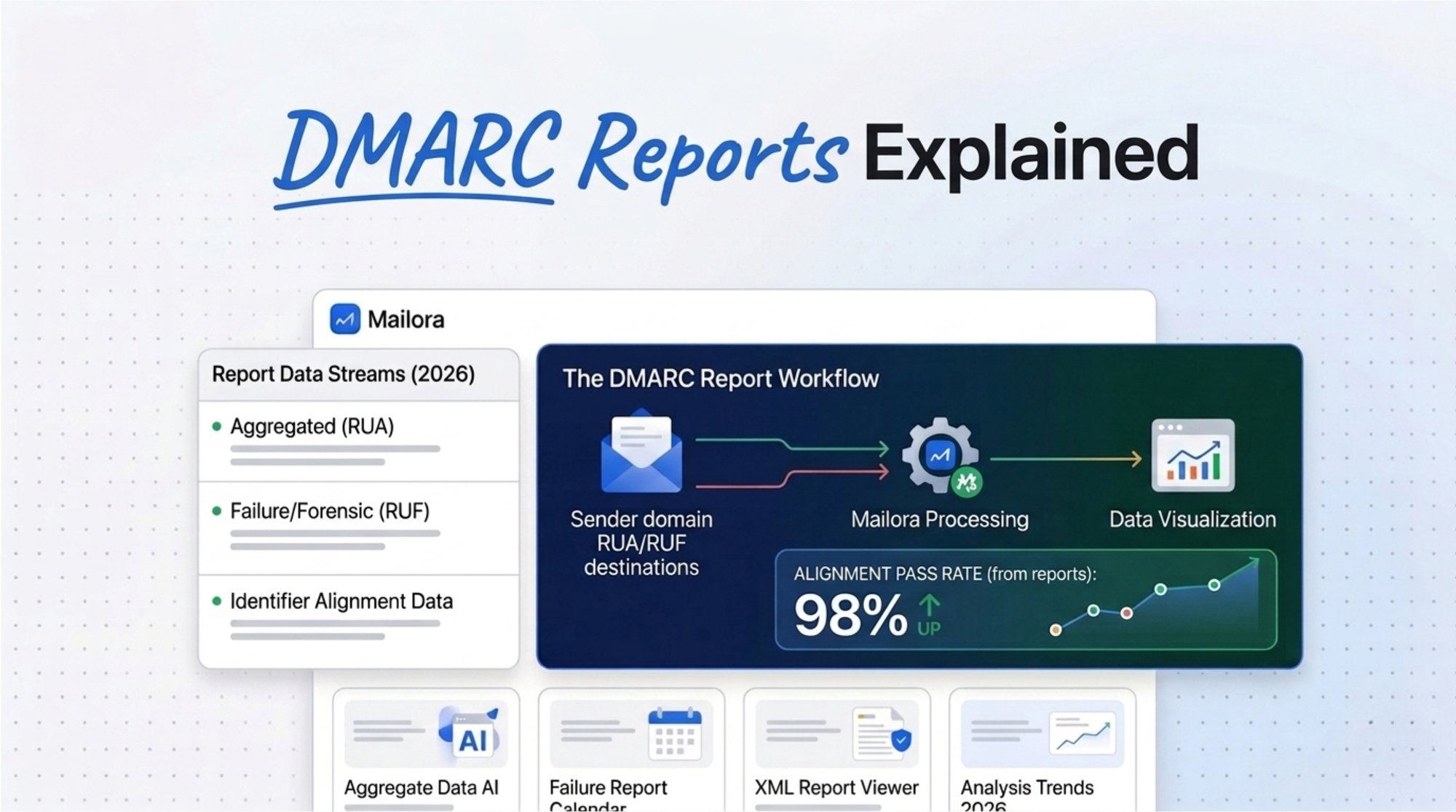
Most teams treat DMARC reports as raw XML files that confirm whether authentication passed or failed. That is a limited view.
When used correctly, DMARC reports become a domain-level telemetry system. They show who is sending emails as your brand, whether authentication is stable, which email streams could break under stricter policies, and which unknown sources represent risk.
In practice, these DMARC emails act as automated feedback from receiving systems, showing how your domain is being used across different sources.
This guide explains what DMARC reports are, how to read them, how to analyze them in a structured way, and how to use them to move toward enforcement without disrupting your email operations.
What is a DMARC Report?
A DMARC report is generated by receiving mail systems such as Gmail, Microsoft, and Yahoo, and other major ISPs, and sent to the domain owner. It summarizes how emails using your domain performed against SPF and DKIM checks, and whether DMARC alignment was achieved between those identities and the visible From domain.
A DMARC report answers:
- Who is sending emails using your domain
- Whether SPF and DKIM passed
- Whether those results were aligned with your domain
- Whether DMARC passed or failed
- What action the receiver applied
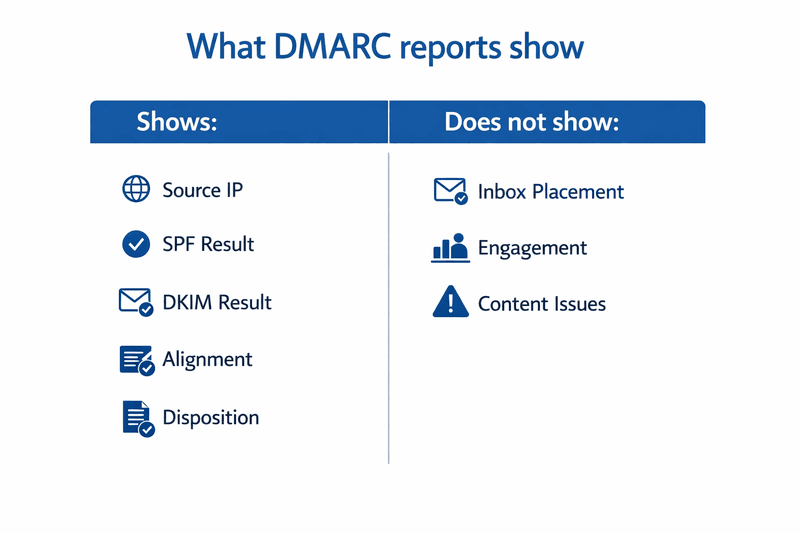
A DMARC report does not show inbox placement, engagement, or content quality. Those require separate tools.
The key concept to understand is this. DMARC evaluates aligned pass, not just authentication pass. SPF or DKIM can pass and still fail DMARC if alignment is not correct.
Types of DMARC Reports: Aggregate vs Forensic
| Attribute | Aggregate Report (RUA) | Forensic Report (RUF) |
|---|---|---|
| What you receive | Volume grouped by source IP and authentication outcome | Individual message failure sample |
| Operational reality | Core signal for most domains | Often limited or disabled by providers |
| Primary use | Inventory, alignment monitoring, enforcement readiness | Debugging specific failures |
| Privacy considerations | Standard telemetry handling | May require stricter access controls |
For most organizations, aggregate reports are the main working data. Forensic reports are often restricted by providers and are not required for most use cases.
One important distinction to keep in mind: a DMARC report shows authentication and policy outcomes. It does not show inbox placement, engagement data, or content quality. Those require separate monitoring.
The DMARC Visibility Maturity Model
DMARC reporting becomes more valuable as your organization matures in how it uses the data.
There are five stages of maturity:
- Visibility — Collect and centralize reports
- Alignment — Ensure aligned DKIM or SPF for all legitimate senders
- Classification — Separate approved aligned, approved misaligned, and unknown sources
- Enforcement — Move from none to quarantine to reject safely
- Governance — Monitor trends, prevent drift, and manage risk continuously
Most organizations stop at visibility. The real value comes from reaching governance.
What DMARC Reports Are and What They Are Not
A DMARC report is a report generated by a receiving mail system that summarizes how mail using your domain performed against SPF and DKIM authentication and alignment checks, and which DMARC policy disposition was applied.
What a DMARC report can answer with high confidence
- Which source IP addresses sent mail using your domain in the visible From header
- If SPF authentication passed and aligned with the domain
- If DKIM authentication passed and aligned with the domain
- The final DMARC evaluation result (pass or fail)
- The policy disposition the receiver applied when DMARC failed
What a DMARC report cannot answer by itself
- Inbox placement or engagement
- Content and list quality issues
- The exact message that caused a failure in aggregate reports
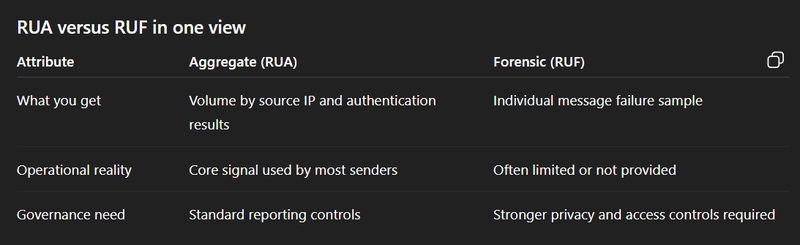
RUA versus RUF in one view:
Before analyzing reports, it is essential to first understand the practical difference between aggregate and forensic reporting. Most teams rely almost entirely on aggregate data.
2. How to Read a DMARC Report
DMARC aggregate reports are delivered as XML files. You do not need to understand every tag. You need to focus on the fields that drive decisions.
Every report contains three core blocks:
- Report metadata — who sent the report and the time range it covers
- Policy published — the DMARC policy your domain had in DNS during that period
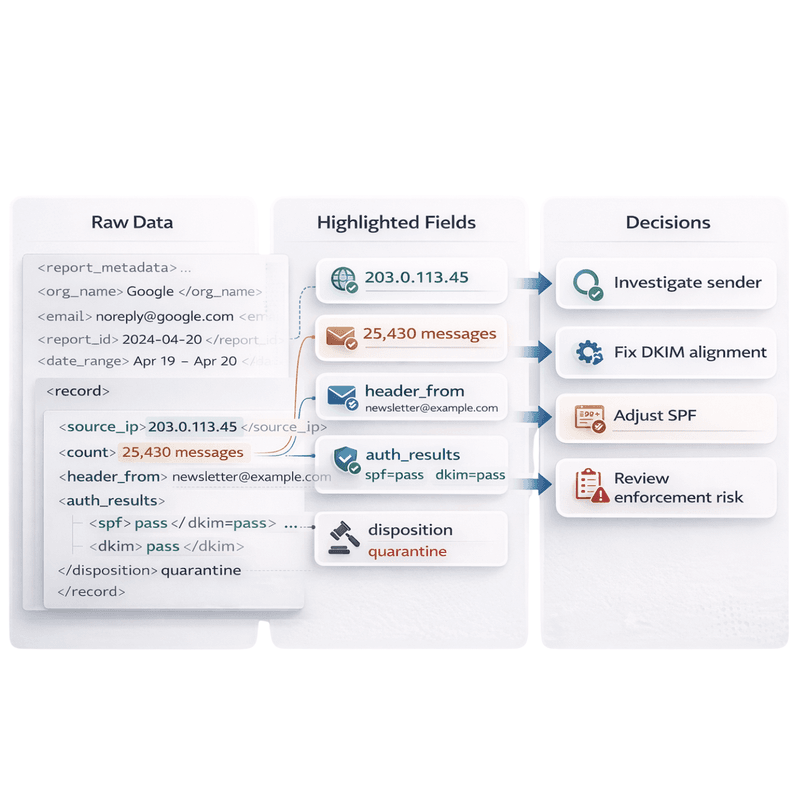
- Records — one or more entries, each listing a source IP, message count, SPF and DKIM outcomes, alignment results, and the disposition applied
<report_metadata>...</report_metadata>
<policy_published>...</policy_published>
<record>...</record>
Here is how the key fields map to decisions:
| Field | Interpretation | Decision it supports |
|---|---|---|
| source_ip and count | Who is sending and message volume | Prioritize fixes based on impact |
| header_from | Visible domain in the From address | Determine main domain or subdomain scope |
| auth_results dkim domain and selector | DKIM signing identity evaluated | Correct signing domain or selector setup |
| auth_results spf domain | SPF identity evaluated | Fix return path alignment or SPF authorization |
| disposition | Receiver action on DMARC failure | Evaluate enforcement risk and potential breakage |
A common mistake is assuming SPF pass means DMARC pass. SPF can pass on a different domain and still fail alignment. The same applies to DKIM.
3. How to Read and Analyze DMARC Reports: A Repeatable Workflow
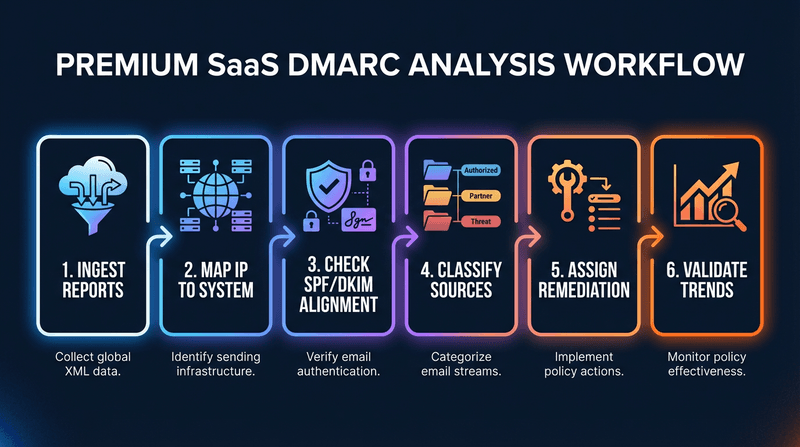
Reading reports effectively comes down to a consistent process: classify your senders, remediate what is broken, and validate the fix before tightening policy.
- Centralize reports for all sending domains and subdomains
- Sort records by message count, so high-volume sources come first
- Map each source IP to a system and an internal owner
- Calculate aligned SPF pass and aligned DKIM pass by source
- Classify each source as approved aligned, approved misaligned, or unknown
- Assign remediation tasks and validate improvement across multiple reporting cycles
The classification step is where most operational value comes from:
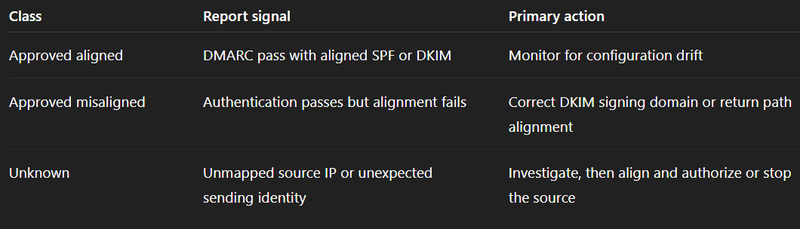
For example, a new vendor may appear in reports with SPF passing but failing alignment. Fixing DKIM alignment ensures the sender remains stable when policies are enforced.
4. Common DMARC Report Patterns and the Fastest Fixes
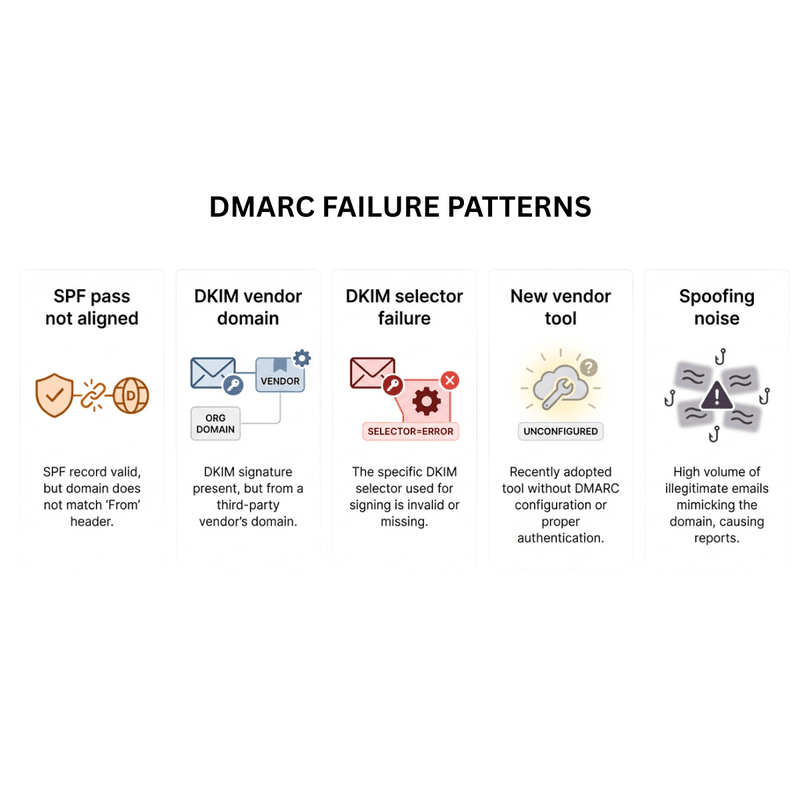
Most DMARC failures follow recognizable patterns. Matching the report signature to the root cause leads to faster remediation.
SPF passes but alignment fails
The return-path domain does not match the From domain. Fix this by configuring DKIM alignment as your primary control, or by setting up a custom return-path domain that matches your From domain.
DKIM passes on a vendor domain, not your domain
The third-party platform is signing messages with its own domain instead of yours. Configure the vendor to sign with your domain, and manage the DKIM selector in your DNS.
DKIM selector failures
A selector is missing or published under the wrong domain — often caused by key rotation errors. Validate selector publishing and ensure overlap during any rotation so messages in transit are not left without a valid key.
New vendor tool appearing in reports
A new sending source shows up without prior authentication setup. Map it to an owner, align DKIM to your domain, and authorize the source in SPF before enforcement catches it.
Many small failing sources at low volume
These often represent spoofing attempts or shadow IT. Treat them as telemetry, document them, and focus enforcement readiness on ensuring all legitimate sources are aligned first.
5. When to act and how to move toward enforcement safely
DMARC policy enforcement, moving from p=none to p=quarantine or p=reject, is where breakage happens if rushed. Reports are how you prove you are ready before raising policy.
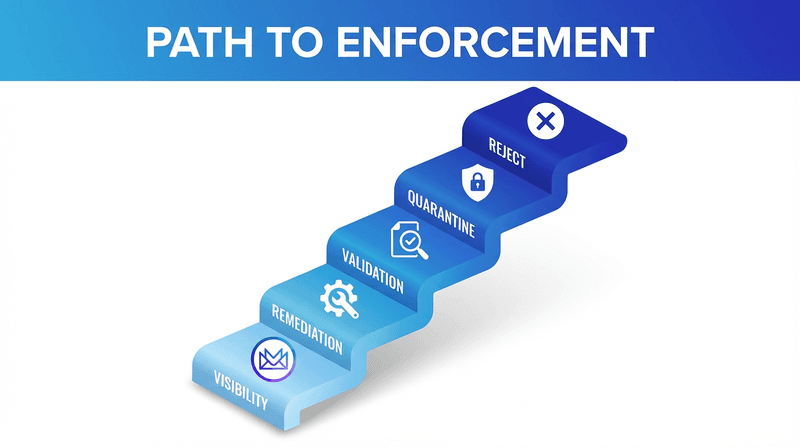
The phased path looks like this:
- Visibility — publish
p=none, collect reports, and build a sender inventory - Remediation — align DKIM for every known sender and validate SPF identity
- Validation — confirm stable aligned pass across normal operational changes
- Quarantine — raise policy with active monitoring and a rollback plan
- Reject — move only when unknown source volume is minimal and all critical streams are stable
A useful readiness test before raising policy:
Policy readiness decision matrix
| What reports show | Readiness | Next action |
|---|---|---|
| Unmapped sources at meaningful volume | Not ready | Investigate and resolve before moving to enforcement |
| Known sources fail alignment intermittently | Partially ready | Fix DKIM operations and vendor alignment, then validate stability |
| All critical sources show stable aligned pass | Ready for quarantine | Plan controlled rollout and monitor disposition impact |
| Stable aligned pass and unknown sources minimal | Ready for reject | Move forward with rollback plan and ongoing governance |
Treat enforcement as a change management process, not a one-time task. Assign owners, set monitoring gates, and keep a rollback plan ready for each policy change.
6. DMARC Reporting as a Security and Deliverability Control
DMARC reporting is not just a deliverability tool. It is also a domain-level security signal.
Reports reveal activity that traditional monitoring often misses. Unknown IPs attempting to send as your domain appear clearly. New vendors show up before they are documented. Repeated failures can indicate spoofing or phishing activity.
As organizations mature, DMARC reporting becomes a control layer.
Instead of just collecting reports, teams classify senders, assign ownership, and enforce alignment standards. This protects both deliverability and domain identity.
The main risk is acting too early.
Enforcing policy before all senders are aligned can break important email flows. This is common in complex environments with multiple tools and vendors.
To use DMARC reporting effectively:
- Validate every sender before enforcement
- Monitor DKIM alignment during changes
- Ensure vendors sign with aligned domains
- Control subdomains and sender sprawl
It is also important to understand the limits.
DMARC does not guarantee inbox placement. It confirms authentication and alignment. SPF passing alone is not enough.
The teams that succeed treat DMARC as an ongoing system. They combine report data with inbox placement and reputation signals to make better decisions.
7. DMARC Report Tools and Operationalization
Many platforms also convert XML data into human-readable weekly email summaries that help teams quickly review authentication changes.
These summaries are often delivered as DMARC digests, highlighting new senders, alignment failures, and authentication changes.
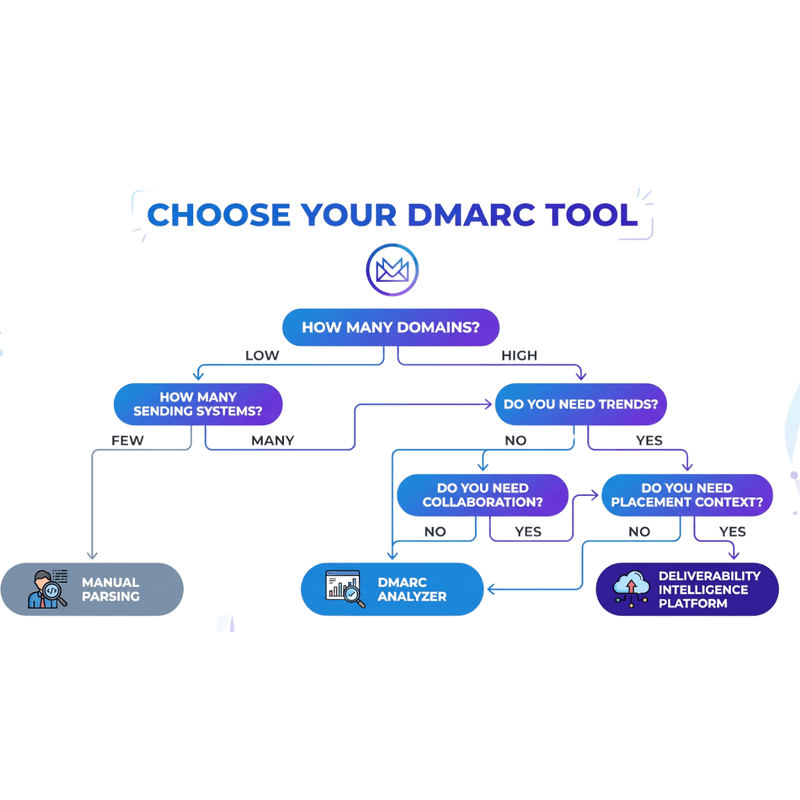
If you manage multiple domains or multiple ESPs, manual parsing becomes a bottleneck. Modern DMARC monitoring platforms convert raw XML reports into dashboards that provide real-time insights into authentication performance and sender infrastructure. You need ingestion, normalization, trending, and ownership workflows supported by new comprehensive DMARC monitoring tools.
Manual DMARC parsing can work for small audits, but ongoing operations benefit from analyzer tooling that centralizes reports, trends aligned pass rates, and alerts on new sources. Some platforms now incorporate AI-powered solutions to classify unknown senders and highlight anomalies faster. Evaluate tools using a capability checklist or explore broader email deliverability tools used for authentication monitoring, reputation tracking, and inbox placement diagnostics and confirm current features in vendor documentation.
Pros and cons
| Approach | Pros | Cons |
|---|---|---|
| Manual parsing | Full control, useful for audits and deep inspection | Time intensive, difficult to trend, error prone at scale |
| DMARC analyzer | Centralized reporting, trend analysis, alerting | Requires proper setup and governance review |
| Deliverability intelligence platform | Combines authentication visibility with placement and reputation context | Requires cross team adoption and process alignment |
8. ROI impact analysis without fabricated numbers
The ROI of DMARC reporting is measurable without guessing revenue. It shows up as fewer incidents, faster remediation, and fewer outages during enforcement
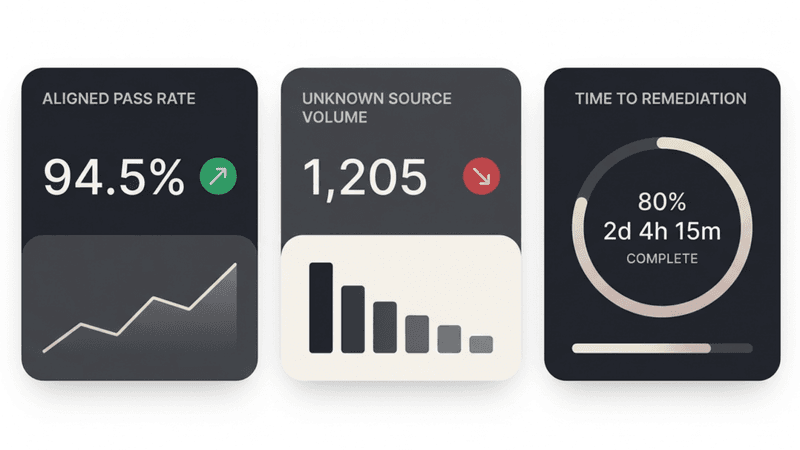
You can measure DMARC reporting ROI using operational metrics: time to identify new senders, time to fix alignment issues, aligned pass rate for critical streams, unknown source volume, and stability after policy changes.
Metrics to track
| Metric | Why it matters | How to measure |
|---|---|---|
| Time to discovery of new sender | Reduces incident impact and exposure | Days from first report appearance to classification |
| Time to remediation | Reflects operational efficiency | Days from issue identification to stable aligned pass |
| Unknown source volume | Indicates unmanaged authentication risk | Total message count from unmapped sources |
| Aligned pass rate for critical streams | Predicts enforcement safety and stability | Percentage of aligned SPF or DKIM pass by stream |
9. Compliance, risk factors, and myth corrections
DMARC reports as a security signal
DMARC reporting is often treated as a deliverability diagnostic tool. It also functions as a domain-level security control.
Every report surfaces activity that traditional infrastructure monitoring may not catch:
- Spoofing detection — unknown source IPs sending as your domain, with high failure volume, appear clearly in report data even when messages are blocked by receivers
- Shadow IT discovery — marketing tools, event platforms, and third-party SaaS systems that send email without governance show up as new sending IPs or unexpected DKIM signing domains
- Brand abuse signals — high-volume unauthorized senders and repeated authentication failures targeting specific providers can indicate impersonation campaigns
- Phishing visibility — failed authentication attempts from unfamiliar networks or geographic anomalies can be correlated with other security telemetry
Once you move beyond basic visibility and begin classifying your sending ecosystem, DMARC reporting becomes an operational signal for domain identity protection — not just a tool for improving deliverability.
DMARC Reporting in Email Security Governance
DMARC reports are often seen as technical outputs, but in reality, they’re one of the most powerful signals you have for understanding and controlling your email ecosystem.
At a basic level, DMARC reports show who is sending emails on behalf of your domain and whether those messages pass SPF and DKIM alignment. That’s the “explained” part most guides stop at.
But the real value starts when you use this data operationally.
When monitored consistently, DMARC reports help you build a verified inventory of all your sending sources, detect unauthorized activity early, and track authentication alignment across every vendor and system. This turns DMARC from a static setup into a continuous control layer for both deliverability and domain security.
This is where most teams either level up, or make costly mistakes.
The biggest risk isn’t missing data. It’s acting on incomplete data.
Enforcing stricter policies like quarantine or reject before all legitimate senders are properly aligned can break critical email flows. This is especially common in environments with multiple tools, vendors, and poorly documented sending infrastructure.
DMARC reports make these gaps visible, but they don’t fix them for you.
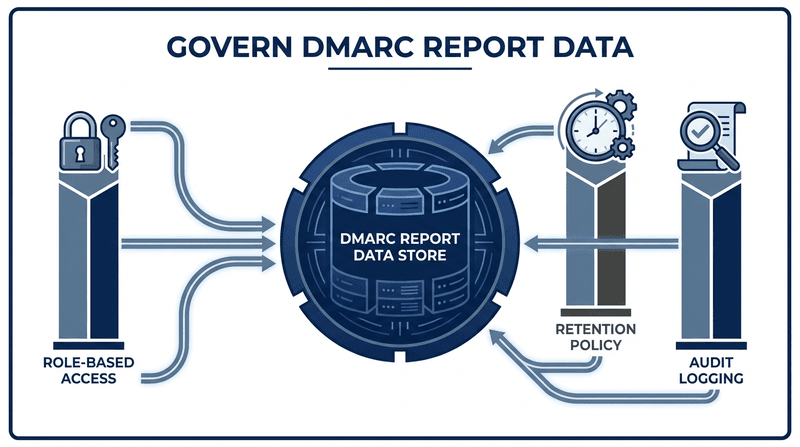
To use them effectively, you need to treat DMARC data as operational telemetry, not just a report. That means:
- Validating every sender before tightening policy
- Monitoring DKIM alignment during key rotations or vendor changes
- Ensuring vendors are signing with aligned domains under strict policies
- Keeping control over subdomains and sender sprawl
There are also a few misconceptions worth clearing up.
DMARC does not guarantee inbox placement, it only confirms authentication and alignment. SPF passing alone is not enough, and while forensic reports sound useful, most teams can get everything they need from aggregate reports when used correctly.
The teams that get the most value from DMARC reporting treat it as an ongoing system, not a one-time project. They combine report data with inbox placement signals and reputation monitoring to make better decisions, not just compliant ones.
A simple example: a team moves to strict alignment and sees DKIM passing in reports, but alignment fails for a key transactional sender. Instead of pushing forward, they fix the vendor configuration, validate stability, and only then enforce policy. That’s the difference between visibility and control.
At its core, DMARC reporting isn’t just about understanding what’s happening.
It’s about being confident enough to take the right action, at the right time.
FAQ
What is a DMARC report
A DMARC report is a structured report from a receiving mail system that summarizes SPF and DKIM outcomes, alignment outcomes, and policy disposition for mail using your domain.
How often are DMARC reports sent
Aggregate reports are often sent daily, but the schedule is controlled by each receiving mail system and can vary.
What is the difference between a DMARC aggregate report and a policy report
A DMARC aggregate report is the XML summary you receive from receivers. A policy report usually refers to the policy published in DNS and reflected inside the report as policy published tags.
What is the difference between RUA and RUF
RUA reports are aggregate XML summaries by source and volume. RUF reports are message level failure reports that are uncommon and often restricted.
Why are DMARC reports in XML
XML is used because it supports standardized fields like source IP, counts, and authentication results that tools can parse consistently.
How do I read a DMARC report quickly
Sort sources by count, map each IP to a system owner, then focus on aligned SPF pass and aligned DKIM pass. Everything else is supporting detail.
What should I do when SPF passes but DMARC fails
Check alignment. SPF can pass on a return path domain that does not align with the From domain. Configure aligned DKIM signing or a custom return path domain.
Does DMARC improve inbox placement
DMARC supports consistent domain identity and reduces spoofing risk, which can support deliverability, but DMARC alone does not guarantee inbox placement.
Do DMARC reports show inbox placement
No. They show authentication and policy outcomes. Use placement monitoring and reputation signals to understand delivery location and performance.
When is it safe to move to p=reject
When you have a complete sender inventory, all critical streams show stable aligned pass over multiple cycles, and unknown sender volume is minimal, with monitoring and rollback plans in place.
Send with confidence through visibility
Teams evaluating these workflows often rely on technical documentation and product guides to standardize DMARC monitoring and enforcement processes.
DMARC reporting is one layer of authentication visibility. The practical value is that it turns raw authentication outcomes into a sender inventory and a remediation queue that supports safe enforcement and protects deliverability.
Mailora positions DMARC reporting as a visibility layer within a deliverability intelligence workflow. In practice, teams often combine authentication monitoring with deliverability testing to verify inbox placement and domain reputation.If you want DMARC reporting alongside inbox placement monitoring and reputation tracking in one operational view, evaluate whether Mailora matches your requirements.
Stay in the loop
Deliverability insights, product updates, and early access to new features. No spam, unsubscribe anytime.
By subscribing, you agree to our Privacy Policy. Unsubscribe anytime.