Domain Reputation Check: How to Diagnose and Improve Your Score
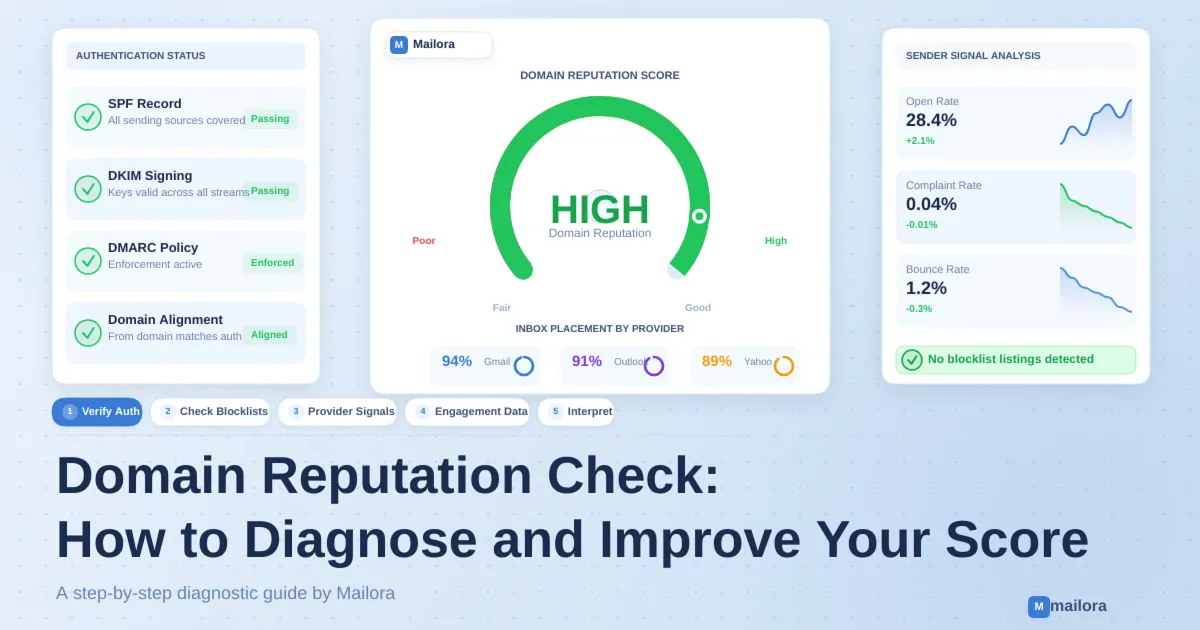
Key Takeaways:
|
Your emails are being delivered but open rates are dropping, conversions are slowing, and inbox placement is becoming inconsistent across providers.
In many cases, the issue is your domain reputation.
Mailbox providers don’t treat your domain as a static sender. They continuously evaluate it based on:
- Authentication alignment (SPF, DKIM, DMARC)
- Recipient engagement patterns
- Spam complaint rates
- Sending consistency over time
When these signals weaken, emails lose inbox priority. Some land in promotions, others in spam, and the rest see reduced visibility. The impact is gradual, but compounding.
A domain reputation check gives you a structured way to:
- Understand how mailbox providers currently assess your domain
- Identify which signals are causing trust to decline
- Diagnose why inbox placement is shifting even when delivery looks normal
In this blog, we will discuss what domain reputation is, how mailbox providers evaluate it, how to check it step by step, the warning signs of declining reputation, and the actions that actually help improve and stabilize it over time.
What Is Domain Reputation?
Domain reputation is the level of trust mailbox providers associate with a domain based on its email-sending history and behavior. Providers such as Gmail and Outlook use reputation signals to help determine how incoming messages from a domain should be handled.
A domain that consistently sends wanted, authenticated emails and receives few spam complaints is more likely to establish a positive sending reputation. Conversely, repeated complaints, poor list quality, suspicious sending patterns, and authentication problems can contribute to a negative reputation.
Domain reputation is not determined by a single metric or universal scoring system. Each mailbox provider uses its own filtering systems and reputation signals. This means a domain may have different reputation indicators across Gmail, Microsoft, and other email providers.
Why Does Domain Reputation Matter?
Your domain reputation can influence how mailbox providers handle your emails. A poor reputation may increase the likelihood of messages being filtered into spam or rejected, while a positive reputation can support consistent email delivery.
It is particularly important for businesses that depend on email for:
- Marketing campaigns and promotional newsletters
- Transactional emails, such as order confirmations and password resets
- Customer onboarding and product notifications
- Sales outreach and customer communication
- Lifecycle and retention campaigns
Monitoring domain reputation helps identify potential sending issues, understand changes in email performance, and take corrective action before deliverability problems become more significant.
Domain Reputation vs. IP Reputation
Domain reputation and IP reputation are two related but distinct factors that mailbox providers may consider when evaluating incoming emails. Both can influence email filtering, spam placement, and delivery decisions, but they measure different aspects of your sending history.
Domain reputation reflects the trust associated with your sending domain. It can be influenced by authentication practices, recipient complaints, engagement patterns, and the consistency of your email activity.
IP reputation reflects the sending history of the IP address used to deliver your emails. It can be affected by sending volume, spam complaints, bounce rates, and the behavior of other senders when you use a shared IP address.
Key Differences Between Domain Reputation and IP Reputation
| Comparison Factor | Domain Reputation | IP Reputation |
|---|---|---|
| What it evaluates | Trust associated with your sending domain | Trust associated with your sending IP address |
| Main influences | Authentication, complaints, engagement, and sending behavior | Sending history, email volume, complaints, and bounce patterns |
| Monitoring | Google Postmaster Tools and domain-focused reputation services | Google Postmaster Tools, Microsoft SNDS, and IP blocklist checks |
| Shared infrastructure | Can follow a domain across different sending IPs | Can be affected by other senders using the same shared IP |
| Potential impact | May influence how mailbox providers filter messages from your domain | May influence how mailbox providers handle messages from your sending IP |
Which Matters More: Domain Reputation or IP Reputation?
Neither is universally more important. Their influence depends on the mailbox provider, sending infrastructure, authentication setup, and email traffic patterns.
For example, moving to a new sending IP does not automatically remove concerns associated with a domain's previous sending history. Similarly, using a domain with a positive reputation does not guarantee successful delivery if the sending IP has a poor history.
For a reliable domain reputation check, monitor both your sending domain and the IP addresses used by your email infrastructure. Reviewing them together provides a more complete picture of potential deliverability problems.
How Mailbox Providers Evaluate Domain Reputation
Mailbox providers evaluate multiple signals to determine whether emails from a domain are trustworthy and wanted by recipients. These signals help filtering systems identify legitimate senders, detect suspicious activity, and decide how incoming messages should be handled.
Although Gmail, Outlook, and other providers use their own filtering systems, several factors commonly influence sender reputation.
1. Email Authentication and Alignment
Email authentication helps mailbox providers verify whether a sender is authorized to send messages using a domain.
The three primary authentication mechanisms are:
- SPF (Sender Policy Framework): Identifies the servers authorized to send emails on behalf of a domain
- DKIM (DomainKeys Identified Mail): Uses a cryptographic signature to help verify that an email was authorized by the signing domain and has not been altered in transit
- DMARC (Domain-based Message Authentication, Reporting, and Conformance): Builds on SPF and DKIM by defining how receiving systems should handle messages that fail authentication and providing reporting mechanisms
Proper configuration and alignment help establish a trustworthy sending identity. Authentication alone, however, does not guarantee a positive domain reputation or inbox placement.
2. Spam Complaints
Spam complaints occur when recipients report messages as unwanted through their mailbox provider.
A consistently high complaint rate can indicate that recipients do not recognize, expect, or value your emails. This can negatively affect how mailbox providers handle future messages from your domain.
For Gmail senders, Google recommends keeping the reported spam rate below 0.10% and avoiding a rate of 0.30% or higher. These are Gmail-specific recommendations, not universal thresholds for every mailbox provider.
3. Recipient Engagement
Recipient behavior can provide mailbox providers with signals about how people interact with incoming messages.
Relevant behaviors may include:
- Moving messages from spam to the inbox
- Deleting messages without reading them
- Replying to or interacting with messages
- Reporting emails as spam
Engagement signals vary across providers and are not fully disclosed. Open rates should not be treated as a reliable standalone indicator of domain reputation because privacy features and automated activity can distort tracking data.
4. Sending Volume and Consistency
Mailbox providers monitor sending patterns to identify unusual or potentially suspicious activity.
Sudden increases in email volume, inconsistent sending schedules, or large campaigns from previously inactive domains can create additional filtering risk.
Maintaining predictable sending patterns and gradually increasing volume when scaling campaigns can help establish a more consistent sending history.
5. Bounce Rates and Email List Quality
High bounce rates may indicate outdated, invalid, or poorly maintained email lists.
Repeatedly sending messages to invalid addresses can create negative delivery signals and suggest weak list acquisition or management practices.
Regularly remove invalid addresses, process hard bounces, and use appropriate consent-based list-building practices to maintain list quality.
6. Blocklists and External Reputation Signals
Email blocklists maintain records of domains or IP addresses associated with suspicious or abusive sending activity.
A listing can indicate a potential reputation issue, but not every blocklist has the same purpose, coverage, or influence on mailbox filtering. Some providers use their own internal reputation systems rather than relying on public blocklists.
Check relevant domain and IP blocklists as part of your investigation, but do not assume that appearing on one list automatically means all your emails will be blocked.
Domain Reputation Check: Step-by-Step Guide
Mailbox providers evaluate your domain across authentication, infrastructure signals, and recipient behavior. To understand where trust is breaking down, you need to assess each layer in sequence and connect the signals. Here’s the step-by-step process to diagnose your domain reputation:
Step 1: Verify Email Authentication (SPF, DKIM, DMARC)
Authentication forms the identity layer of your domain reputation. Before mailbox providers evaluate engagement or sending behavior, they first verify whether your domain is authorized to send the message and whether that identity is consistent.
This step is about confirming that authentication is passing consistently and aligned correctly with your visible sending identity.
What to validate:
- SPF includes all legitimate sending sources (ESP, CRM, outbound systems)
- DKIM signatures are active and valid across all email streams
- DMARC record is published (monitoring or enforced)
- Alignment between authenticated domain and visible From domain
For DMARC to pass, either SPF or DKIM must both authenticate and align with the From domain. Many teams assume authentication is working because SPF or DKIM passes, but misalignment still causes DMARC failure, silently weakening domain trust.
In practice:
- Failed authentication means sender identity cannot be verified
- Misalignment means domain identity is not trusted
- Missing third-party configuration means hidden failures across tools
In many cases, these issues are fragmented across different tools and platforms. Using a centralized deliverability check using tools like Mailora can help surface authentication failures, alignment gaps, and configuration issues in one place, instead of diagnosing them in isolation.
Step 2: Check Domain Blocklist Status
Blocklists represent external trust signals that reflect how your domain is perceived across the broader email ecosystem. They do not define your reputation, but they can significantly influence how mailbox providers treat your emails.
A domain typically appears on a blocklist after patterns of risky or unwanted behavior are detected, such as high complaint rates, poor list quality, or sudden spikes in volume.
What to assess:
- Presence on major blocklists (Spamhaus, Barracuda, SURBL)
- Whether listings are isolated incidents or recurring
- Type of listing (domain-level, URL-based, or IP-associated)
It’s important to interpret these signals correctly. Blocklists are lagging indicators, meaning they surface after damage has already occurred:
- A single listing may be tied to a specific campaign or segment
- Repeated listings often indicate systemic issues in acquisition or targeting
From an operational standpoint, the focus should be on diagnosis first and removal second:
- Identify what triggered the listing (campaign, list source, volume change)
- Pause or reduce sending if risk is ongoing
- Fix underlying issues before submitting delisting requests
Without addressing root causes, blocklist removal becomes temporary and cycles of relisting are common.
Step 3: Assess Provider-Specific Reputation Signals
To understand how your domain is actually being evaluated, you need visibility into mailbox provider–specific reputation systems. These are the most accurate indicators because they reflect real filtering decisions.
Tools like Google Postmaster Tools and Microsoft SNDS provide direct insight into how providers classify your domain based on recent sending behavior.
Key signals to review:
- Domain reputation rating (High, Medium, Low, Bad)
- Spam complaint rates
- Authentication success rates
- Reputation trends over time
These signals should always be interpreted in context. A single snapshot is less useful than understanding direction:
- A drop from High to Medium often signals early degradation
- Sustained Low or Bad indicates active filtering and reduced inbox placement
- Sudden changes typically correlate with a campaign, audience, or volume shift
The most meaningful diagnosis happens in understanding how your actions are influencing reputation over time.
Step 4: Use Third-Party Reputation Tools
Third-party tools provide an additional layer of visibility, particularly around infrastructure health and broader reputation signals. They are useful for identifying patterns that may not be immediately visible in provider-specific tools.
These tools typically surface:
- Reputation scores and risk classifications
- Infrastructure or DNS-related issues
- Historical behavior trends
Common examples include Cisco Talos, Barracuda Reputation Lookup, Sender Score, and MXToolbox.
However, these tools should be interpreted carefully because they operate independently of mailbox provider algorithms, which means:
- A high score does not guarantee inbox placement
- A low score does not always indicate active filtering
The most effective way to use them is as supporting diagnostics:
- Validate anomalies observed in provider data
- Investigate potential infrastructure issues
- Add context to broader reputation trends
They are valuable for expanding visibility, but should not be used as the primary measure of domain reputation.
Step 5: Analyze Engagement and Complaint Signals
Recipient behavior is one of the most influential inputs into domain reputation. Mailbox providers continuously evaluate how users interact with your emails to determine whether they are relevant, expected, and trustworthy.
Unlike authentication, which is binary (pass/fail), engagement is behavioral and cumulative. It evolves over time based on how recipients respond to your emails.
Signals that matter:
- Open and click-through rates
- Spam complaint rates
- Unsubscribe trends
- Engagement consistency across segments
These signals act as a proxy for user trust:
- Low engagement suggests misalignment between content and audience
- High complaints indicate strong negative feedback
- Segment-level variation highlights where reputation damage is coming from
Complaint rates are especially sensitive:
- Around 0.1% = early warning
- Around 0.3% or higher = high-risk threshold
From a corrective standpoint, this is where targeted action is required:
- Suppress or remove unengaged users
- Segment audiences based on recent activity
- Reduce frequency for low-engagement segments
- Reassess acquisition sources contributing low-quality users
Even with strong technical setup, sustained negative engagement will gradually erode domain reputation.
Step 6: Interpret Your Domain Reputation Signals
This is where you connect signals across all layers to identify the actual cause of reputation issues.
Domain reputation problems rarely stem from a single factor. They typically emerge when multiple weak signals reinforce each other over time.
What matters here is pattern recognition:
- Authentication issues + high complaints: structural and behavioral breakdown
- Strong authentication + low engagement: audience or targeting issue
- Blocklist presence + volume spikes: sending pattern instability
Instead of treating issues independently, apply a structured triage approach:
- Start with authentication and alignment: Establish a verified and consistent sending identity
- Resolve blocklist and infrastructure risks: Remove amplified external trust issues
- Improve engagement and audience quality: Rebuild positive signals through better targeting
- Stabilize sending behavior: Avoid sudden changes that reset trust signals
Domain reputation improves when trust signals align consistently over time. Isolated fixes may reduce symptoms, but only coordinated improvements across all layers restore long-term inbox placement stability.
What Actually Affects Domain Reputation
Domain reputation is not calculated from a single metric, rather mailbox providers evaluate how consistently your domain behaves across identity, sending patterns, and recipient response signals.
To manage reputation effectively, you need to understand how these factors influence mailbox provider decision-making over time.
1. Email Authentication
Before mailbox providers evaluate engagement or behavior, they first verify whether your domain is legitimately authorized to send the message and whether that identity is consistent.
It’s not enough for SPF or DKIM to simply pass. For domain-level trust to be established, authentication must align with the visible From domain, which is what DMARC enforces. This is where many configurations fail in practice.
When authentication is:
- Missing or failing, it means the sender cannot be verified
- Passing but misaligned, it means the domain identity is not trusted
- Inconsistent across tools, it means trust becomes fragmented
This has a cascading effect. Even if your emails generate strong engagement, weak authentication signals can limit inbox placement because the domain itself is not reliably identified.
Suggested Read: Top 10 Inbox Placement Tools in 2026
2. Spam Complaint Rate
Spam complaints are one of the most direct and influential negative signals in domain reputation systems. Unlike engagement, which is inferred behavior, complaints represent explicit user feedback that a message is unwanted.
Mailbox providers treat complaints as a strong indicator of:
- Misaligned expectations
- Poor targeting
- Over-aggressive sending practices
Even relatively small complaint rates can have a significant impact.
What makes complaints particularly important is their compounding nature. A single campaign with high complaints can affect how future emails from your domain are treated, even if subsequent campaigns improve.
3. Recipient Engagement Signals
Engagement signals help mailbox providers answer a critical question “Do recipients actually want emails from this domain?”
Unlike authentication, which is binary, engagement is behavioral and cumulative. It builds over time based on how consistently recipients interact with your emails.
Positive signals (opens, clicks, replies) reinforce trust, while negative signals (ignoring emails, deleting without reading) gradually erode it.
What’s important is trend and consistency:
- Declining engagement over time suggests relevance is dropping
- Uneven engagement across segments indicates audience quality issues
- High volume with low interaction signals potential overreach
Mailbox providers interpret these patterns to decide:
- Whether future emails should reach the inbox
- Whether your domain is becoming less relevant to recipients
Improving engagement is less about optimizing campaigns and more about sending to the right audience, at the right time, with the right expectations.
4. Sending Consistency
Sending behavior plays a critical role in how mailbox providers model your domain over time. Consistency allows providers to build a predictable trust profile, while inconsistency introduces risk.
When sending patterns are stable, both in volume and frequency, mailbox providers can confidently evaluate your domain. However, sudden changes disrupt that model.
For example:
- A sharp increase in volume can resemble spam-like activity
- Long periods of inactivity followed by large sends can reset trust signals
- Irregular cadences make it harder for providers to establish baseline behavior
These disruptions often lead to increased filtering, even if other signals (like engagement) are relatively stable.
Consistency becomes especially important in scenarios like:
- Warming up a new domain or IP
- Recovering from reputation damage
- Scaling email programs
In these cases, gradual and predictable changes are more effective than aggressive adjustments. Reputation improves when sending behavior is stable enough to build confidence over time.
5. Bounce Rates
Bounce rates provide insight into the quality and reliability of your email data. While they may seem like a technical metric, mailbox providers interpret them as a reflection of how responsibly you manage your audience.
Hard bounces, emails sent to invalid or non-existent addresses, are particularly important. High levels of hard bounces suggest:
- Outdated or poorly maintained lists
- Weak acquisition practices
- Potential use of purchased or scraped data
From a reputation standpoint, repeated bounces signal that your domain is not maintaining accurate recipient data, which reduces trust.
What makes this challenging is that bounce-related issues often accumulate quietly:
- Lists degrade over time as users abandon email addresses
- Old or inactive segments continue to receive messages
- Data sources introduce invalid contacts without validation
Maintaining low bounce rates requires ongoing list hygiene:
- Regular removal of invalid addresses
- Monitoring bounce trends across campaigns
- Validating new contacts before adding them to your list
6. List Quality
List quality is one of the most impactful, and overlooked, drivers of domain reputation. High-quality lists are built on:
- Explicit user consent
- Clear expectation setting
- Ongoing engagement filtering
Low-quality lists, on the other hand, introduce multiple risks at once:
- Inactive users reduce engagement rates
- Unqualified users increase complaint likelihood
- Poor acquisition sources introduce unreliable data
What makes list quality particularly critical is its long-term effect. Unlike a single campaign issue, poor list quality continuously feeds negative signals into the system.
For example:
- Sending to a large, disengaged audience can gradually suppress overall engagement
- Even a small percentage of poor-quality users can drive complaint rates above safe thresholds
Improving list quality requires:
- Regular suppression of inactive users
- Stronger acquisition controls
- Alignment between messaging and user intent
7. Blocklist Status
Blocklists act as external validation signals that your domain may be engaging in risky or unwanted behavior. While they are not the primary determinant of reputation, they can significantly amplify existing issues.
A blocklist listing typically occurs after:
- High complaint volumes
- Suspicious sending patterns
- Detection of spam-like activity
Once listed, your domain may face:
- Increased filtering across multiple mailbox providers
- Reduced trust from filtering systems that reference blocklists
However, it’s important to recognize that blocklists reflect problems that already exist in your sending practices.
8. Audience Quality and Lifecycle Stage
Not all audiences behave the same way, and mailbox providers account for this. In particular, B2C senders often experience faster reputation decay due to the nature of their audience.
Common challenges include:
- Large segments of inactive or low-intent users
- Frequent promotional messaging leading to fatigue
- Broad targeting that reduces relevance
For example:
- A large list with declining engagement can gradually weaken reputation, even without obvious complaints
- Sending promotional content to users who have not engaged recently increases the likelihood of negative signals
Lifecycle misalignment is a key issue here:
- Early-stage users may be highly engaged
- Mid or late-stage users may require different messaging or reduced frequency
- Inactive users should be suppressed rather than continuously targeted
Managing this effectively requires:
- Segmenting audiences based on engagement recency
- Aligning content with lifecycle stage
- Actively removing or suppressing inactive users
6 Warning Signs of Poor Domain Reputation
A decline in domain reputation does not always produce an immediate delivery failure. In many cases, email performance changes gradually as mailbox providers adjust their filtering decisions.
Recognizing these warning signs early can help you investigate the underlying issues before they affect a larger portion of your email campaigns.
1. Increasing Spam Folder Placement
One of the most noticeable warning signs is a growing percentage of emails landing in spam instead of the intended inbox.
If spam placement increases across multiple campaigns, investigate your domain authentication, recipient complaints, sending patterns, and email list quality.
2. Rising Spam Complaint Rates
An increase in spam complaints suggests that more recipients consider your messages unwanted.
Review complaint trends across campaigns and audience segments. Pay particular attention to recently added subscribers, inactive contacts, and audiences receiving frequent promotional emails.
3. Declining Email Delivery Rates
A sudden increase in rejected emails, temporary delivery failures, or deferrals may indicate a problem with your sending infrastructure or reputation.
Review SMTP response codes and provider-specific delivery reports to identify whether the issue is related to authentication, IP reputation, sending volume, or filtering.
4. Blocklist Listings
If your sending domain, IP address, or email-related URLs appear on recognized blocklists, investigate the reason behind the listing.
Check whether the issue is isolated to one sending source or affects multiple campaigns and infrastructure components.
5. Declining Recipient Engagement
A consistent decline in clicks, replies, and other meaningful interactions may indicate that your emails are becoming less relevant to recipients.
Although low engagement alone does not prove poor domain reputation, it can highlight problems with audience targeting, content relevance, or sending frequency.
Do not use open rates as the only indicator because privacy protections and automated activity can distort open tracking.
6. Authentication Failures
Repeated SPF, DKIM, or DMARC failures can indicate configuration problems or unauthorized sending activity.
Review authentication reports and check every platform authorized to send emails using your domain. Pay particular attention to newly added services and changes to DNS records.
How to Confirm Whether These Signs Indicate a Reputation Problem
One warning sign alone does not establish that your domain reputation is damaged. For example, declining engagement may result from an irrelevant campaign, while delivery failures may be caused by a temporary server issue.
Compare multiple signals over time:
- Check Google Postmaster Tools for Gmail-specific reporting
- Review Microsoft SNDS for relevant sending IP information
- Monitor domain and IP blocklist listings
- Validate SPF, DKIM, and DMARC configuration
- Compare spam complaints, bounce rates, and inbox placement across campaigns
When several indicators deteriorate together, investigate the underlying sending behavior and infrastructure before making major changes.
How to Improve Your Email Domain Reputation
Improving domain reputation requires consistent attention to email authentication, list quality, recipient engagement, and sending behavior. Focus on the following 8 practices to maintain a healthy sending reputation.
1. Fix Email Authentication and Alignment
- Configure SPF, DKIM, and DMARC correctly
- Ensure SPF or DKIM aligns with your visible From domain
- Authenticate every legitimate sending platform
- Review DMARC reports to identify failures
2. Warm Up New or Inactive Sending Infrastructure
- Start with recently engaged recipients
- Increase sending volume gradually
- Maintain a consistent sending schedule
- Monitor complaints, bounces, and delivery performance
3. Clean and Maintain Your Email Lists
- Remove invalid addresses and hard bounces
- Suppress consistently inactive recipients
- Avoid purchased or poorly sourced lists
- Review list quality regularly
4. Use Double Opt-In and Set Clear Expectations
- Confirm subscriber intent through double opt-in
- Explain what types of emails subscribers will receive
- Set clear expectations about sending frequency
- Make unsubscribing easy
5. Improve Content Relevance and Targeting
- Segment audiences by interests and engagement
- Personalize campaigns based on recipient behavior
- Match content to customer lifecycle stages
- Adjust frequency to avoid overwhelming subscribers
6. Separate Marketing and Transactional Email Streams
Use dedicated subdomains where appropriate:
- marketing.yourdomain.com for promotional emails
- notifications.yourdomain.com for transactional emails
This makes sending infrastructure easier to manage, although it does not guarantee complete reputation isolation.
7. Control Sending Volume and Consistency
- Avoid sudden increases in sending volume
- Maintain predictable campaign schedules
- Scale gradually when increasing output
- Monitor mailbox provider responses
8. Monitor DMARC Reports and Third-Party Senders
- Identify authentication failures and unauthorized senders
- Check alignment across email platforms
- Audit ESP, CRM, and marketing automation integrations
- Remove outdated or unnecessary sending sources
Consistent monitoring and corrective action help maintain sending health and reduce the risk of recurring reputation problems.
Set Realistic Domain Reputation Recovery Expectations
Domain reputation does not recover overnight. The timeline depends on the severity of the issue, its root cause, sending behavior, and mailbox provider.
To support recovery:
- Identify and fix the underlying deliverability issues
- Stop problematic sending practices and correct list quality
- Maintain proper SPF, DKIM, and DMARC configuration
- Resume sending gradually to engaged recipients
- Monitor complaint rates, bounces, delivery trends, and provider feedback
Some improvements may become visible within days or weeks, but broader reputation recovery can take longer. There is no guaranteed recovery timeline or instant reputation reset.
Does Email Authentication Affect Domain Reputation?
Email authentication is a foundational input in how mailbox providers evaluate domain reputation. It establishes whether your domain can be trusted as a legitimate sender before any engagement or behavioral signals are considered.
Authentication works at two levels:
- Verification: SPF and DKIM confirm that the email was sent by authorized infrastructure
- Alignment: DMARC ensures that the authenticated domain matches the domain visible to the recipient
For DMARC to pass, either SPF or DKIM must both authenticate and align with the From domain. If this condition is not met, the message fails DMARC, even if authentication technically exists.
When authentication is missing, misconfigured, or misaligned:
- Mailbox providers cannot reliably verify sender identity
- Messages are more likely to be filtered or rejected
- Domain trust weakens over time
In contrast, properly configured authentication:
- Establishes a consistent identity layer
- Supports reputation stability across mailbox providers
- Enables visibility through DMARC reporting to detect misconfigurations or unauthorized senders
Running individual checks across authentication, blocklists, and mailbox provider tools can reveal potential issues, but they don't show the complete picture of your email deliverability.
Mailora bridges that gap by connecting deliverability signals with actual inbox placement results. Test your emails across mailbox providers, identify potential authentication and spam-related issues, and understand how different email variations affect placement.
Instead of relying on isolated checks or guesswork, use Mailora to gain actionable insights into your email deliverability and make more informed sending decisions. Run a Free Email Deliverability Test with Mailora
Frequently Asked Questions About Domain Reputation
1. How Do I Check My Domain Reputation?
Check your SPF, DKIM, and DMARC configuration, review domain blocklists, and monitor provider-specific data through Google Postmaster Tools. Also analyze spam complaints, bounce rates, and inbox placement to identify potential issues.
2. What Is a Good Domain Reputation Score?
There is no universal domain reputation score. Google Postmaster Tools provides reputation classifications for eligible Gmail sending domains, while third-party tools use their own scoring systems. Consistent inbox placement is a more practical indicator of sending health.
3. Why Is My Domain Reputation Bad?
Common causes include high spam complaint rates, poor list quality, authentication failures, inconsistent sending patterns, and low recipient engagement. Review these signals together to identify the underlying issue.
4. How Long Does It Take to Improve Domain Reputation?
Recovery depends on the severity of the issue, its root cause, and mailbox provider evaluation. Improvements may take weeks or longer. Consistent sending practices and ongoing monitoring are essential.
5. Does Email Authentication Affect Domain Reputation?
Yes. SPF, DKIM, and DMARC help mailbox providers verify sender identity. Proper authentication and alignment support trust, but they do not guarantee inbox placement. Recipient behavior and sending practices also matter.
Stay in the loop
Deliverability insights, product updates, and early access to new features. No spam, unsubscribe anytime.
By subscribing, you agree to our Privacy Policy. Unsubscribe anytime.