DKIM vs SPF: What's the Difference? Do You Need Both?
Key takeaways:
- SPF (Sender Policy Framework) authorizes which servers can send email on behalf of your domain
- DKIM (DomainKeys Identified Mail) verifies that a message was signed by your domain and remains unchanged
- DMARC (Domain-based Message Authentication, Reporting, and Conformance) depends on SPF or DKIM passing and proper alignment
- Implementing both SPF and DKIM provides stronger authentication coverage than relying on either protocol alone
- SPF can fail during forwarding, while DKIM signatures typically survive standard forwarding scenarios
- Authentication signals influence inbox placement decisions alongside reputation, engagement, and sending consistencyEmails can show as “sent” in your dashboard and still never reach the inbox. Deliverability drops, engagement declines, and nothing in your logs explains why.
When teams search DKIM vs SPF, they’re usually trying to answer a practical question: which protocol matters more, and is one enough?
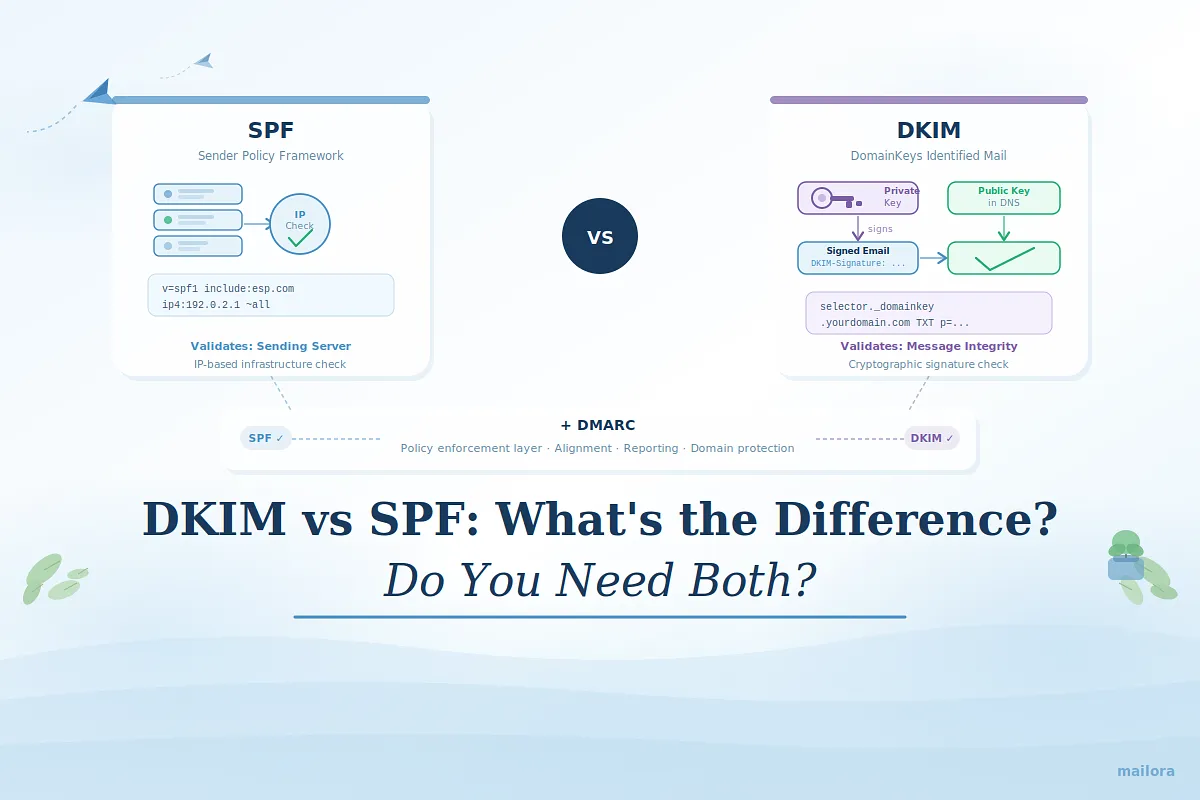
SPF (Sender Policy Framework) and DKIM (DomainKeys Identified Mail) validate different layers of email trust. SPF confirms that the sending server is authorized to send on behalf of your domain. DKIM confirms the message was cryptographically signed by your domain and remains intact during transit.
Mailbox providers evaluate both signals together, and DMARC (Domain-based Message Authentication, Reporting, and Conformance) enforces alignment between authentication results and the visible From domain. If you send marketing, lifecycle, or transactional email at scale, understanding how these protocols work together directly affects inbox placement and domain protection.
In this post, we break down the difference between SPF and DKIM, how each works, how DMARC depends on them, and how to implement them correctly.
Is it DKIM vs SPF—or both?
It's not DKIM vs SPF. Both are critical. And neither guarantees inbox placement on its own.
Modern sender standards expect proper authentication across multiple layers.
If you send marketing, lifecycle, or transactional emails at scale, configuring only SPF or only DKIM is not enough. Mailbox providers like Google and Yahoo now require strong authentication for bulk senders. Most serious email programs also publish DMARC.
Each protocol validates a different layer.
- SPF confirms the sending server is authorized to send for your domain (IP-based validation). It validates the infrastructure
- DKIM confirms the message was cryptographically signed by your domain and hasn’t been altered in transit. It validates the integrity of the message
Why you need both
Mailbox providers evaluate multiple authentication signals when deciding whether to trust an email. SPF verifies that the sending infrastructure is authorized, while DKIM confirms the message itself hasn't been modified and was signed by the domain.
Relying on only one of these signals leaves gaps in trust that can affect inbox placement. When SPF and DKIM work together, they provide the credibility mailbox providers need to treat your messages as legitimate.
DKIM vs SPF: The short answer
DKIM and SPF are both email authentication protocols, but they verify different parts of the email process.
SPF (Sender Policy Framework) verifies that the sending server is authorized to send email on behalf of your domain. It checks the sender’s IP address against a list of approved sources published in your domain’s DNS.
DKIM (DomainKeys Identified Mail) verifies that the email message was cryptographically signed by your domain and that its contents were not altered during transit.
Modern email programs should implement both SPF and DKIM. Each protocol validates a different layer of trust, and together they support stronger authentication, enable DMARC enforcement, and improve inbox placement.
How does domain spoofing work?
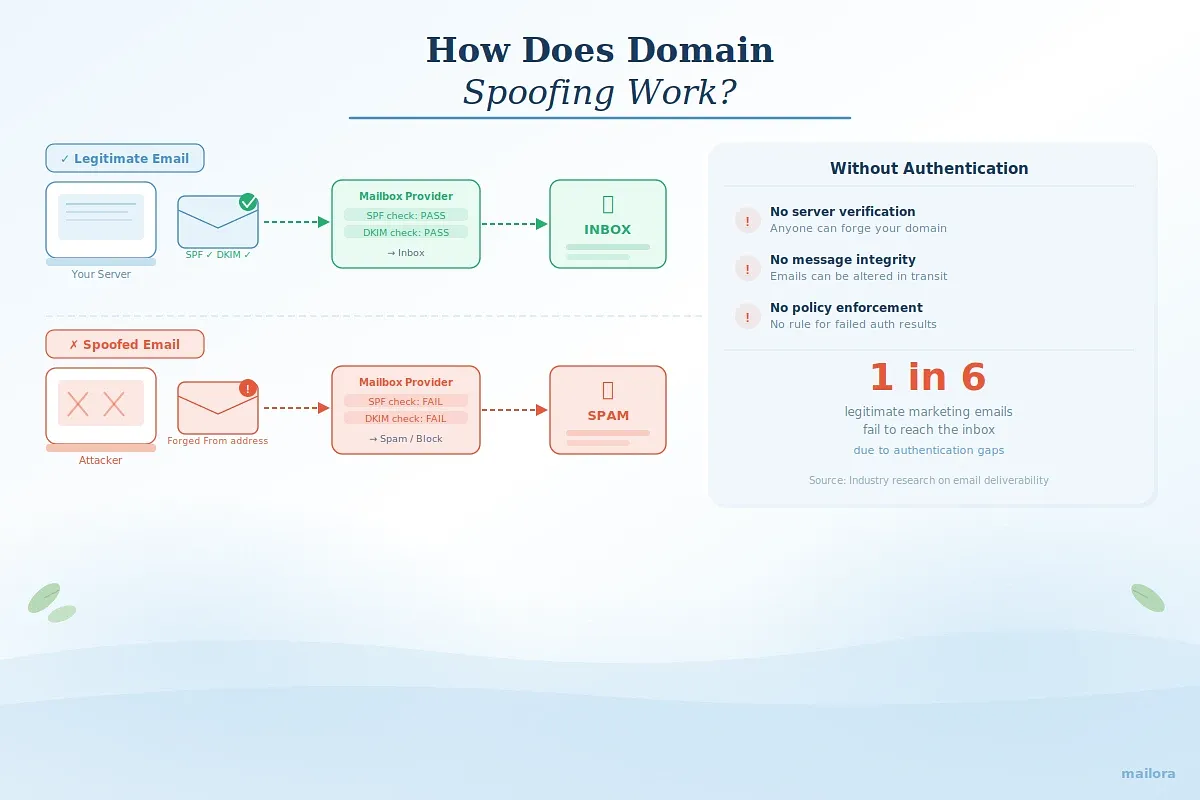
Without authentication, mailbox providers cannot distinguish legitimate traffic from spoofed traffic using your domain.
Domain spoofing happens when someone sends email that appears to come from your domain without using your servers. The attacker forges the “From” address to impersonate your brand.
Email headers are easy to manipulate. The visible “From” field alone does not prove legitimacy. Without proper authentication, receiving servers cannot reliably separate authorized traffic from impersonation attempts.
That’s why SPF, DKIM, and DMARC exist. Without them, mailbox providers have no dependable way to verify who is allowed to send on behalf of your domain, whether the message was altered in transit, or what to do when authentication fails. In fact, one in six legitimate marketing emails fails to reach the inbox, often due to authentication gaps.
Authentication helps mailbox providers answer three critical questions:
- Is this server allowed to send for this domain? SPF
- Was this message cryptographically signed by this domain? DKIM
- Do authentication results align with the visible “From” address, and what should happen if they don’t? DMARC
When those signals align, trust increases. When they do not, placement suffers.
So what are DKIM and SPF?
The confusion around DKIM vs SPF usually comes down to misunderstanding what each protocol actually validates.
Both are email authentication protocols. Both use DNS. Both influence deliverability. But they solve different problems.
What is SPF (Sender Policy Framework)?
SPF is a DNS TXT record that specifies which servers are authorized to send email on behalf of your domain. You publish the record in DNS with approved IPs or sending services. When a mailbox provider receives your message, it checks the connecting server’s IP against that record.
If the IP is authorized, SPF passes. If not, it fails.
What is DKIM (DomainKeys Identified Mail)?
DKIM works differently. Instead of validating the sending server, it validates the message itself. When you send an email, your system signs using a private key. That signature is added to the email header. Your domain publishes the matching public key in DNS.
Here’s how SPF and DKIM differ:
DKIM vs SPF: Technical comparison
Feature | SPF | DKIM |
| What it validates | Sending server authorization | Message integrity and domain signature |
| Validation method | Compares sending IP to DNS record | Verifies cryptographic signature in header |
| Protects against | Unauthorized sending servers | Message tampering in transit |
| Breaks when | Email is forwarded without proper setup | Signature is altered or message modified |
| Based on | IP address authentication | Public/private key cryptography |
| Aligns with DMARC | Yes | Yes |
The table highlights the key differences, but understanding how each protocol works in practice helps explain why both are necessary for modern email authentication.
How does DKIM work?
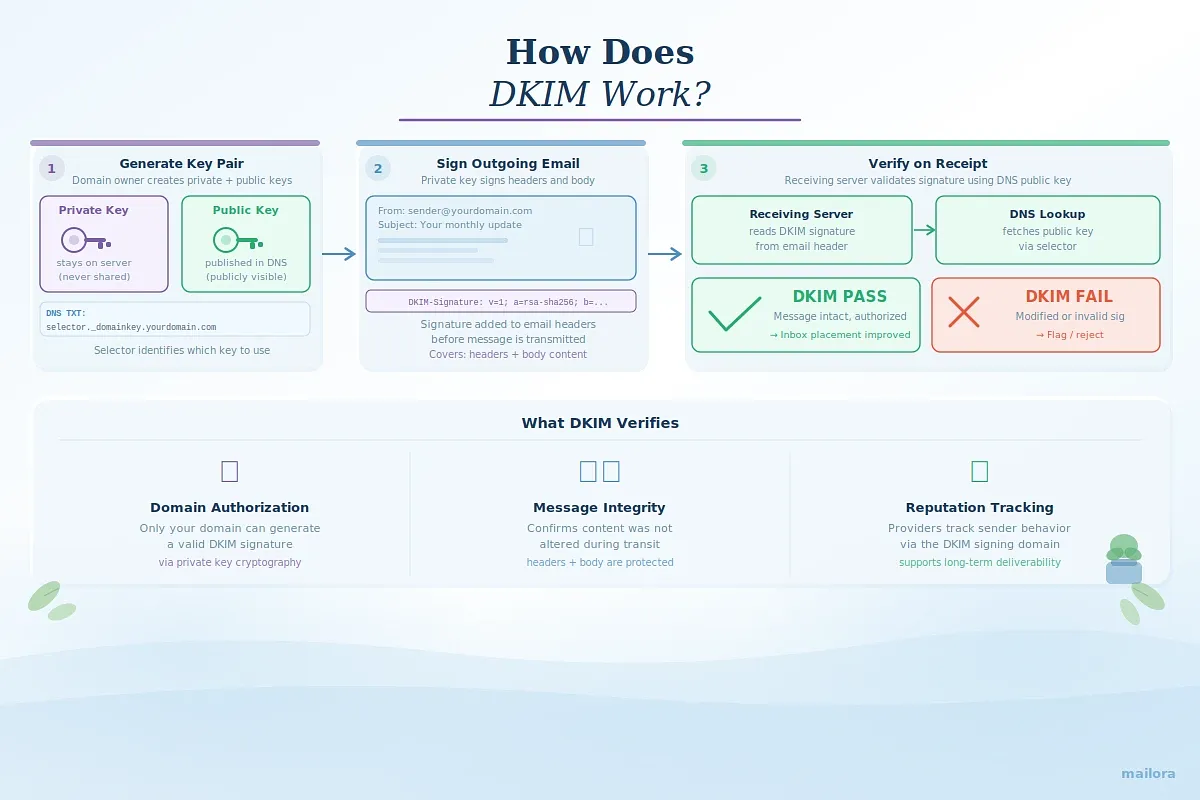
DKIM adds a cryptographic signature to each email. That signature allows receiving servers to verify two things:
- The message was authorized by the sending domain
- The message was not altered in transit
Unlike SPF, which validates the sending server, DKIM validates the message itself.
Here’s the high-level flow:
1. Generate keys and publish the public key
The domain owner generates a public–private key pair.
- The private key stays securely on the sending server
- The public key is published in DNS as a TXT record
This DNS record is stored under a selector, which identifies the specific signing key being used. Selectors allow multiple keys to exist simultaneously, useful for key rotation and multiple sending systems.
2. Sign outgoing messages
When an email is sent, the sending system uses the private key to generate a cryptographic signature.
That signature is inserted into the email headers before transmission. It covers specific parts of the message, including headers and body content.
3. Verify on receipt
When the message arrives, the receiving mail server:
- Reads the DKIM signature from the header
- Retrieves the corresponding public key from DNS
- Uses it to validate the signature
If verification succeeds:
- The message has not been modified in transit
- The domain authorized the signature
If verification fails, the message may be flagged, filtered, or rejected depending on DMARC policy.
How does SPF work?
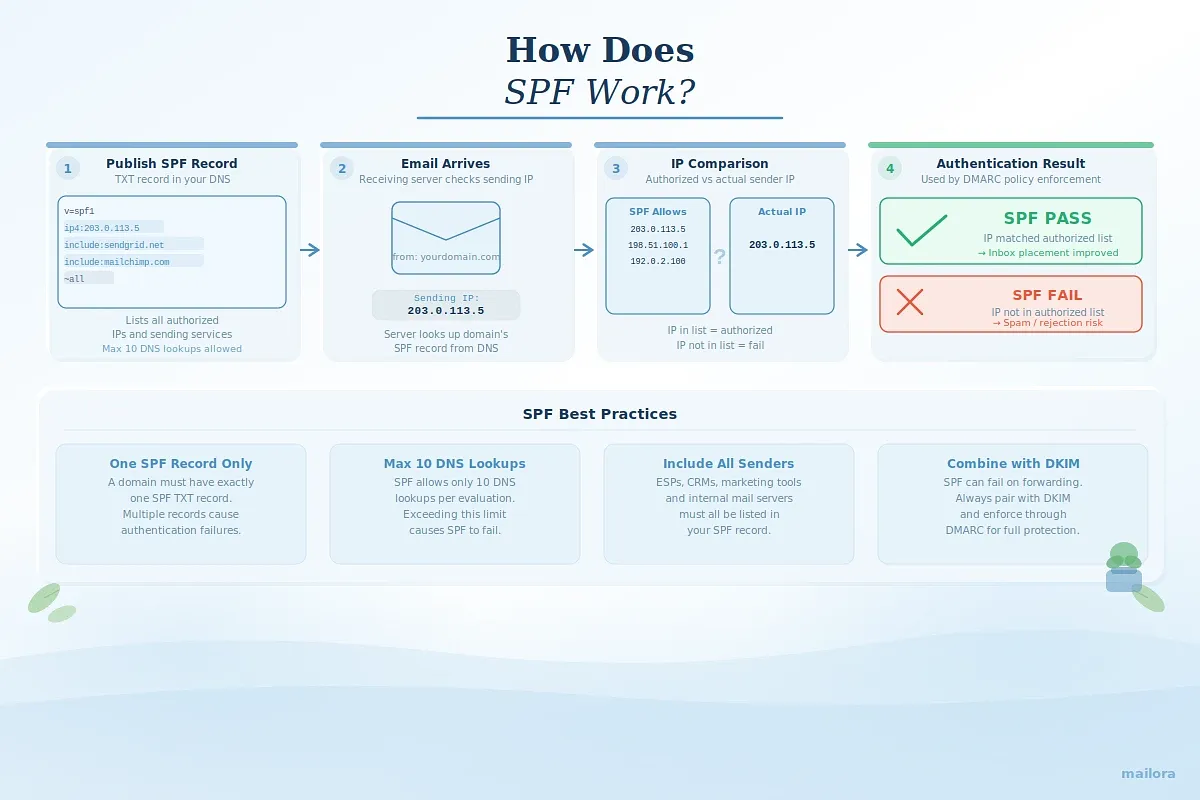
SPF (Sender Policy Framework) works by telling receiving servers which systems are allowed to send email on behalf of your domain. Instead of verifying the message itself, SPF checks whether the sending infrastructure is authorized.
Here’s the high-level process:
1. Publish an SPF record in DNS
The domain owner creates an SPF TXT record in DNS that lists approved sending sources. These can include specific IP addresses or mechanisms such as include: statements for email service providers (for example, include:servers.sendgrid.net).
2. Receiving server checks the sending IP
When an email arrives, the receiving mail server looks up the SPF record for the domain used in the return-path. It then compares the connecting IP address with the list of authorized senders defined in that record.
3. Authentication result is evaluated
If the sending IP matches an authorized source in the SPF record, the check passes. If the IP is not listed or permitted, the SPF check fails, signalling that the sender may not be authorized to send email for that domain.
Because SPF validates sending infrastructure rather than message integrity, it works best when combined with DKIM and enforced through DMARC.
Where DMARC Fits In
DMARC does not replace SPF or DKIM. It depends on them. DMARC passes only when SPF or DKIM passes and aligns with the visible From domain.
That alignment requirement is critical.
Mailbox providers do not just check whether SPF or DKIM passed. They check whether the authenticated domain matches the domain shown to the user in the From address.
DMARC adds two key controls:
- Alignment enforcement
- Policy instructions: none, quarantine, or reject
Without SPF or DKIM passing, DMARC cannot pass. And without DMARC alignment, authentication signals lose enforcement power.
Implement DKIM, SPF, or both?
Implement both. If you manage multiple domains, ESPs, or client portfolios, consistency across sending sources becomes critical. SPF and DKIM validate different signals, and mailbox providers evaluate them together. Relying on just one leaves gaps, especially in scenarios like forwarding or message modification.
Here’s how most teams approach it:
Step1: Start with SPF
Authorize all legitimate sending sources in a single consolidated SPF record. This includes your ESPs, internal mail servers, and any third-party senders. Keep the record streamlined to avoid exceeding the 10 DNS lookup limit.
Step 2: Add DKIM
Generate a key pair, publish the public key under a selector in DNS, and configure your sending platform to sign outgoing mail. Where possible, align the visible “From” domain with the DKIM signing domain to support DMARC alignment.
Step 3: Then layer in DMARC
Once SPF and DKIM are functioning correctly, publish a DMARC record to define policy and enable reporting.
Authentication passing in DNS doesn’t guarantee inbox placement. Alignment failures, forwarding breaks, or degraded domain reputation can still push mail to spam.
That’s why authentication should be evaluated in live sending alongside inbox placement and domain reputation to confirm it’s working.
Deliverability intelligence tools surface authentication results, helping you identify what to fix next.
How does DMARC work with both of these protocols?
If SPF authorizes the server and DKIM verifies the message, DMARC is the policy layer that tells receiving servers what to do with the results. DMARC tells receiving servers what to do when authentication checks fail.
A DMARC policy can instruct receivers to:
- p=none → Monitor only (no enforcement)
- p=quarantine → Send failing messages to spam/junk
- p=reject → Block failing messages outright
In practice, DMARC enforces alignment between authentication results and the visible “From” domain.
How to look up SPF, DKIM, and DMARC records
You can check records in two ways:
1. Manual DNS lookup
Use command-line tools like dig or nslookup to query DNS records directly.
- SPF: Check the root domain for an SPF TXT record
- DKIM: Look up the selector record (selector._domainkey.yourdomain.com)
- DMARC: Query _dmarc.yourdomain.com
2. Online authentication checkers
Most deliverability tools show SPF, DKIM, and DMARC pass/fail results in one place. They show how these protocols perform across major mailbox providers and help catch alignment or configuration issues early.
Authentication records in DNS are static. Delivery behavior is not.
Reviewing your SPF and DKIM records with an authentication visibility tool can quickly confirm whether your setup is valid and aligned.
Why SPF and DKIM matter today
Modern email authentication (SPF, DKIM, and DMARC) is baseline sender infrastructure.
Major mailbox providers strengthened bulk sender requirements in 2024–2025, making proper SPF and DKIM configuration essential for consistent delivery and DMARC enforcement. Authentication is no longer optional hygiene. It directly influences filtering decisions.
If SPF or DKIM is missing, misaligned, or consistently failing, messages are far more likely to land in spam or face rejection. Mailbox providers evaluate authentication as part of a broader trust model that includes reputation, engagement, and sending behavior.
But configuration is not a one-time task.
Forwarding rules, ESP migrations, new marketing tools, DNS edits, or vendor changes can introduce silent alignment issues. Over time, these gaps weaken deliverability, especially when multiple teams or client domains are involved.
Authentication should be monitored as part of your full deliverability picture, not treated as a static setup item.
If you’re unsure how your domain is performing, running an authentication and inbox placement check with Mailora provides visibility into where your mail lands, which protocols pass or fail, and what to fix next.
Frequently asked questions (FAQs)
1. Should I always implement both SPF and DKIM?
Yes. SPF and DKIM validate different parts of your email authentication setup. SPF authorizes sending servers. DKIM verifies message integrity. Modern mailbox providers expect both, especially for bulk senders.
2. Can SPF or DKIM alone protect my domain?
No. SPF can fail in forwarding scenarios. DKIM can fail if a message is modified in transit. Relying on only one creates gaps that can affect deliverability and increase spoofing risk.
3. Does DMARC require both SPF and DKIM?
No. DMARC requires either SPF or DKIM to pass, and align with the visible From domain. Alignment is mandatory. A protocol can pass technically, but if it does not align with the From domain, DMARC will fail.
In practice, you should configure both SPF and DKIM. If one fails, for example due to forwarding or infrastructure changes, the other can still pass and preserve DMARC compliance.
4. Does DKIM work without DMARC?
Yes. DKIM can verify message integrity independently. However, without DMARC, mailbox providers don’t have clear policy instructions for how to handle failures or misalignment.
5. Can DMARC pass with just SPF?
Yes, if SPF passes and aligns with the visible “From” domain. But relying solely on SPF is risky, particularly in forwarding situations where SPF may fail.
6. How do I know if my SPF and DKIM are set up correctly?
Verify setup by checking DNS records and reviewing authentication results in message headers or deliverability tools. You can also inspect an email’s headers and look for authentication results such as spf=pass, dkim=pass, and dmarc=pass to confirm what the receiver saw. Tools like Mailora display pass/fail status for SPF, DKIM, and DMARC in one dashboard, making it easier to spot misconfigurations.
7. What is DKIM in email?
DKIM (DomainKeys Identified Mail) is an email authentication method that uses cryptographic signatures to verify a message was sent by an authorized domain and hasn’t been altered in transit.
8. What is SPF in email?
SPF (Sender Policy Framework) is an email authentication protocol that specifies which servers are authorized to send email on behalf of your domain. It helps prevent unauthorized sources from impersonating your domain.
9. How do I check my SPF and DKIM records?
Look up your domain’s TXT records in DNS. SPF is typically published at the root domain, while DKIM uses a selector under _domainkey.yourdomain.com. You can also use an online SPF/DKIM checker like Mailora to confirm your records are valid and passing.
Stay in the loop
Deliverability insights, product updates, and early access to new features. No spam, unsubscribe anytime.
By subscribing, you agree to our Privacy Policy. Unsubscribe anytime.