Which SMTP Port Should You Use? 25 vs 465 vs 587 vs 2525
Key Takeaways
|
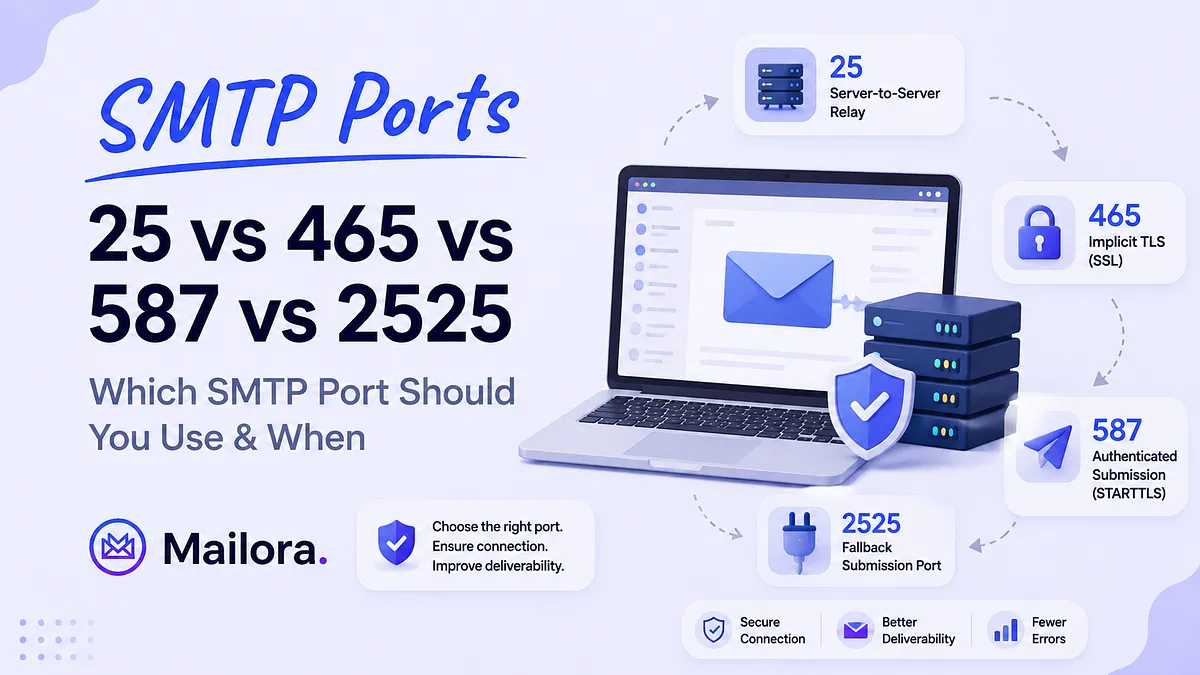
SMTP uses four commonly encountered ports: 25, 465, 587, and 2525. Each serves a different purpose, yet they're often treated as interchangeable.
For most applications and email clients, the choice comes down to port 587 or port 465. Port 25 is intended for server-to-server relay, while port 2525 exists as a fallback supported by some email providers when standard submission ports aren't available.
This guide explains what each SMTP port is used for, how ports 465 and 587 differ, when port 2525 is appropriate, and how to troubleshoot common SMTP connection errors.
It also explains what SMTP ports don't do because choosing the right port establishes the connection to your mail server, but it doesn't influence inbox placement or email deliverability.
What Is An SMTP Port?
An SMTP port is a numbered TCP endpoint that tells the receiving server what type of SMTP connection you're trying to establish. The port determines how the connection is made and whether encryption starts immediately or is negotiated later. It doesn't change your email's content, improve your sender reputation, or influence whether your message reaches the inbox.
SMTP ports seem more complicated than they are because different port numbers exist for different stages of sending an email.
The port numbers only make sense once you know what kind of SMTP connection you're making. SMTP uses different ports because sending an email from an application to your mail server is a different job from one mail server delivering to another.
Relay is server-to-server traffic. One mail server (MTA) hands a message to another mail server so it can continue toward the recipient. This is the job port 25 was designed for.
Submission is client-to-server traffic. An application, email client, or sending platform authenticates to an outbound SMTP server and submits a message for delivery. This is what ports 587 and 465 are designed to handle.
| Port | Purpose |
| 25 | Server-to-server SMTP relay |
| 587 | Authenticated email submission using STARTTLS |
| 465 | Authenticated email submission using implicit TLS |
| 2525 | Unofficial fallback submission port |
Choosing the right SMTP port only determines whether your mail server can establish a successful connection. It does not determine whether your email lands in the inbox because Inbox placement depends on different signals, including authentication, sender reputation, and recipient engagement.
The Four SMTP Ports And What Each One Is For
Choosing the right SMTP port is simpler once you understand what each one was designed to do. While most applications only need port 587 or 465, ports 25 and 2525 still have specific use cases. Here's what each port does and when you should use it.
Port 25
Port 25 is the original SMTP port used for server-to-server email relay. When one mail server delivers a message to another, it almost always happens over port 25.
If you're sending email from a website, application, CRM, or email client, port 25 usually isn't the right choice. Most cloud providers and residential ISPs block outbound traffic on port 25 by default to reduce spam, so connections often fail before authentication even begins.
Use port 25 only if you're operating your own mail server and need SMTP relay. For authenticated email submission, use port 587 or 465 instead.
Port 587
Port 587 is the standard SMTP submission port for applications and email clients. Connections start normally and are upgraded to an encrypted session using STARTTLS before credentials or email content are transmitted.
Since it's widely supported across email providers, SMTP libraries, hosting environments, and corporate networks, port 587 is the default recommendation for almost every outbound email setup.
If you're configuring SMTP for a website, SaaS application, CRM, or transactional email service, start with port 587 unless your provider recommends otherwise.
Port 465
Port 465 is often misunderstood because its status changed over time. While it was briefly considered deprecated, it was officially reinstated as the SMTP submission port for implicit TLS in 2018.
Here's where the two ports differ:
- Port 587 starts with a standard SMTP connection and upgrades to TLS using STARTTLS.
- Port 465 establishes an encrypted connection before the SMTP conversation begins.
From a deliverability perspective, there's no meaningful advantage to either approach. Both provide encrypted, authenticated email submission. Choose the one your email provider or application recommends.
Port 2525
Port 2525 isn't part of the SMTP standard, but many email providers support it as an alternative submission port.
Some corporate networks, hosting providers, and firewalls block outbound connections on port 587. Rather than requiring infrastructure changes, providers often expose SMTP on port 2525 as a workaround.
If port 587 works, use it. If it doesn't and your email provider documents support for port 2525, it's a good fallback.
Which SMTP Port Should You Use?
For almost every email sending setup, use port 587 or port 465.
Both ports are designed for authenticated email submission and are supported by virtually every major email provider. Port 25 is intended for mail servers relaying email between one another, not for applications, websites, or email clients sending outbound messages. Port 2525 isn't an official SMTP standard, but many providers support it as a fallback when port 587 is blocked by a firewall or hosting environment.
Here's the practical recommendation:
- Port 587: Your default choice for authenticated email sending using STARTTLS.
- Port 465: Use when your provider or application requires implicit TLS.
- Port 25: Only for server-to-server SMTP relay if you're operating your own mail infrastructure.
- Port 2525: A fallback when port 587 is unavailable and your provider explicitly supports it.
| Port | Encryption | Best used for | Use it when | Blocking risk |
| 25 | None by default; STARTTLS where supported | Server-to-server SMTP relay | You're operating your own mail server | High. Commonly blocked by cloud providers and residential ISPs |
| 587 | STARTTLS | Authenticated email submission | You're sending from an application, website, or email client | Low |
| 465 | Implicit TLS | Authenticated email submission | Your provider or application requires implicit TLS | Low |
| 2525 | Usually STARTTLS | Fallback email submission | Port 587 is blocked and your provider supports it | Low |
[Table: Each SMTP port serves a different purpose. For most email sending setups, the choice comes down to port 587 or port 465. ]
Port 465 vs 587: How Do They Differ?
Port 587 and port 465 both support authenticated SMTP submission. Although port 465 was considered deprecated for several years, RFC 8314 restored it in 2018 as the official port for implicit TLS submission.
Port 587 uses STARTTLS
On port 587, the connection starts normally. After the client and server introduce themselves using the SMTP protocol, the server advertises STARTTLS support. If it's available, the connection upgrades to TLS before any credentials or email content are sent.
Since encryption begins after the initial SMTP handshake, there's a small window where a network device could interfere by removing the STARTTLS advertisement. If that happens and the client isn't configured to require encryption, the connection may continue without TLS. This type of downgrade attack is well understood but uncommon on modern, properly configured networks.
Port 465 uses implicit TLS
Port 465 establishes TLS immediately when the TCP connection is created. The SMTP conversation doesn't begin until the encrypted tunnel is already in place.
There is no opportunity to downgrade the connection because encryption is required from the start. If the TLS handshake fails, the connection simply doesn't proceed.
As mentioned above, port 587 remains the default choice for most SMTP clients because of its broad compatibility. Port 465 is equally secure and fully standards-compliant, but it's typically used when an email provider or application specifically requires implicit TLS.
| Feature | Port 587 | Port 465 |
| Encryption | STARTTLS (upgrades to TLS after the SMTP handshake) | Implicit TLS (encrypted from the first packet) |
| Standard | RFC 6409 + STARTTLS (RFC 3207) | RFC 8314 |
| Connection behavior | Starts unencrypted, then upgrades to TLS | TLS established before SMTP begins |
| Failure behavior | Can fail if STARTTLS isn't negotiated successfully | Connection fails immediately if TLS cannot be established |
| Compatibility | Highest; supported by virtually all providers and clients | Widely supported by modern providers and clients |
[Table: Port 587 and port 465 both support secure SMTP submission. The main difference is when TLS is established and how the connection behaves if encryption can't be negotiated ]
When An SMTP Port Is Blocked (And How To Check)
A connection timeout doesn't always mean your SMTP settings are wrong. The port itself may be blocked by your network, hosting provider, or firewall.
Check whether the SMTP server is reachable before changing your configuration.
Test port 587 with Telnet or Netcat:
| telnet smtp.youresp.com 587 |
Or
| nc -zv smtp.youresp.com 587 |
A successful connection returns a 220 SMTP banner within a few seconds:
| 220 smtp.youresp.com ESMTP ready |
If the connection hangs, times out, or returns Connection refused, the port is likely blocked or unreachable.
Test port 465 with OpenSSL:
| openssl s_client -connect smtp.youresp.com:465 |
Since port 465 establishes TLS immediately, Telnet can't complete the connection. openssl s_client performs the TLS handshake and displays the server certificate if the connection succeeds. If the handshake fails or the connection times out, verify that the server supports implicit TLS and that port 465 is accessible from your network.
Once you've confirmed that the port is unreachable, the next step is choosing an alternative connection method or resolving the network restriction.
If port 587 is blocked
Start by confirming the timeout using one of the commands above rather than assuming it's a configuration issue.
If the port is blocked:
- Check whether your email provider supports port 2525. Many providers, including Mailgun, SendGrid, Postmark, Brevo, and MailerSend, offer it as an alternative SMTP submission port.
- If port 2525 isn't available or is also blocked, use your provider's HTTP API instead. API-based email delivery doesn't rely on SMTP ports and is often the better choice on restricted cloud infrastructure.
Port 25 is different. Most cloud providers, including AWS, Google Cloud, and Azure, block outbound connections on port 25 by default to reduce spam. If you're running your own mail server and need a server-to-server SMTP relay, you'll typically need to request that outbound port 25 be unblocked before the relay can work.
Common SMTP Port Errors And What They Actually Mean
SMTP response codes are fairly predictable once you know how they're grouped.
- 2xx means the server accepted the command.
- 4xx indicates a temporary problem that can usually be retried.
- 5xx indicates a permanent failure that requires a configuration change before the request will succeed.
| Error / Symptom | What it usually means | What to check |
| Connection timed out | The SMTP port is blocked, the server can't be reached, or the hostname is incorrect. | Test the connection with telnet, nc, or openssl, verify the SMTP hostname, and try another supported submission port if necessary. |
| Connection refused | The server is reachable, but nothing is listening on that port. | Confirm you're using the correct SMTP hostname and port. Some providers use different endpoints depending on the connection type. |
| 530 5.7.0 Must issue a STARTTLS command first | The client attempted to authenticate before upgrading the connection to TLS on port 587. | Enable STARTTLS in your SMTP client so encryption is negotiated before authentication. |
| 535 5.7.8 Authentication credentials invalid | The server rejected the username or password. Some providers require app passwords instead of account passwords. | Verify your credentials and authentication method. If you're using Gmail with 2FA enabled, use an app password instead of your account password. |
| TLS handshake failure / SSL error | The client and server don't agree on how the connection should be encrypted, or certificate validation failed. | Make sure you're using STARTTLS with port 587 or implicit TLS with port 465, and verify the server certificate is trusted. |
[Table: Common SMTP connection errors, what they usually mean, and where to start troubleshooting. ]
A 250 OK response only confirms that the receiving mail server accepted the message. It doesn't tell you where the message landed. Inbox placement happens after SMTP accepts the email, so a message can be accepted successfully and still end up in spam.
With the SMTP connection confirmed, the next question is whether your email is actually reaching the inbox. A successful connection only means the receiving server accepted the message. It doesn't determine how mailbox providers evaluate or place it.
Choosing The Right Port Is Only the First Step
Mailbox providers make their own placement decision after the SMTP connection is established. Gmail, Outlook, and Yahoo evaluate SPF, DKIM, and DMARC alignment, sending IP and domain reputation, engagement signals from previous sends, and whether the sending IP appears on blocklists they consult.
A message accepted on port 587 with correct authentication can still land in spam, while a message accepted on port 465 can reach the inbox. The port is the same variable in both outcomes, but the email deliverability factors driving the difference are not.
The most common post-configuration assumption is that 250 OK means delivered, and accepted. However, delivered and accepted are two different outcomes, and most deliverability problems are found in this gap.
If your emails aren't reaching the inbox, switching ports won't change the outcome. The useful questions are whether your domain is properly authenticated, whether your sending reputation is healthy, and whether any of your sending IPs are listed on blocklists that Gmail and Outlook actively reference.
A Spamhaus listing affects delivery at every provider that queries it, and that listing can appear between campaigns, over a weekend, with no bounce and no error to signal it happened.
The port is a connectivity setting, and has a fixed answer. Deliverability is an ongoing practice, and shifts as DNS records change, reputation signals accumulate, and mailbox provider policies tighten. A setup that delivered cleanly at launch can quietly start failing months later, with the same port, the same credentials, and the same 250 OK in the logs.
Confirming the port is right takes 30 seconds with telnet or openssl. Confirming the mail is actually landing, and understanding what's working against it when it isn't, requires a test across real mailbox providers.
Run your first deliverability test to see where your mail is landing across Gmail, Outlook, and Yahoo, what's affecting your sender reputation, and what to fix before the next campaign goes out.
FAQs
Which SMTP port should I use: 25, 465, 587, or 2525?
Use port 587 for sending mail from an application or email client. Port 587 is the standard submission port defined in RFC 6409, supported by virtually every ESP, and not blocked on most cloud infrastructure. Use port 465 if your ESP supports implicit TLS and your client handles it correctly. Port 25 is for server-to-server relay. Port 2525 is an informal ESP fallback for environments where 587 is blocked.
What is the difference between SMTP port 465 and 587?
On port 587, the connection starts normally and upgrades to TLS using STARTTLS before credentials or email content are sent. On port 465, TLS is established as soon as the connection is opened, before the SMTP conversation begins.
Why is port 25 blocked by ISPs and cloud providers?
Port 25 is used for server-to-server SMTP relay, but it has also been widely abused to send spam from compromised computers and servers. To reduce that risk, most residential ISPs and cloud providers block outbound connections on port 25 by default.
If you're sending email from an application, website, or email client, this usually isn't a problem because those use ports 587 or 465 instead. If you're operating your own mail server and need SMTP relay over port 25, you may need to request that your cloud provider remove the restriction. Approval depends on the provider and isn't guaranteed.
Is port 2525 an official SMTP port?
No. Port 2525 is not part of the SMTP standard. It exists because some corporate networks, hosting providers, and firewalls block outbound connections on port 587.
Many email providers,including Mailgun, SendGrid, Postmark, Brevo, and MailerSend, support port 2525 as an alternative SMTP submission port. If your provider documents support for it, it's a perfectly valid fallback. Otherwise, use port 587 or 465.
Does using the right SMTP port improve email deliverability?
No. Choosing the right SMTP port ensures your application can connect to your mail server. It doesn't determine whether your email reaches the inbox.
Inbox placement depends on different factors, including sender reputation, SPF, DKIM, DMARC, message content, and recipient engagement. A message sent over port 587 can still land in spam, while a message sent over port 465 can reach the inbox. The port only establishes the connection, but doesn't influence how mailbox providers evaluate your email.
Stay in the loop
Deliverability insights, product updates, and early access to new features. No spam, unsubscribe anytime.
By subscribing, you agree to our Privacy Policy. Unsubscribe anytime.