Why Changing Your Domain Won’t Fix Your Email Domain Reputation
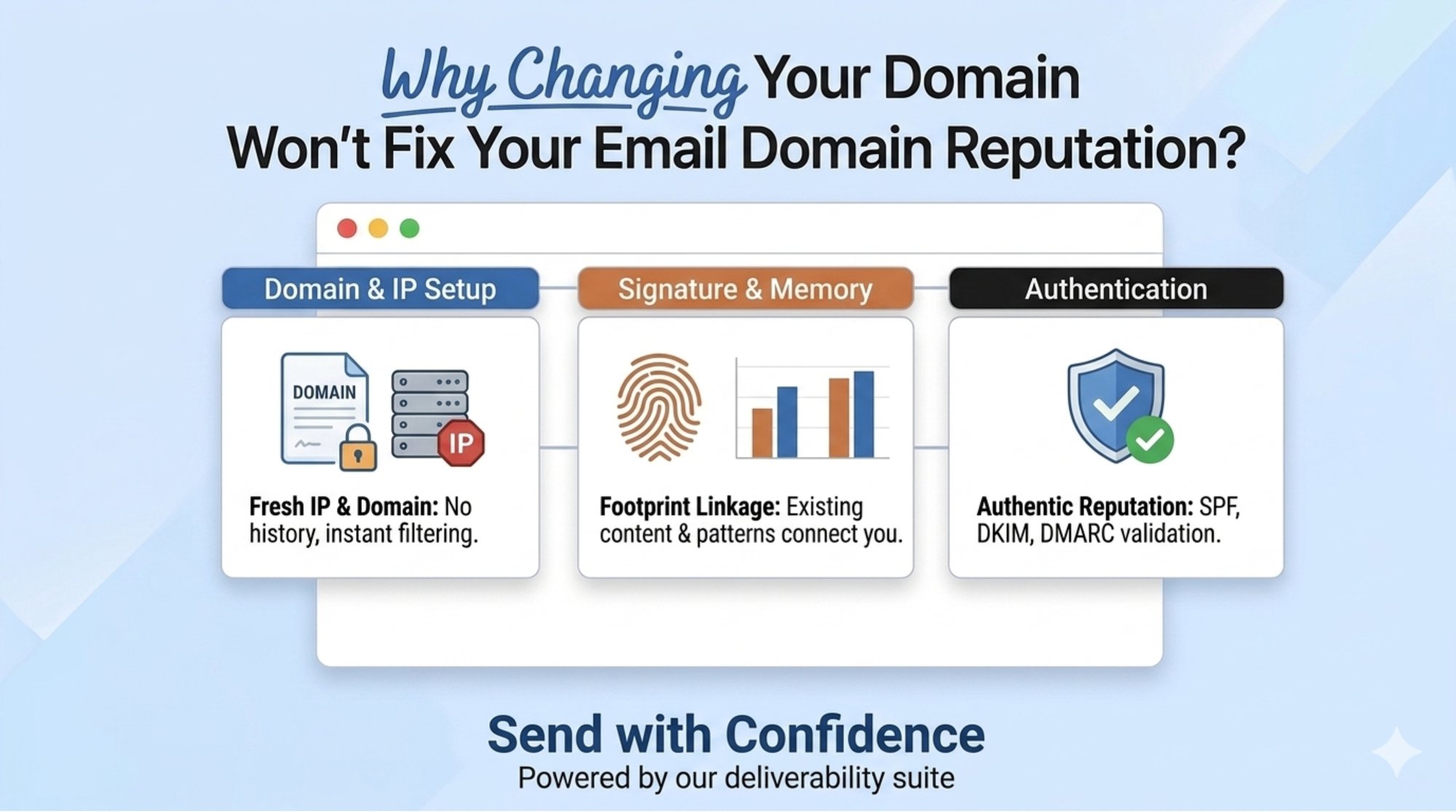
If your email domain reputation is damaged, changing domains will not fix the problem by itself. A new domain removes some visible history, but it does not remove poor list quality, aggressive sending, weak engagement, broken authentication, or spam complaint patterns that push messages into the spam folder.
This is why teams say, “We switched domains and still hit spam.”
Deliverability is behavior driven, not domain driven, and it’s judged by mailbox and email service providers, inbox providers, and their filtering algorithms, not by wishful resets.
Why Email Domain Reputation Does Not Reset
Why teams switch domains
Outbound teams, founders, SDR teams, and growth marketers usually change domains after seeing:
| Symptom | Common reaction | Real issue |
|---|---|---|
| Emails land in spam | Buy a new domain | Root cause remains |
| Reply rates drop | Rotate sender identity | Engagement problem remains |
| Domain reputation falls | Warm up new domain | Trust still has to be earned |
| Campaign volume slows | Add more inboxes | Risk spreads across assets |
The mistake is treating domain change as a shortcut. A new domain has no positive history. It must earn trust through authenticated, wanted, consistent sending from the right sending email domain and domain name.
The false reset assumption
A domain change can hide part of the old identity, but it cannot hide the operating model behind the sending email program.
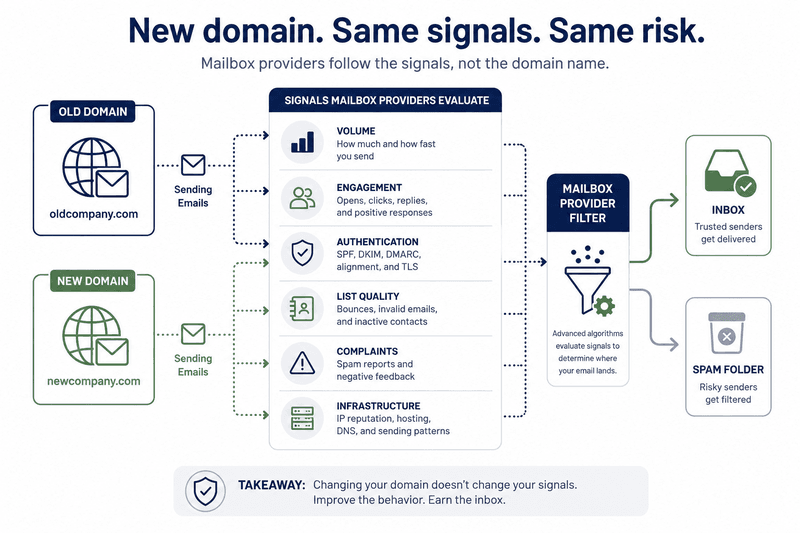
Mailbox providers can evaluate:
- Sending volume
- Recipient response
- Spam complaints
- Bounce patterns
- Authentication alignment
- IP and infrastructure signals (including your sending ip address and whether you’re on a shared pool vs a dedicated ip address)
- Content and link patterns
- Unsubscribe behavior
If these signals stay weak, the new domain inherits the same risk pattern, especially if you keep using the same email lists and the same outreach motion.
What Actually Carries Over Into Email Domain Reputation
Mailbox providers evaluate email domain reputation using long term engagement, authentication, complaint history, and sender consistency across the full identity stack (domain + IP + headers + links). This is why teams can have a poor domain reputation or bad domain reputation even after “starting fresh,” leading to email deliverability issues and a lower email deliverability rate.
A new domain changes the label. It does not change the signals, or your overall domain reputation once patterns repeat.
| Signal that carries over | Why it matters | Correct action |
|---|---|---|
| Sending behavior | Mailbox providers evaluate cadence, volume, and consistency | Slow down, segment, and rebuild gradually |
| Infrastructure patterns | SMTP setup, mail server behavior, IP pools, headers, tracking domains, and DNS records can repeat | Audit the full sending stack |
| IP and engagement signals | Poor engagement and shared IP issues still affect placement | Monitor inbox placement by provider |
| List quality | Bad lists create bounces and complaints on any domain | Suppress invalid, inactive, and low intent contacts |
| Authentication process | SPF, DKIM, DMARC, PTR, and TLS issues often repeat | Complete email authentication setup before scaling |
A new domain does not fix bad sending. It gives bad sending a new place to fail, and it can create nasty email problems faster because the baseline trust is zero.
Why Email Domain Reputation Fails Faster On New Domains
ISP intelligence improvements
Mailbox providers do not judge only the domain name. They evaluate identity, authentication, infrastructure, engagement, and user feedback together, including how your sending email server interacts with receiving email servers.
That means a new domain can be scored quickly if it shows risky behavior.
Pattern recognition
A new domain is not anonymous when the campaign looks the same.
Risk patterns include:
- Same prospect list
- Same message templates
- Same tracking links
- Same sending cadence
- Same reply handling
- Same unsubscribe weakness
- Same authentication gaps
This is why domain rotation is a weak deliverability strategy and a common source of email deliverability mistakes.
Faster reputation scoring
New domains have low tolerance for mistakes. They have no stable history, no proven engagement, and no established sender identity.
Scaling too fast can create email deliverability issues before the domain has any chance to build trust, and it can lock in a bad sender reputation (or bad email reputation) early, especially with high-risk traffic to gmail addresses and other major inbox providers.
The Real Root Cause of Deliverability Issues
Poor list quality
Bad lists cause deliverability damage on every domain.
Common list problems include:
- Invalid addresses
- Stale contacts
- Low intent prospects
- Role based addresses
- Recipients with no clear reason to expect the message
If recipients do not want the mail, mailbox providers receive negative signals, and your email reputation score (where visible) becomes a good indicator of risk, not a guarantee of inboxing.
Aggressive sending
High volume does not repair reputation. It increases exposure to complaints, ignores, deletes, and bounces.
A safe recovery plan starts with fewer messages to better segments.
Weak engagement
Engagement is a trust signal. If recipients do not open, reply, click, or interact, mailbox providers have less evidence that the mail is wanted.
A domain change cannot manufacture engagement or restore reputation authority by itself, only consistent positive signals and a good sender reputation can do that.
How To Repair Email Domain Reputation
Improving email domain reputation requires controlled sending, list hygiene, authentication alignment, and positive engagement signals. These best practices work whether you send cold outbound, newsletters, or transactional flows like password resets and shipping notifications.
Reputation rebuilding
Domain reputation recovery means changing the behavior that caused the problem.
Use this framework:
| Step | Action | Why it matters |
|---|---|---|
| 1 | Pause risky campaigns | Stops further reputation damage |
| 2 | Audit authentication | Confirms identity can be verified |
| 3 | Clean lists | Reduces bounces and complaints |
| 4 | Segment by engagement | Sends first to recipients most likely to respond |
| 5 | Reduce volume | Rebuilds trust through controlled sending |
| 6 | Test inbox placement | Shows provider specific outcomes |
| 7 | Monitor complaints | Detects risk before scale |
| 8 | Increase gradually | Builds stable reputation signals |
Controlled sending
Controlled sending means volume increases only after positive signals appear.
Do not scale because DNS is complete. Scale because inbox placement, engagement, bounce rate, and complaints are stable, and because email delivery results are consistent across providers.
List hygiene
List hygiene is not a cleanup task after failure. It is a deliverability control.
Remove invalid, inactive, and low intent recipients before sending. Relevance protects reputation more than domain rotation.

Technical Breakdown: What Must Be Correct
A new sending domain should not be used until the technical foundation is complete, and until you’ve confirmed the full path from your sending email server/mail server to major receiving email servers is stable.
| Standard | Required role |
|---|---|
| SPF | Authorizes allowed sending sources |
| DKIM | Adds cryptographic message signing |
| DMARC | Defines policy and alignment for authenticated mail |
| PTR | Supports reverse DNS verification |
| TLS | Protects mail transport |
| One click unsubscribe | Supports compliant opt out for subscribed mail |
| RFC 5322 format | Keeps message structure valid |
For bulk sending, authentication alignment matters. Passing SPF somewhere in the path is not enough if the visible From domain is not aligned with the authenticated identity.
For additional monitoring, teams often use google postmaster tools, plus other domain reputation check tools for a quick domain reputation lookup and an ongoing email health report, but those tools won’t fix the underlying behavior on their own.
Tool Comparison: Mailora and GlockApps
GlockApps has broad deliverability coverage, including inbox testing, spam testing, DMARC tools, free checkers, education pages, and consulting paths. Its content depth is useful, but the research gap is a sharper root cause framework for teams who believe changing domains will solve deliverability.
Mailora is better positioned for this article because its public messaging focuses on inbox placement diagnostics, reputation monitoring, authentication checks, and actionable intelligence rather than domain rotation.
| Use case | Mailora | GlockApps |
|---|---|---|
| Inbox placement testing | Strong fit | Strong fit |
| Authentication checks | Strong fit | Strong fit |
| Reputation monitoring | Strong fit | Strong fit |
| Root cause diagnosis | Strong fit for behavior based analysis | Useful but spread across many guide and tool pages |
| Domain change decision support | Strong fit for this topic | Less focused on the fresh domain myth |
| Best use | Diagnose what to fix next | Run broad deliverability checks |
Decision Matrix: When a New Domain Makes Sense
A new domain is not always wrong. It is wrong when it is used to avoid fixing behavior.
| Situation | Best decision | Reason |
|---|---|---|
| Poor engagement | Repair current program | New domain repeats same audience problem |
| Spam complaints | Fix consent and relevance | Complaints follow unwanted mail |
| Authentication gaps | Fix setup first | New DNS can still be wrong |
| Stale list | Clean list | Bad data damages every domain |
| Rebrand | Use controlled migration | Legitimate identity change |
| Security compromise | Consider new domain after containment | Risk isolation may be valid |
| Separate mail streams | Use email subdomain | Helps isolate transactional, marketing, and outbound mail |
Compliance Considerations
Deliverability and compliance overlap, but they are not the same.
Senders should maintain accurate sender identity, non deceptive subject lines, visible unsubscribe options, valid contact details where required, consent controls where required, and suppression of opted out contacts.
Compliance alone does not guarantee inbox placement. Mailbox providers still evaluate wanted mail, authentication, engagement, and reputation.
ROI Impact Analysis
A domain switch creates hidden costs.
| Cost | Business impact |
|---|---|
| New DNS setup | Extra technical work and new failure points |
| Lost history | Less visibility into what caused the issue |
| Slower ramp | New domains need controlled volume |
| Brand confusion | Recipients may distrust unfamiliar senders |
| Repeated damage | Same behavior can burn the new domain |
The higher ROI path is diagnosis first, then recovery, because only email reputation improvements come from sustained behavior change, not a quick swap.
Troubleshooting Guide
| Problem | Likely cause | Fix |
|---|---|---|
| New domain lands in spam | No trust plus fast scaling | Reduce volume and send to engaged contacts |
| SPF passes but inboxing fails | DKIM or DMARC alignment issue | Audit full authentication chain |
| Spam test looks good but placement is poor | Reputation or engagement issue | Test inbox placement by provider |
| Bounces are high | Bad list quality | Suppress risky addresses |
| Replies are low | Weak relevance | Improve targeting and message fit |
| Complaints increase | Unwanted mail | Tighten consent and unsubscribe process |
When a New Domain Does Make Sense
Legitimate use cases
A new domain can make sense for:
- Company rebrand
- Domain compromise
- Legal entity change
- Separate product identity
- Clear mail stream separation
These are identity and architecture reasons, not reputation escape tactics, especially when you’re trying to recover from bad email reputation, bad sender reputation, or an established poor domain reputation.
Migration strategies
If a new domain is justified, migrate carefully.
- Complete email authentication setup
- Configure SPF, DKIM, DMARC, PTR, and TLS
- Start with low volume
- Send to engaged recipients first
- Monitor inbox placement
- Keep complaints low
- Increase volume only after stable signals
If your team changed domains and still sees spam placement, Mailora can help identify the actual cause.
Use Mailora to test inbox placement, review authentication, monitor reputation signals, and turn deliverability problems into a clear recovery plan, then support ongoing domain reputation maintenance as you scale.
FAQ
What is email domain reputation?
Email domain reputation is the trust mailbox providers assign to a sending domain based on authentication, engagement, complaints, bounce patterns, and sending behavior.
Does changing domains reset sender reputation?
No. A new domain starts with no trust. It does not remove poor sending behavior, bad lists, weak engagement, or infrastructure issues.
Why does my new domain still go to spam?
The likely causes are fast scaling, low engagement, weak list quality, missing authentication, or repeated campaign patterns, often the same patterns that caused email deliverability issues before.
Should I warm up new domain assets?
Yes, but warming up only helps when authentication, targeting, content, and sending volume are controlled.
What is domain reputation recovery?
Domain reputation recovery is the process of reducing risk, improving authentication, cleaning lists, restoring engagement, and rebuilding trust gradually.
Is email authentication setup enough to fix deliverability?
No. Authentication verifies identity, but inbox placement also depends on reputation, engagement, complaints, and recipient behavior.
What causes spam reputation?
Spam reputation can come from complaints, low engagement, invalid recipients, misleading content, poor authentication, aggressive sending, and repeated infrastructure signals that harm email marketing performance.
When should I use a subdomain?
Use an email subdomain to separate mail streams such as transactional, marketing, and outbound messages. Do not use it to hide poor sending behavior.
How long does reputation rebuilding take?
No verified universal timeline exists. Recovery depends on complaint rate, list quality, volume control, authentication, and engagement quality.
How do I know if my domain is improving?
Track inbox placement, bounce patterns, complaint signals, authentication results, and engagement by mailbox provider. You can also compare results using a domain reputation lookup and related domain reputation check tools, but treat them as directional, not definitive.
Is GlockApps useful for deliverability testing?
Yes. GlockApps is useful for broad deliverability checks, inbox testing, spam testing, and DMARC tools. For this topic, Mailora should focus on root cause diagnosis and behavior based recovery.
What is the safest fix for email deliverability issues?
The safest fix is to diagnose the cause, repair authentication, clean lists, reduce volume, send to engaged recipients first, and rebuild gradually, using a consistent, solid system rather than domain rotation.
Stay in the loop
Deliverability insights, product updates, and early access to new features. No spam, unsubscribe anytime.
By subscribing, you agree to our Privacy Policy. Unsubscribe anytime.