Sender Reputation: How Mailbox Providers Decide Where Your Email Lands

Key Takeaways
|
Most senders start thinking seriously about sender reputation at the worst possible moment: after their emails start landing in spam. By then, recovery takes weeks, and the pipeline that depended on those campaigns has already leaked.
Here's the uncomfortable part. You can pass a spam test, hold a 98 Sender Score, and still watch Gmail quietly filter your best campaigns. That's because reputation isn't one number. It's dozens of signals (complaints, bounces, engagement, authentication, sending behavior) evaluated differently by every mailbox provider, at the IP level, the domain level, and often the campaign level.
This article breaks down what sender reputation actually is, which signals move it, how to diagnose a drop by root cause, and how to monitor it continuously instead of reacting to damage. It's written from the practitioner's seat, and it reflects how Mailora turns fragmented reputation signals like DMARC reports, blocklists, engagement, and bounce patterns into clear decisions about what to fix first. Less "what is a score," more "which signal is hurting mine, and what do I do about it."
What Sender Reputation Actually Is (And Why It Decides Inbox Placement)
Sender reputation is the trust score mailbox providers assign to your sending identity: your IPs, your domains, and the patterns behind them. Gmail, Yahoo, Microsoft, and Apple each maintain their own version of it, built from your history with their users: how often people complain, how often your mail bounces, whether recipients open and reply or delete without reading.
It is not one number. Each provider computes its own composite from its own signals, weighted in its own way. Gmail leans heavily on user engagement. Microsoft is famously sensitive to infrastructure and volume consistency. Yahoo watches complaint rates closely. There is no universal ledger; there are several, and they don't compare notes.
What makes a reputation worth your attention is what it controls: the filtering decision after your mail is accepted. Delivery just means a server took the message. Reputation decides whether it lands in the inbox, gets routed to a tab, or disappears into spam. It is the gatekeeper between "delivered" and "seen," and the stakes are real. DMA research found 95% of people check their inbox daily, while only 58% check spam. Mail filtered to spam isn't just demoted; for most recipients, it functionally doesn't exist.
IP Reputation vs. Domain Reputation (And Why You Need to Track Both)
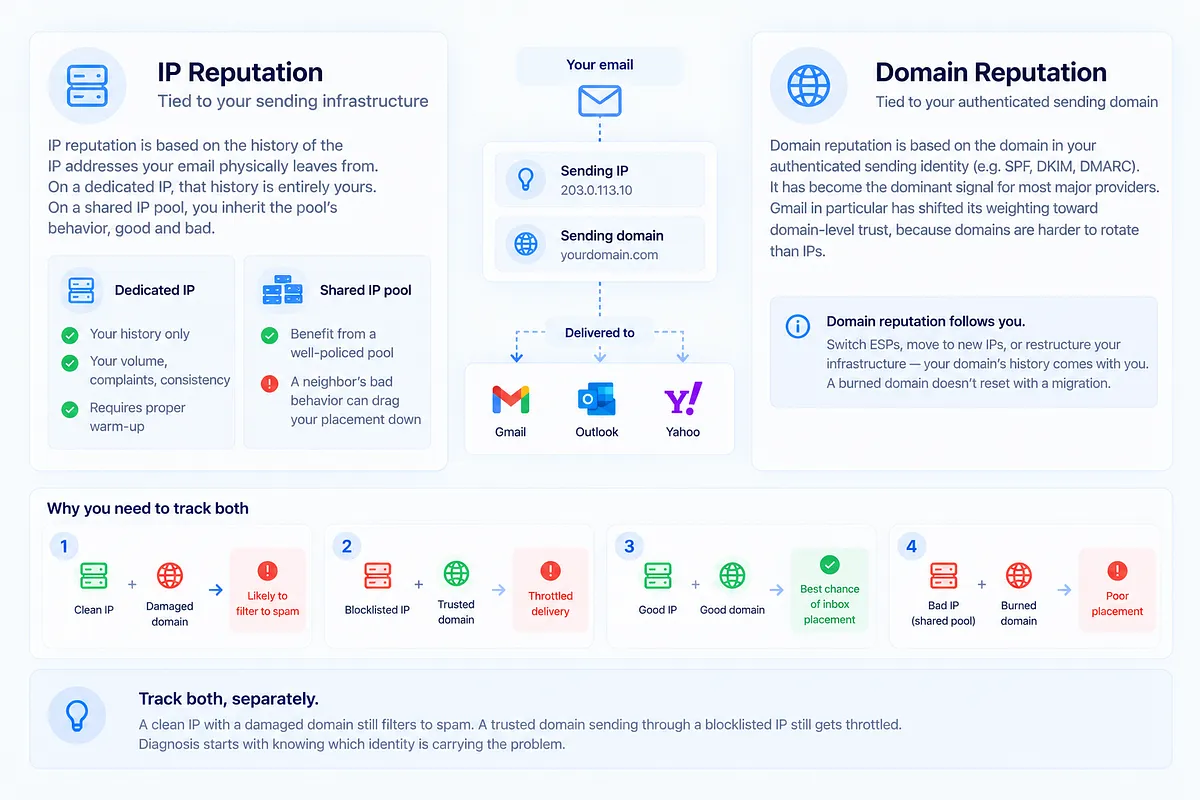
Reputation attaches to two identities, and they behave differently.
IP reputation is tied to your sending infrastructure: the addresses your mail physically leaves from. On a dedicated IP, that history is entirely yours: your volume, your complaints, your consistency. On a shared IP pool, you inherit the pool's behavior, good and bad. A neighbor running a dirty list can drag your placement down; a well-policed pool can carry a low-volume sender who couldn't sustain a dedicated IP's warm-up requirements.
Domain reputation is tied to the domain in your authenticated sending identity, and it has become the dominant signal for most major providers. Gmail in particular has shifted its weighting toward domain-level trust, because domains are harder to rotate than IPs. That design choice has a practical consequence: domain reputation follows you. Switch ESPs, move to new IPs, restructure your infrastructure: your domain's history comes along. A burned domain doesn't reset with a migration.
The operational takeaway: track both, separately. A clean IP with a damaged domain still filters to spam. A trusted domain sending through a blocklisted IP still gets throttled. Diagnosis starts with knowing which identity is carrying the problem.
How Reputation Is Scored (And Why the Score Is Only Half the Story)
The best-known public proxy is Sender Score: a 0–100 rating computed as a rolling 30-day average of IP behavior. The conventional read is that 80+ is good and 90+ is excellent, and as a rough directional indicator, that holds.
But here's what a decade of ISP escalations teaches you: senders with 98–99 Sender Scores still end up with real deliverability problems. Regularly.
How? Because a single aggregate score averages away exactly the detail you need. Your transactional mail (high engagement, low complaints) can prop up the average while your promotional segment quietly deteriorates. Your Outlook placement can be healthy while Gmail has started routing you to spam. Your primary domain can look pristine while a subdomain someone spun up for a product launch accumulates complaints.
A score answers "how does my aggregate history look to one measurement network?" It does not answer "which mailbox provider is filtering me, on which mail stream, because of which signal?" That second question is the one that determines what you fix. This is the same trap as trusting a clean spam test; we've written about why a good spam score can still hide deliverability problems in depth.
Use scores as a smoke detector. Don't use them as a diagnosis.
The Signals That Actually Move Sender Reputation
Strip away the scoring frameworks and reputation comes down to a handful of drivers. In rough priority order:
Spam complaints. The strongest negative signal at nearly every provider. Since the 2024 Gmail and Yahoo bulk sender requirements, the line is explicit: keep complaint rates under 0.10%, ideally well under. Sustained rates above 0.30% invite aggressive filtering.
Bounce rate. Hard bounces above 2% tell providers your list hygiene is poor. You're mailing addresses you don't actually know. High bounce rates correlate with purchased lists and stale data, and providers weigh them accordingly.
Spam-trap hits. Traps are addresses that should never receive legitimate mail: recycled dead addresses or pristine ones seeded to catch scrapers. Even a small number of hits signals list-acquisition or hygiene problems, and some blocklist operators treat them as near-automatic listing triggers.
Engagement. Opens, clicks, replies, and forwards build trust; deletes-without-reading, ignores, and spam-folder rescues (or the absence of them) erode it. Gmail weighs this category most heavily of the majors.
Authentication. SPF, DKIM, and DMARC don't earn you inbox placement by themselves, but failing or misaligned authentication caps your reputation at every provider, and since 2024 it's a hard requirement for bulk senders at Gmail and Yahoo.
Sending consistency. Providers reward predictable volume and cadence. A jump from 20,000 to 400,000 sends overnight reads as compromise or list purchase, regardless of your history.
No provider weights these identically. Microsoft can tolerate engagement softness that Gmail punishes; Gmail can forgive infrastructure quirks that trip Outlook filtering. Which is exactly why the next point matters.
Why One Reputation Number Isn't Enough: Reputation Is Segmented
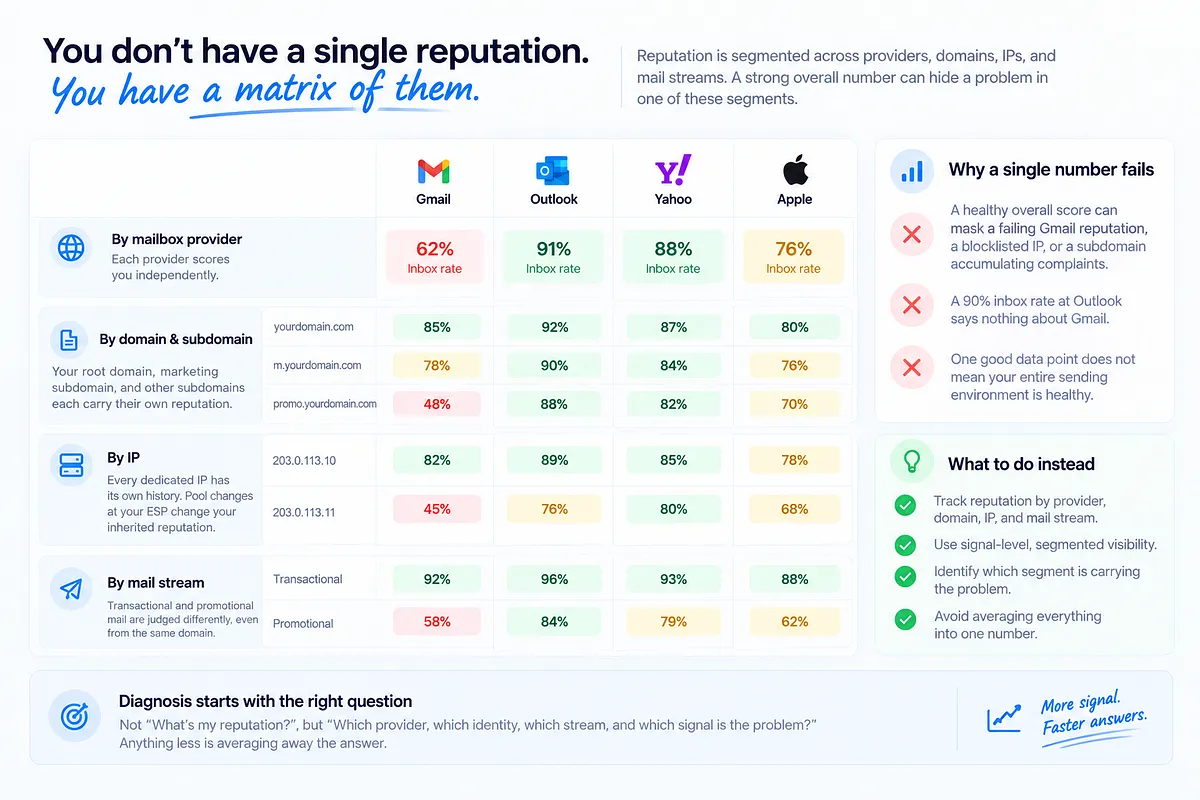
Here is the mental model shift that separates senders who diagnose quickly from senders who flail: you don't have a reputation. You have a matrix of them.
Reputation varies across at least four dimensions simultaneously:
- By mailbox provider. Gmail, Microsoft, Yahoo, and Apple each score you independently. A 90% inbox rate at Outlook says nothing about Gmail.
- By domain and subdomain. Your root domain, your marketing subdomain, and that promo. subdomains from last quarter each carry separate (though related) reputations. One poisoned subdomain can fail while everything else looks fine.
- By IP. Every dedicated IP has its own history. Pool changes at your ESP change your inherited reputation without you touching anything.
- By mail stream. Providers increasingly distinguish behavioral patterns: your transactional stream and your promotional blast don't get judged as one sender in practice, even from the same domain.
This is why the aggregate-score comfort blanket fails. A healthy overall number can, and routinely does, mask a failing Gmail reputation, a blocklisted secondary IP, or a subdomain accumulating complaints. Practitioners need signal-level, segmented visibility: which provider, which identity, which stream, which signal. Anything less is averaging away the answer.
How to Check Your Sender Reputation (Tools & What Each Reveals)
Several tools give you partial views. Know what each shows, and what each misses.
| Tool | What it shows | What it misses |
|---|---|---|
| Mailora | Domain and IP reputation trends, blocklist status across 50+ lists, SPF/DKIM/DMARC health, and inbox placement unified in one continuous view, with alerts and prioritized next steps | ISPs' private internal scores (no tool can see those); complements free sources like Postmaster Tools and SNDS rather than replacing them |
| Google Postmaster Tools | Gmail's own read on your domain and IP reputation, complaint rates, authentication results | Gmail only; data is delayed, coarse-grained, and requires meaningful volume to populate |
| Microsoft SNDS | Complaint and trap data for mail into Microsoft properties, per IP | Microsoft only; IP-level only; no domain reputation view |
| Sender Score | 0–100 IP score from Validity's data network, 30-day rolling | IP-only; aggregate; no provider or stream segmentation |
| MxToolbox | Blocklist status, DNS and authentication record checks | Point-in-time lookups; no engagement or placement context |
| Spamhaus | Listing status on the blocklists ISPs actually weight most | Listing status only; it tells you you're listed, not why your reputation slid there |
| Barracuda / Talos | Reputation as seen by two widely deployed filtering vendors | Each reflects one vendor's lens; no cross-signal synthesis |
Each of the free and single-vendor tools above is worth checking, and they share the same two limitations: they're episodic (a snapshot when you remember to look) and they treat each signal in isolation. Postmaster Tools won't tell you your Barracuda listing coincided with your bounce spike. SNDS won't connect its complaint data to your DMARC failures.
The diagnostic question is always cross-signal: what changed, across which identities, at which providers, at the same time? That's the gap the last row exists to close, and it's the view Mailora's email deliverability test is built to give you: placement, authentication, reputation, and blocklist signals pulled into one read, so you're interpreting a picture instead of reconciling six tabs.
Reading DMARC Reports as a Reputation Signal (Not Just Security)
Most teams treat DMARC as a compliance checkbox: publish a policy, pass the audit, move on. That leaves one of the richest reputation data sources unread.
DMARC aggregate reports (RUA) are mailbox providers telling you, daily, exactly how your authentication looks from their side: which sources are sending as your domain, which pass SPF and DKIM with alignment, and which fail. Read as a deliverability lens rather than a security artifact, they surface problems that directly erode domain reputation:
- Legitimate sources failing alignment. Marketing added a new tool, nobody updated SPF, and now a real mail stream is authenticating poorly, quietly degrading domain trust with every send.
- Spoofing against your domain. Someone else sending as you generates authentication failures and complaints that land on your domain's record at receiving providers.
- Infrastructure drift. Rotated DKIM keys, an SPF record that crept past the 10-lookup limit, a subdomain with no policy: each one a slow leak in your authentication posture.
The failure pattern in a DMARC report often predates the placement drop by weeks. This is why Mailora processes DMARC aggregate data as an actionable deliverability signal, flagging which sending source broke, when, and what it means for your domain's standing, instead of filing it under security paperwork.
Diagnosing Why Your Reputation Dropped (Root-Cause Framework)
When reputation slides, the instinct is to change five things at once. Resist it. Work the sequence: what changed → what it means → what to fix first → how urgent.
1. What changed? Establish the timeline. When did placement or reputation metrics move, and what happened in the preceding two weeks? New template, new segment, new sending source, volume increase, ESP migration, list import?
2. What does the signal pattern say? Match symptoms to causes:
| Symptom pattern | Likely root cause | Fix first | Urgency |
|---|---|---|---|
| Complaints spiked after a specific send | Segment or content mismatch: mailing people who didn't expect it | Suppress the segment; audit acquisition source | High |
| Bounce rate climbed steadily | List decay: stale addresses accumulating | Hygiene pass; sunset policy for inactives | Medium |
| Auth failures rising in DMARC reports | Broken SPF/DKIM: new source or DNS drift | Fix the failing source's authentication | High |
| Sudden single-provider drop (e.g., Gmail only) | Provider-specific reputation event, often engagement-driven | Pull back to engaged-only sends at that provider | High |
| Blocklist listing alert | Trap hits or complaint surge reached an operator | Identify the trigger before requesting delisting | Depends on the list |
| Drop right after volume increase | Ramp too fast for your reputation to absorb | Step volume back; re-ramp gradually | Medium-high |
| Drop after ESP/IP/domain change | New infrastructure with no earned trust | Structured warm-up to engaged recipients | Medium |
3. Fix in priority order. Authentication breaks and active complaint sources first; they compound daily. Hygiene and volume discipline second. Content and cadence tuning third.
4. Calibrate urgency honestly. A Spamhaus listing needs action today. A slow bounce creep needs a plan this month. Treating everything as a fire guarantees you'll fix the loud thing instead of the important one.
How to Improve and Recover Sender Reputation
Recovery is a sequenced playbook, not a scramble:
- Stop the bleeding. Suppress the segments, sources, or campaigns generating complaints and bounces. Recovery can't start while the damaging behavior continues.
- Fix authentication. Get SPF, DKIM, and DMARC passing with alignment across every legitimate source. This is the floor everything else stands on.
- Clean the list. Remove hard bounces, purge addresses with no engagement in 6–12 months, and validate anything from questionable acquisition sources.
- Send to your best audience only. Restrict sends to recently engaged recipients: the people whose opens and replies actively rebuild trust. This is the single most effective recovery lever at Gmail.
- Re-warm deliberately. Expand volume in controlled steps, watching placement and complaint data at each stage before the next increase. The discipline here is the same as scaling up. We've covered how to scale sending without killing reputation if you're rebuilding toward higher volume.
Set expectations honestly: with consistent good practices, typical cases recover in 2–4 weeks. Severe damage (blocklistings, trap-driven listings, a domain with months of complaint history) takes longer, and there's no legitimate shortcut. Anyone promising overnight reputation repair is selling something that doesn't exist.
And reframe the goal. Recovery isn't a project with an end date; it's the entry point into lifecycle management. The practices that rebuild reputation are the same ones that keep it, which is the argument for the next section.
Why Continuous Monitoring Beats One-Off Checks
Reputation is a moving target because your sending is a moving target. Product launches change volume. Migrations change infrastructure. New segments change engagement profiles. Seasonal pushes change cadence. Every one of those shifts re-rolls the dice with every provider's filters, and the episodic check ritual ("look at Postmaster Tools when something feels off") means you find out after placement has already moved.
The difference between monitoring and checking is the difference between a trend and a snapshot. A snapshot says your domain reputation is "medium." A trend says it dropped two days after the new welcome series launched, alongside a complaint uptick concentrated at Gmail, which is a diagnosis, not just a data point.
That's the operating model behind Mailora's deliverability monitoring features: continuous tracking of domain and IP reputation, blocklist status across 50+ lists, and authentication health, with alert thresholds so a reputation dip or a new listing reaches you the day it happens, correlated against what changed in your sending, so the first question you ask is "what do we fix" instead of "what happened." Teams that monitor act while the problem is a dip. Teams that check act when it's a crater.
Connecting Sender Reputation to Pipeline and Revenue
For everyone outside the email team, here's the translation: sender reputation is the upstream variable behind every email revenue number you report.
The chain is direct. Reputation determines inbox placement. Placement determines whether mail gets seen: recall the gap, 95% of people check their inbox daily, 58% check spam. Visibility determines opens, replies, meetings, and orders. Cut placement and everything downstream falls with it, at the same conversion rates you've always had, on a smaller base.
What makes reputation degradation expensive is that it's silent. Bounces show up in dashboards. Spam-folder placement doesn't. Delivery still reads 99%, the sends still go out, and the only visible symptom is engagement drifting down and pipeline quietly thinning. By the time someone asks "why is email down this quarter," the reputation damage is weeks old and the recovery clock (those 2–4 weeks, minimum) starts from that moment, not from when the problem began.
That's the business case for treating reputation as a managed, monitored asset rather than a metric you look up during incidents. The senders who win the inbox aren't the ones who recover fastest. They're the ones who see the signal move before recovery is needed.
Ready to see where your reputation actually stands, signal by signal, provider by provider? Run your first deliverability test with Mailora and get a unified read on placement, authentication, blocklists, and reputation in one view. Send with confidence.
---
FAQ
What is a good sender reputation score?
On the Sender Score scale (0–100, rolling 30-day average of IP behavior), 80+ is generally considered good and 90+ excellent. Treat any single score as directional, though; senders with 98–99 scores can still have provider-specific deliverability problems, because aggregate scores average across segments and mailbox providers that behave very differently.
How is sender reputation different from IP reputation and domain reputation?
Sender reputation is the umbrella term. IP reputation attaches to your sending infrastructure and changes if you move IPs; domain reputation attaches to your authenticated sending domain and follows you across ESPs and infrastructure changes. Major providers now weigh domain reputation most heavily, but a problem with either one can filter your mail, so track both.
How long does it take to recover sender reputation after a drop?
Typical cases recover in 2–4 weeks of consistent good practices: suppressing complaint sources, fixing authentication, cleaning the list, and sending only to engaged recipients while re-warming volume. Severe damage (blocklistings or long complaint histories) takes longer. There is no legitimate overnight fix.
Can I have a high Sender Score and still land in spam?
Yes, and it happens routinely. Sender Score measures aggregate IP behavior through one data network. It can't see that Gmail specifically is filtering your promotional stream, or that a subdomain is accumulating complaints. A high score with poor placement usually means the problem lives in a segment the aggregate is averaging away.
How often should I check my sender reputation?
High-volume senders should monitor continuously with alerting, not check on a schedule; reputation moves with every launch, migration, and volume change. At minimum: review Postmaster Tools and blocklist status weekly, watch DMARC reports for new failure patterns, and test placement before and after any major change to content, volume, or infrastructure.
Stay in the loop
Deliverability insights, product updates, and early access to new features. No spam, unsubscribe anytime.
By subscribing, you agree to our Privacy Policy. Unsubscribe anytime.