Microsoft SNDS 2026 Update: What Changed and Why It Matters for Inbox Placement
Key Takeaways
|
The cron job that has pulled your SNDS CSVs every morning for three years starts returning 404s. JMRP complaint reports arrive without a recipient address. The spam-trap column you have watched for a decade is simply gone from the Data Report. Nothing announced itself. Your Outlook.com traffic still has to be diagnosed today. The dashboard you diagnose it with just got thinner.
What a sender needs to know is which workflows break, which signals disappeared, and whether Outlook inbox placement actually moved. Provider telemetry is useful, but it is not where the mail landed. If you have not confirmed that recently, an email deliverability test settles it faster than any dashboard.
What follows is enough to keep your Outlook diagnosis working after the migration.
What Microsoft SNDS actually is (and what it is not)
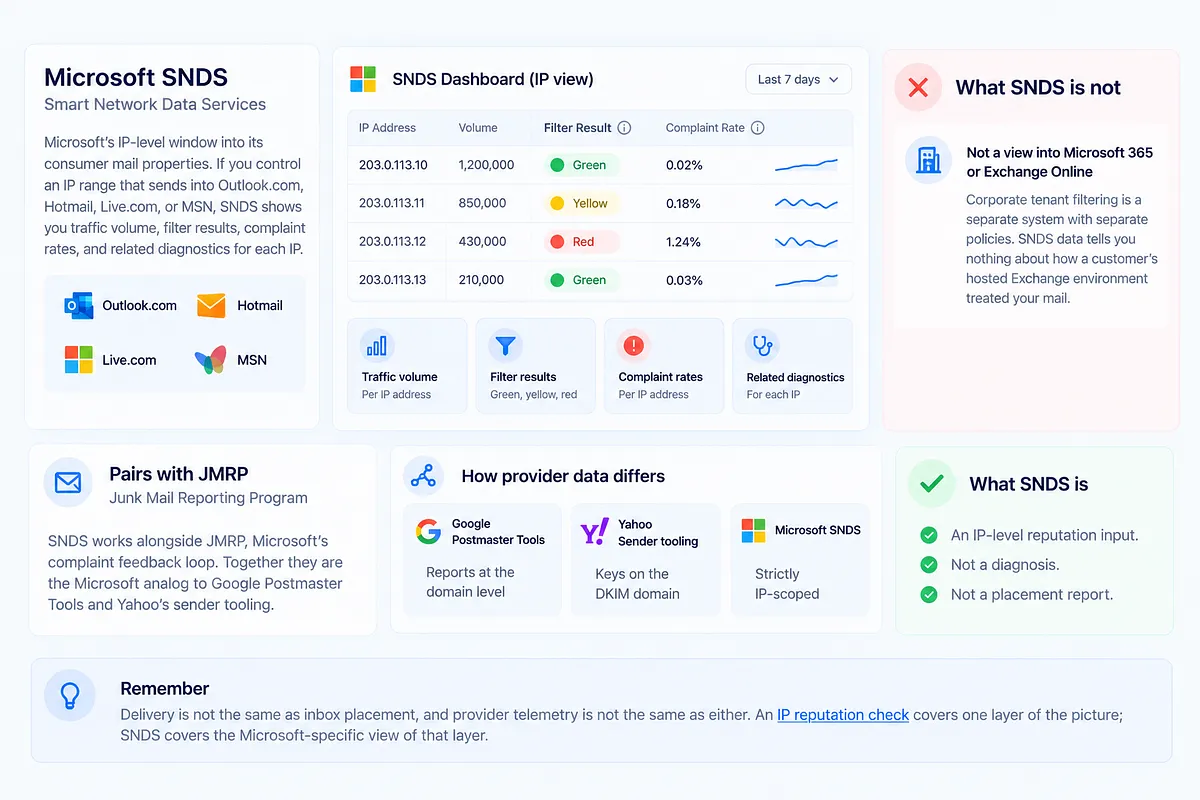
Smart Network Data Services is Microsoft's IP-level window into its consumer mail properties: Outlook.com, Hotmail, Live.com, and MSN. If you control an IP range that sends into those systems, SNDS shows you traffic volume, filter results as green, yellow, or red, complaint rates, and related diagnostics for each IP.
What it is not: a view into Microsoft 365 or Exchange Online. Corporate tenant filtering is a separate system with separate policies, and SNDS data tells you nothing about how a customer's hosted Exchange environment treated your mail.
SNDS pairs with JMRP, the Junk Mail Reporting Program, which is Microsoft's complaint feedback loop. Together they are the Microsoft analog to Google Postmaster Tools and Yahoo's sender tooling, with one structural difference worth keeping in mind: Google reports at the domain level and Yahoo keys on the DKIM domain, while SNDS is strictly IP-scoped. If your reputation problem lives at the domain layer, SNDS may look clean while Outlook placement degrades anyway. An IP reputation check covers one layer of that picture; SNDS covers the Microsoft-specific view of the same layer.
SNDS is a reputation input. It is not a diagnosis and it is not a placement report. Delivery is not the same as inbox placement, and provider telemetry is not the same as either.
What changed in the 2026 SNDS migration
On June 8, 2026, Microsoft moved SNDS to a new portal at https://substrate.office.com/ip-domain-management-snds/SNDS. The old host, sendersupport.olc.protection.outlook.com/snds/, redirects to it. The UI refresh is the least interesting part. The substantive changes sit underneath:
| Area | Before | After |
|---|---|---|
| Portal | sendersupport.olc.protection.outlook.com/snds/ | substrate.office.com/ip-domain-management-snds/SNDS (old URL redirects) |
| Automated data access | Long-lived CSV download URLs | Links expire after 30 days, then return 404 |
| Programmatic access | Screen-scraping and CSV pulls | OAuth 2.0 API: IP Data and IP Status, with date-filtered and IPv4 queries |
| JMRP complaint format | Full original message, complaint samples, recipient visible | Standard ARF (RFC 5965), no full MIME, no samples, no recipient address |
| Spam-trap data | Trap hit counts in the Data Report | Removed as of July 22, 2026 |
| Network ownership | Delegations effectively permanent | Delegations expire and must be revalidated |
Nothing in the table changes how Microsoft filters your mail; it changes what you can see, and through what plumbing.
Why the OAuth API and expiring links create silent Outlook blindness
The workflow most teams actually ran was Automated Data Access: generate a CSV URL once, wire it into a script, forget it. Those URLs now expire after 30 days, and an expired link does not error loudly. It returns a 404 your script may swallow without complaint.
The OAuth 2.0 API is the intended replacement, and it is genuinely more capable: IP Data and IP Status endpoints, date-filtered queries, IPv4 lookups. The catch is the auth model. As practitioners have reported it, the OAuth flow is desktop-oriented, access tokens last around eight hours, and there is no refresh token for unattended server-side pulls. Microsoft has not published a spec that says otherwise, so treat those limits as observed by senders rather than documented guarantees. Either way, the operational shape is the same: a pipeline that needs a human to re-authenticate is not monitoring, it is a chore with gaps in it.
The failure mode is the dangerous part. A broken SNDS pull does not look like an outage. It looks like "Outlook is fine": flat charts, no new complaints, no red IPs. By the time someone notices the data stopped in July, placement may have been moving for weeks. If your SNDS ingestion has not been touched since before June 8, assume it is broken until you have proven it is not.
JMRP is now ARF: you can still act, you just cannot name the person
JMRP complaints now arrive as standard ARF reports under RFC 5965, and the privacy trim is real. The full original message is gone. Complaint sample downloads are gone. The recipient address is gone. You can no longer look up who complained and suppress that one address.
What survives is everything you control on the way out. An ARF report still carries enough of your own message to attribute the complaint, provided you planted the handles before sending: the Message-ID, custom X-headers such as a campaign ID or send ID, a VERP-encoded envelope sender, and the DKIM selector and domain. If your sends carry those, every complaint still maps cleanly to a campaign, a stream, and a segment.
This is not Microsoft being difficult. It is the same privacy and anti-abuse posture Gmail has held for years; Google's feedback loop has been anonymous and aggregate from the start, and Microsoft trimming recipient data brings the two providers into line. The provider pattern is clear: complaint feedback is moving from "who complained" to "what did they complain about."
Which means the work does not stop, it moves up a level. Address-level suppression from JMRP is over; campaign-level and stream-level attribution is the durable practice, and it is what you should already be running across every ISP, not just Microsoft. A complaint spike you can pin to one campaign is actionable. A complaint spike you cannot attribute is just anxiety.
Spam-trap counts are gone. Outlook list hygiene is not.
The removal of spam-trap hit counts from the Data Report on July 22, 2026 is the biggest visibility loss in this migration. It is not the biggest problem, and the distinction matters.
Trap hits were never the disease. They were a proxy for hygiene: a nonzero count meant your acquisition or list maintenance was letting dead and recycled addresses through. Microsoft removing the counter does not remove the traps, and it does not change how trap hits feed the filtering decision. It only removes your view of them. Treating the empty column as absolution is the exact mistake this migration invites.
The replacement is not one signal but a stack, and every layer of it is something you can own rather than borrow from a provider:
- Bounce and deferral patterns on Outlook traffic, especially unknown-user rates creeping up on older segments
- Complaint movement through the ARF stream, attributed by campaign
- Engagement decay by acquisition cohort, which surfaces list rot before traps do
- Outlook seed placement, measured as Inbox, Spam, or Missing, as the ground-truth check
- Cross-ISP confirmation: hygiene problems rarely stay Microsoft-only for long
One transition-period caution: trap numbers you recorded shortly before July 22 should be read as directional, not exact. Do not build a cleanup threshold on a metric that was already being dismantled.
Does an SNDS color change actually hurt your inbox placement?
Sometimes.
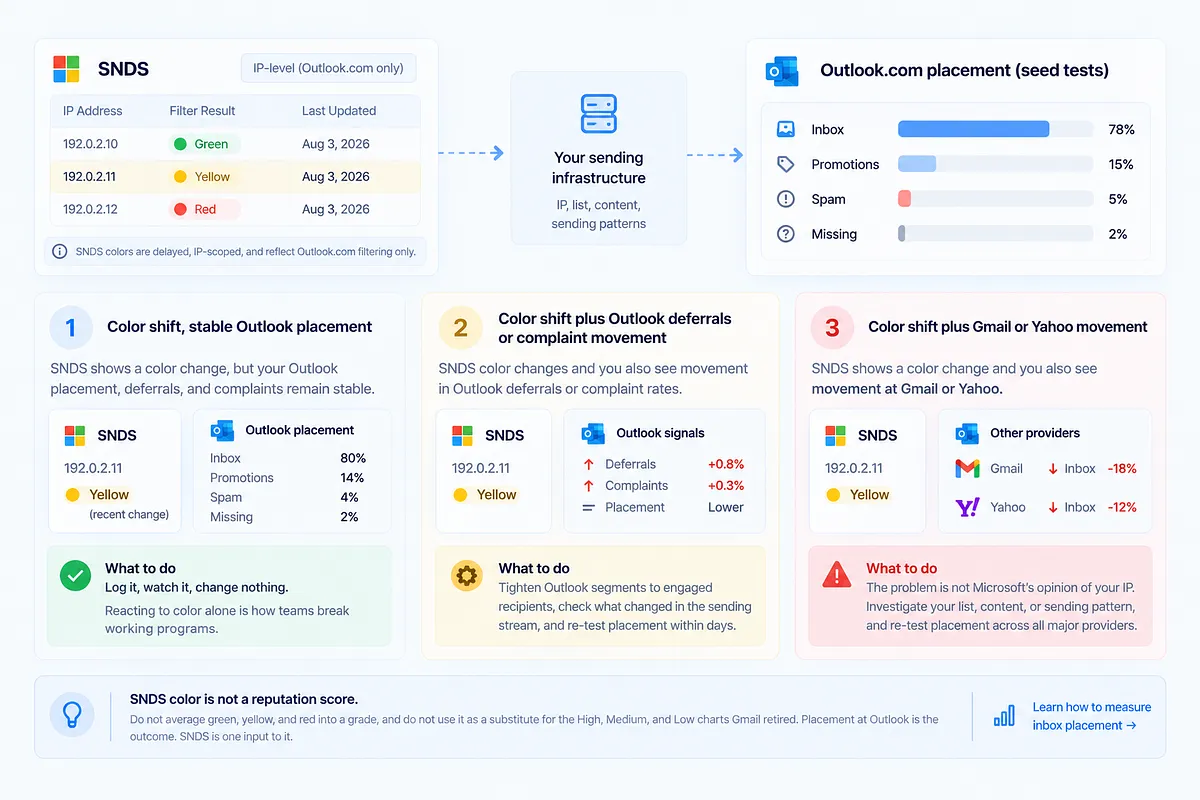
SNDS filter colors are delayed, IP-scoped, and Outlook.com-only. A yellow that appears today reflects filtering decisions already made, on one IP, at one provider's consumer properties. It is an investigation trigger, not a verdict. Grade the severity by what moves with it:
- Color shift, stable Outlook placement. Your seed tests still show inbox at Outlook, deferrals are flat, complaints are flat. Log it, watch it, change nothing. Reacting to color alone is how teams break working programs.
- Color shift plus Outlook deferrals or complaint movement. Now two independent signals agree. Tighten Outlook segments to engaged recipients, check what changed in the sending stream, and re-test placement within days.
- Color shift plus Gmail or Yahoo movement. The problem is not Microsoft's opinion of your IP. Something upstream, in the list, the content, or the sending pattern, is degrading reputation everywhere, and SNDS just happened to say it first.
SNDS color is not a reputation score. Do not average green, yellow, and red into a grade, and do not press it into service as a substitute for the High, Medium, and Low reputation charts Gmail retired from Postmaster Tools. Gmail took its grades away; Microsoft still shows IP colors. Neither was ever a complete reputation system, and neither tells you how to measure inbox placement. Placement at Outlook is the outcome. SNDS is one input to it.
How to keep Outlook diagnosis intact after the signal loss
The operating sequence, in the order that prevents the most damage:
- Update portal access now. Confirm your team can log in at the new portal and that every IP range you send from is still visible. Do not wait for a bad week to discover the account lapsed.
- Inventory your automated CSV URLs and their rotation dates. Every Automated Data Access link now dies at 30 days. List them, calendar the rotations, and make your scripts alert on 404s instead of swallowing them.
- Confirm network ownership before delegations lapse. Ownership delegations now expire and must be revalidated. If an ex-employee or a former vendor holds the delegation, fix that this week, not when access disappears.
- Relink JMRP to an SNDS account with current network access, so the ARF stream keeps flowing through the transition.
- Inject attribution handles into every send: Message-ID discipline, campaign and send-ID headers, VERP envelope senders. ARF complaints are only as useful as the handles you planted.
- Decide API versus manual pull honestly. Given the token model as senders currently report it, roughly eight-hour tokens with no unattended refresh, choose either an owned re-auth process someone is accountable for, or a scheduled manual pull. An unowned automation is the worst of both.
- Run an Outlook-inclusive inbox placement test whenever SNDS data stalls or colors move. Seeds are your ground truth when the provider dashboard goes quiet. Pair the tests with continuous deliverability monitoring across domain and IP reputation, blocklists, and authentication, the layer that keeps working when a provider trims its telemetry.
Microsoft, like Gmail before it, is narrowing what it shows senders. The programs that stay diagnosable are the ones whose monitoring does not depend on any single provider's telemetry.
Turning SNDS into an Outlook send decision
SNDS tells you how Microsoft sees your IPs: traffic, filter colors, complaint rates, all delayed and all scoped to consumer Outlook. Placement, complaints, and authentication tell you what to do about it.
An SNDS yellow next to stable Outlook seed placement, clean blocklists, and passing authentication reads very differently from the same yellow next to rising deferrals and a Gmail placement dip. Mailora correlates SNDS-relevant signals with Gmail, Outlook, and Yahoo placement, blocklist status, and SPF, DKIM, and DMARC results, so you know which variable to change first.
Run your first deliverability test with Outlook seeds included, so the next time a color moves or a CSV link dies, you are comparing against ground truth instead of guessing.
---
FAQ
What is Microsoft SNDS, and does it cover Microsoft 365 / Exchange Online?
SNDS (Smart Network Data Services) is Microsoft's IP-level reputation and traffic view for its consumer mail properties: Outlook.com, Hotmail, Live.com, and MSN. It does not cover Microsoft 365 or Exchange Online, which use separate tenant-level filtering. Clean SNDS data tells you nothing about how a corporate Exchange tenant treated your mail.
Why did my SNDS automated download links start returning 404 errors?
Since the June 8, 2026 migration, Automated Data Access CSV links expire after 30 days. Expired links fail as quiet 404s rather than loud errors, so scripts often keep running against dead URLs. Rotate the links on a calendar, alert on 404 responses, or move to the OAuth 2.0 API with an owned re-authentication process.
Can I still see who complained after JMRP switched to ARF?
No. ARF reports (RFC 5965) omit the recipient address, the full original message, and sample downloads. You can still attribute complaints to a campaign or sending stream using the handles in your own message: Message-ID, custom campaign headers, VERP envelope senders, and the DKIM domain. Attribution at the campaign level replaces suppression at the address level.
Does the removal of SNDS spam-trap counts mean I can stop list hygiene for Outlook?
No. Microsoft removed the counter on July 22, 2026, not the traps. Trap hits still affect filtering; you just cannot see them. Replace the proxy with signals you own: bounce and deferral patterns, attributed complaint movement, engagement decay by cohort, and Outlook-inclusive seed placement tests.
How do I know if an SNDS color change is actually hurting inbox placement?
Correlate it. A color shift with stable Outlook seed placement and flat deferrals is a watch item. A color shift plus Outlook deferrals or complaint movement calls for segment tightening and a re-test. A color shift plus Gmail or Yahoo placement movement means the problem is upstream of Microsoft entirely. Run an Outlook-inclusive placement test to confirm before changing anything.
Stay in the loop
Deliverability insights, product updates, and early access to new features. No spam, unsubscribe anytime.
By subscribing, you agree to our Privacy Policy. Unsubscribe anytime.