Google Postmaster Tools Without Reputation Scores: How to Diagnose Gmail Inbox Placement
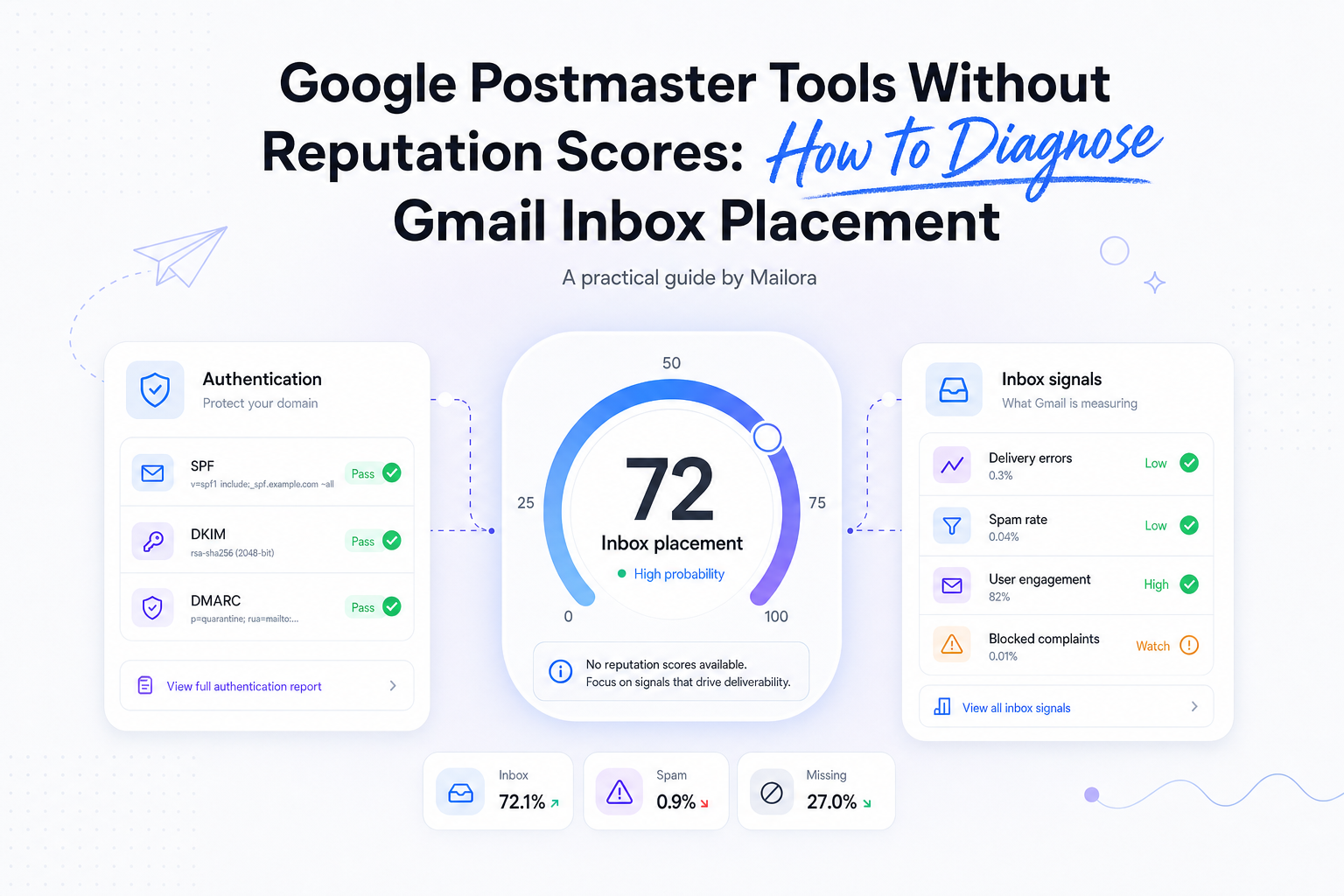
Key Takeaways
|
Something feels off at Gmail. Opens dipped, replies dried up, and you do what every email operator learned to do years ago: open Google Postmaster Tools and look for High or Low. The charts are not there anymore. "What does Gmail think of me?" no longer has a color. The useful question is where the mail landed, for whom, and what changed.
The reputation score was broad, slow, and easy to misread, but it was a single shared number a team could point at in a Monday meeting. Postmaster Tools v2 gives you compliance data and plain-language verdicts that still do not tell you why, and they still do not show Inbox versus Promotions versus Spam. Most teams either go looking for a replacement number or refresh six dashboards hoping one of them turns into an answer.
Work this sequence instead: confirm the problem is Gmail placement, read your own evidence, treat Postmaster as a clue rather than a verdict, and change one thing at a time. Reputation was never the root cause of anything. It was a delayed picture of complaints, silence, suspicion, and infrastructure. You still have all of that evidence. Start with an email deliverability test that tells you where mail is landing right now.
What Postmaster Tools still shows, and what the missing score never was
The v1 Domain Reputation and IP Reputation dashboards, with their High, Medium, Low, and Bad ratings, are gone from Postmaster Tools v2. Gmail did not stop evaluating your reputation. It evaluates it constantly, internally, per user and per message. It simply stopped publishing the color-coded summary.
Here is what survived the transition and what is new:
Report | v1 | v2 |
| Spam rate | Yes | Yes |
| Feedback Loop (FBL) | Yes | Yes |
| Authentication (SPF, DKIM, DMARC) | Yes | Yes |
| Encryption (TLS) | Yes | Yes |
| Delivery errors | Yes | Yes |
| Domain Reputation | Yes | Removed |
| IP Reputation | Yes | Removed |
| Compliance Status | No | New |
| Deliverability Analysis | No | New |
Be clear about what the score never was. Domain Reputation was not inbox placement. It was a delayed, aggregated reflection of complaints, engagement, authentication results, and sending behavior, compressed into four buckets and updated on Gmail's schedule, not yours. A High rating never meant your mail was in the inbox. Plenty of senders held a High rating while a meaningful slice of their mail sat in Promotions or worse.
The distinction that matters, and the one that should anchor every Gmail investigation: delivery is a transport result. Placement is a filtering outcome. The receiving server accepting your message tells you the pipe works. It tells you nothing about whether a human can see the message. Reputation, whether Gmail publishes it or not, sits underneath placement as one input among several. We covered how this played out for IP-level signals in our IP reputation check guide, which noted the v2 removal when it landed in late 2025.
Confirm the failure is Gmail placement, not a blended dashboard
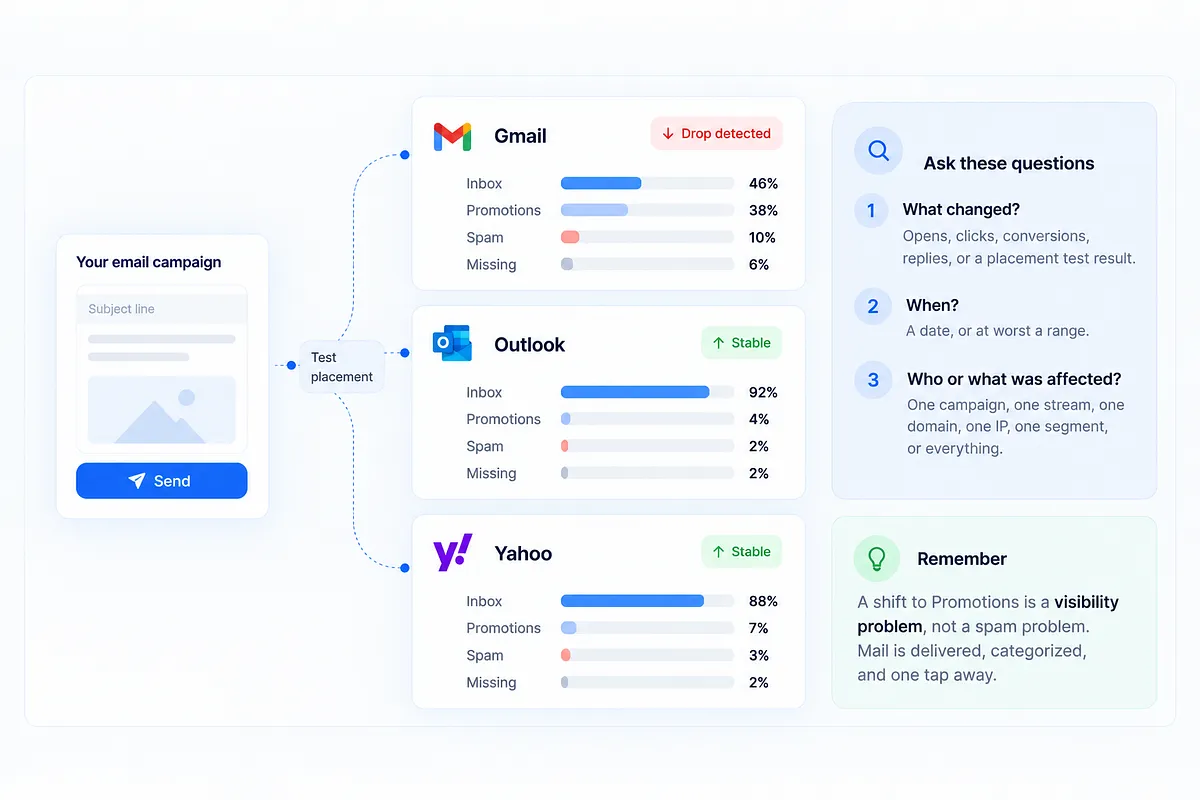
Before you interpret anything Google shows you, establish that you actually have a Gmail problem. Three questions, answered with your own data:
- What changed? Opens, clicks, conversions, replies, or a placement test result. Name the metric.
- When? A date, or at worst a range. Filtering changes correlate with something you did or something Gmail did.
- Who or what was affected? One campaign, one stream, one domain, one IP, one segment, or everything.
Then split the failure into one of three shapes. A Gmail-only drop while Outlook and Yahoo hold steady points at Gmail-specific filtering. A multi-ISP drop points at infrastructure, authentication, or a list-quality problem every provider can see. And a shift into the Promotions tab is a visibility problem, not a spam problem. Promotions is not a Gmail outage. Mail in Promotions was delivered, categorized, and is one tap away. Treating it like a reputation crisis leads to exactly the wrong interventions.
While you are at it, list every coincident change: volume or cadence shifts, a new audience source, new content or templates, a domain or IP change, DNS or authentication edits, ESP configuration changes, suppression logic, unsubscribe processing, messages per recipient, or a shift in the transactional and marketing mix. One of these usually turns out to be the story.
The way to confirm the shape of the problem is ISP-level placement testing: where does the same message land at Gmail, Outlook, and Yahoo, split across Inbox, Promotions, Spam, and Missing? That is the ground truth you check Google's verdicts against, not the other way around.
Read your own sending evidence before Gmail's verdicts
Your own event data is the richest evidence you have, and it is available in real time. Before opening Postmaster Tools, pull:
- Accepted, deferred, and rejected counts with the actual SMTP response codes. Deferrals that resolve are throttling. Rejections are a different investigation.
- Complaints from feedback loops where your ESP surfaces them, tagged to campaign and segment.
- Clicks, replies, and conversions. Opens are noisy since Apple MPP and bot prefetching, so treat them as a trend line at best.
- Unsubscribes, including whether one-click unsubscribe requests are being processed promptly.
- Volume, split by campaign, segment, sending domain, IP, and mail stream.
Then isolate. Did one campaign fail while everything else held? That points at content or audience. Did every Gmail stream degrade at once? That points at domain-level filtering. Is Gmail stable while another ISP dropped? Then this is not a Gmail investigation at all.
The goal of this pass is a hypothesis, not a verdict: a testable cause and a way to check it. Run a placement check before the send and a check after. The pre-send test tells you where a campaign will land, and the post-send verification tells you where it did. A weekly glance at a reputation chart never gave you either.
What Gmail complaint data can and cannot tell you
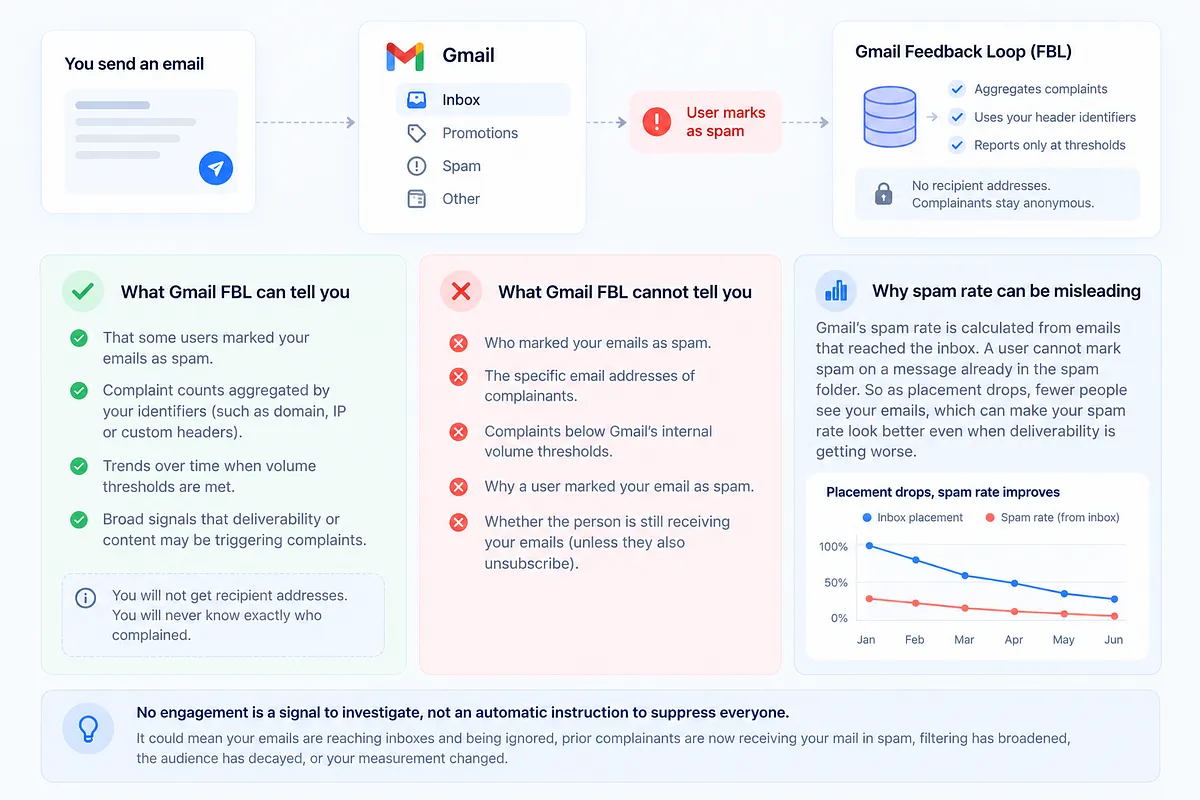
Gmail's Feedback Loop is unlike the FBLs you may know from other providers. There are no recipient addresses. You will never get a list of who marked you as spam. The FBL works on identifiers you embed in headers, aggregates complaints against those identifiers, and only reports when volume thresholds are met. Complainants stay anonymous, and unless they also unsubscribe, they usually stay on your list.
The spam rate report has its own subtlety: it is calculated from mail that reached the inbox. A user cannot mark spam on a message already sitting in the spam folder. This produces the cruelest illusion in deliverability: a spam rate that improves as placement collapses. A pretty 0% can mean nobody is complaining, or it can mean nobody is seeing your mail.
After a user marks your mail as spam, Gmail typically routes your future messages to that user's spam folder. From your side, that person now looks permanently silent. So when a verdict or a metric says users are not taking action, several different realities could be hiding underneath: mail is reaching inboxes and being ignored, prior complainants are now receiving mail in spam, filtering has broadened beyond complainants, the audience has genuinely decayed, or your measurement changed and the audience did not. "No engagement" is a signal to investigate, not an automatic instruction to suppress everyone.
How to use Compliance Status and Deliverability Analysis as clues
Compliance Status is v2's checklist of Google's sender requirements: SPF and DKIM authentication, DMARC alignment, forward and reverse DNS, TLS encryption, message formatting, spam rate, and one-click unsubscribe with timely processing. Meeting every requirement is necessary. It is not sufficient. Authentication proves who you are; it does not prove anyone wants your mail. We have written about this gap before, for senders whose emails pass checks but still don't land.
Deliverability Analysis is Gmail's plain-language layer, and its verdicts are clues, not diagnoses. Read them as "what this establishes" and "where to look next":
Verdict (Google's language) | What it establishes | Where to look next |
| Not enough outgoing email | Volume below reporting thresholds | Nothing is wrong by default; do not manufacture volume to force a verdict |
| Many delivery errors | Mail is being rejected or deferred at SMTP | Your rejection logs and SMTP codes, split by stream and IP |
| Sender does not meet requirements | A compliance item is failing | Compliance Status detail; check for partial failures on one domain or stream |
| Spam rate above 0.1% | Inbox-delivered mail is drawing complaints | Which campaigns and audience sources drove the spike |
| Users do not want your messages | Complaint and negative-signal patterns | Acquisition sources, frequency, and expectation mismatch |
| Users don't take action | Low engagement on delivered mail | The hidden states above: ignored, filtered, or decayed |
| Users signal they want your messages | Positive engagement patterns | Keep doing what produced this; investigate other ISPs if problems persist |
On spam rate, read trends over single days, and hold the two policy numbers in mind: Google recommends staying below 0.1%, and 0.3% is the ceiling for bulk senders. Use FBL identifiers to find campaign and category patterns, never people. And watch authentication and delivery-error charts for partial failures: intermittent DKIM on one subdomain looks fine in an aggregate view and terrible in a per-stream one.
One scope note: Postmaster Tools reflects mail to personal Gmail accounts (@gmail.com and @googlemail.com). It is not a window into every Google Workspace tenant you send to.
Build a Gmail hypothesis you can test, don't hunt for a new score
Don't hunt for a replacement score. Every tool in the diagnostic kit is evidence with limits, not a universal reputation number:
- Seed tests show controlled placement across ISPs. They do not show every real recipient's inbox.
- DMARC reports show authentication outcomes across receivers. They say nothing about placement.
- Blocklists show a listing exists. A listing may not prove impact on Gmail at all.
- Engagement metrics trend usefully but opens are noisy and lag the filtering decision.
- Complaint rate and Postmaster dashboards show aggregated, delayed, inbox-weighted signals.
The method that works: one hypothesis, one variable, a stable comparison cohort, and a rollback plan. Concrete versions we see constantly:
- Audience expansion, then complaints. You added a new source; spam rate crossed 0.1% ten days later. Test: pause the source, hold everything else, watch the trend.
- Volume spike, then deferrals. Delivery errors rose after a 3x send day. Test: return to baseline volume and step up gradually.
- The second daily send underperforms. Messages per recipient doubled; engagement per message halved. Test: cut back to one and compare the same segment week over week.
- One acquisition source is toxic. Complaints concentrate in a single signup flow. Test: split it into its own segment and measure separately.
- Intermittent DKIM on one domain. Authentication passes 94% instead of 100%. Test: fix the signing config, verify per-stream.
- Gmail-only versus multi-ISP. Placement testing tells you which investigation you are actually in.
If content is your suspect, that is a multi-variant content test: isolate which element of the email moves Gmail's filtering, one variant at a time. It is a controlled experiment, not a new color chart. The measurement side of that discipline is covered in how to measure inbox placement.
Decide the next send with Gmail placement in the loop
Once you have a diagnosis, decide the next send. If the evidence says engagement genuinely died, you have three honest options: a careful re-engagement series to a recent-activity slice, a reconfirmation campaign followed by suppression of non-responders, or moving the preference conversation to another channel entirely. Confirmed opt-in is evidence of consent quality at signup, not proof of lifetime enthusiasm. People change; lists decay even when acquisition was clean.
Recipients hold preferences at the brand level. Nobody cares that your promotional mail and transactional mail use different domains; if they are tired of the brand, both streams feel it eventually. And stream separation exists to protect infrastructure, so a marketing problem does not take down password resets. It must never become a way to route around a stop signal.
Then keep Gmail placement in the loop permanently: ISP-level placement results, reputation and blocklist trends, authentication visibility, and a prioritized next step after every test, so the missing High and Low chart is never again the thing you wait for. Mailora doesn't replace Gmail's missing reputation grade with another color. It helps you see what changed at Gmail, Outlook, and Yahoo, and what to do next.
The practical next step: run your first deliverability test, then pull your Postmaster v2 data and your own event data up side by side.
FAQs
1. Did Gmail stop using sender reputation, or only stop showing the score?
Only the display is gone. Gmail still evaluates sender reputation internally as one input to filtering decisions. Postmaster Tools v2 removed the Domain Reputation and IP Reputation dashboards; the underlying evaluation continues, message by message.
2. What should I look at first in Google Postmaster Tools v2 if mail is going to spam?
Compliance Status first, to rule out a failing requirement, then the spam rate trend against the 0.1% recommendation. But before either, confirm the problem with your own event data and an ISP-level placement test, so you know whether this is Gmail-specific, multi-ISP, or a Promotions-tab shift.
3. Why can my Gmail spam rate look low even when inbox placement is bad?
Because Gmail calculates spam rate from mail delivered to the inbox. If most of your mail is already filtered to spam, users cannot complain about it, and the reported rate stays flat or improves while placement collapses. A low spam rate plus falling engagement is a reason to test placement, not relax.
4. Does Google's Feedback Loop tell me which subscribers marked me as spam?
No. Gmail's FBL is identifier-based, thresholded, and anonymous. It reports complaint patterns against identifiers you embed in headers, never recipient addresses. Use it to find which campaigns or categories draw complaints, then act on segments and sources rather than individuals.
5. Can a seed test or another reputation score replace Postmaster Tools Domain Reputation?
No single number can, and that is the point. Seed tests show controlled placement across ISPs, not every real inbox. Third-party reputation scores measure different signals than Gmail does. The replacement for the score is a process: your event data, placement testing, and Postmaster's compliance and verdict data, read together against one testable hypothesis at a time.
Stay in the loop
Deliverability insights, product updates, and early access to new features. No spam, unsubscribe anytime.
By subscribing, you agree to our Privacy Policy. Unsubscribe anytime.