SPF Too Many DNS Lookups: Why It Happens and How to Fix It for Good
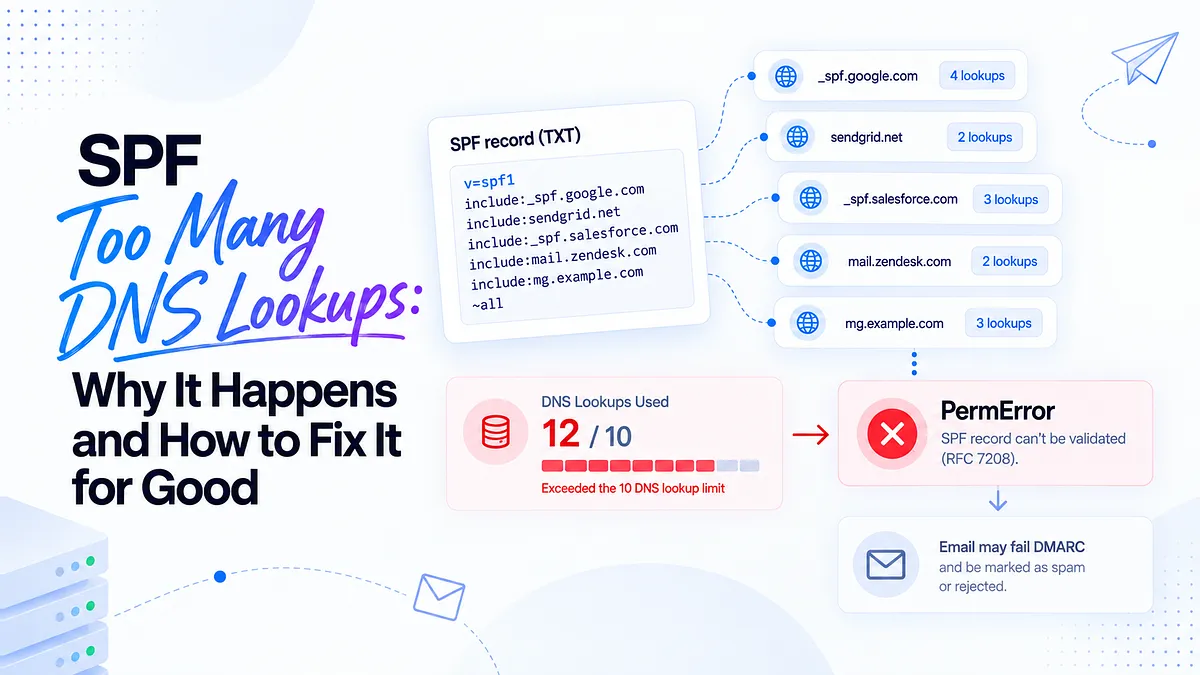
An SPF record that validated cleanly last quarter can quietly break the moment someone on your team connects a new marketing tool. Nothing errors out. No alert fires. Your DNS console still shows a record that looks perfectly fine. But somewhere between your fourth and fifth sending platform, the record tipped past SPF's 10-DNS-lookup limit, and every receiver that checks it now returns a PermError instead of a pass.
For teams running transactional mail, marketing campaigns, support tickets, and CRM sequences from the same domain, "too many DNS lookups" isn't a syntax bug. It's a growth leak. DMARC converts that PermError into an authentication failure, mailbox providers downgrade the mail, and the first symptom anyone notices is open rates drifting down with no obvious cause.
This guide covers both halves of the problem: why the limit exists and how counting actually works, and (the part most guides skip) how to decide which parts of your record are safe to remove, so the fix holds as your stack keeps growing.
What "SPF too many DNS lookups" actually means
SPF (Sender Policy Framework) lets a domain publish which servers are authorized to send mail on its behalf. When a receiving server checks your SPF record, it may need to make additional DNS queries to resolve the mechanisms inside it: every include: points at another domain's SPF record, which may point at more.
RFC 7208, the SPF specification, caps those DNS-querying mechanisms at 10 per check. Exceed the cap and the receiver stops evaluating and returns PermError, a permanent error meaning the record can't be validated at all.
Two things make this failure mode nasty:
- It's not a typo. Your record can be syntactically perfect and still fail. Most "is my SPF valid?" checks that only look at syntax will wave it through.
- It's silent. No bounce necessarily comes back to you. Receivers simply stop treating your mail as authenticated, and filtering gets progressively harsher. You find out through engagement metrics, weeks later.
The SPF 10-lookup limit explained (RFC 7208)
The limit isn't arbitrary. Every SPF check a receiver performs can trigger a chain of DNS queries. Without a cap, an attacker could publish a deliberately deep SPF record and use the world's mail servers as a DNS amplification engine, with every spam message forcing dozens of queries against a victim's DNS. The 10-lookup ceiling protects receiver resources and shuts down that abuse vector.
There's a second, less-known limit in the same RFC: a maximum of 2 void lookups per check. A void lookup is a DNS query that returns no answer or NXDOMAIN, typically caused by an include: pointing at a domain that no longer publishes an SPF record. Cross two void lookups and you get a PermError even if your total lookup count is fine. If you've ever seen the error "a null DNS lookup was found for include," this is the limit you hit; a stale include for a vendor you stopped using is the usual culprit.
Both limits are hard. There is no receiver-side grace, no warning threshold, no partial credit.
Which SPF mechanisms count toward the limit (and which don't)
Counting is where most teams get burned, because it's not the number of terms you can see in your record. It's the number of DNS queries required to resolve them, recursively.
Mechanisms that count toward the 10:
- include: costs one lookup each, plus every lookup inside the included record
- a costs one lookup
- mx costs one lookup
- ptr costs one lookup (and is deprecated; avoid it entirely)
- exists: costs one lookup
- redirect= costs one lookup, plus everything inside the target
Mechanisms that don't count:
- ip4: and ip6: are literal addresses, zero DNS required
- all is a policy statement, not a query
Here's how a record with four visible includes blows past the limit. Suppose your record is:
v=spf1 include:_spf.google.com include:sendgrid.net include:_spf.salesforce.com include:mail.zendesk.com ~all
Four includes looks comfortably under 10. Now count the actual queries in this illustrative scenario:
Mechanism | Direct lookup | Nested lookups | Running total |
| include:_spf.google.com | 1 | 3 (Google's netblock includes) | 4 |
| include:sendgrid.net | 1 | 0 | 5 |
| include:_spf.salesforce.com | 1 | 3 | 9 |
| include:mail.zendesk.com | 1 | 2 | 12 |
Twelve lookups from four includes. Add one more vendor next quarter and you're at 14 or 15. The record looks short; the resolution tree is what counts, and vendors change their own nested includes without telling you.
Why this error is more than a technical footnote
DMARC evaluates SPF as one of its two authentication inputs. When SPF returns PermError, DMARC treats it as an SPF failure, full stop. If DKIM isn't passing and aligned for that message stream, the message fails DMARC entirely, and your published policy (quarantine or reject) tells receivers what to do with it.
The stakes have risen recently. Microsoft 365 no longer honors allow rules (like safe-sender list entries) for domains that fail authentication, meaning even recipients who explicitly trusted you can have your mail filtered when SPF breaks. Google and Yahoo's bulk-sender requirements similarly assume working authentication as table stakes.
Translate that to business terms: a lookup-limit breach on your primary domain can simultaneously degrade marketing campaigns, transactional receipts, support replies, and sales sequences, since every stream shares the record. Fewer inboxed messages, fewer opens, less pipeline, and a sender reputation that erodes while the dashboard says "delivered."
How to check if SPF lookups are hurting your deliverability
Start by counting. Run your domain through an SPF checker that evaluates the full resolution tree, not just syntax. You're looking for two numbers: total DNS lookups (against the limit of 10) and void lookups (against the limit of 2). Good evaluators show the tree itself, so you can see exactly which include contributes which lookups; that map is what you'll work from when trimming.
But a lookup count in isolation doesn't tell you whether real mailbox providers are actually rejecting or spam-foldering your mail because of it. That's the question that matters. Run an email deliverability test to see how your messages authenticate and where they land across Gmail, Outlook, and Yahoo. If SPF is returning PermError in live evaluation, you'll see it reflected in authentication results and placement, not just in a static DNS readout.
While you're diagnosing, check for the void-lookup variant too. If your checker reports "a null DNS lookup was found for include," one of your includes points at a domain with no SPF record, usually a vendor you've offboarded or a domain they've deprecated. That's a different failure than the 10-lookup breach, and often an easier fix: delete the dead include.
How to fix SPF too many DNS lookups
Work the remediation hierarchy in order of safety. Flattening is on the list, but it's last for a reason.
- Audit and remove unnecessary includes. Most over-limit records carry dead weight: ESPs trialed and abandoned, tools that moved to their own return-path domain, duplicate entries. Every removed include reclaims its whole nested subtree.
- Consolidate sending platforms. If two tools do the same job (two transactional providers, two survey tools that send email), consolidating isn't just an SPF win; it simplifies reputation management too.
- Segment senders across subdomains. Each subdomain gets its own SPF record and its own fresh 10-lookup budget. Move marketing to mail.yourdomain.com, support to help.yourdomain.com. This is the structural fix for multi-platform teams.
- Replace stable includes with static ip4:/ip6: ranges. For vendors with genuinely stable IP ranges, listing addresses directly costs zero lookups. Only do this where the vendor documents and commits to their ranges.
- Flatten as a last resort, resolving all includes to raw IPs. It works, but it creates a maintenance liability (more on that below).
One more mistake to rule out while you're in DNS: multiple SPF records. A domain may publish exactly one v=spf1 TXT record. Two or more is an automatic PermError regardless of lookup count. If you find duplicates, merge the mechanisms into a single record: one v=spf1, one all at the end. For the full step-by-step on each fix, see how to fix SPF PermError.
Note on record length: each TXT string is capped at 255 characters, though multiple strings within one record concatenate. If your merged record runs long, split it into quoted strings rather than into separate records.
Decision intelligence: which includes to keep vs. remove
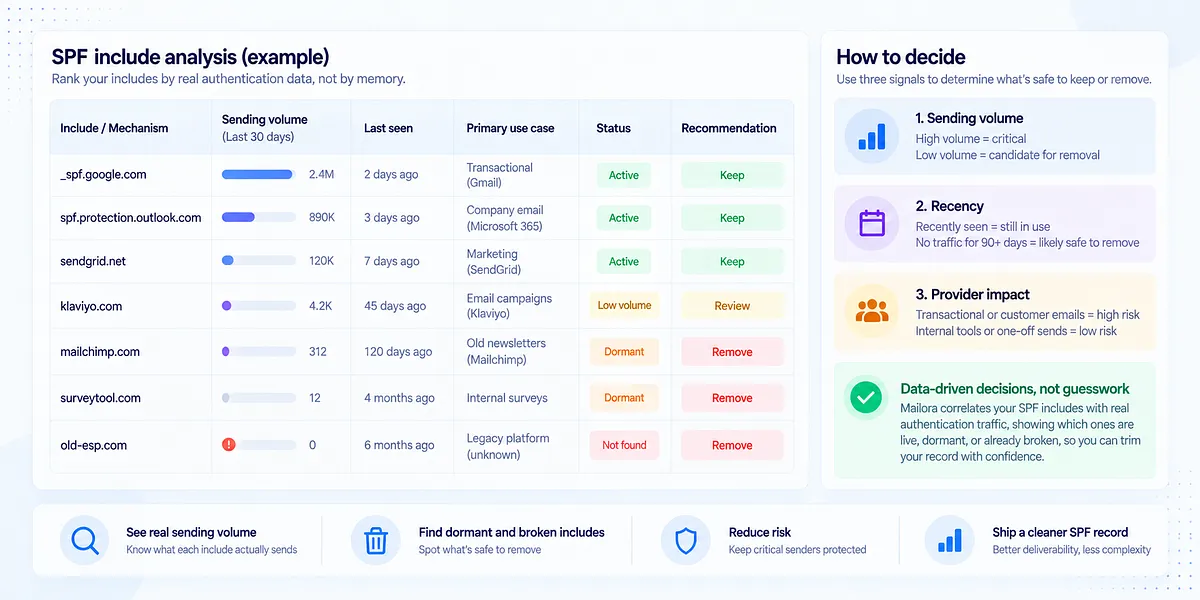
Here's where most guides stop short. They tell you how to trim SPF; they don't tell you what's safe to trim. And that's the actual decision a deliverability owner faces: delete the wrong include and legitimate mail starts failing authentication tomorrow.
The answer is to rank your includes by evidence, not by memory:
- Sending volume. How much mail actually authenticates through each include? An include carrying millions of messages a month is untouchable; one that carried twelve messages last quarter is a candidate.
- Recency. When did each include last authenticate real traffic? An ESP that's been dormant for 90+ days is a strong "safe remove" signal, likely a tool the team abandoned without cleaning up DNS.
- Provider impact. Which streams flow through it: transactional receipts (high blast radius if broken) or an internal survey tool (low)?
This is the layer Mailora is built for. Rather than showing you a lookup count and leaving the judgment call to guesswork, Mailora correlates your SPF mechanisms with observed authentication traffic, surfacing which includes are live and load-bearing, which are dormant, and which are already broken, so the record you ship is trimmed by data, not by hope. That's the difference between a checker and a decision layer.
Designing SPF for multi-sender, multi-domain environments
If you're running four or more platforms, stop trying to fit everything into one record and design the architecture instead. A reference layout for a growth-stage team:
- Root domain (yourdomain.com): corporate mail only (e.g., Google Workspace or Microsoft 365). One or two includes. Lookup budget stays low and stable.
- send.yourdomain.com: transactional (Amazon SES or SendGrid). Static ip4: ranges where the provider supports dedicated IPs.
- mail.yourdomain.com: marketing (Klaviyo, Braze). Their include plus room to grow.
- help.yourdomain.com: support (Zendesk).
- crm.yourdomain.com: sales/CRM sequences (Salesforce).
Each subdomain gets its own 10-lookup budget, its own reputation surface, and its own blast radius: a Salesforce include change can't break your receipts. Validate each subdomain independently after setup with a deliverability test, because a clean design on paper still needs confirmation from real mailbox providers.
SPF flattening: when it helps and when it hurts
Flattening means resolving every include down to its current IP addresses and publishing those as ip4:/ip6: mechanisms, dropping your lookup count to near zero. It genuinely works, today.
The cost shows up later. Vendors change their sending IPs without notice; a flattened record freezes yesterday's addresses in your DNS. When SendGrid or Salesforce rotates ranges, mail from the new IPs silently fails SPF, and you've recreated the original problem in a harder-to-diagnose form.
If you do flatten:
- Flatten selectively, not wholesale: only the includes you couldn't remove or replace otherwise.
- Keep TTLs short (300–3600 seconds) on the flattened record so corrections propagate fast.
- Schedule changes deliberately. Never flatten the week before a peak send like Black Friday.
- Assign an owner. A flattened record without a named owner and a re-verification cadence is a scheduled outage.
Be wary of auto-flattening services that treat flattening as the product. Automation that rewrites your record on a schedule hides the drift risk rather than surfacing it. Flattening is viable only when paired with monitoring that tells you when the flattened IPs and the vendor's real IPs diverge.
Reading SPF failures in your DMARC reports
Your DMARC aggregate (RUA) reports are where SPF PermErrors become attributable. Each report is XML from a receiving provider, listing source IPs, message counts, and per-message SPF and DKIM results. PermErrors show up as SPF permerror results tied to specific source IPs, which means you can trace them back to the platform that sent the failing mail.
In practice: group failing rows by source IP, resolve those IPs to your sending platforms, and you'll see whether the PermErrors concentrate in one stream (say, everything from your CRM) or hit everything on the domain (a root-record problem). That attribution decides what you fix first.
Raw RUA XML is genuinely painful to work with at volume: hundreds of files a week for a high-volume sender. Mailora's DMARC signal analysis does this grouping for you: errors clustered by root cause and sending source, ranked by message volume, so "we have PermErrors" becomes "the marketing subdomain record broke on Tuesday, affecting 40% of campaign volume. Fix that first."
How to prevent SPF lookup issues from coming back
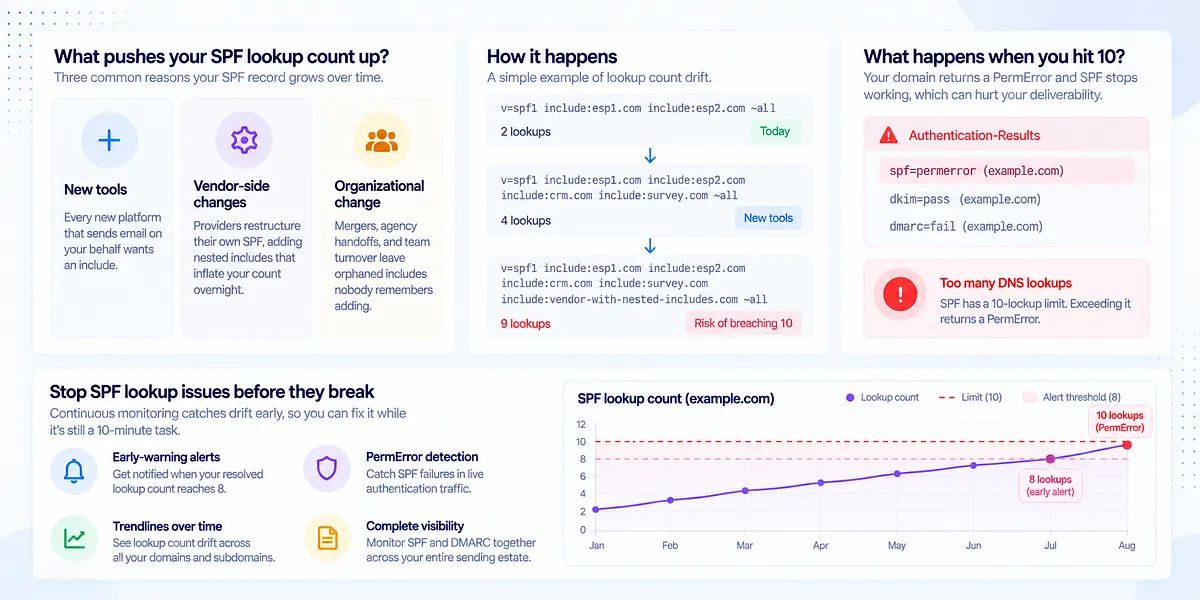
SPF isn't a set-and-forget artifact. It's drifting infrastructure. Three forces push your lookup count up over time without anyone touching your DNS:
- New tools. Every platform that sends email on your behalf wants an include.
- Vendor-side changes. Providers restructure their own SPF, adding nested includes that inflate your count overnight.
- Organizational change. Mergers, agency handoffs, and team turnover leave orphaned includes nobody remembers adding.
The fix that lasts is monitoring, not a bigger cleanup. Mailora's SPF and DMARC monitoring watches the things that change out from under you: early-warning alerts when your resolved lookup count reaches 8 (before you breach 10), PermError detection in live authentication traffic, and per-domain and per-subdomain trendlines so you can see drift building across your whole sending estate. Catching a record at 8 lookups is a 10-minute cleanup; catching it after a month of PermErrors is a reputation recovery project.
What a safe SPF record looks like
A healthy record for a root domain looks unglamorous:
v=spf1 include:_spf.google.com ip4:203.0.113.0/24 ~all
One include for corporate mail, a static range for owned infrastructure, a clear qualifier at the end, resolving to roughly 4 lookups and leaving real headroom. The marketing, support, and CRM streams live on subdomains with their own budgets.
What makes it safe isn't just the count. It's that every mechanism has a documented reason to exist, so the next person who touches the record knows what's load-bearing. Keep a one-line comment per mechanism in your DNS change log: which vendor, which stream, who owns it. And remember SPF is one leg of three: pair it with DKIM signing and an enforced DMARC policy, since receivers increasingly expect all three. For reference records across common stacks, see these SPF record examples.
FAQ
What causes the "SPF too many DNS lookups" PermError?
Your SPF record requires more than 10 DNS queries to fully resolve. Every include:, a, mx, exists:, ptr, and redirect= mechanism counts, including includes nested inside your vendors' records. Receivers stop evaluating at the limit and return PermError, which DMARC treats as an SPF failure.
What is the SPF 10 DNS lookup limit and why does it exist?
RFC 7208 caps DNS-querying mechanisms at 10 per SPF check to prevent SPF from being abused for DNS amplification attacks and to bound the work receivers do per message. It's a hard limit with no grace threshold. A separate limit allows at most 2 void lookups (queries returning no answer) per check.
Which SPF mechanisms count toward the 10-lookup limit?
include:, a, mx, ptr, exists:, and redirect= each count, and includes count recursively: everything inside an included record adds to your total. ip4:, ip6:, and all cost nothing, which is why static IP ranges are the most lookup-efficient way to authorize stable senders.
Is SPF flattening safe, or will it break my email authentication?
Flattening works on the day you do it, but flattened records go stale when vendors rotate their sending IPs, silently failing authentication for mail from new addresses. Treat it as a last resort after removing dead includes and segmenting across subdomains, and only run it with monitoring that alerts you when the flattened IPs drift from the vendor's live ranges.
Can you have more than one SPF record on a domain?
No. A domain may publish exactly one v=spf1 TXT record. Two or more cause an automatic PermError regardless of what's inside them. If you find duplicates, merge their mechanisms into a single record with one all qualifier at the end.
Stay in the loop
Deliverability insights, product updates, and early access to new features. No spam, unsubscribe anytime.
By subscribing, you agree to our Privacy Policy. Unsubscribe anytime.