SOA Lookup: How to Check and Read DNS SOA Records
Key Takeaways
- SOA (Start of Authority) is a DNS record that stores essential information about a DNS zone, including its primary nameserver, administrator contact, and zone update settings.
- An SOA lookup helps you inspect these details to understand how a domain’s DNS zone is configured and managed.
- Every DNS zone has an SOA record at its apex, which helps identify its authoritative configuration and management parameters.
- SOA records contain key fields such as the serial number, refresh, retry, expire, and minimum values, each serving a specific purpose in DNS operations.
- The SOA serial number helps secondary DNS servers determine whether their copy of a zone needs updating.
- You can perform an SOA lookup using command-line utilities such as dig or third-party DNS lookup services.
- SOA records and email authentication records serve different purposes. SOA manages DNS zone information, while SPF, DKIM, and DMARC help establish email sender authorization, message authenticity, and domain-level email policies.
- Understanding DNS configuration helps administrators troubleshoot infrastructure issues and supports a more informed approach to email deliverability and authentication.
What Is an SOA Record?
A Start of Authority (SOA) record is a DNS record that stores administrative information about a domain's DNS zone. It identifies the primary source of zone information and defines parameters used by secondary DNS servers when synchronising DNS data.
Every properly configured DNS zone has an SOA record at its apex. It contains information such as the primary name server, administrator contact, serial number, and timing values.
For example, when a DNS administrator updates a record, the SOA serial number can indicate that the zone data has changed. Secondary servers use this information to determine when they need to check for updates.
What Is an SOA Lookup?
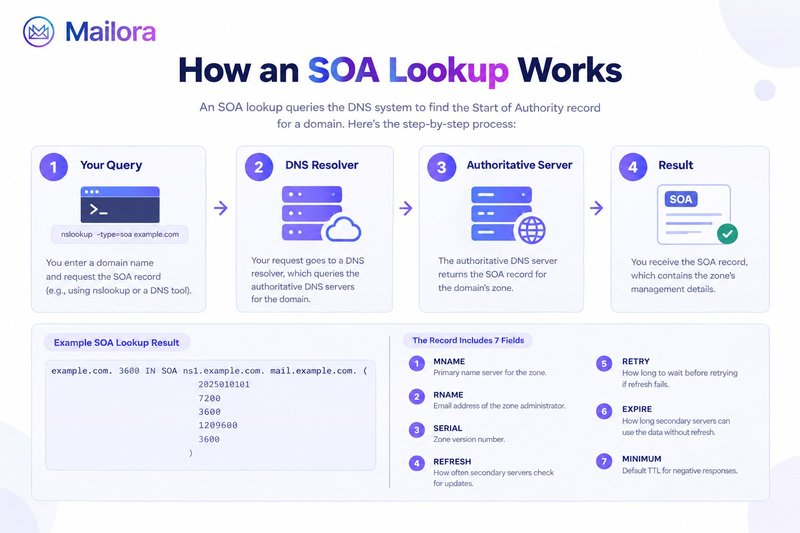
An SOA lookup is a DNS query that retrieves the Start of Authority record for a domain or DNS zone.
A DNS SOA lookup helps administrators inspect the zone's administrative details and synchronisation settings. It can be useful when troubleshooting DNS configuration, investigating inconsistent records, or checking whether zone information is being updated as expected.
You can use an online SOA checker or a DNS lookup service that supports SOA queries. These services retrieve publicly available DNS information without requiring access to the domain's hosting account.
How to Perform an SOA Lookup
You can check SOA record details using a third-party DNS lookup service.
Follow these steps:
- Open a DNS lookup service that supports SOA record queries
- Enter the domain name you want to investigate
- Select SOA as the DNS record type
- Run the lookup
- Review the returned record and examine its seven fields
For example, if you want to check SOA record details for example.com, enter the domain and select the SOA query type.
A DNS record lookup can return different record types depending on the query selected. Make sure you choose SOA rather than MX, A, TXT, or another record type.
The result should display the SOA record published for the queried DNS zone. Keep in mind that results can vary depending on the resolver, DNS propagation, and caching.
Understanding the 7 Fields of an SOA Record
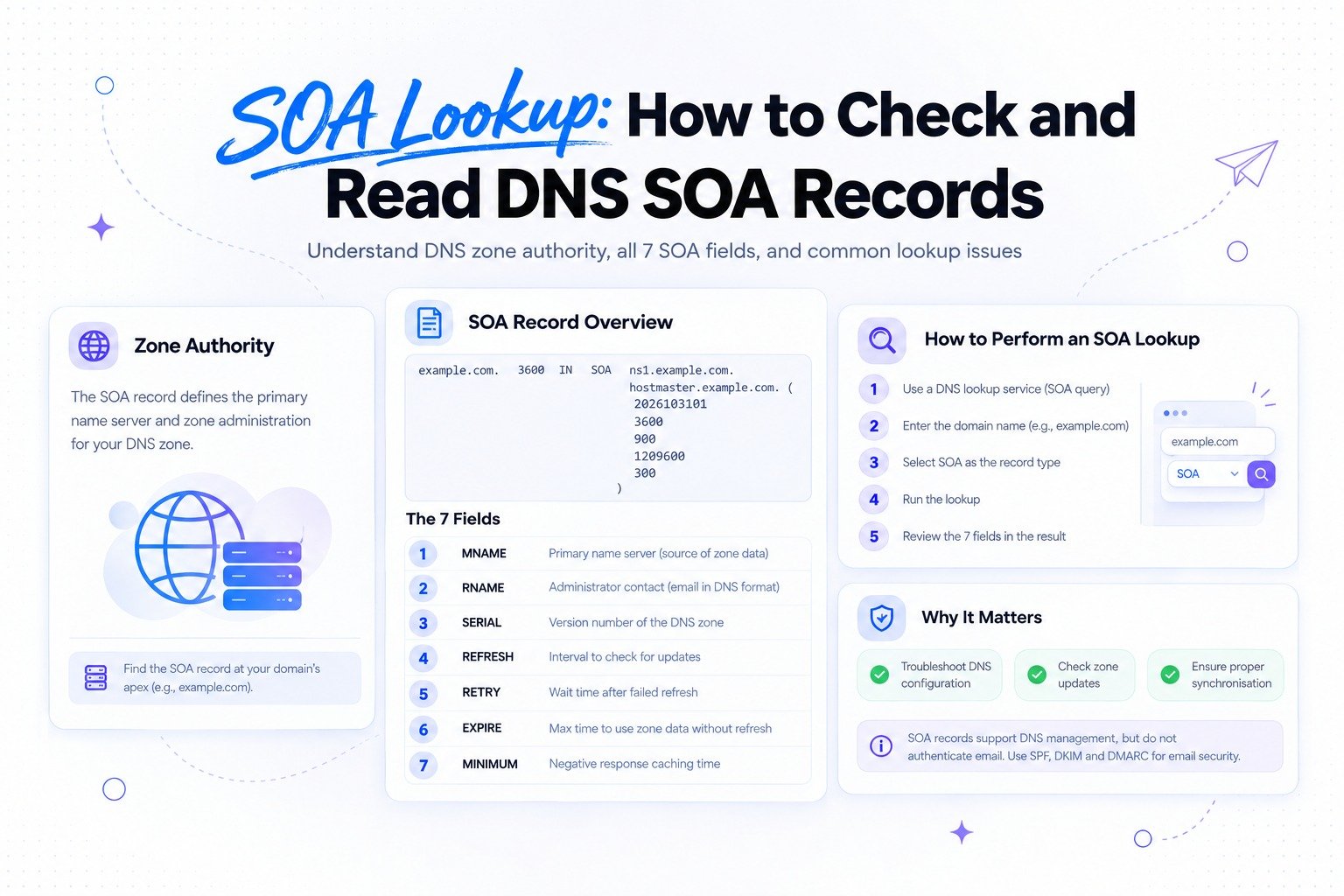
An SOA record contains seven important fields. Consider this illustrative example:
example.com. 3600 IN SOA ns1.example.com. hostmaster.example.com. (
2026103101
3600
900
1209600
300
)
| Field | Purpose |
|---|---|
| MNAME | Identifies the primary source of zone data |
| RNAME | Represents the administrator's contact email in DNS format |
| SERIAL | Version number of the DNS zone |
| REFRESH | Interval at which secondary servers check for updates |
| RETRY | Interval before retrying a failed refresh |
| EXPIRE | Maximum time a secondary server can use zone data without a successful refresh |
| MINIMUM | Used in determining negative DNS response caching |
Here is what each field means:
1. MNAME
MNAME identifies the primary name server associated with the zone's original source of data. It does not provide the complete list of authoritative name servers. That information is generally published through NS records.
2. RNAME
RNAME represents the email address of the person responsible for the DNS zone. DNS uses a domain-name format to represent this address. For example, hostmaster.example.com. conventionally represents hostmaster@example.com.
3. SERIAL
SERIAL is the version number of the DNS zone. When zone data changes, the serial number should be updated so secondary servers can identify the newer version.
It uses 32-bit unsigned serial-number arithmetic, so comparisons must account for rollover rather than treating the number as an ordinary unlimited counter.
4. REFRESH
REFRESH specifies how frequently secondary DNS servers should check the primary source for zone updates. DNS NOTIFY can also alert secondary servers about changes, so refresh is not necessarily the only way updates are detected.
5. RETRY
RETRY defines how long a secondary server should wait before trying again after an unsuccessful refresh attempt.
6. EXPIRE
EXPIRE defines how long a secondary server can continue serving the zone without successfully refreshing its data. Once this period expires, the server should no longer treat that zone data as authoritative.
7. MINIMUM
MINIMUM is used in negative DNS response caching. Under RFC 2308, the negative caching TTL is determined by the lower of the SOA record's TTL and the SOA MINIMUM value.
It should not be interpreted as a universal minimum TTL for every DNS record.
Why Is an SOA Lookup Important?
An SOA lookup helps DNS administrators understand how a zone is managed and identify potential configuration issues.
Common uses include:
- Checking zone updates: Compare serial numbers to investigate whether secondary servers have received newer zone data
- Troubleshooting synchronisation: Review refresh, retry, and expire values when investigating update delays
- Understanding DNS administration: Identify the primary source and administrative contact information
- Investigating negative caching: Understand why certain DNS responses may remain cached after a record changes
SOA information is particularly useful for domain administrators, hosting providers, and teams responsible for maintaining DNS infrastructure.
Common SOA Lookup Issues
An SOA lookup may reveal configuration differences or unexpected results. Common issues include:
| Issue | What to investigate |
|---|---|
| SOA record not returned | Check the queried domain, zone delegation, and DNS response |
| Unexpected serial number | Compare the serial across authoritative name servers |
| Delayed zone updates | Review refresh settings and DNS NOTIFY configuration |
| Secondary server stops serving a zone | Check the expire value and refresh failures |
| Unexpected negative responses | Review the SOA TTL and MINIMUM value |
A single lookup does not always reveal the root cause. Compare results across authoritative name servers and investigate the relevant DNS configuration before making changes.
SOA Lookup vs. Other DNS Lookups
Different DNS lookup types answer different questions. Choosing the correct record type helps narrow down an investigation.
| DNS record | What it helps identify |
|---|---|
| SOA | Zone administration and synchronisation information |
| A | IPv4 address associated with a hostname |
| AAAA | IPv6 address associated with a hostname |
| MX | Mail servers responsible for receiving email |
| TXT | Text-based DNS information, including SPF policies |
| NS | Authoritative name servers for a DNS zone |
An SOA lookup should not be confused with an MX lookup or an email authentication check. Each serves a different purpose.
How Does SOA Relate to Email Deliverability?
SOA records help manage DNS zones, but they do not directly authenticate outgoing emails or determine inbox placement.
Email authentication relies on separate DNS-based mechanisms:
- SPF: Specifies which sending sources are authorised to send email for a domain
- DKIM: Uses cryptographic signatures to help receivers verify email authenticity and integrity
- DMARC: Defines how receivers should handle messages that fail authentication checks and provides reporting mechanisms
For a better understanding, explore how DMARC works, SPF alignment, and DKIM alignment.
Although SOA and email authentication records serve different purposes, both belong to the broader DNS environment that email infrastructure depends on.
This is where Mailora becomes relevant. Mailora focuses on email deliverability intelligence and authentication visibility, helping teams better understand the factors that influence their email-sending environment.
Frequently Asked Questions
1. What does an SOA lookup do?
An SOA lookup retrieves the Start of Authority record for a DNS zone. It provides information about zone administration, serial numbers, and DNS synchronisation parameters.
2. How do I check an SOA record?
Use an online DNS lookup service that supports SOA queries. Enter the domain, select SOA as the record type, and review the returned values.
3. What are the 7 fields of an SOA record?
The seven fields are MNAME, RNAME, SERIAL, REFRESH, RETRY, EXPIRE, and MINIMUM.
4. Does every domain have an SOA record?
Every properly configured DNS zone has an SOA record at its apex. The result depends on querying the correct zone and receiving an appropriate DNS response.
5. What is the difference between SOA and NS records?
An SOA record contains administrative and zone synchronisation information. NS records identify the name servers responsible for a DNS zone.
6. Does an SOA record affect email deliverability?
An SOA record does not directly authenticate email or determine inbox placement. Email authentication depends on SPF, DKIM, and DMARC, while DNS configuration supports the broader email infrastructure.
7. What happens when an SOA serial number is not updated?
Secondary DNS servers may not recognise that newer zone data is available through serial-number comparison. This can lead to inconsistent DNS information until the issue is corrected.
8. Is an SOA lookup the same as an MX lookup?
No. An SOA lookup retrieves zone administration information, while an MX lookup identifies the mail servers responsible for receiving email for a domain.
Conclusion
An SOA lookup helps you inspect the administrative and synchronisation details of a DNS zone. By understanding its seven fields, you can investigate zone updates, identify configuration differences, and troubleshoot common DNS issues.
However, checking SOA records alone is not enough to assess email authentication or deliverability.
If you want to understand how your domain performs from an email deliverability perspective, try Mailora's free Email Deliverability Test.
Run a Free Email Deliverability Test to take a closer look at your email deliverability and authentication setup.
Send with confidence.
Stay in the loop
Deliverability insights, product updates, and early access to new features. No spam, unsubscribe anytime.
By subscribing, you agree to our Privacy Policy. Unsubscribe anytime.