What Marketers Must Check Before Sending Email: An Email Campaign Checklist
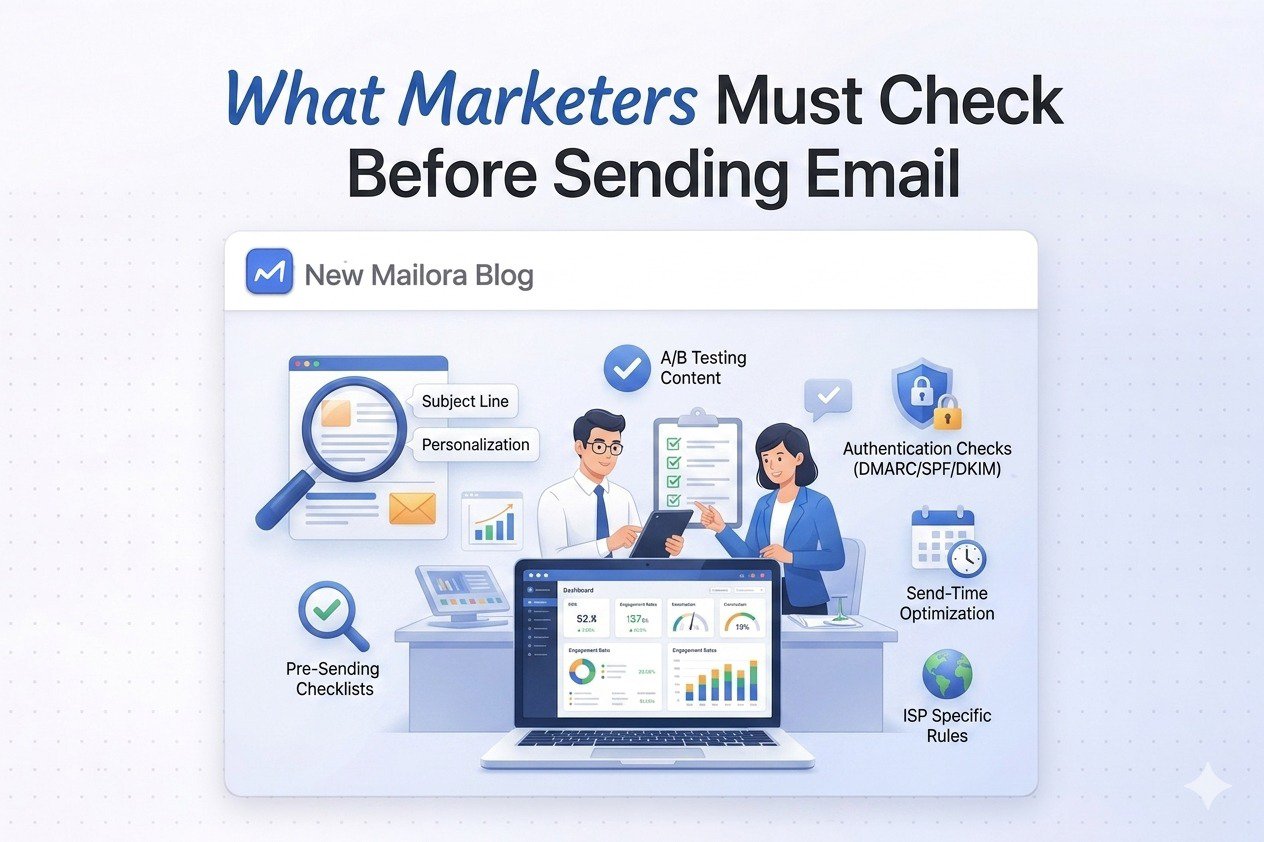
Campaign success is decided before the send, not after. Most deliverability failures, spam placements, and performance drops are preventable. They happen because marketing teams treat the send button as a publishing action rather than a release decision.
This is not a design checklist. It is not a reminder to test your subject line. It is a decision framework built for experienced marketers who already know how to build campaigns but want the discipline to launch them with confidence. If you have been burned before by a send that looked fine in staging and fell apart in live delivery, this is for you.
Think of this as your email campaign checklist, not a surface-level review, but a structured pre-send framework that covers every layer providers actually evaluate. It works as a practical email testing checklist and an email marketing campaign overview for release readiness. Before you click send, you need answers across four areas: identity, reputation, content, and sending behavior. Miss one and the campaign is already at risk.
Why "Just Send It" Is the Biggest Deliverability Risk
Pressure is the enemy of good launch decisions. When the campaign is ready, the copy is approved, and someone is waiting on results, the instinct is to ship. That instinct is where most avoidable mistakes are made.
Gmail and Yahoo have tightened enforcement on authentication, unsubscribe handling, complaint rates, DNS integrity, and message format. Gmail treats a sender as a bulk sender permanently once they cross the volume threshold even once. A single rushed send with unresolved technical risk can leave a mark that outlasts the campaign itself.
The most common errors in pressure-driven sends are not creative failures. They are operational ones:
- Infrastructure changed but was not fully tested before launch
- A broader-than-usual audience included inactive or risky segments from your email list (not just current subscribers)
- Reputation signals were trending down but nobody checked before the send
- Authentication passed, but alignment was never verified
Sending is a risk decision. The send button is a release gate. Not every campaign relies solely on links. Reports, invoices, media kits, and other downloadable files are often attached directly to emails, making it important to understand email attachment size limits before sending to avoid provider restrictions or delivery issues. A proper email campaign checklist before send is not bureaucracy, it is the difference between a controlled launch and an avoidable failure, especially for retail email campaigns and other high-volume programs.
Visual breakdown
Think of pre send risk as four stacked gates. If one gate fails, the whole send becomes unstable.
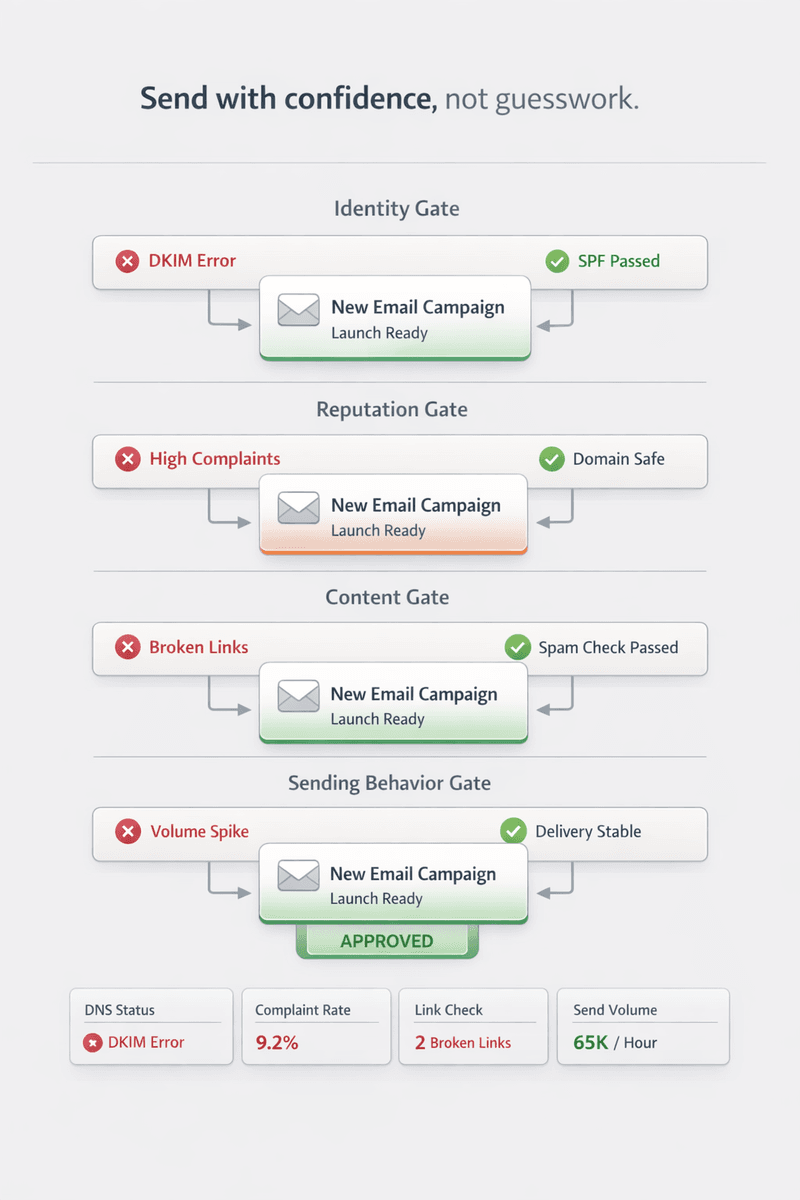
Every campaign should pass through four evaluation layers before it leaves staging. This pre-send email checklist structure is built around stacked gates. If one gate fails, the entire send becomes unstable, regardless of how strong the creative or the offer is.
- Identity: Am I authenticated and aligned as a sender?
- Reputation: Am I sending from a healthy position?
- Content: Will this message trigger filtering or cause confusion?
- Sending Behavior: Does this campaign look normal to providers?
None of these layers operates in isolation. A message with perfect authentication but a rising complaint rate will still underperform. A clean reputation with broken link logic still creates friction. Work through all four before you release.
1. Identity: "Is This Campaign Authenticated and Aligned?"
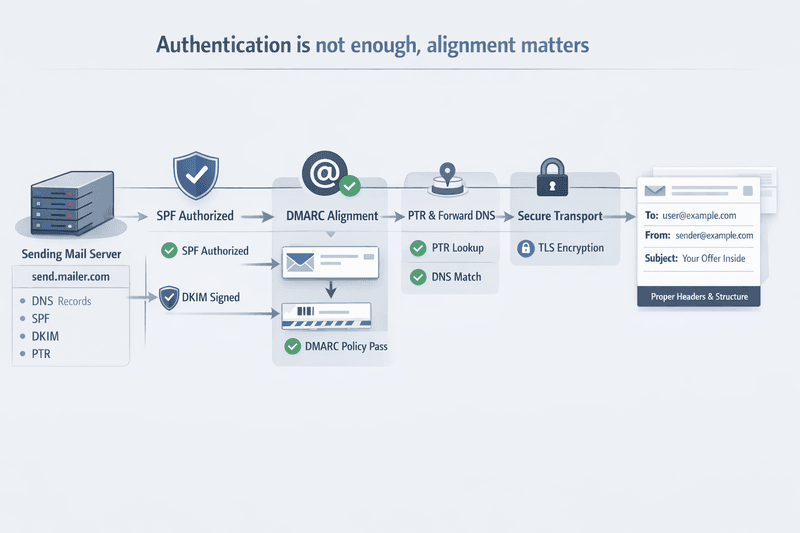
Identity is the technical foundation that proves you are allowed to send this message from this domain. For Gmail bulk senders, that means SPF, DKIM, DMARC, aligned From domain, valid PTR records, TLS on the sending connection, and RFC 5322 compliant message format.
The most important distinction here is the difference between authentication passing and alignment being correct. A message can pass SPF and DKIM while still failing DMARC alignment if the visible From domain does not match the authenticated domain. That mismatch is invisible in basic testing and creates real inbox risk.
Questions to ask:
- Does the visible From domain align with SPF or DKIM?
- Are all active sending tools and vendors authenticated under the same brand domain strategy (including any mobile email marketing or SMS-linked capture flows)?
- Are PTR and forward DNS records valid for the sending IPs?
- Is TLS active on the sending connection?
- Has any DNS change from the last few days fully propagated?
- Does the message have clean headers and a valid Message ID?
| SPF | Present and valid for the sending path | Authorizes the sending hosts |
|---|---|---|
| DKIM | Valid signature with modern key size (2048-bit preferred) | Protects integrity and proves domain responsibility |
| DMARC | Published and aligned with the visible From domain | Ties authentication to the identity users see |
| PTR + Forward DNS | Both valid and matching | Reduces technical trust issues at providers |
| TLS | Enabled for SMTP transport | Required by Gmail for bulk senders |
| Message Format | RFC 5322 compliant, valid Message ID, one From address | Reduces rejection and parsing failures |
A common failure mode: a team migrates to a new ESP but leaves one form workflow on the previous platform. The campaign passes internal tests, but one sending path signs with the wrong domain and breaks alignment for a segment of traffic. The fix is not more content review. The fix is inventory control over every sender in the stack (across all standard email marketing workflows and vendors, from your primary ESP to mylink marketingplatform).
Visual breakdown
Map identity as a chain: sending host, SPF authorization, DKIM signature, DMARC alignment, DNS trust, and message format.
Authentication proves your identity. Reputation answers a harder question: even if this message is valid, is it welcome? Providers evaluate reputation signals continuously, and the pattern leading up to your send matters as much as the send itself.
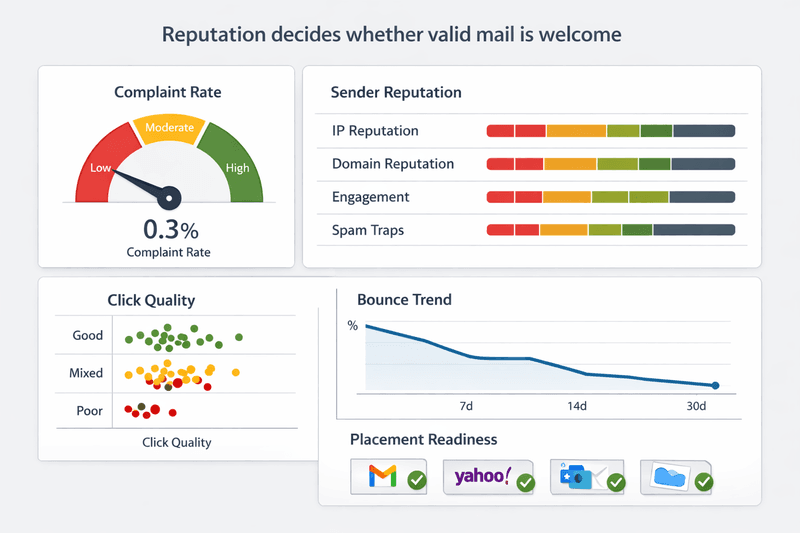
Google says bulk senders should keep spam rate below 0.1 percent and avoid ever reaching 0.3 percent or higher. Google also acknowledges it does not track open rates and cannot verify third-party open reporting. Apple Mail Privacy Protection further distorts open data by prefetching images regardless of whether a recipient actually opened a message. Open rate is not a reliable safety signal for effective email marketing campaigns.
Questions to ask:
- Is Gmail spam rate stable and well below the danger threshold?
- Did complaint volume rise after the last comparable send?
- Are hard bounces, blocks, or temporary failures trending upward?
- Are you sending to your most recently engaged users first (not just “subscribers engaged | campaign monitor” as a dashboard label, but real click intent)?
- Are inactive or high-risk recipients excluded before launch?
- Do controlled placement tests show normal inbox results for key providers?
| Spam complaint rate | Direct reputation input at providers | Core risk signal |
|---|---|---|
| Click and conversion quality | Indicates real intent and value | Stronger than inflated opens |
| Hard bounce trend | Shows list and routing health | Early quality warning |
| Domain and IP reputation | Reflects provider trust level | Needed for launch readiness |
| Placement test results | Controlled inbox signal | Useful validation layer |
| Complaint Feedback Loop data | Reveals who wants to unsubscribe | Suppression input before send |
A real scenario: a newsletter shows strong open rates after a subject line change, so the team expands the next send to older inactive users. Apple image loading had inflated the apparent engagement. Complaint pressure rises, and Gmail placement drops. The fix is to trust complaint rate and click quality, not vanity engagement numbers.
Visual breakdown
Picture reputation as a live score fed by complaints, engagement quality, bounce data, and provider trust.
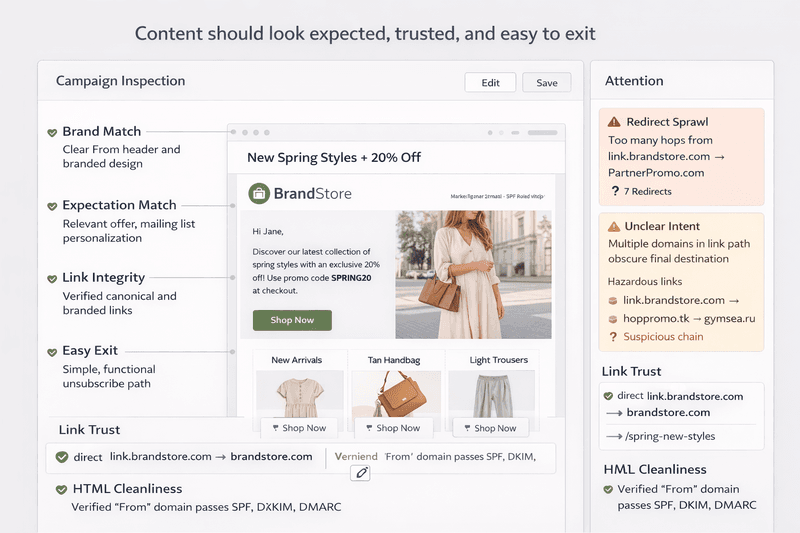
Content risk is not about avoiding spam words. Providers stopped relying primarily on keyword filters years ago. Real content risk comes from mismatch and friction: messages that do not match what users signed up for, links that route through unrecognized domains, and unsubscribe paths that do not work as required.
Gmail requires one-click unsubscribe for marketing and promotional messages from bulk senders and recommends honoring unsubscribe requests within 48 hours. Yahoo requires the proper list-unsubscribe header and says a request not honored within two days fails its requirement. In the United States, CAN-SPAM requires opt-out requests to be honored within 10 business days. UK and EU rules require careful attention to consent and direct marketing compliance.
Questions to ask:
- Does this email match what the recipient signed up for and what they have been receiving (targeted email that reinforces consistent marketing communication)?
- Are all links live, clearly branded, and necessary?
- Is one-click unsubscribe present where required?
- Does the body include a visible and functional unsubscribe option?
- Does the HTML render correctly across major clients and devices (across key email clients), and have you done accessibility-focused email testing?
- Is commercial intent clearly separated from transactional content?
- Do you have a valid consent or lawful marketing basis for this audience and jurisdiction (legal requirements and email marketing regulations)?
A common mistake: using a preference center as a substitute for one-click unsubscribe. Another: routing all calls-to-action through a newly created tracking domain that providers have no history with. Both create unnecessary friction. Clean up the link path and honor the unsubscribe requirement before launch, not after a complaint spike.
Visual breakdown
See content risk as a triangle: expectation match, link trust, and unsubscribe clarity.
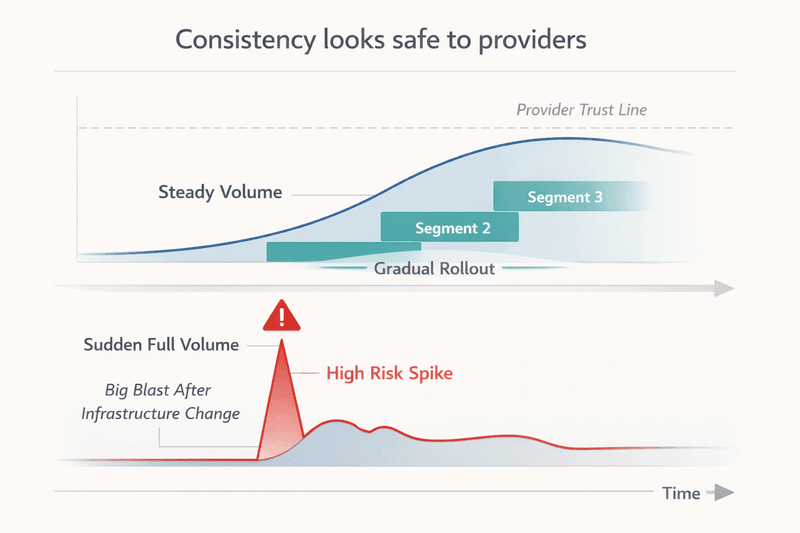
Providers assess not just what you send but how you send it. Volume consistency, traffic patterns, and the relationship between your sending history and your current campaign all factor into inbox placement decisions. Normal behavior earns trust. Sudden behavior raises questions.
Gmail advises senders to maintain a consistent sending rate, avoid volume bursts, ramp slowly after significant infrastructure or header changes, and increase modified traffic separately from unchanged traffic. Yahoo similarly advises separating different content types and streams, because promotional and transactional mail sharing a reputation surface creates risk for both.
Questions to ask:
- Is this send volume consistent with recent sending history for this domain and stream?
- Have any headers, domains, IPs, or ESPs changed recently?
- Are promotional and transactional messages separated into different streams?
- Are you sending to your most engaged cohort first?
- If volume is increasing, is the ramp gradual?
| Stable domain, stable stream, clean recent signals | Yes | Optional | No |
|---|---|---|---|
| Recent vendor or DNS change | No | Yes | Sometimes |
| Material volume increase | No | Yes | Sometimes |
| Weak recent complaint trend | No | Maybe | Yes |
| Broad inactive audience | No | No | Yes |
| Mixed transactional and promotional logic | No | Maybe | Yes |
A team moves to a new ESP and sends a holiday promotion at full volume on day one because the calendar cannot move. Providers see new infrastructure, an unfamiliar volume shape, and a traffic pattern they have no history with. The safer plan is a staged release by engagement tier, with highest-intent users first and lowest-intent users last.
Visual breakdown
Imagine behavior as a timeline. Stable sends create a recognizable pattern. Spikes break the pattern and raise risk.
The four-layer framework becomes most useful when it is converted into specific questions that produce a go or hold decision. This email deliverability checklist before sending is designed to be answered before a campaign leaves staging, not diagnosed after delivery problems begin. Consider it a basic 10-step email marketing checklist for experienced operators (not an ultimate email design checklist).
| Is my authentication aligned, not just passing? | From domain aligns with SPF or DKIM | Fix identity first |
|---|---|---|
| Has recent performance been stable? | Complaints, bounces, placement are normal | Reduce scope or hold |
| Am I sending to engaged users first? | Recent engagers are prioritized | Stage the send |
| Has anything changed in my infrastructure? | No major unresolved change | Pilot changed traffic separately |
| Is my volume consistent with previous sends? | Pattern looks normal for this domain | Ramp instead of blasting |
| Are all links and domains correct? | Links resolve cleanly and match the brand | Repair before launch |
| Does this email match user expectations? | Intent matches signup and recent cadence | Rewrite or re-segment |
| Am I excluding inactive or risky segments? | High-risk recipients are suppressed | Tighten the audience |
| Have I tested placement before sending? | Controlled test shows acceptable inbox rates | Run the test first |
| If this lands in spam, do I know why? | A clear diagnostic path exists | Do not send yet |
These questions should be recorded, not just reviewed mentally. Assign an owner to any unresolved risk. Set a hold rule for any answer that cannot be confirmed. Use this campaign readiness checklist as a formal sign-off document, a campaign that cannot pass it in writing is not ready to send.
Why Most Campaigns Fail Before They're Sent
Most campaign post-mortems focus on the wrong variables. Teams review the subject line, examine the creative, and analyze the send time. It's also common to see identical campaigns perform very differently across email platforms because mailbox providers evaluate sender reputation, infrastructure, and historical signals—not just the email itself. The actual failure was usually decided days or weeks earlier, when the infrastructure changed without a proper review, when the audience quality degraded without triggering a suppression update, or when reputation signals started trending the wrong way and nobody was watching.
"Everything looked fine but Gmail dropped us" is one of the most common things experienced email teams say. It usually means the team was checking for visible problems, not technical ones. Design and copy passed review. Authentication and alignment did not get the same scrutiny.
The discipline gap is not about knowledge. Most experienced marketers know what SPF, DKIM, and DMARC are. The gap is in the process: there is no formal email campaign checklist that requires technical sign-off before the creative sign-off means anything.
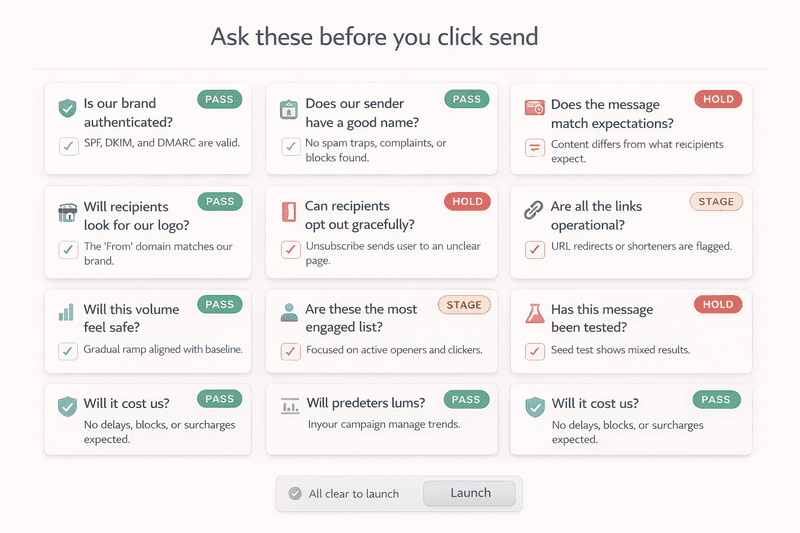
Checking means you verified prerequisites. Knowing means you gathered enough evidence to release with confidence. These are not the same thing, and the difference shows up in delivery results.
Checking: SPF passes, DKIM passes, links load in preview, the template renders in the tool.
Knowing: Authentication is aligned across every sending path. Reputation signals are stable. Placement testing on the actual message shows expected inbox rates. The audience has been filtered to remove risk. Volume is consistent with provider expectations.
| Manual QA | Are links, rendering, and obvious errors clean? | Fast and low cost | No provider truth |
|---|---|---|---|
| Seed testing (e.g. GlockApps) | Where did monitored test mail land? | Controlled inbox signal, auth and spam checks | Not your real audience history |
| Provider telemetry (e.g. Postmaster Tools) | How does Gmail view my domain? | Strong live reputation view | Can lag; requires sending scale |
| Integrated decision layer (e.g. Mailora) | Is this campaign safe to release now? | Combines testing, reputation context, and release logic | Requires proper setup and integration |
Seed testing is useful diagnostic evidence. GlockApps notes that its delivery report is accurate for its seed list, which is a cold audience operating under default filters. That tells you something real about authentication, spam score, and inbox placement in a controlled environment. It does not recreate your actual audience history, engagement pattern, or complaint profile. Pair it with provider reputation data and segmentation judgment before calling it a release decision.
For teams managing multiple streams, many sending tools, or shared and dedicated IP decisions, the governance challenge is larger. The framework is the same. The number of failure points is not. The most common email testing gaps show up when no one owns the core email testing areas (identity, reputation, content, and behavior) as part of campaign planning and ongoing review.
How to Reduce Risk Before Every Campaign
Building a repeatable pre-send email checklist process is not a one-time project. It is an operating standard that gets more valuable as your program scales and your sending history deepens.
- Test inbox placement before every significant send using controlled seed tests (and where it matters, b testing for placement, not just creative)
- Monitor authentication and alignment continuously, not just when something breaks
- Track performance trends across complaint rate, click quality, and bounce patterns over time
- Segment sends intelligently by starting with the most recently engaged cohort
- Enforce change control: any DNS, ESP, or domain change triggers a staged send before full volume
- Keep promotional and transactional streams separated wherever possible
- Record pre-send answers formally so post-send diagnosis has a baseline to work from
None of this requires sophisticated tooling to start. It requires a decision to treat the send as a release, not a publication. It’s also how you consistently improve effectiveness, protect long-term success rate, and build a successful email marketing campaign that supports exceptional brand experiences.
Send With Confidence, Not Guesswork
A real pre-send workflow is more than a spam checker or a link validator. It is a decision layer that combines deliverability testing, reputation context, infrastructure change control, and a formal release judgment that can be defended before the campaign goes live.
The marketers who send with consistent confidence are not necessarily the ones with the cleanest creative or the largest lists. They are the ones who built a preflight email campaign checklist into their workflow, internalized the ten questions, and created an organizational norm where technical sign-off carries the same weight as copy approval.
Before your next campaign, answer the questions. Check the four layers. Test placement on the actual message. Review your reputation signals. Confirm the audience is right-sized and properly suppressed.
If you can answer all ten questions in writing and every one resolves to a pass, you are not guessing. You are sending with evidence. That is the difference between hoping a campaign works and knowing it is ready.
If you need a step-by-step guide to operationalizing this across multiple teams and streams (including how to validate effective subject lines with different subject lines without over-indexing on opens), this framework can be adapted into a comprehensive guide and comprehensive rundown for complex programs, the exact approach we’ve seen work in high-discipline orgs like abstrakt marketing group, where expert insights are only valuable when they translate into repeatable release decisions and resources email marketing content your team actually uses.
Stay in the loop
Deliverability insights, product updates, and early access to new features. No spam, unsubscribe anytime.
By subscribing, you agree to our Privacy Policy. Unsubscribe anytime.