Multiple SPF Records: Why They Fail and How to Combine Them Correctly
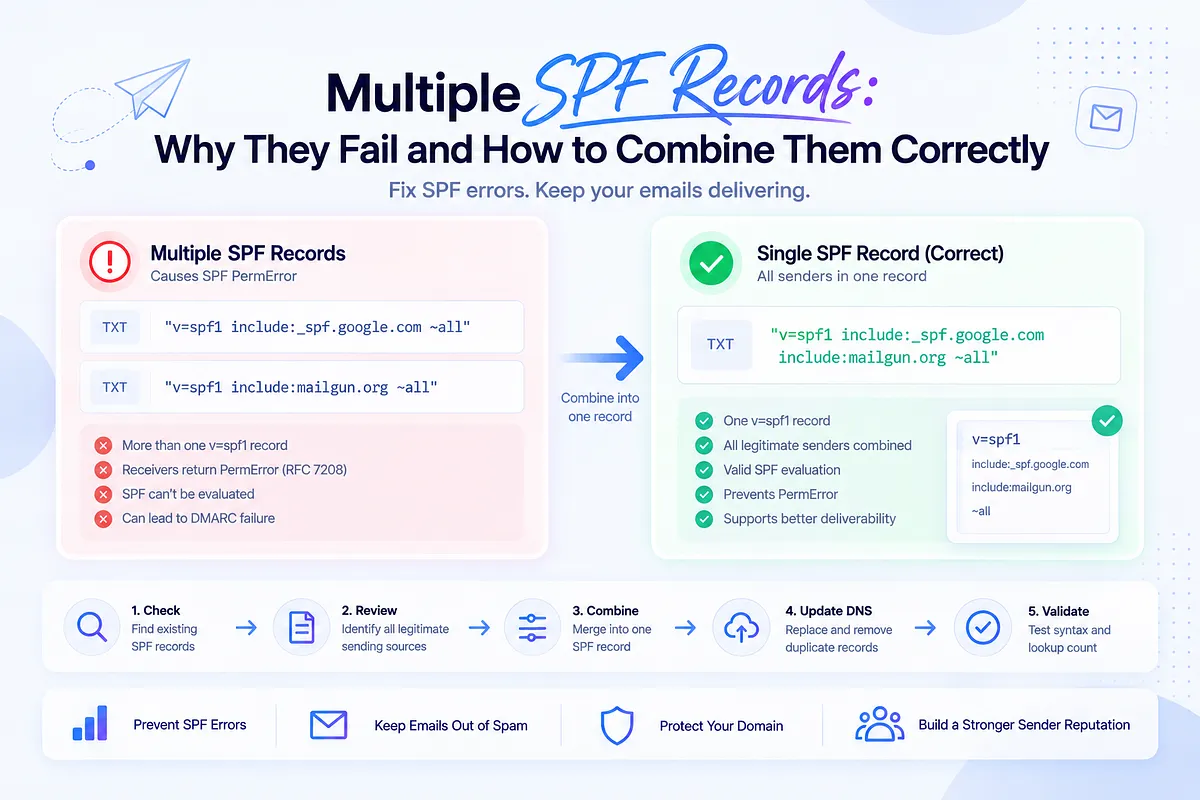
The domain that passed SPF last quarter can break the moment someone adds a new tool. A vendor onboarding doc says "add this SPF record," someone in ops pastes it into DNS as a new entry, and RFC-compliant receivers that evaluate SPF now see two v=spf1 records where RFC 7208 allows exactly one. That produces an SPF PermError. It is not the same thing as a DMARC fail, and it does not by itself put mail in spam. Teams often notice only after a campaign underperforms, because they were relying on one-off checks instead of continuous visibility.
That's the pattern behind most multiple-SPF-record incidents. This article covers why multiple records fail, how to merge them correctly without blowing the 10-lookup limit, and the question most guides never touch: how to decide which senders actually belong in the record. It's written from the perspective of teams that read DMARC data every day and know that "you have two SPF records" is the start of the diagnosis, not the answer.
Can You Have Multiple SPF Records on One Domain?
No. A domain can have exactly one SPF record: one TXT record beginning with v=spf1. This isn't a best practice or a convention; it's the standard. RFC 7208 (the current SPF specification, superseding RFC 4408) requires receivers to treat a domain publishing more than one v=spf1 TXT record as a permanent error.
When an RFC 7208-compliant receiver queries your domain and finds two or more v=spf1 records, it doesn't pick one, and it doesn't merge them for you. check_host() returns PermError. PermError means the policy could not be evaluated. It is not the same result as SPF Fail, and it is not automatically a DMARC fail. Receivers that do not check SPF will ignore the duplication.
The good news: this is one of the most fixable problems in email infrastructure. The records merge into one. How quickly receivers see the new record depends on DNS TTL, not a fixed clock: caches expire after the previous TTL, often minutes to a few hours, longer if the old TTL was set high. The rest of this article is about doing that merge correctly, because a naive merge can create a new failure on the way out of the old one.
What Happens When You Have More Than One SPF Record?
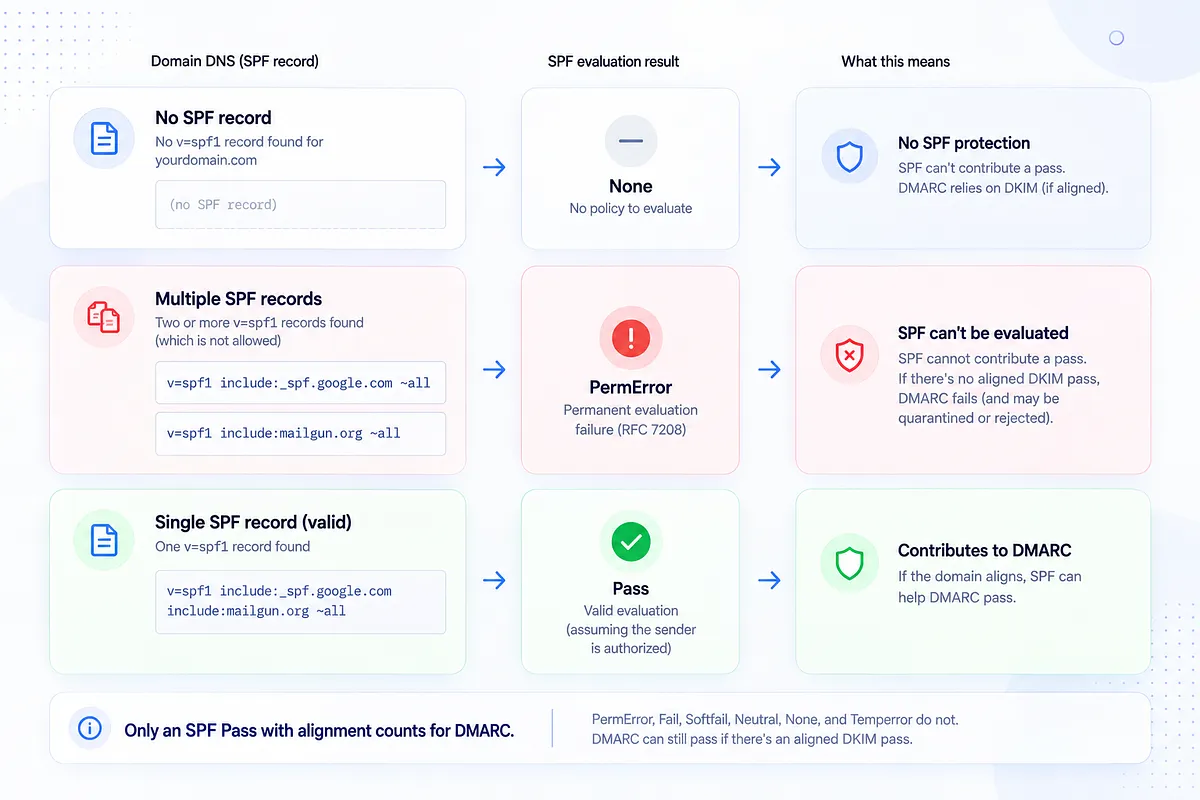
Receiver-side behavior is defined in RFC 7208 for implementations that follow the spec:
- No v=spf1 record: the result is None. The receiver has no policy to evaluate, and your domain gets no SPF protection or credit.
- Multiple v=spf1 records: the result is PermError, a permanent evaluation failure. The receiver couldn't determine your policy at all.
PermError matters because SPF can no longer contribute a pass. For DMARC, only an SPF Pass with alignment counts; PermError, Fail, Softfail, Neutral, None, and Temperror do not. If a message also has an aligned DKIM pass, DMARC can still pass even while SPF returns PermError. If the stream relies on SPF alignment alone, DMARC fails too. Under p=quarantine or p=reject, receivers should then quarantine or reject that mail. Under p=none, DMARC failure does not change disposition. Any extra placement impact beyond that is a receiver-specific filtering decision, not a guaranteed outcome of the SPF error.
The damage is also indiscriminate. Both records might individually be correct, with every include legitimate and every IP yours. It doesn't matter. The duplication itself is the SPF evaluation failure. We've covered the full diagnostic path in how to fix SPF PermError, because multiple records are one of its two most common causes (the other is coming later in this article).
How Multiple SPF Records Actually Happen (The Real Cause)
Nobody sets out to publish two SPF records. The duplication is a lifecycle problem: it enters through change events, which is why growth-stage stacks are especially exposed:
- Onboarding a new ESP or warm-up tool. The vendor doc says "add this SPF record to your DNS." It means "add our include to your existing record." The person doing the setup, often not the person who built the original record, takes the instruction literally and creates a second TXT entry.
- Agency and team handovers. The new operator doesn't know what the existing record covers, doesn't want to break it, and adds their own alongside it. Caution produces the exact failure it was trying to avoid.
- Vendor swaps. The new platform's record gets added; the old platform's record never gets removed. Now there are two, and one of them authorizes a vendor you stopped paying six months ago.
- M&A and domain consolidation. Two organizations' DNS zones merge, each bringing its own SPF record, and both survive the migration.
- Copy-paste setup instructions. The root enabler of all of the above: vendor documentation written for domains with no existing SPF, pasted into domains that already have one.
Notice what's common to every path: the domain was fine before the change and broken after it, with no error surfacing at the moment of the edit. DNS will happily store both TXT records. Only SPF evaluators object, and they object per message at authentication time. Whether that shows up as a DMARC fail or as a filtering problem depends on DKIM alignment and the domain's DMARC policy.
Valid vs. Invalid SPF: What a Correct Record Looks Like
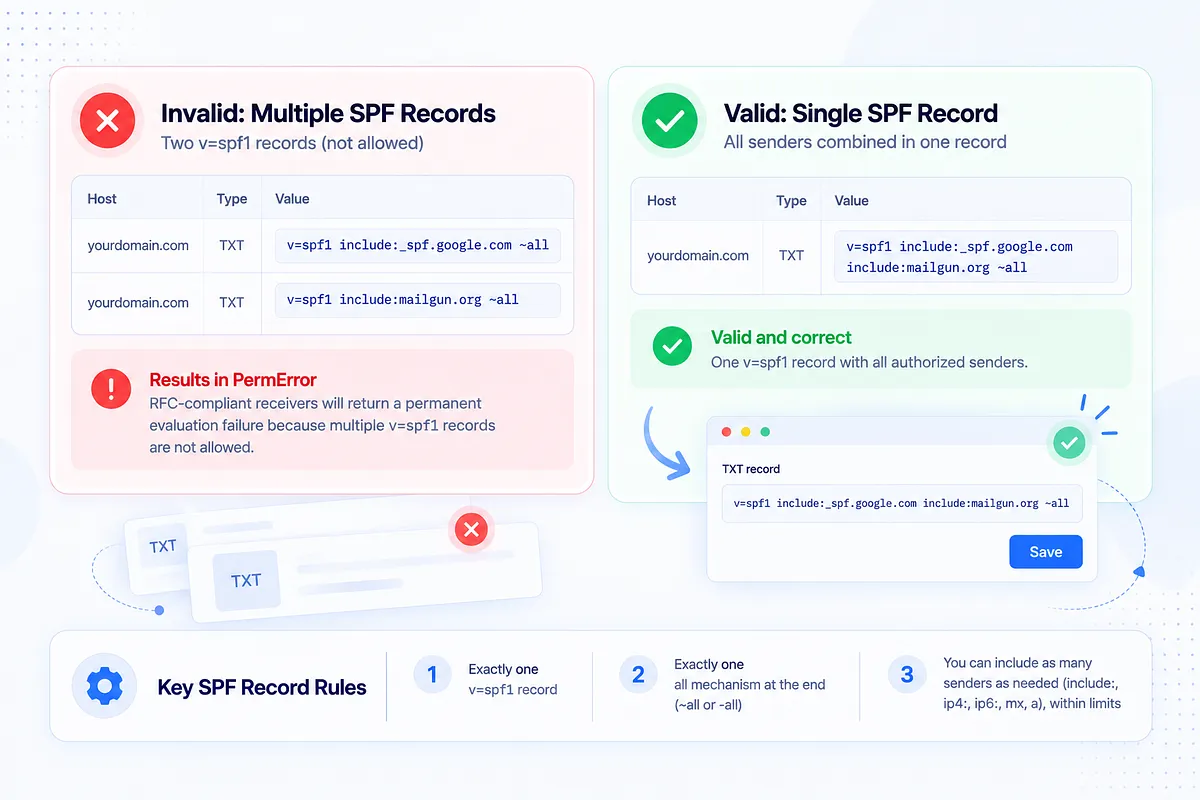
Invalid: two separate TXT records, each starting with v=spf1:
yourdomain.com TXT "v=spf1 include:_spf.google.com ~all"
yourdomain.com TXT "v=spf1 include:mailgun.org ~all"
Every RFC-compliant SPF evaluator that queries this domain returns PermError. Both records are individually well-formed; together they are unevaluable.
Valid: one record combining both senders:
yourdomain.com TXT "v=spf1 include:_spf.google.com include:mailgun.org ~all"
The structural rules are simple:
- Exactly one record beginning with v=spf1.
- Exactly one terminating all mechanism, at the end (~all softfail or -all hardfail; pick one, and it's the last thing in the record).
- Everything in between (include:, ip4:, ip6:, mx, a) can repeat as many times as your senders require, within limits we'll get to shortly.
One record can authorize as many senders as you need. Multiple includes inside one record: correct and normal. Multiple records: always broken. We've published more worked configurations in our SPF record examples guide.
How to Check If You Have Multiple SPF Records
Four ways to check, from fastest to most thorough:
1. An online SPF checker. Most report a duplicate-record error explicitly.
2. Command line (Mac/Linux):
dig TXT yourdomain.com +short
3. Command line (Windows):
nslookup -type=TXT yourdomain.com
In either output, you're looking for one thing: more than one TXT value beginning with v=spf1. Other TXT records (verification strings, DKIM keys at their own hosts, site-ownership tokens) are fine and irrelevant here.
4. Your DNS console. In Cloudflare, GoDaddy, Namecheap, or wherever your zone lives, filter TXT records on the root domain and inspect them directly. This is also where you'll fix it, so it's worth looking at the source of truth.
And if what you actually want to know is "is my email authentication healthy end to end," run an email deliverability test. It checks SPF (including duplicates), DKIM, DMARC, and where your mail actually lands, in one pass, instead of you assembling the picture from four lookups.
How to Combine or Merge Multiple SPF Records into One
The merge itself:
- Log into your DNS host and pull up all TXT records on the affected domain.
- Locate every record starting with v=spf1. Copy each one out to a scratch file before touching anything.
- Do not create another record. The fix is consolidation, never addition.
- Merge every mechanism into a single record: one v=spf1 at the front, every unique include:, ip4:, ip6:, mx, and a mechanism from all source records in the middle (drop exact duplicates), and one all qualifier at the end. If your source records disagree on ~all vs -all, choose deliberately: ~all is the safer setting while you're still verifying which senders are live.
- Save the merged record and delete the redundant ones, leaving exactly one v=spf1 TXT entry.
- Re-query until resolvers you care about return the single merged record. That follows the previous TTL, not a universal 48-hour wait. If you do not know the old TTL, 24–48 hours is a conservative check window, not a protocol requirement.
A worked example. Starting state: three records accumulated over two years:
"v=spf1 include:_spf.google.com ~all"
"v=spf1 include:mailgun.org ip4:203.0.113.25 ~all"
"v=spf1 include:servers.mcsv.net -all"
Merged result:
"v=spf1 include:_spf.google.com include:mailgun.org include:servers.mcsv.net ip4:203.0.113.25 ~all"
One version tag, three includes, one direct IP, one terminating qualifier. Syntactically correct, and possibly still wrong, for a reason the next section explains.
The Hidden Trap: SPF's 10 DNS Lookup Limit
Merging everything into one record can walk you out of one PermError and directly into another. RFC 7208 §4.6.4 requires implementations to cap DNS-querying terms at 10 during evaluation: include, a, mx, ptr, exists, and redirect. ip4, ip6, and all do not count. Includes are recursive, so nested vendor records spend multiple slots from the same budget. Exceed 10 and RFC-compliant receivers return PermError even though the single record is well-formed. RFC 7208 also recommends limiting "void" lookups (NXDOMAIN or empty answers) to two; exceeding that recommended default is another PermError path.
This is the second great cause of SPF PermError, and it's most often triggered by exactly the well-intentioned merge you just performed: three old records' worth of vendors, all preserved into one record, several of them nesting two or three lookups deep.
Two other constraints worth knowing while you're editing. The 255-octet cap is per character-string inside a TXT record, not per SPF record (RFC 7208 §3.3 / RFC 1035). One SPF record can contain multiple quoted strings; receivers concatenate them without adding spaces. Splitting into multiple TXT records is the PermError problem; splitting into multiple strings inside one TXT record is the correct way to publish a long policy. RFC 7208 §3.4 also recommends keeping the whole DNS answer small enough to fit a 512-octet UDP packet (a practical guideline of about 450 octets). And ip4:/ip6: mechanisms cost zero lookups, which is why they matter in the flattening discussion below.
The deeper point: "just merge everything" is naive. A merge done under the lookup limit forces a real question: which of these senders still deserves a slot?
Which Senders to Keep, Merge, or Remove
Most guides explain how to merge. Almost none address which senders belong in the record at all, and that's the decision that determines whether your merged record is lean and evaluable or bloated and one vendor away from PermError.
The evidence you need already exists: DMARC aggregate reports. They show every source actually sending as your domain, with volume and authentication results, straight from the receiving providers. Cross-reference that against your SPF record and every include sorts into one of three buckets:
- Keep: sources with real, current volume and passing authentication. Your active ESP, your transactional platform, your support desk. They've earned their lookups.
- Flatten: legitimate low-complexity senders eating multiple recursive lookups. If a vendor publishes stable IP ranges, replacing its include with direct ip4: mechanisms buys back lookup budget (with a maintenance cost, covered next section).
- Remove: includes with zero traffic in your DMARC data over a full sending cycle. The ESP you left last year, the trial tool nobody adopted, the agency platform from two contracts ago. Every one is a dead vendor occupying a lookup slot and an open authorization for infrastructure you no longer control.
Prioritize by volume and pass rate: high-volume passing sources are untouchable; zero-volume includes are removals; everything in between gets a decision. This is exactly the analysis Mailora automates: reading your SPF record and your DMARC data together, showing which includes carry live traffic and which are dead weight, so the merge you publish is built from evidence rather than fear of deleting the wrong thing.
SPF Flattening vs. Includes: When to Use Which
Flattening (resolving includes into their raw IP addresses) is an operational workaround, not an SPF protocol feature. It is genuinely contested among practitioners, and both sides have a point.
The case for flattening: ip4:/ip6: mechanisms cost no lookups, so flattening beats the 10-lookup limit decisively. A record that was eleven lookups deep becomes two.
The case against: vendors often change their sending IPs without telling you. That IP-drift risk is a practitioner observation, not an RFC rule. A manually flattened record is correct on the day you publish it and silently rots afterward. When your ESP adds a sending range, your flattened record doesn't cover it, and legitimate mail starts failing SPF with no DNS change on your side. Includes exist precisely so vendors can maintain their own IP lists.
A practitioner's decision rule rather than a verdict:
- Comfortably under 10 lookups? Keep includes. They're self-maintaining, and flattening buys you nothing but risk.
- Over the limit after pruning dead senders? Flatten selectively: start with vendors whose published IP ranges are stable, keep includes for platforms that change infrastructure often.
- Flattening more than a couple of senders? Use dynamic/managed flattening (tooling that re-resolves includes and updates your record automatically) rather than a hand-maintained IP list. Manual flattening at scale is a standing appointment with a future authentication failure.
Either way, the sequence is prune first, flatten second. Most over-limit records get under 10 just by removing senders that no longer exist.
How to Prevent Multiple SPF Records From Happening Again
The fix took an afternoon. Prevention is what keeps you from doing it again next quarter, because the change events that caused this (new tools, handovers, vendor swaps) will keep happening.
Monitor the record itself. The moment a second v=spf1 record appears in your DNS, that's an alert, not a discovery you make three weeks later in a bounce log. Same for lookup count: an alert when you're at 8 or 9 lookups turns the next vendor onboarding from an outage into a planning conversation.
Watch authentication outcomes, not just records. A previously-passing sender that starts failing SPF in your DMARC data is drift (a vendor changed IPs, a record edit went wrong), and it's visible days before it becomes a placement problem.
Write the onboarding runbook. One page: check the current record and lookup count, add the new sender's include to the existing record (never a new one), verify with a lookup after propagation, confirm passing authentication in DMARC data within a week. Hand it to whoever touches DNS.
This is the shift from episodic checks to standing visibility, and it's what Mailora's deliverability monitoring features are built for: continuous checks on your SPF record, lookup budget, authentication pass rates, and placement, with alerts when something drifts, so the second-record mistake gets caught the day it's made instead of the day a campaign underperforms.
SPF Is One Layer: Aligning With DKIM and DMARC
A clean, single, under-limit SPF record isn't the finish line; it's a prerequisite. SPF alone authenticates the envelope sender. DKIM signs the message. DMARC ties both back to the From address your recipients actually see, and enforcement (p=quarantine, then p=reject) is what finally stops others from sending as your domain.
The sequence that works: monitor (get visibility into every source sending as your domain), fix SPF and DNS (one record, under the lookup limit, dead senders pruned), then enforce DMARC once your legitimate mail passes with alignment. Enforcing on top of a broken or bloated SPF record punishes your own mail; enforcing on top of a clean one is what actually stops spoofing.
If you're not sure where your domain stands across all three layers right now, run your first deliverability test. It reads SPF, DKIM, DMARC, and actual inbox placement together, so you know what to fix first.
FAQ
Can you have multiple SPF records for one domain?
No. RFC 7208 allows exactly one SPF record (one TXT record beginning with v=spf1) per domain. If an RFC-compliant receiver finds more than one, it returns PermError, so SPF cannot pass for those messages. You can authorize as many senders as you need, but they must all live inside that single record.
What error do multiple SPF records cause?
PermError: a permanent SPF evaluation failure. An RFC-compliant receiver found more than one v=spf1 record and could not determine which policy to apply. That is not the same as SPF Fail, and it is not automatically a DMARC fail. DMARC still passes if DKIM is aligned. DMARC fails only when there is no aligned SPF Pass and no aligned DKIM Pass. Under p=quarantine or p=reject, that DMARC failure is what can quarantine or reject legitimate mail.
How do I combine two SPF records into one?
Copy every mechanism (include:, ip4:, mx, a) from both records into a single record: one v=spf1 at the start, all unique mechanisms in the middle, one ~all or -all at the end. Delete the redundant record so exactly one remains, re-check after the previous TTL expires (24–48 hours only if you do not know that TTL), and verify the merged record stays under SPF's 10 DNS-querying-term limit.
Can one SPF record have multiple includes?
Yes, and that's the correct way to authorize multiple sending services. v=spf1 include:_spf.google.com include:mailgun.org ~all is a valid record with two includes. The constraint is the lookup budget: every include (plus anything it includes recursively) counts toward the 10-DNS-lookup cap, so prune senders you no longer use rather than accumulating includes indefinitely.
Do multiple SPF records affect subdomains too?
SPF records are evaluated per domain: a subdomain that sends mail is checked against its own SPF record, not the parent's. So duplicate records on your root domain don't directly break mail.yourdomain.com, but each sending subdomain needs its own single, valid record, and the same one-record rule applies at every level. Audit every domain and subdomain that sends when you do the cleanup.
Stay in the loop
Deliverability insights, product updates, and early access to new features. No spam, unsubscribe anytime.
By subscribing, you agree to our Privacy Policy. Unsubscribe anytime.