Inbox Deliverability: How to Know Your Emails Actually Land

Key Takeaways
|
Your ESP can report 98% "delivered" while a third of those emails never reach a human. The dashboard says the campaign went out. The revenue report says nobody saw it.
So teams do what teams do. They rewrite subject lines. They test CTAs. They rebuild templates. Meanwhile the real problem sits somewhere else entirely: authentication drift, reputation erosion, or a misaligned ESP silently failing DMARC. The copy was never the issue. The infrastructure was.
Pass/fail spam checkers won't find that. What follows is a working framework for diagnosing, monitoring, and improving inbox placement across providers and sending streams: how the signals connect, and how Mailora turns seed tests, DMARC reports, engagement data, and infrastructure signals into decisions instead of more dashboards to interpret alone. If you want a baseline first, run an email deliverability test and keep the results open as you go.
What Inbox Deliverability Actually Means (and Why It's Not Just "Delivered")
Email delivery and inbox deliverability are two different measurements that get collapsed into one number on most dashboards.
Delivery means the receiving server accepted your message. SMTP handshake completed, no bounce, no block. That's a transport result.
Inbox deliverability (inbox placement) means the message landed where a human will see it: the primary inbox, rather than spam, or buried in Promotions or Updates. That's a filtering outcome, decided after acceptance by each mailbox provider's own scoring.
The gap between the two is where campaigns quietly die. A 98%+ delivery rate can coexist with sub-84% inbox placement, and nothing in a standard ESP dashboard will tell you. The sends went out. The servers said yes. And a meaningful slice of your audience never saw a thing.
Why Inbox Placement Is a Revenue Problem, Not a Technical One
It's tempting to file deliverability under "technical plumbing" and hand it to whoever manages DNS. That framing is exactly why it fails.
Follow the chain. Placement determines visibility. Visibility determines opens, clicks, and replies. Those determine meetings booked, carts recovered, trials activated, and pipeline created. When placement drops, every downstream metric falls with it, at your normal conversion rates, on a silently shrinking base.
For outbound teams, spam placement means sequences that generate zero replies from prospects who never saw them. For lifecycle marketers, it means flows that "sent successfully" while revenue per send decays. For agencies, it means client reporting that can't explain the dip.
That's why deliverability belongs to RevOps and growth leadership as core infrastructure, not to a ticket queue. The teams that treat it as a revenue system, with owners, KPIs, and monitoring, are the teams whose email keeps compounding.
Inbox Deliverability vs. Email Delivery: Reading the Gap
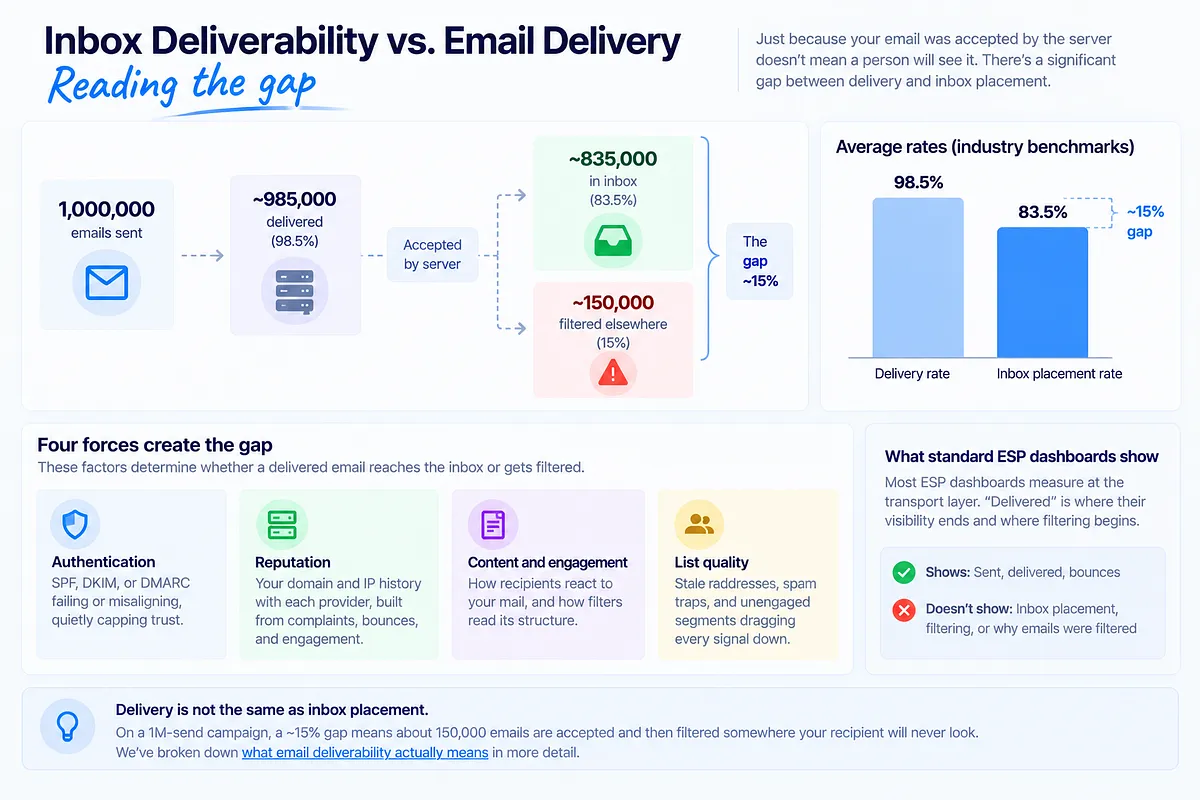
Industry benchmarks put average delivery around 98.5% and average inbox placement around 83.5%. That's a roughly 15-point gap between "the server took it" and "a person could see it." On a 1M-send campaign, that's about 150,000 emails accepted and then filtered somewhere your recipient will never look.
Four forces create the gap:
- Authentication: SPF, DKIM, or DMARC failing or misaligning, quietly capping trust.
- Reputation: your domain and IP history with each provider, built from complaints, bounces, and engagement.
- Content and engagement: how recipients react to your mail, and how filters read its structure.
- List quality: stale addresses, spam traps, and unengaged segments dragging every signal down.
Standard ESP dashboards don't surface any of this because they measure at the transport layer. "Delivered" is where their visibility ends and where filtering begins. We've broken down what email deliverability actually means in more detail.
How an Email Deliverability Test Works (Seed Lists, Spam Checkers, and Their Limits)
A seed-list test (inbox placement test) is the most direct way to observe filtering. You send your message to a network of test addresses across Gmail, Outlook, Yahoo, Apple Mail, and regional providers. The system then reports where each copy landed: Inbox, Promotions, Updates, Spam, or Missing, plus provider-level breakdowns, time-to-receive, and authentication results per test.
A spam checker adds content-level analysis: risky formatting, mismatched links, broken HTML, and authentication status for a single message.
Both are useful. Both have limits:
- A test is a snapshot. It shows placement at one moment, under one configuration. Placement next Tuesday, after your volume ramp, is a different question.
- Seed accounts aren't real recipients. They don't open, reply, or complain, so they can't capture the engagement signals that drive long-term placement.
- A result isn't a root cause. "30% spam at Outlook" tells you where you stand, not why, or what to fix first.
Where GlockApps shows you spam vs. inbox, Mailora shows you why, across providers, and prioritizes the fixes. A test that ends in a folder breakdown leaves you interpreting alone. A test that ends in a ranked diagnosis gives you a next action.
The Four Signals That Decide Inbox Placement
Every mailbox provider's filtering model reduces to four signal groups:
- Authentication: SPF, DKIM, and DMARC alignment. Identity verification. The floor, not the ceiling.
- Sender reputation: your domain and IP history per provider. Complaints, bounces, traps, consistency.
- Content and engagement: what you send and how recipients respond to it.
- List hygiene: the quality of the addresses you're mailing.
These signals interact. Weak reputation makes filters read your content more harshly. Poor list hygiene generates the bounces and complaints that erode reputation. Broken authentication caps everything above it.
Which means fixing the wrong one wastes cycles. Teams burn weeks rewriting copy when the actual problem is a subdomain failing DKIM. Or they re-warm an IP when the complaint spike came from one stale segment. Diagnosis before treatment: Mailora's root-cause breakdown scores each signal group separately (authentication vs. reputation vs. content vs. list) so you spend effort where the signal actually points.
Email Authentication Requirements: SPF, DKIM, and DMARC
Three protocols verify your sending identity:
- SPF publishes which servers may send for your domain. A receiving server checks the envelope sender against that list.
- DKIM cryptographically signs each message so providers can verify it wasn't altered and genuinely came from your domain.
- DMARC ties the two together, requiring alignment between the visible From domain and the domains SPF and DKIM validated, and tells providers what to do on failure.
Alignment is the part teams miss. SPF can pass on your ESP's domain while your From domain stays unverified. DMARC closes that hole, which is why providers now demand it.
Since 2024, the Gmail, Yahoo, and Microsoft bulk-sender rules have made this non-negotiable: authentication with all three protocols, spam complaint rates below 0.3% (ideally below 0.1%), and one-click unsubscribe under RFC 8058. These are entry requirements, not optimizations.
And yet passing authentication doesn't guarantee the inbox. It only removes a disqualifier. If your setup passes and placement is still poor, we've covered why emails pass checks but still don't land in the inbox in detail.
DMARC Reports as Deliverability Telemetry (Not Just Security)
Only about 7.6% of domains enforce DMARC. Most teams that do have a policy treat the aggregate reports as compliance paperwork. That's a mistake, because those reports are the richest free deliverability telemetry you have.
DMARC aggregate reports are mailbox providers telling you, daily, exactly which sources send as your domain and how each one authenticates. Read as deliverability data, they reveal:
- Misaligned ESPs: a legitimate platform sending your mail with broken or unaligned SPF/DKIM, dragging domain trust with every send.
- Problematic subdomains: a forgotten promo. subdomain failing authentication while your root domain looks clean.
- Unauthorized third-party senders: spoofing that generates failures and complaints attributed to your domain.
- Shadow IT: the tool someone in sales connected last quarter that nobody added to SPF.
Reading this data debugs low inbox placement faster than blind seed-test iteration, because it points at the failing source directly instead of making you guess through variants. The raw XML is painful, which is why Mailora normalizes DMARC signals into a deliverability map: which sources send as you, which authenticate cleanly, which are hurting you, and what to fix first.
Sender Reputation and Warm-Up: Building Trust Before You Scale
Reputation is the trust history each provider keeps on your domain and IPs. It's earned slowly and spent quickly.
Fresh domains and IPs are the riskiest asset class in email. No history reads as no trust, and providers filter cautiously until you prove a pattern. That's what warm-up is: a progressive volume ramp, typically 3–6 weeks to full volume, with daily increases held to no more than 20–25%. For cold outbound specifically, sustainable volume sits around 75–150 emails per inbox per day. Jump past those rates and filters read the spike as compromise or list purchase, regardless of intent.
Warm-up tools and deliverability monitoring are different categories. Warm-up services generate artificial engagement to build early reputation. Monitoring tells you what your reputation actually is, how it's trending, and what changed when it moved. Mailora does the latter: continuous domain and IP reputation tracking with historical trend lines, so "your reputation dropped the day the new welcome series launched" is a fact you can see, not a theory you assemble after the damage.
List Hygiene and Data Quality: Protecting Reputation at the Source
Every deliverability problem is cheaper to prevent at the list level than to repair at the reputation level. The operating targets:
- Bounce rate under 2%. Past 5–10% you're signaling to providers that you don't know your own list.
- Complaints under 0.1%, with 0.08% as the working ceiling at Gmail. At 0.3% you're in filtering territory.
- Re-verify regularly. B2B data decays around 22% per year. A list that was clean at signup is not clean two years later.
- Remove role accounts, disposables, and trap-prone addresses before they hit your bounce and complaint numbers.
- Use double opt-in and a visible unsubscribe. 47% of recipients will file a spam complaint if they can't find an unsubscribe link. A complaint hurts your reputation; an unsubscribe doesn't.
ZeroBounce cleans your list; Mailora tells you when bounce patterns mean it's time to re-verify, warm up, or split domains. One is the scrub. The other is the signal that tells you a scrub is due, and whether the bounce pattern points at list decay or something upstream.
Content and Engagement: What Actually Moves the Needle
Modern filters are not keyword lists. "Free" will not send you to spam; a weak domain reputation will, no matter how carefully you write. Infrastructure and reputation outweigh copy at every major provider.
What content actually controls is engagement, and engagement is a reputation input. Opens, clicks, and replies build trust. Deletes-without-reading, sustained ignoring, and spam marks erode it. The practical guidance:
- Keep cold email plain-text-friendly with few links and one clear CTA. Heavy HTML and link density raise scrutiny on unwarmed domains.
- Write for the real attention window: readers spend under 9 seconds per email. Front-load the point.
- Personalize where it's genuine. Personalized cold emails see roughly 32% higher response rates, and replies are among the strongest positive signals a provider can record.
- Match the subject line to the body. Misleading framing converts curiosity into complaints.
Content won't rescue broken infrastructure. But once the foundation is sound, engagement is the lever that separates inbox from Promotions.
Provider-Specific Deliverability: Why Gmail, Microsoft, and Yahoo Behave Differently
There is no such thing as one inbox placement rate. Benchmark data puts Gmail around 87% average placement, with Microsoft near 76% and Apple Mail near 76%. Same senders, same mail, ten-point spreads.
The reason is weighting. Gmail leans heavily on user engagement signals. Microsoft weights infrastructure, IP reputation, and volume consistency more aggressively, which is why Outlook placement often breaks first after a migration. Corporate environments add another layer: Microsoft 365 tenants running Proofpoint or Mimecast apply their own filtering on top of anything the provider decides.
The operational consequence: remediation must be provider-specific. A Gmail engagement problem calls for tighter segmentation and engaged-only sending. A Microsoft filtering problem calls for infrastructure and authentication review. Applying the Gmail fix to the Microsoft problem does nothing, and over-correcting for one provider can degrade another. Mailora's per-provider confidence indicators exist for exactly this: placement, trend, and risk read separately per mailbox provider, so you fix what's actually broken where it's actually broken.
Pre-Send vs. Post-Send: Building One View of Deliverability
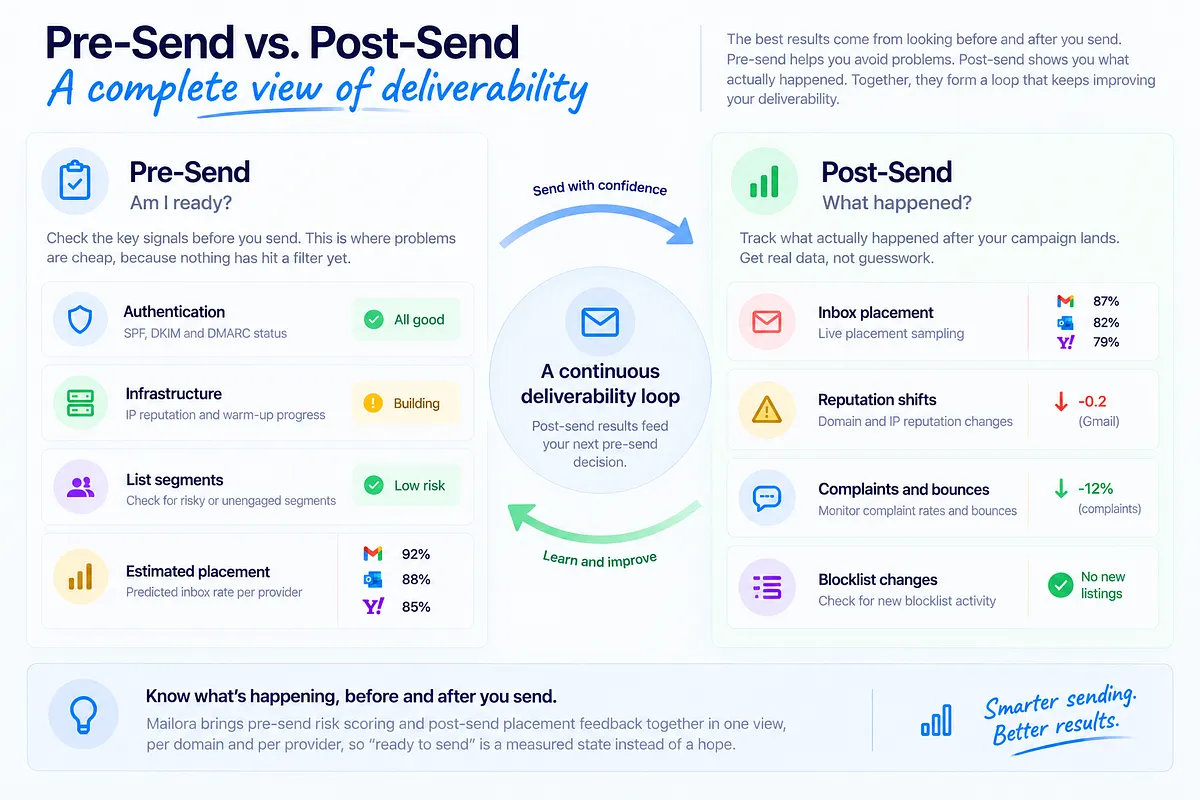
Most deliverability practice is post-hoc: send, then discover. Mature programs work both sides of the send.
Pre-send answers "am I ready?": authentication and infrastructure status, warm-up progress, list-segment risk, and estimated placement risk per provider before the campaign goes out. This is where problems are cheap, because nothing has hit a filter yet.
Post-send answers "what happened?": live placement sampling, reputation shifts, complaint and bounce movement, and blocklist changes after the campaign lands.
Run separately, these become scattered one-off checks: a spam test here, a Postmaster Tools glance there, a blocklist lookup when something feels wrong. Run together, they form a loop where post-send results feed the next pre-send decision.
Mailora is built around that loop: pre-send risk scoring and post-send placement feedback in one view, per domain and per provider, so "ready to send" is a measured state instead of a hope. Know what's happening, before and after you send.
How to Monitor Inbox Deliverability Over Time
One-off tests answer today's question. Monitoring answers the question you haven't asked yet. A working operational cadence:
- Per campaign: placement test before major sends; placement and complaint check after.
- Daily: complaint rate, bounce rate, and blocklist status for active sending domains.
- Weekly: reputation trends per domain and IP, placement KPIs per provider, DMARC report review for new failing sources.
Track KPIs per provider (Gmail, Microsoft, Yahoo each get their own line) and per stream (marketing, transactional, outbound measured separately). Blended averages hide exactly the failures you need to see.
Set alert thresholds so drift becomes a notification instead of a surprise: Gmail spam rate above 0.08%, Microsoft inbox placement below 75%, any new listing on a blocklist that matters.
Google Postmaster Tools and Microsoft SNDS are legitimate free sources and you should connect both. Their limits: each covers one provider, data lags, and neither correlates its signals with the others. Mailora's deliverability monitoring features consolidate reputation, blocklist status across 50+ lists, authentication health, and placement into one dashboard with alerts that say what changed and why, not just that a number moved.
A Diagnostic Runbook for When Inbox Placement Drops
When placement drops, resist the urge to change five things at once. Work the sequence:
Step 1: Authentication. Check SPF, DKIM, and DMARC alignment first, including recent DMARC reports for new failing sources. Auth breaks are common, silent, and fast to fix. Rule them out before anything else.
Step 2: Reputation. Check domain and IP reputation trends, plus blocklist status. A listing or a reputation dip explains a sudden drop better than any content theory.
Step 3: List and complaints. Review complaint and bounce movement by segment. A spike traced to one segment or acquisition source is a list problem wearing a deliverability costume.
Step 4: Content. Only after the first three are clean, examine what changed in the message itself: new template, new links, new format.
Then branch by pattern:
- Microsoft spam is high but Gmail primary is fine: infrastructure or IP reputation issue. Check authentication alignment and recent infra changes; Microsoft punishes those first.
- Gmail dropped, others stable: engagement-driven. Suppress inactives, send engaged-only, rebuild the signal.
- Everything dropped at once: check blocklists and authentication immediately; broad failures are rarely content.
- Drop right after a migration or volume ramp: new-infrastructure caution. Slow down and re-warm.
This is the difference between diagnosis and trial-and-error. Mailora's root-cause prioritization encodes the same logic: when placement moves, the platform ranks which signal group moved with it, so step one is already identified when you open the alert.
Deliverability Across Multiple Sending Streams
Most real programs run at least two of: marketing campaigns, transactional mail, and cold outbound. How you architect these streams decides whether one bad week stays contained.
Reputation attaches to domains, subdomains, and IPs. Streams sharing infrastructure share fate: a complaint surge on marketing sends can drag down the transactional password-reset emails your product depends on. That's cross-stream bleed-over, and it's how a promo calendar quietly breaks receipts.
The standard pattern is reputation segregation: transactional on the root domain or a dedicated subdomain with its own IPs, marketing on its own subdomain, and cold outbound on entirely separate domains, because outbound carries the highest reputation risk and a burned outbound domain must never touch your primary.
Segregation only works if you monitor by stream. Blended metrics hide a failing stream inside healthy averages until the bleed-over is done. Mailora's per-stream dashboards keep marketing, transactional, and outbound visible separately, so the failing stream is identified while it's still the only casualty.
From Testing to Confidence: Making Deliverability a Decision, Not a Guess
The shift that matters is from episodic checking to continuous monitoring.
A one-off inbox test is a snapshot. It tells you where mail landed under one configuration on one day, and nothing about next week, the new segment, or the template shipping Thursday. Teams that rely on snapshots operate reactively by definition: the check happens after the suspicion, and the suspicion happens after the damage.
Ongoing monitoring works the other way. Authentication, reputation, blocklists, placement, and engagement tracked continuously, per provider and per stream, with alerts that explain what changed and recommendations ranked by root cause. The question changes from "where did my mail land?" to "am I ready to send, and if something slips, will I know where and why before it costs revenue?"
That's what sending with confidence means in practice. Not hoping the campaign lands. Knowing before you hit send that infrastructure, reputation, and content are ready, and knowing exactly where to look when they're not.
Start with ground truth: run your first deliverability test and see where your email actually lands, provider by provider, before your next major send.
---
FAQ
What's the difference between email delivery and inbox deliverability?
Delivery means the receiving server accepted your message: no bounce, no block. Inbox deliverability means the message landed where a human will see it, in the primary inbox rather than spam or a secondary tab. Delivery is a transport result; placement is a filtering decision made after acceptance. The industry gap between them averages about 15 points (roughly 98.5% delivery vs. 83.5% inbox placement).
How do I test my inbox deliverability?
Run a seed-list placement test: send your message to test addresses across Gmail, Outlook, Yahoo, and Apple Mail, and review where each copy landed, with per-provider breakdowns and authentication results. Test before major campaigns and after any change to templates, volume, or infrastructure. Remember that a test is a snapshot; pair it with continuous monitoring of reputation, complaints, and blocklists for the between-tests picture.
Why do my emails pass authentication checks but still land in spam?
Because authentication is an entry requirement, not a ranking factor. SPF, DKIM, and DMARC verify identity; they don't earn trust. Placement after authentication is decided by sender reputation, engagement history, list quality, and sending consistency. Passing auth with a weak domain reputation still filters to spam. Check reputation trends and complaint rates next.
What's a good inbox placement rate, and how does it vary by provider?
Overall average placement runs around 83.5%, but it varies sharply by provider: Gmail averages around 87%, while Microsoft and Apple Mail sit near 76%. Anything materially below your provider baselines, or a sudden drop at one provider while others hold, is a signal worth diagnosing. Track placement per provider rather than as one blended number.
How often should I monitor inbox deliverability?
Continuously, with a defined cadence layered on top: placement tests before and after major campaigns, daily checks on complaints, bounces, and blocklist status, and weekly reviews of reputation trends, per-provider KPIs, and DMARC reports. High-volume senders should also set alert thresholds (for example, Gmail spam rate above 0.08% or Microsoft placement below 75%) so drift reaches you before revenue feels it.
Stay in the loop
Deliverability insights, product updates, and early access to new features. No spam, unsubscribe anytime.
By subscribing, you agree to our Privacy Policy. Unsubscribe anytime.