How to Write a Formal Email: Format, Steps, and Examples
Key Takeaways
- A formal email should include a specific subject line, professional greeting, clear message, polite closing, and email signature.
- Start with your purpose instead of using lengthy introductions or unnecessary explanations.
- Keep your email concise, organized, and respectful of the recipient's time.
- Use an appropriate greeting and closing based on your relationship with the recipient.
- Proofread your email and check attachments, recipient details, and formatting before sending.
- For important business communications, check email deliverability to understand whether your messages reach inboxes or spam folders.
Writing a formal email requires more than using professional words. You need a clear subject line, an appropriate greeting, a well-organized message, and a polite closing that makes your purpose easy to understand.
Whether you are contacting a hiring manager, requesting information from a company, writing to a professor, or communicating with a client, knowing how to write a formal email helps you make a professional impression.
In this guide, you will learn the correct formal email format, how to write each section, and how to use practical examples and templates for different professional situations. You will also discover common email writing mistakes and ways to check whether your important emails reach the recipient's inbox.
What Is a Formal Email?
A formal email is a professionally written electronic message used for official, academic, workplace, or business communication. It follows a structured format and uses polite, clear, and respectful language.
Unlike informal emails sent to friends or family, formal emails maintain a professional tone and communicate a specific purpose.
You may need to write a formal email when:
- Applying for a job or following up after an interview.
- Requesting information from a company or organization.
- Communicating with a manager, professor, or senior professional.
- Sending a business proposal or project update.
- Requesting a meeting or appointment.
- Submitting documents or responding to official requests.
- Communicating with customers, vendors, or business partners.
The main purpose is to communicate your message clearly while maintaining professionalism and making it easy for the recipient to understand what you need.
What Is the Correct Format for a Formal Email?
A formal email generally follows six essential components: a subject line, greeting, opening sentence, main body, closing statement, and professional signature.
Here is a basic formal email format:
Subject: [Brief and Specific Email Subject]
Dear [Recipient's Name],
I am writing to [clearly state the purpose of your email].
[Provide the necessary background information, details, or explanation. Keep the message organized and relevant.]
[Clearly mention any action, response, or information you need from the recipient.]
Thank you for your time and consideration. I look forward to hearing from you.
Kind regards,
[Your Full Name]
[Job Title]
[Company Name]
[Contact Information]
Let's understand each component in detail.
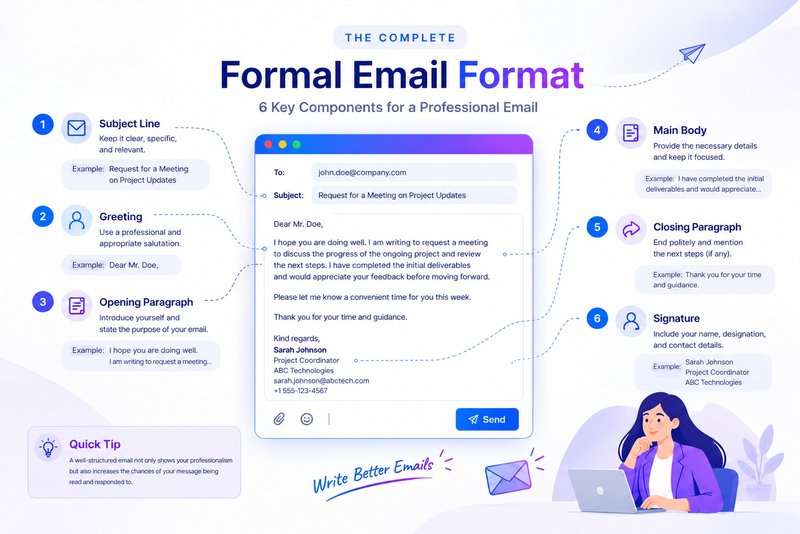
1. Write a Clear and Specific Subject Line
The subject line tells the recipient what your email is about before they open it. It should be short, relevant, and specific.
Avoid vague subject lines such as "Hello," "Important," or "Quick Question." Instead, explain the purpose of your email in a few words.
Examples of professional email subject lines:
| Purpose | Subject line |
| Job application | Application for Marketing Manager Position |
| Meeting request | Request for a Meeting on Project Updates |
| Information request | Inquiry About Your Consulting Services |
| Leave request | Leave Request for December 10–12 |
| Follow-up | Follow-Up on Our Previous Discussion |
| Document submission | Submission of Requested Documents |
| Business proposal | Partnership Proposal for [Company Name] |
A descriptive subject line helps recipients understand the context and prioritize their messages.
2. Choose an Appropriate Professional Greeting
Start your email with a greeting that reflects your relationship with the recipient and the level of formality required.
If you know the recipient's name, use their appropriate title and name. If you are contacting someone for the first time, a more formal greeting is generally preferable.
Examples of formal email greetings:
- Dear Mr. [Last Name],
- Dear Ms. [Last Name],
- Dear Dr. [Last Name],
- Dear Professor [Last Name],
- Dear Hiring Manager,
- Dear [Department Name] Team,
- Dear Sir or Madam,
If you already have an established professional relationship, you can use "Hello [First Name]" or "Dear [First Name]."
Avoid overly casual greetings such as "Hey," "What's up," or "Hi buddy" in formal business communication.
Tip: If you are unsure about someone's preferred title, use their full name or a neutral greeting such as "Hello [Full Name]."
3. Start With a Clear Opening Sentence
After the greeting, explain why you are writing. Your opening should establish the purpose of the email without making the recipient read through unnecessary introductions.
Examples of professional opening sentences:
- I am writing to inquire about the available opportunities at your organization.
- I would like to request a meeting to discuss the upcoming project.
- I am contacting you regarding the proposal we discussed last week.
- I am writing to formally apply for the position advertised on your website.
- I would appreciate some additional information about your services.
Choose an opening that directly matches your communication objective.
4. Write a Clear and Organized Email Body
The email body contains the main information you want to communicate. Keep it focused on one primary purpose and organize the details into short paragraphs.
A good email body should:
- Explain the reason for contacting the recipient.
- Include relevant background information.
- Present important details in a logical order.
- Clearly communicate your request or expectations.
- Avoid unnecessary explanations and repetition.
For example, instead of writing a long paragraph about why you need a meeting, explain the purpose, suggest a suitable time, and mention the topics you want to discuss.
If your email contains multiple requests or important information, use bullet points to make it easier to read.
5. End With a Polite Closing Statement
Your closing statement should politely conclude the message and explain what you expect next, if anything.
Examples of formal email closing sentences:
- Thank you for your time and consideration.
- I look forward to hearing from you.
- Please let me know if you require any additional information.
- I would appreciate your response at your earliest convenience.
- Thank you for considering my request.
- Please feel free to contact me if you have any questions.
Avoid demanding language or unnecessary urgency unless the situation genuinely requires it.
6. Add a Professional Email Signature
Your email signature helps recipients identify you and understand your professional role.
A standard professional signature can include:
- Full name.
- Job title or designation.
- Company or organization.
- Contact number.
- Website or LinkedIn profile, if relevant.
Example:
Kind regards,
Sarah Johnson
Marketing Manager
ABC Technologies
sarah.johnson@abctech.com
+1 555 123 4567
www.abctech.com
Use a consistent signature for professional correspondence. Avoid excessive images, decorative fonts, and unnecessary promotional information.
How to Write a Formal Email in 7 Steps
Now that you understand the structure, follow these seven steps whenever you need to write a formal email.
Step 1: Identify the Purpose of Your Email
Before writing, determine exactly what you want to communicate.
Are you requesting information, submitting an application, asking for approval, scheduling a meeting, or following up on an earlier conversation?
Having a clear objective helps you avoid unnecessary details and keeps your email focused.
Step 2: Understand Your Recipient
Consider who will receive your email and your existing relationship with them.
For example, an email to a hiring manager may require a more formal introduction than a message to a colleague you communicate with regularly.
Choose your language, greeting, and level of detail accordingly.
Step 3: Write a Relevant Subject Line
Summarize the purpose of your email in the subject line. Make it descriptive enough for the recipient to understand the topic without opening the message.
Step 4: Use a Professional Greeting
Address the recipient appropriately. Use their name or professional title whenever possible.
If you are writing to a group, use a suitable greeting such as "Dear Team" or "Hello Everyone."
Step 5: Organize the Main Message
Start with your purpose, provide the necessary details, and clearly explain what you need from the recipient.
Keep paragraphs short and use simple language. If you are requesting an action, mention the expected deadline where appropriate.
Step 6: Add a Polite Closing and Signature
End with a respectful closing statement and include your professional signature.
Make sure the recipient knows whether you are expecting a response, approval, document, or another action.
Step 7: Proofread and Review Before Sending
Before clicking Send, check your email carefully.
Review the following:
- Correct recipient email address.
- Accurate and relevant subject line.
- Proper spelling and grammar.
- Professional tone and formatting.
- Correct attachments and document names.
- Working links and contact information.
- Appropriate CC and BCC recipients.
A final review can prevent avoidable communication mistakes and help you maintain a professional image.
Formal Email Examples for Different Situations
The following examples show how to apply the correct formal email format to common professional and academic situations.
1. Formal Email to a Manager
Subject: Request for a Meeting to Discuss Project Progress
Dear Mr. Smith,
I hope you are doing well.
I would like to request a meeting to discuss the progress of the ongoing project and review the next steps. I have completed the initial deliverables and would appreciate your feedback before moving forward.
Please let me know a convenient time for you this week.
Thank you for your time and guidance.
Kind regards,
John Williams
Project Coordinator
2. Formal Email to a Professor
Subject: Request for Guidance Regarding Research Project
Dear Professor Johnson,
I hope this email finds you well.
I am writing to request your guidance regarding my research project on [Research Topic]. I have completed the initial research and would appreciate an opportunity to discuss my findings and receive your feedback.
Please let me know if you are available for a brief discussion this week.
Thank you for your time and consideration.
Sincerely,
Emily Davis
Student, Department of Business Studies
3. Formal Email for a Job Application
Subject: Application for the Digital Marketing Manager Position
Dear Hiring Manager,
I am writing to express my interest in the Digital Marketing Manager position at [Company Name].
With experience in SEO, content marketing, and digital strategy, I believe my professional background aligns with the requirements of this role.
I have attached my resume for your review. I would welcome the opportunity to discuss how my skills and experience could contribute to your organization.
Thank you for considering my application. I look forward to hearing from you.
Kind regards,
Alex Morgan
+1 555 123 4567
4. Formal Email Requesting Information
Subject: Inquiry Regarding Your Business Services
Dear [Recipient's Name],
I hope you are doing well.
I am contacting you to request additional information about the services offered by [Company Name].
Could you please share details regarding your available service packages, pricing, and the process for getting started?
I would appreciate any relevant documents or information you could provide.
Thank you for your assistance.
Best regards,
Michael Brown
Operations Manager
5. Formal Email Requesting a Meeting
Subject: Request for a Meeting to Discuss Business Collaboration
Dear Ms. Anderson,
I hope you are doing well.
I am writing to explore a potential business collaboration between our organizations. I believe there may be opportunities for us to work together and achieve mutually beneficial outcomes.
Would you be available for a 30-minute meeting next week to discuss this further?
Please let me know your preferred date and time.
Thank you for your consideration.
Kind regards,
David Wilson
Business Development Manager
6. Formal Email Requesting Leave
Subject: Leave Request for December 10–12
Dear Mr. Johnson,
I am writing to formally request leave from December 10 to December 12 due to personal commitments.
I will ensure that my current responsibilities are completed or appropriately handed over before my leave begins. I will also coordinate with the team to minimize any disruption to ongoing work.
I would appreciate your approval of this request.
Thank you for your consideration.
Kind regards,
Sarah Miller
Marketing Executive
7. Formal Follow-Up Email
Subject: Follow-Up on the Business Proposal
Dear Mr. Anderson,
I hope you are doing well.
I am writing to follow up on the business proposal I shared with you on [Date]. I wanted to check whether you had an opportunity to review the document.
Please let me know if you need any additional information or clarification.
I look forward to your feedback.
Best regards,
James Taylor
Business Development Executive
8. Formal Email to a Client
Subject: Project Update and Next Steps
Dear [Client's Name],
I hope you are doing well.
I wanted to provide an update on the progress of your project. We have completed the initial phase and are currently working on the remaining deliverables.
The next milestone is scheduled for [Date]. We will share the updated progress report once the work is completed.
Please let me know if you have any questions or additional requirements.
Thank you for your continued cooperation.
Kind regards,
[Your Name]
[Company Name]
Formal Email Templates You Can Copy
Use these simple templates when you need to draft a professional email quickly.
General Formal Email Template
Subject: [Your Email Subject]
Dear [Recipient's Name],
I am writing to [state the purpose of your email].
[Provide relevant details, background information, or an explanation of your request.]
[Clearly mention any action or response you expect.]
Thank you for your time and consideration. I look forward to hearing from you.
Kind regards,
[Your Full Name]
[Job Title]
[Company Name]
Formal Email Request Template
Subject: Request for [Specific Information or Action]
Dear [Recipient's Name],
I would like to request [clearly explain what you need].
[Provide a brief explanation of why you are making this request and any relevant details.]
I would appreciate your assistance and look forward to your response.
Best regards,
[Your Name]
Formal Email Follow-Up Template
Subject: Follow-Up Regarding [Previous Discussion or Request]
Dear [Recipient's Name],
I hope you are doing well.
I am following up on my previous email regarding [topic or request] sent on [Date].
I would appreciate an update whenever convenient. Please let me know if you require any additional information from my end.
Thank you for your time.
Kind regards,
[Your Name]
What Is the Difference Between Formal and Informal Emails?
Formal and informal emails differ in their purpose, language, structure, and level of professionalism.
| Factor | Formal Email | Informal Email |
| Purpose | Official and professional communication | Personal or casual communication |
| Greeting | Dear Mr. Smith | Hi John |
| Language | Polite and professional | Casual and conversational |
| Structure | Organized and consistent | Flexible |
| Subject line | Clear and specific | Can be more relaxed |
| Closing | Kind regards, Sincerely | Thanks, Cheers |
| Abbreviations | Generally avoided | Commonly used |
| Emojis | Usually avoided | Acceptable depending on context |
For example:
Formal:
Dear Mr. Smith, I would like to request an update regarding the project timeline.
Informal:
Hi John, just checking if there is any update on the project.
Choose the style that best matches the recipient and purpose of your communication.
Common Mistakes to Avoid When Writing a Formal Email
Even a well-written email can appear unprofessional if it contains avoidable mistakes.
Here are some common issues to watch for:
| Mistake | Better approach |
| Using a vague subject line | Write a clear, descriptive subject |
| Starting with an overly casual greeting | Use an appropriate professional greeting |
| Writing long paragraphs | Keep paragraphs short and focused |
| Using slang or unnecessary abbreviations | Use clear and professional language |
| Making unclear requests | State exactly what you need |
| Forgetting attachments | Check all referenced attachments before sending |
| Using excessive capital letters | Follow standard capitalization |
| Adding too many recipients | Include only relevant people |
| Sending without proofreading | Review grammar, spelling, and formatting |
| Using an unprofessional email address | Use a recognizable professional address |
Taking a few moments to review these details can make your communication clearer and more effective.
How to Make Sure Your Important Emails Reach the Inbox
Writing a formal email correctly helps you communicate professionally, but it does not guarantee that your message will reach the recipient's inbox.
Email providers evaluate several signals when deciding whether to deliver a message to the inbox, spam folder, or another filtered location.
Some factors that can influence email deliverability include:
1. Check Your Sender Reputation
Mailbox providers use sender reputation signals to evaluate incoming messages. A poor domain or IP reputation can increase the likelihood of emails being filtered or rejected.
Organizations that regularly send business emails should monitor their sending reputation and investigate unexpected changes.
2. Verify Your Email Authentication
Email authentication helps receiving servers verify whether a message is authorized by the domain it claims to come from.
Three important protocols are:
- SPF: Identifies the servers authorized to send email for a domain.
- DKIM: Uses a digital signature to help verify message integrity and domain authorization.
- DMARC: Defines how receiving systems should handle messages that fail authentication and provides reporting visibility.
Correctly configured authentication helps establish sender identity, although it does not guarantee inbox placement.
You can learn more in Mailora's email authentication guide.
3. Test Your Email Inbox Placement
If your business emails are consistently landing in spam, or you are unsure where your messages are being delivered, run an email deliverability test.
An inbox placement test helps you understand whether test messages reach inboxes or spam folders across participating mailbox providers.
Check Where Your Emails Actually Land With Mailora
A professionally written email deserves a better chance of reaching its intended recipient. Mailora's free email deliverability test lets you send a test email from Gmail, Outlook, or another mailbox using its provided seed list.
Mailora measures inbox versus spam placement and provides recommendations based on the test results.
Run a Free Email Deliverability Test
Test your email placement, identify potential delivery issues, and make informed improvements to your email sending practices.
Final Checklist Before Sending a Formal Email
Before sending an important professional email, use this checklist to make sure everything is in order.
- Does the subject line clearly explain the purpose?
- Have you addressed the recipient appropriately?
- Is your opening sentence direct and relevant?
- Is the main message clear and organized?
- Have you included all necessary information?
- Is your tone polite and professional?
- Have you included an appropriate closing?
- Is your email signature complete?
- Have you checked spelling and grammar?
- Are the recipient addresses and attachments correct?
For important business communications, consider checking your email deliverability as well.
Frequently Asked Questions
1. How do you start a formal email?
Start a formal email with a professional greeting, such as "Dear Mr. Smith" or "Dear Ms. Johnson." Follow it with a brief opening sentence that explains why you are writing. For example, "I am writing to request additional information about your services."
2. What is the correct format for a formal email?
A formal email should include a clear subject line, professional greeting, opening sentence, organized body, polite closing statement, and professional signature. This structure helps recipients understand your message and respond appropriately.
3. How do you end a formal email professionally?
End a formal email with a polite closing statement followed by a professional sign-off. Common options include "Kind regards," "Sincerely," "Best regards," and "Thank you." Choose one that matches the context and your relationship with the recipient.
4. What are some examples of formal email greetings?
Common formal email greetings include:
- Dear Mr. [Last Name]
- Dear Ms. [Last Name]
- Dear Dr. [Last Name]
- Dear Professor [Last Name]
- Dear Hiring Manager
- Dear [Department] Team
Use the recipient's correct title whenever possible.
5. How long should a formal email be?
A formal email should generally be as short as possible while including all the information the recipient needs. For routine professional communication, a few short paragraphs are often sufficient. More complex requests may require additional details or bullet points.
6. Can I use "Hi" in a formal email?
Yes. "Hi" can be appropriate in professional communication, especially when you already know the recipient or have an established working relationship. For first-time communication, official requests, or more formal situations, "Dear" is generally a safer choice.
7. What should you avoid when writing a formal email?
Avoid slang, excessive abbreviations, emojis, vague subject lines, unnecessarily long paragraphs, demanding language, and unprofessional email addresses. Always proofread your message before sending it.
8. How can I make sure my formal email reaches the recipient's inbox?
Use a properly authenticated sending domain, maintain a healthy sender reputation, follow responsible sending practices, and test inbox placement. A deliverability test can help identify whether your messages are reaching inboxes or being filtered into spam.
You can use Mailora's free email deliverability test to check your email placement and identify potential issues.
9. What is the difference between a formal and professional email?
A formal email follows a more structured and traditionally respectful writing style. A professional email is a broader term that includes both formal and moderately conversational workplace communication. The appropriate style depends on the recipient, purpose, and relationship.
10. Should I reply to a formal email?
Yes, when the email requires a response or requests confirmation, information, or action. Reply within a reasonable timeframe, address the sender appropriately, answer the questions clearly, and maintain a professional tone.
Stay in the loop
Deliverability insights, product updates, and early access to new features. No spam, unsubscribe anytime.
By subscribing, you agree to our Privacy Policy. Unsubscribe anytime.