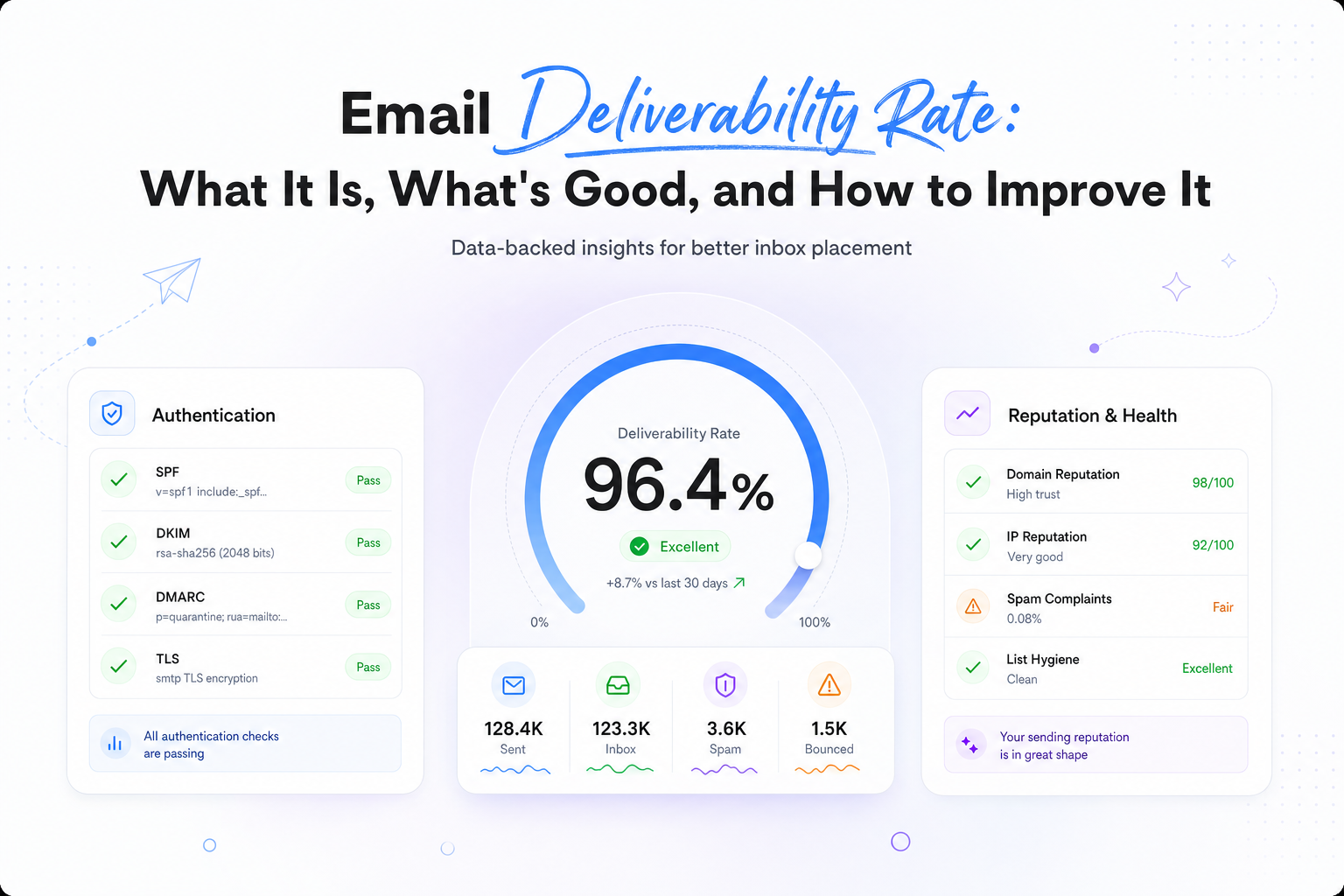
Email Deliverability Rate: What It Is, What's Good, and How to Improve It
Key Takeaways
|
Most senders track a delivery rate north of 95% and assume they're safe. Meanwhile, global inbox placement hovers around 83–85%. That means roughly one in six emails never reaches the inbox, and the gap hides behind a number that looks healthy on every dashboard.
For high-volume marketing and outbound teams, that gap is lost pipeline. The sends went out, the servers accepted them, and a meaningful share of your audience never saw a thing. Nobody notices until revenue per send starts drifting down and someone asks why.
By the end of this piece you'll be able to tell which layer of deliverability is failing — server acceptance, inbox placement, folder routing, or spam and block outcomes — and what to fix first. Deliverability data is everywhere: DMARC reports, seed tests, ESP metrics, Postmaster Tools. Clarity is rare, and clarity is what protects your sends.
What Is Email Deliverability Rate?
Email deliverability rate is the percentage of your sent email that reaches recipients' inboxes, as opposed to being rejected, filtered to spam, or lost along the way.
That definition sounds simple. In practice, "deliverability rate" is not one number. It's a layered picture spanning three distinct outcomes:
- Server acceptance: did the receiving server take the message at all?
- Inbox placement: did it land where a human will see it?
- Folder-level routing: within the mailbox, did it hit Primary, Promotions, Updates, or spam?
Collapsing those layers into a single percentage is how teams end up confidently wrong. A sender quoting "98% deliverability" is usually quoting server acceptance, which says nothing about where the mail went after the server said yes.
The number matters only as a prompt to act. The question it should answer is not "how good is my number?" but "is my mail reaching humans, and if not, at which layer is it failing?"
Email Delivery Rate vs. Email Deliverability Rate
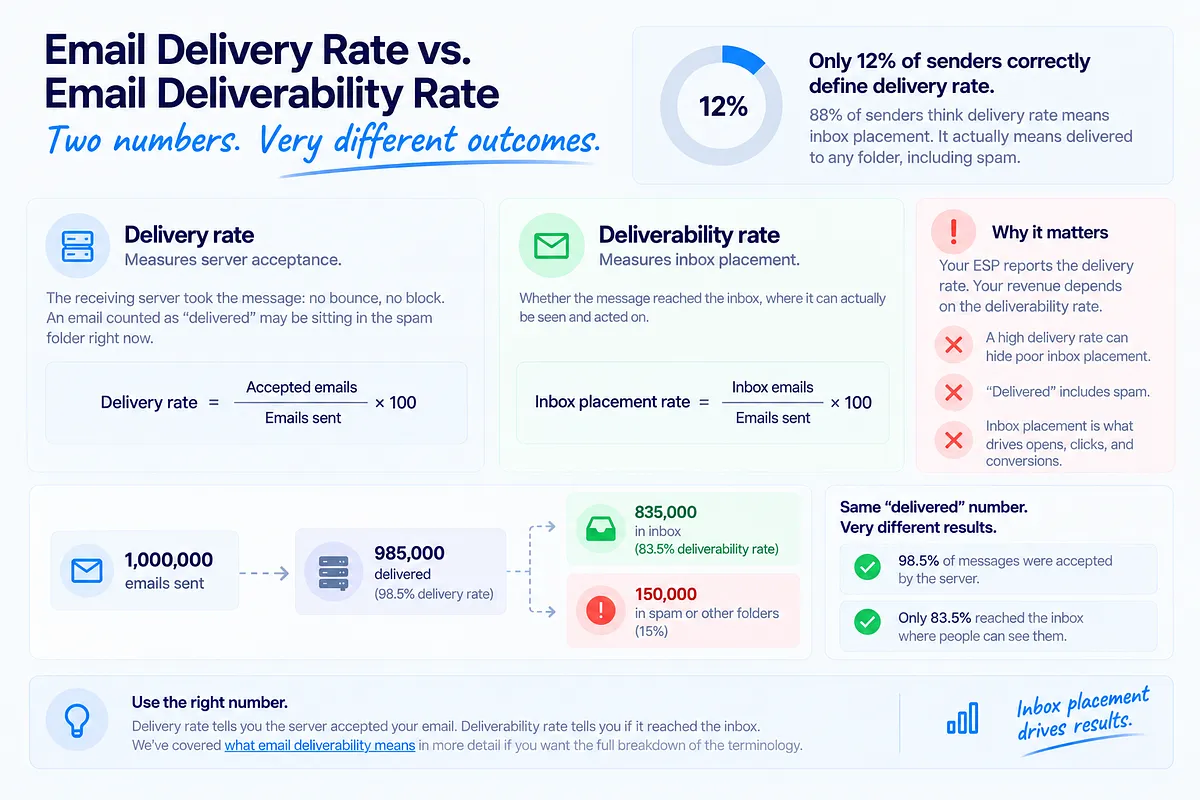
This is the most misunderstood distinction in email, and the numbers prove it: 88% of senders can't correctly define delivery rate. Only 12% understand that it means "delivered to any folder," including spam.
Delivery rate measures server acceptance. The receiving server took the message: no bounce, no block. An email counted as "delivered" may be sitting in the spam folder right now.
Deliverability rate measures inbox placement: whether the message reached the inbox, where it can actually be seen and acted on.
The formulas make the difference concrete:
- Delivery rate = (accepted emails ÷ emails sent) × 100
- Inbox placement rate = (inbox emails ÷ emails sent) × 100
Your ESP reports the first number. Your revenue depends on the second. We've covered what email deliverability means in more detail if you want the full breakdown of the terminology.
The Multi-Layer Deliverability Rate Model
Single-number deliverability hides real problems. A layered model exposes them. Here's how to read your sending as five distinct rates:
| Layer | What it measures | What a problem here means |
|---|---|---|
| Delivery rate | Server-level acceptance | Infrastructure issues: bounces, blocks, blocklistings, DNS problems |
| Inbox placement rate | Mail reaching the inbox (any tab) | Reputation or authentication trouble; filtering after acceptance |
| Folder/tab placement | Primary vs. Promotions vs. Updates | Engagement and content classification; visibility, not rejection |
| Spam/junk rate | Mail routed to the spam folder | Active distrust: complaints, weak reputation, content risk signals |
| Block/deferral rate | Mail refused or delayed at the gate | Severe reputation damage or blocklist hits; the loudest alarm |
Each layer tells you something different. High deferrals point at infrastructure and reputation. Rising spam rate with stable delivery points at post-acceptance filtering. Promotions-tab drift is an engagement and classification story, not a spam story, and treating it like one wastes effort.
One blended percentage averages all of this away. Five layers give you a diagnosis. That layered read is how Mailora structures deliverability data by design, because the layer that's failing determines what you fix.
What Is a Good Email Deliverability Rate? Benchmarks for 2026
Benchmarks for inbox-level deliverability:
| Rate | Verdict | What it means operationally |
|---|---|---|
| 98%+ | Gold standard | Healthy infrastructure, strong reputation, clean list. Maintain and monitor. |
| 95–97% | Good | Solid, with room to tighten. Watch trends per provider. |
| Below 95% | Warning | Something is actively leaking. Diagnose by layer before it compounds. |
| Below 90% | Critical | Systemic problem: reputation damage, authentication failure, or list decay. Fix before scaling anything. |
Two caveats keep these honest.
Global inbox placement averages 83–85%. Many senders quoting 95%+ are quoting delivery rate, not inbox placement. If your true inbox placement is at the global average, roughly one in six of your emails is invisible, and "95% delivered" is masking it.
Benchmarks also vary by context. Opt-in marketing to an engaged list should sit at the top of these ranges. Cold outbound structurally runs lower. Industry, list age, and send type all move the baseline. Compare yourself to your own trend line first, your segment second, and the global average last.
Why Your Deliverability Rate Can Look Fine While Inbox Placement Drops
Here is the failure mode that costs the most revenue: a 98% delivery rate coinciding with deteriorating inbox placement.
It happens because the two metrics measure different events. The server accepts your mail (delivery: fine), then the provider's filtering routes it to spam or buries it in Promotions (placement: falling). Nothing in a standard ESP dashboard distinguishes these outcomes. Sends complete, bounces stay low, and the only visible symptom is engagement sliding for "no reason."
Delivery-rate complacency has a predictable arc. Placement erodes quietly for weeks. Opens and clicks drift down. Someone blames the creative. Subject lines get rewritten. Meanwhile the real cause, a reputation dip or an authentication break, keeps compounding, and by the time it's found, recovery is measured in weeks instead of days.
If your metrics pass every check and results still disappoint, that's a recognized pattern with specific causes. We've written about why emails pass checks but still don't land in the inbox in detail.
What Affects Your Email Deliverability Rate
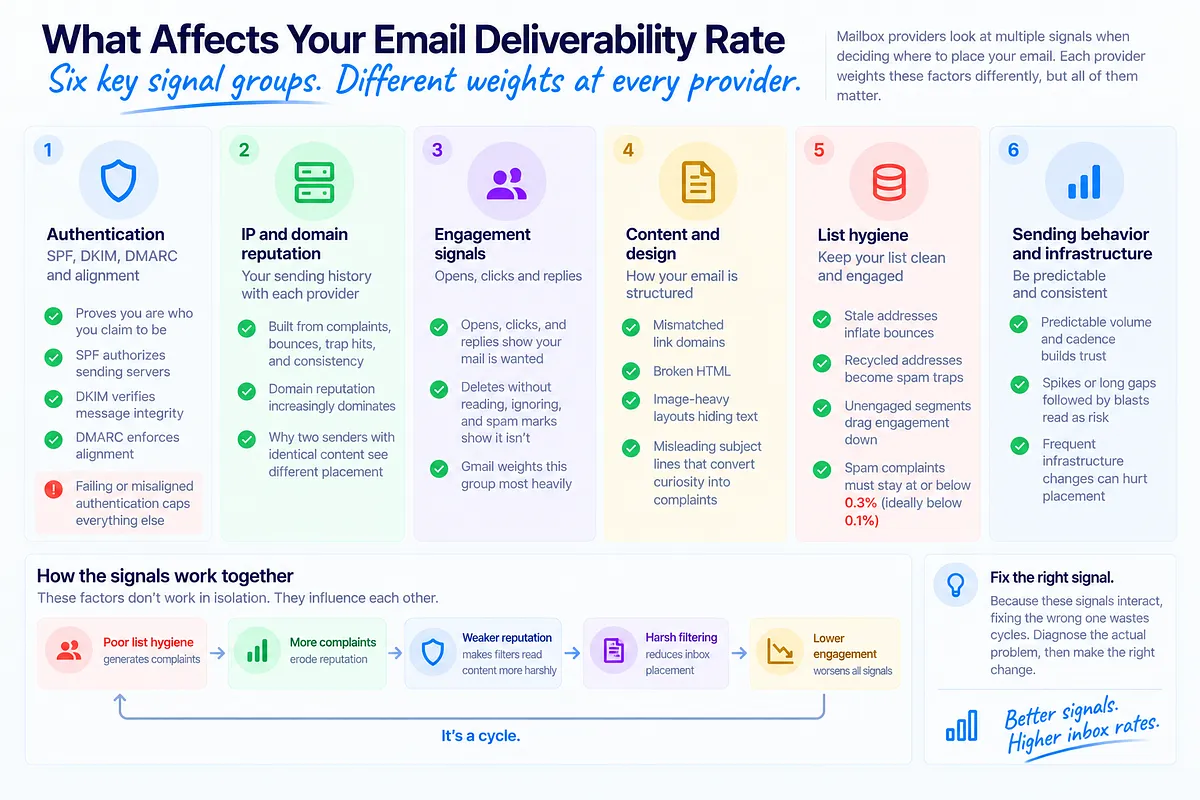
Mailbox providers decide placement using signal groups, each weighted differently at Gmail, Microsoft, and Yahoo.
Authentication (SPF, DKIM, DMARC, and alignment). Providers need to verify you are who you claim to be before trust enters the picture. SPF authorizes sending servers, DKIM verifies message integrity, DMARC enforces alignment between the visible From domain and what SPF and DKIM validated. Failing or misaligned authentication caps everything else, and since 2024 it's a hard requirement for bulk senders.
IP and domain reputation. Your sending history with each provider: complaints, bounces, trap hits, and consistency. Domain reputation increasingly dominates because domains are harder to rotate than IPs. Reputation is why two senders with identical content see different placement.
Engagement signals. Opens, clicks, and replies tell providers your mail is wanted. Deletes without reading, sustained ignoring, and spam marks tell them it isn't. Gmail weights this group most heavily.
Content and design. Modern filters don't keyword-match "free" into spam, but structural risk matters: mismatched link domains, broken HTML, image-heavy layouts hiding text, and misleading subject lines that convert curiosity into complaints.
List hygiene. Stale addresses inflate bounces, recycled addresses become spam traps, and unengaged segments drag every engagement signal down. Google and Yahoo's requirements draw the line explicitly: spam complaints must stay at or below 0.3%, ideally below 0.1%.
Sending behavior and infrastructure. Providers reward predictable volume and cadence. Spikes, long gaps followed by blasts, and frequent infrastructure changes all read as risk regardless of intent.
These signals interact. Weak reputation makes filters read content more harshly; poor hygiene generates the complaints that erode reputation. That interaction is why fixing the wrong signal wastes cycles.
How to Measure Your Email Deliverability Rate Accurately
ESP analytics alone won't get you there. Opens are distorted by Apple Mail Privacy Protection and bot pre-fetches, and bounce data only covers the delivery layer. Those are proxies, not ground truth. Accurate measurement has four parts:
- The two formulas, kept separate. Track delivery rate (accepted ÷ sent) and inbox placement rate (inbox ÷ sent) as distinct KPIs. The gap between them is itself a diagnostic: a widening gap means filtering is intensifying even while acceptance holds.
- Seed testing for placement ground truth. Send to a network of test addresses across Gmail, Outlook, Yahoo, and Apple Mail, and observe where each copy lands: Inbox, Promotions, Updates, Spam, or Missing, per provider. This is the only direct way to observe folder-level outcomes before a major send. It's worth knowing that only 13% of senders use inbox placement reports at all, which means most teams are flying on proxies.
- DMARC aggregate reports for source-level truth. These tell you which sources send as your domain and how each authenticates, straight from the providers themselves.
- Google Postmaster Tools for Gmail's own read. Domain reputation, spam rate, and authentication results as Gmail sees them. Free, legitimate, Gmail-only, and lagging, but a necessary input.
Running an email deliverability test pulls the placement, authentication, and reputation layers into one read, so you're interpreting a picture instead of reconciling four separate tools.
DMARC Reports as Deliverability Data
Most teams file DMARC under security: publish a policy, pass the audit, done. That leaves the single richest source of deliverability attribution unread.
DMARC aggregate reports are mailbox providers telling you, daily, exactly how every source sending as your domain authenticates. Read as deliverability data rather than compliance paperwork, they answer the question no other tool answers: which specific source is costing you inbox volume?
- SPF failures causing rejections: a legitimate ESP sending outside your SPF record, or a record that crept past the 10-lookup limit when someone added a new tool.
- DKIM misalignment: signatures passing on the ESP's domain but not aligning with your From domain, which quietly caps trust with every send.
- Unauthorized senders: spoofing or shadow IT generating authentication failures attributed to your domain's record.
This is attribution, not just detection. Instead of "placement dropped," you get "placement dropped because this ESP's DKIM broke on this date, affecting this share of volume." That's a fixable statement. The raw XML is painful to work with, which is why Mailora processes DMARC aggregate data into a per-source deliverability map: which sources send as you, which authenticate cleanly, which are leaking inbox volume, and what to fix first.
How to Improve Your Email Deliverability Rate
Fix in this order, based on the signal pattern you're seeing:
| Signal pattern | What it means | Fix first |
|---|---|---|
| Complaints above 0.3% | Consent or expectation mismatch | Triage engagement and consent: suppress the offending segments, audit acquisition sources |
| DMARC failures concentrated on one ESP | That source's authentication broke | Root-cause that specific source before touching anything else |
| Gmail-only placement drop | Engagement-driven, Gmail-specific | Gmail diagnostics: engaged-only sending, suppress inactives at Gmail |
| Bounce rate climbing steadily | List decay | Hygiene pass, re-verification, sunset policy for inactives |
| Drop after volume increase | Ramp outpaced reputation | Step volume back, re-ramp in stages |
| Block or deferral spike | Reputation or blocklist event | Check blocklists and provider postmaster data immediately |
Authentication breaks and active complaint sources compound daily, so they always come first. Hygiene and volume discipline come second. Content and cadence tuning come last, because they only matter once the foundation holds.
The reason senders struggle here isn't ignorance of best practices. Top reported challenges tell the story: staying out of spam (47.9%), list hygiene (33.8%), and reducing bounces (28.4%). All three are ongoing operational problems, not one-time setup tasks, which is why continuous email deliverability monitoring features beat annual cleanup projects: reputation trends, blocklist status, authentication health, and placement tracked continuously, with alerts when a signal moves.
Deliverability Rate for Cold Outbound and High-Volume Senders
Most deliverability content assumes an opt-in list and a single ESP. Growth and RevOps teams running cold outbound or multi-system sending face a different problem.
Cold outbound runs structurally lower. Recipients didn't ask for the mail, engagement signals start at zero, and complaint tolerance is thinner. Benchmarks calibrated for opt-in marketing will read as alarming when applied to outbound; what matters is your own trend line and provider-level pattern, not a universal target.
Multi-domain setups exist to contain risk. The standard architecture separates outbound onto dedicated domains, away from your primary, because outbound carries the highest reputation risk and a burned outbound domain must never touch the domain your product and marketing depend on. That containment only works if each domain is measured separately.
Multi-ESP sending fragments your visibility. When mail flows from a CRM, a marketing automation platform, and an outreach tool simultaneously, each system reports its own delivery metrics and none sees the whole. Your domain's reputation, however, is shared across all of them. A complaint surge in the outreach tool degrades placement for the marketing platform, and neither dashboard will connect those dots.
The guardrails that protect domain reputation at volume: warm new domains progressively over weeks rather than days, hold daily volume increases to gradual steps, keep per-inbox cold volume modest, and monitor placement and complaints per domain and per sending system so one stream's problem is caught before it spreads. Mailora's multi-domain monitoring tracks every domain, IP, and sending source separately, in one view, so a problem in one stream is visible before it reaches the rest.
Turning Deliverability Rate Into a Decision, Not a Report
The shift that matters: stop checking a number and start running a feedback loop.
The loop has two halves. Pre-send prediction: before a campaign goes out, what does the evidence say about readiness? Authentication status, reputation trend, list-segment risk, estimated placement per provider. Post-send verification: after it lands, what actually happened? Placement by provider, complaint movement, reputation shift, and the delta between what you predicted and what occurred.
Run separately, these are just more reports. Run together, each send teaches the next one. The prediction that missed tells you which signal you underweighted. The verification that surprised you tells you where visibility is thin.
Most tools cover one input. A seed tester like GlockApps shows you spam versus inbox for a single send, but it doesn't connect that result to your reputation trend or your DMARC data — the interpretation is still on you.
Mailora combines DMARC data, seed tests, ESP metrics, and Postmaster inputs into one continuous deliverability read, with alerts when a layer moves and prioritized next steps attached to every diagnostic. The rate stops being a number you look up and becomes an ongoing health signal that tells you when to act and what to do first.
That's the difference between reporting deliverability and deciding with it. Start with ground truth: run your first deliverability test and see your delivery, placement, and authentication picture in one view before your next major send.
---
FAQ
What is a good email deliverability rate?
98% and above is the gold standard, 95–97% is good, below 95% is a warning sign, and below 90% is critical. Context matters: global inbox placement averages only 83–85%, opt-in lists should benchmark near the top of the range, and cold outbound structurally runs lower. Always confirm whether a quoted rate measures server acceptance or actual inbox placement, because the two can differ by 15 points.
What's the difference between email delivery rate and email deliverability rate?
Delivery rate measures whether the receiving server accepted your message, into any folder including spam. Deliverability rate, as practitioners use it, measures whether the message reached the inbox. Most senders conflate the two: 88% can't correctly define delivery rate. An email can be "delivered" and completely invisible, which is why the metrics must be tracked separately.
Why is my delivery rate high but my emails still land in spam?
Because the two events happen at different stages. The server accepts your mail (high delivery rate), then the provider's filtering routes it to spam based on reputation, engagement, authentication alignment, or content signals. Standard ESP dashboards only see the first stage. Diagnose with a seed-based placement test and check reputation trends and DMARC reports for the cause.
How do I measure my inbox placement rate accurately?
Use the formula (inbox emails ÷ total emails sent) × 100, measured through seed testing: sending to test addresses across Gmail, Outlook, Yahoo, and Apple Mail and observing where each copy lands, per provider. Pair the snapshot with continuous inputs: DMARC aggregate reports for source-level authentication truth and Google Postmaster Tools for Gmail's reputation read. ESP opens and bounces are proxies, not placement data.
How can DMARC reports help improve email deliverability?
DMARC aggregate reports show exactly which sources send as your domain and how each one authenticates, straight from the mailbox providers. Read as deliverability data, they attribute lost inbox volume to specific causes: an ESP with broken DKIM alignment, an SPF record past its lookup limit, or an unauthorized sender damaging your domain's record. Fixing the failing source directly recovers placement faster than blind trial-and-error.
Stay in the loop
Deliverability insights, product updates, and early access to new features. No spam, unsubscribe anytime.
By subscribing, you agree to our Privacy Policy. Unsubscribe anytime.