Why Identical Campaigns Perform Differently Across Tools
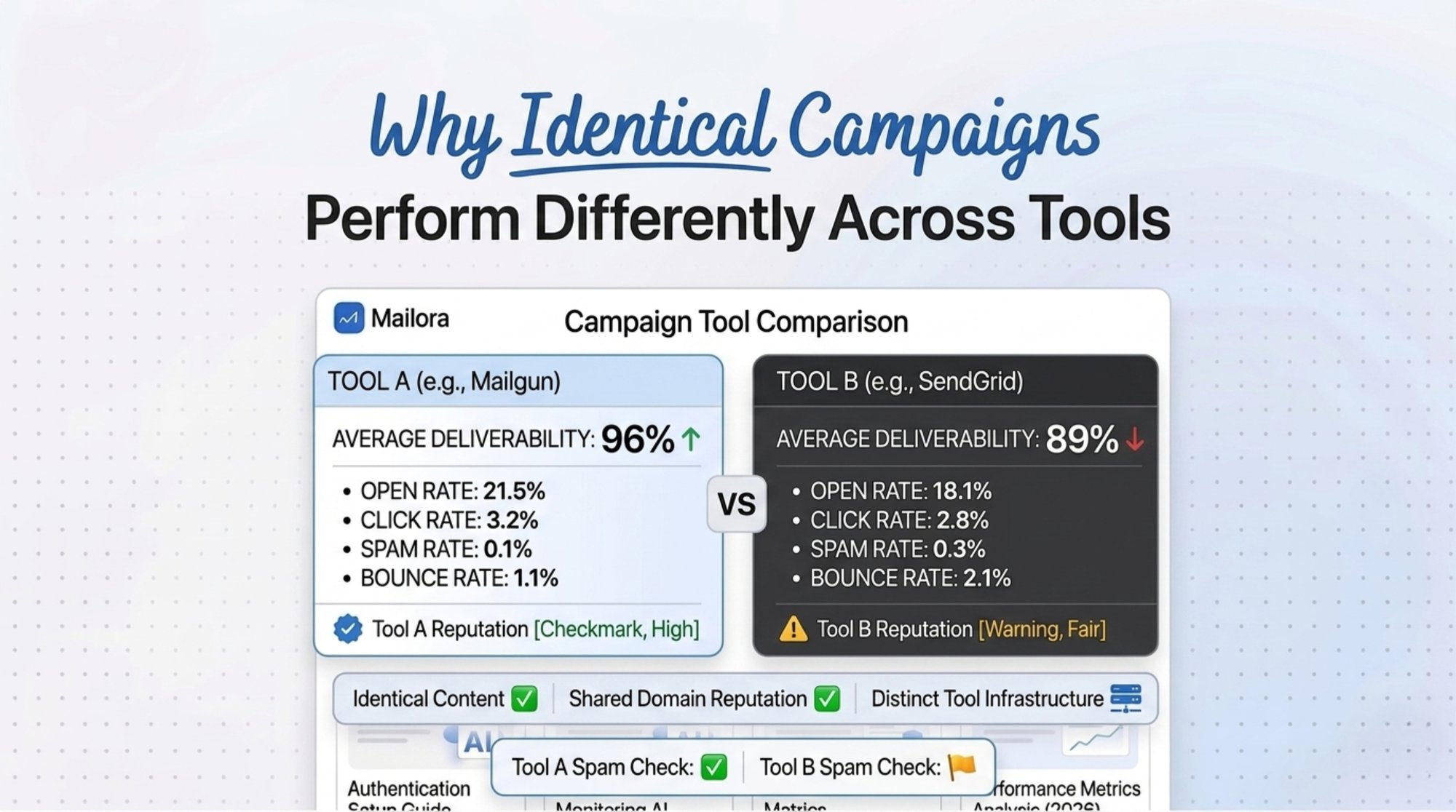
Email campaign performance differences are one of the most frustrating realities in deliverability analysis. The same email can land in the inbox in one testing platform while appearing in spam in another. For marketers, RevOps teams, and deliverability consultants, these conflicting signals create confusion and reduce trust in testing data. Understanding why these differences happen is critical for interpreting results correctly and making better deliverability decisions, and for getting to the best results from your email marketing efforts.
The goal is not to find one perfect number. The goal is to build a reliable decision model from imperfect signals using a systematic approach.
Understanding Email Campaign Performance Differences
The common question is simple: why does Tool A say inbox and Tool B say spam?
The answer is that no email testing tool sees the entire delivery environment. Each platform observes a sample. That sample may include different seed inboxes, test timing, sending paths, IP pools, message headers, reputation signals, or ISP responses.
A campaign can be identical at the creative level and different at the delivery level, even when the same email content, subject line, and tracking links are used across different email marketing campaigns.
Many teams are now testing AI email marketing alongside human-written campaigns to improve personalization and efficiency. However, before attributing performance gains or losses to AI-generated copy, make sure deliverability, inbox placement, and sender reputation are not influencing the results.
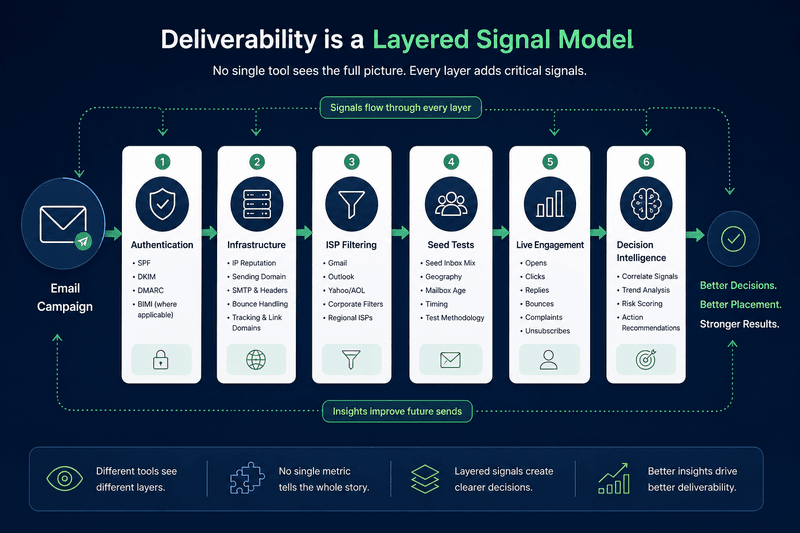
| Layer | What can differ | Why it affects results |
|---|---|---|
| Sending infrastructure | IP pool, SMTP route, bounce handling | ISPs evaluate sender reputation and traffic patterns |
| Authentication | SPF, DKIM, DMARC alignment | Failed or weak alignment can reduce trust |
| Recipient environment | Gmail, Outlook, Yahoo, business mailboxes | Each provider applies different filtering logic |
| Test setup | Seed list, geography, mailbox age, timing | A seed panel is a sample, not a complete audience |
| Engagement context | Opens, replies, deletions, complaints | Real recipients affect future placement |
| Reporting model | Inbox test, spam test, engagement report | Different tools measure different outcomes |
The mistake is treating every deliverability report as a final verdict. A better approach is to classify each report by what it actually measures, define comparison criteria, and run a systematic analysis over multiple time periods.
What Actually Changes Between Tools
Even when the campaign looks identical, the delivery path can change.
Infrastructure differences
A campaign sent through one platform may use different mail transfer agents, headers, tracking domains, return paths, bounce processors, and link wrapping. These differences affect how mailbox providers evaluate the message.
A tool that tests rendering or inbox placement may not replicate the exact infrastructure used during the live send. A live campaign may carry signals that a test send does not.
Sending patterns
Mailbox providers evaluate more than one message. They examine sending consistency, volume changes, complaint behavior, invalid recipient rates, and engagement patterns.
A test sent to twenty seed addresses cannot fully represent a production send to a segmented audience with history, especially for a broadcast send versus a targeted segment.
IP pools and domain reputation
Two tools may send through different IP ranges or observe campaigns from different recipient networks. Shared IP reputation, dedicated IP history, domain reputation, and tracking domain reputation can all affect placement.
This is a major driver of email deliverability variability.
The Role of ISP Specific Behavior
Gmail, Outlook, Yahoo, corporate filters, and regional mailbox providers do not use identical filtering systems. They evaluate similar categories of signals, but they weigh them differently.
| Provider type | Common sensitivity areas | Interpretation risk |
|---|---|---|
| Gmail | Engagement, reputation, authentication, user behavior | Strong engagement can offset some risk, but poor interaction can suppress placement |
| Outlook | Reputation, complaint history, filtering rules, infrastructure | Seed placement may vary sharply across Microsoft environments |
| Yahoo and AOL | Authentication, complaint signals, list quality | Poor list hygiene can affect placement quickly |
| Corporate mailboxes | Security gateways, policy rules, attachment and link analysis | Business filters may block messages that consumer inboxes accept |
This explains why inbox placement inconsistency can be real even when the same campaign performs well with one provider. A clean Gmail result does not prove Outlook placement is safe. A spam result in one seed mailbox does not prove the whole campaign failed.
Why Testing Tools Show Different Results
Email testing tools comparison articles often list features. That is useful, but it does not explain why outputs conflict.
The main issue is methodology, and whether you’re doing like-for-like campaign performance analysis or comparing incomparable campaigns.
Seed list composition
A seed list is a controlled sample of inboxes. Results depend on the mailbox providers included, account condition, geographic mix, mailbox history, and filtering environment.
If one tool has more Microsoft addresses and another has more Gmail addresses, their results can diverge even for the same campaign.
Timing
Filtering is not static. Inbox placement can change based on sending volume, recent complaints, spam trap exposure, authentication changes, and reputation updates. A test run at 9 am can differ from a live send at 2 pm.
For better interpretation, use time-based comparison (e.g., week-over-week or send-over-send) across consistent time periods, not one-off snapshots.
Environment
Some tests use seed addresses. Some rely on campaign data. Some combine inbox placement, engagement, blocklist checks, and authentication diagnostics. These are not interchangeable.
This is why improved campaign tracking should include both placement signals and email marketing results (engagement + conversions), plus channel comparison when email performance is evaluated alongside social posting strategies.
GlockApps in context
GlockApps should be treated as a testing and diagnostic input, not as the only source of truth. Its value is strongest when a team needs seed based visibility, placement checks, authentication review, or comparative testing. Its limitation is the same limitation shared by seed based systems: the result represents a controlled sample, not the complete behavior of every real mailbox provider.
Mailora should be positioned around decision intelligence. That means interpreting raw testing signals alongside campaign behavior, ISP patterns, authentication state, and risk context.
Why There Is No Single Source of Truth
There is no universal inbox placement source because email filtering is fragmented.
Mailbox providers do not publish full filtering logic. User behavior differs by audience. Corporate filters apply custom policies. Reputation can change between tests. Tool panels and dashboards are incomplete by design.
This does not make testing useless. It means testing must be interpreted in layers.
A reliable campaign performance analysis should combine:
- Authentication status
- Inbox placement tests
- ISP level patterns
- Bounce and complaint signals
- Engagement trends (including click-to-open rate)
- Segment behavior (segmented analysis by provider, segment, and offer)
- Sending infrastructure history
- Content and link risk review (including email template performance analysis)
No single layer should override all others without context.
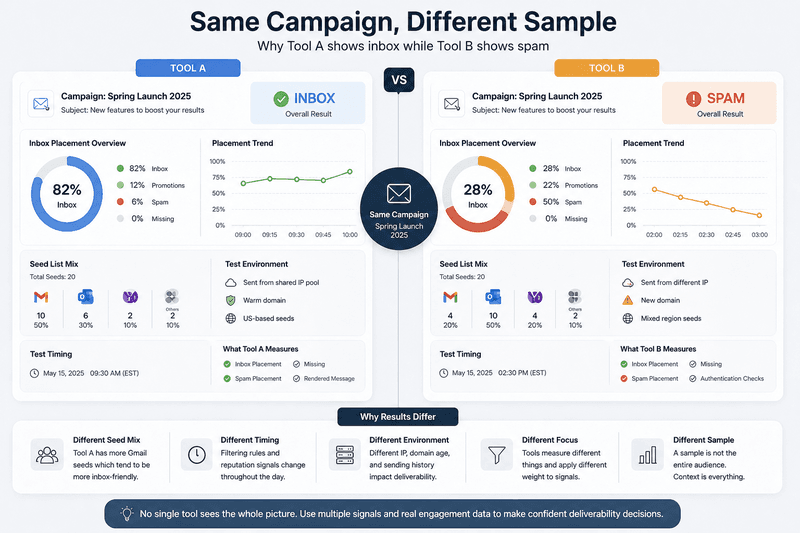
Use this decision framework when tools disagree, and document your comparison criteria so you can explore campaign performance comparison across multiple sends.
| Situation | Likely meaning | Action |
|---|---|---|
| One tool shows spam, another shows inbox | Sample or methodology difference | Compare provider mix and test timing |
| Gmail inbox, Outlook spam | ISP filtering differences | Review Microsoft specific reputation and engagement |
| Test inbox, live campaign weak | Seed result did not reflect audience behavior | Prioritize real recipient signals |
| Test spam, live campaign healthy | Seed inbox may be sensitive or isolated | Watch trends before changing strategy |
| Authentication pass, placement poor | Reputation or engagement issue | Audit complaints, list quality, and volume patterns |
| Placement drops after volume increase | Reputation pressure | Reduce spikes and stabilize sending patterns |
The key is pattern recognition. A single result is a signal. A repeated pattern across providers, campaigns, and time is evidence. This also explains why good scores still lead to bad sends. A campaign can pass authentication checks, earn strong seed test results, and still underperform if reputation, engagement, audience quality, or sending behaviour deteriorate after launch.
Technical Breakdown
A serious deliverability audit must cover these standards and risk factors.
Authentication protocols
| Protocol | Role in deliverability |
|---|---|
| SPF | Confirms which servers are allowed to send for a domain |
| DKIM | Adds a cryptographic signature to verify message integrity |
| DMARC | Connects SPF and DKIM alignment to domain policy |
| BIMI | Displays verified brand indicators when required conditions are met |
Authentication does not guarantee inbox placement. It establishes identity. Filtering systems still evaluate reputation, complaints, engagement, content, links, and sending behavior.
Compliance considerations
Campaigns should account for consent, unsubscribe handling, accurate sender identity, suppression management, and regional privacy rules. Compliance does not guarantee inbox placement, but noncompliance increases complaint and blocking risk.
Deliverability risk factors
| Risk factor | Why it matters |
|---|---|
| Sudden volume spikes | Can trigger reputation review |
| Weak list hygiene | Increases bounces and complaints |
| Misaligned domains | Reduces sender trust |
| Poor engagement | Signals low recipient value |
| Link reputation issues | Can affect filtering even when copy is clean |
| Inconsistent sending | Makes reputation harder to evaluate |
Myth Corrections
| Myth | Correction |
|---|---|
| Same campaign means same placement | Infrastructure, ISP behavior, and test design can change results |
| Authentication guarantees inboxing | Authentication verifies identity, not recipient value |
| Seed tests are always final proof | Seed tests are samples |
| One bad test means a campaign failed | Repeated patterns matter more than isolated results |
| Gmail results represent all inboxes | Each provider filters differently |
| A tool comparison solves strategy | Interpretation matters more than feature lists |
Implementation Framework
- Validate SPF, DKIM, and DMARC alignment before testing.
- Run inbox placement tests across major mailbox providers.
- Separate Gmail, Outlook, Yahoo, and corporate results.
- Compare test output with live engagement and complaint data using key metrics and related metrics (opens, clicks, click-to-open rate, replies, bounces, spam complaints).
- Track patterns across at least several sends before making major changes, using time-based comparison across consistent time periods.
- Classify each issue as authentication, infrastructure, reputation, content, list quality, or methodology.
- Prioritize fixes that repeat across tools and real recipient data.
- Use decision intelligence and optimization rather than raw testing alone.
Diagnostic Checklist
| Check | Pass condition |
|---|---|
| SPF | Authorized sender is present |
| DKIM | Signature passes and aligns |
| DMARC | Policy exists and alignment is valid |
| Provider split | Results are reviewed by Gmail, Outlook, Yahoo, and business mail |
| Seed method | Seed mix and timing are documented |
| Live data | Opens, clicks, replies, bounces, and complaints are reviewed |
| Reputation | Domain and IP behavior are monitored over time |
| Decision rule | No major change is based on one isolated result |
Decision Matrix
| Need | Better approach |
|---|---|
| Diagnose one campaign quickly | Seed test plus authentication review |
| Explain conflicting tool reports | Methodology comparison plus ISP split |
| Plan a high value send | Layered testing plus live behavior analysis |
| Improve long term performance | Trend analysis and reputation monitoring |
| Compare GlockApps with Mailora | Use GlockApps for test input and Mailora for interpretation and decision intelligence |
ROI Impact Analysis
No verified universal percentage can be applied to the revenue impact of deliverability variability. The impact depends on list size, offer value, mailbox mix, sales cycle, and baseline placement.
The practical ROI risk is still clear. If a team misreads testing data, it may suppress a valid promotional campaign, continue a risky send, or fix the wrong problem. Better interpretation protects pipeline quality by improving the decisions made from testing data, improving campaign ROI over time.
For teams tying deliverability to outcomes, add email template performance analysis and email template performance analysis plus b testing analysis (A/B subject line, from-name, and content variants) to your email template performance analysis workflow, so you can separate placement issues from creative issues.
Mailora helps teams move beyond raw inbox tests by turning fragmented deliverability signals into clearer campaign decisions. For teams comparing tools, the strongest use case is not replacing every test. It is understanding which signals deserve action and which ones need more context.
Test your campaign performance before you send.
FAQ
Why do identical email campaigns perform differently across tools?
Because each tool observes a different delivery context, including seed list mix, infrastructure, timing, mailbox providers, and reporting method.
Is one email testing tool always more accurate?
Not always. Accuracy depends on what the tool measures and whether that measurement matches the decision being made.
Why does Gmail show inbox while Outlook shows spam?
Gmail and Outlook use different filtering systems, reputation models, and user behavior signals. Provider level analysis is required.
Are seed tests reliable?
Seed tests are useful, but they are samples. They should be interpreted with live campaign data and provider specific trends.
Does DMARC guarantee inbox placement?
No. DMARC helps verify domain identity. Inbox placement also depends on reputation, engagement, content, complaints, and infrastructure.
What causes inbox placement inconsistency?
Common causes include ISP filtering differences, sender reputation shifts, list quality, engagement variation, authentication problems, and test methodology.
How should teams compare GlockApps and Mailora?
Use GlockApps as a diagnostic testing input where relevant. Use Mailora to interpret multiple signals and support campaign decisions.
What is the best way to handle conflicting test results?
Segment results by provider, compare methodology, check authentication, review live campaign behavior, and act only on repeated patterns.
Should a campaign be stopped after one spam result?
Not automatically. One result should trigger investigation. Repeated spam placement across providers and sends deserves action.
What signals matter most for campaign performance analysis?
Authentication, inbox placement, ISP level behavior, bounce rates, complaint signals, engagement trends, infrastructure history, and list quality.
Why is deliverability probabilistic?
Mailbox providers evaluate changing signals across sender identity, reputation, recipient behavior, and filtering policy. Results are therefore context dependent, not fixed.
Email template performance analysis should be paired with broader email campaign benchmarks and engagement metrics whenever possible. Otherwise, it’s easy to misinterpret lower click rates caused by send frequency, audience differences, list size fluctuations, or varying content formats that make campaigns difficult to compare fairly.
To maintain consistency over time, build a reporting cadence that tracks key performance indicators across providers, audience segments, and campaign types. This helps identify long-term trends instead of reacting to isolated performance swings.
Stay in the loop
Deliverability insights, product updates, and early access to new features. No spam, unsubscribe anytime.
By subscribing, you agree to our Privacy Policy. Unsubscribe anytime.