8 PowerDMARC Alternatives for 2026: DMARC Tools vs Deliverability Platforms
Key Takeaways
|
Is PowerDMARC Not Working for You? Here Are 8 Alternatives Worth Evaluating
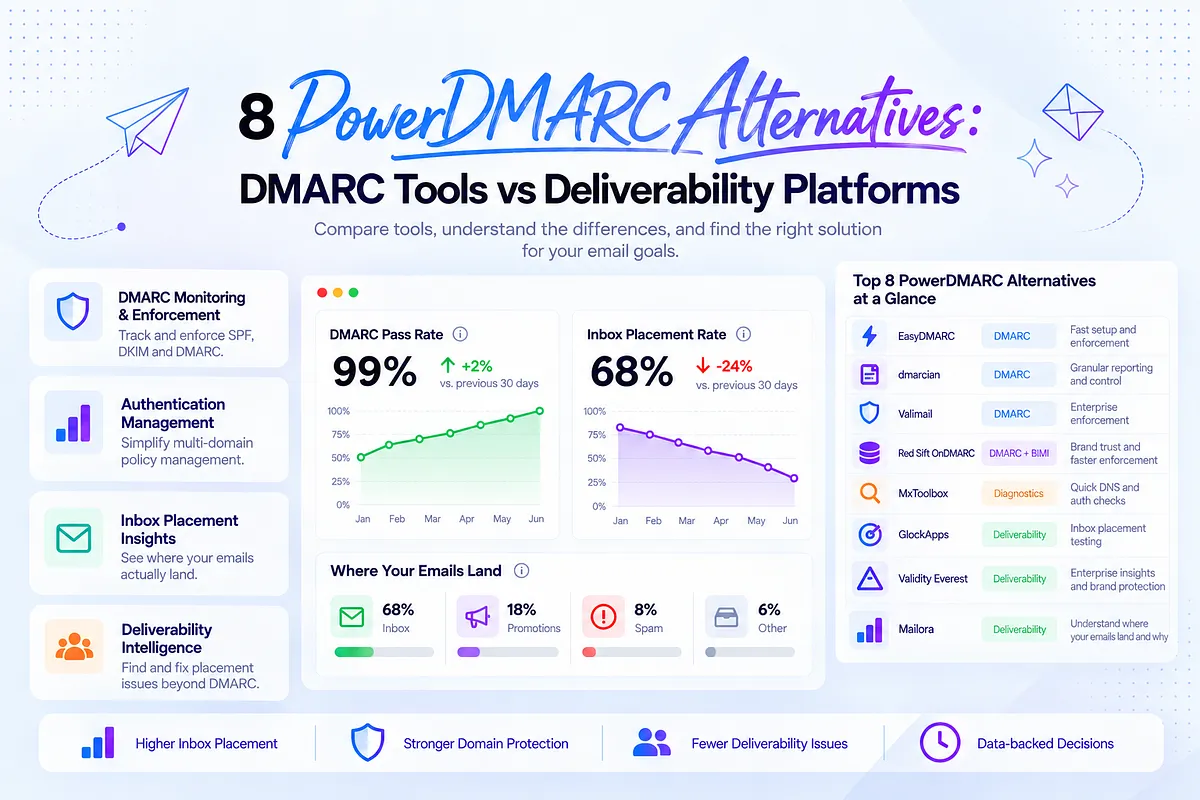
If you're searching for PowerDMARC alternatives, you're probably in one of three situations. Your trial is ending and you're comparing options before committing. Your team outgrew PowerDMARC's reporting depth or multi-domain workflow. Or, more likely if you're reading a comparison post this deep, you set up DMARC, watched your pass rate climb toward 100%, and still can't explain why campaign performance keeps sliding.
That third scenario is the one most PowerDMARC competitor roundups skip. They compare aggregate report parsing, DKIM key rotation alerts, and enforcement timelines as if DMARC health and inbox performance are the same problem. They're not.
DMARC tells mailbox providers whether a message is authorized to claim your domain. It says nothing about whether Gmail, Outlook, or Yahoo decide that message belongs in the inbox, Promotions, or spam. Those are separate filtering decisions, driven by separate signals: reputation, engagement history, content patterns, and sending consistency, none of which show up in a DMARC report.
This guide covers PowerDMARC and seven alternatives across two categories: DMARC and authentication platforms (EasyDMARC, dmarcian, Valimail, Red Sift OnDMARC, MxToolbox) and deliverability and placement platforms (GlockApps, Validity Everest, ZeroBounce, and Mailora). We'll walk through what each does well, where it stops, and which decision it's actually built to help you make. We'll also cover a migration playbook for teams moving off PowerDMARC, five common scenarios where authentication and placement diverge, and a worked example showing how a domain can pass DMARC cleanly while inbox placement quietly falls apart.
One note on methodology before we start: AI Overview citation shares referenced later in this piece (for GlockApps, MxToolbox, Validity Everest, and others) are a visibility indicator, meaning how often a source gets surfaced in AI-generated answers. They are not a quality ranking. We're citing them as one input, not a verdict.
The Short Answer
If you need the shortlist without reading the full breakdown, here's how these eight tools sort by primary job:
Tool | Category | Best For | DMARC Depth | Inbox Placement Testing |
| PowerDMARC | DMARC/authentication | Orgs wanting one console for SPF/DKIM/DMARC across many domains | Deep | No |
| EasyDMARC | DMARC/authentication | Teams wanting fast enforcement with built-in DNS wizard | Deep | No |
| dmarcian | DMARC/authentication | Technical teams wanting granular report control and open-source roots | Deep | No |
| Valimail | DMARC/authentication | Enterprise automated enforcement at scale | Deep | No |
| Red Sift OnDMARC | DMARC/authentication + BIMI | Teams prioritizing fast time-to-enforcement and BIMI/brand trust | Deep | No |
| MxToolbox | Diagnostics/point-in-time | Quick DNS/blocklist/auth spot-checks | Moderate | No |
| GlockApps | Deliverability/placement | Seed testing and inbox placement snapshots | Light | Yes |
| Validity Everest | Deliverability/enterprise | Enterprise deliverability suite with certification programs | Moderate | Yes |
| Mailora | Deliverability decision layer | Diagnosing why authenticated mail still misses the inbox, and validating fixes | Visibility (not enforcement) | Yes |
[Visual: Summary comparison of PowerDMARC alternatives — "Eight PowerDMARC alternatives compared at a glance"]
See where your emails actually land → Start a free test
What PowerDMARC Does Well
PowerDMARC built its category position around simplifying DMARC deployment for organizations that don't want to hand-parse XML aggregate reports or manually track SPF lookup counts across a dozen sending sources. The platform's vendor-published numbers put it at 10,000+ organizations and 2,000+ MSPs across 130+ countries, with a 15-day trial for evaluation (attributed, vendor claim).
For teams evaluating it as a DMARC reporting software option, three things tend to hold up:
Aggregate and forensic report processing. DMARC generates two report types: aggregate (RUA) reports showing which sources sent mail claiming your domain and whether they passed SPF/DKIM alignment, and forensic (RUF) reports showing individual failed message details where recipients support them. Raw XML aggregate reports are unreadable at any real volume. PowerDMARC turns them into dashboards showing sender-source breakdowns, which matters once you have more than two or three sending platforms touching a domain.
Multi-domain DMARC management for MSPs. If you're managing DMARC policy across dozens or hundreds of client or brand domains, a per-domain login model doesn't scale. PowerDMARC's console is built around that multi-tenant reality, which is a large part of why MSPs adopted it as their email authentication platform of choice.
Guided policy progression. Moving a domain from p=none to p=quarantine to p=reject without breaking legitimate mail flow requires watching aggregate reports over weeks, identifying every sending source, and fixing SPF/DKIM alignment before tightening policy. PowerDMARC's guided workflow reduces the chance of locking out a legitimate ESP mid-migration.
Worth being precise here: reaching p=reject confirms your domain can't be spoofed by unauthorized senders claiming your exact domain in the From header. It does not mean your legitimate marketing mail will land in the inbox. Those are unrelated outcomes, and no DMARC platform, PowerDMARC included, claims otherwise in its own technical documentation. Marketing pages sometimes blur this line. The actual mechanism doesn't.
Where PowerDMARC gets evaluated against alternatives is less about whether it does DMARC management well, and more about whether DMARC management is the actual bottleneck a team is trying to solve. For a security or IT stakeholder tightening domain policy, it usually is. For a marketing or lifecycle team trying to explain a Gmail placement drop, it usually isn't, which is the gap the rest of this guide gets into.
DMARC Monitoring Is Not Deliverability Monitoring
Every DMARC platform, PowerDMARC included, is built to answer one question: is this message authorized to claim my domain?
That's an identity question. SPF checks whether the sending IP is allowed to send for the domain. DKIM checks whether the message body was altered in transit. DMARC ties the two together and tells receiving servers what to do when alignment fails: quarantine it, reject it, or do nothing and just report on it.
None of that touches the filtering decision that determines inbox placement. Once a message clears authentication, Gmail, Outlook, and Yahoo run a completely separate evaluation based on sender reputation, recipient engagement history, complaint rates, content patterns, and sending consistency. That evaluation decides Inbox, Promotions, or spam. DMARC has no visibility into it, and no DMARC report will ever show it to you.
Sender-source visibility is where this usually breaks down. Aggregate reports tell you which infrastructure sent mail on your domain's behalf and whether it aligned. They don't tell you whether Gmail trusts that infrastructure enough to place mail in the inbox, or whether the volume from that source crossed Google's and Yahoo's 5,000-messages-per-day bulk sender threshold, which triggers a different, stricter set of authentication and complaint-rate requirements regardless of what your DMARC dashboard shows.
[Visual: Signal coverage framework diagram — authentication, infrastructure, reputation, placement, decision layer — "Five layers of signal coverage most DMARC tools stop before reaching"]
This is the source of a specific, recurring confusion. A team migrates to a DMARC platform, works through the p=none to p=quarantine to p=reject progression over several weeks, watches aggregate reports show 99%+ pass rates across every legitimate sending source, and considers authentication "done." Then a new ESP or transactional provider comes online, and Gmail placement drops without any change in the DMARC dashboard. The pass rate holds steady. The reports look clean. The team has no idea why open rates just fell off a cliff.
The two systems aren't in conflict. They're measuring different things, on different timelines, for different reasons. A message can pass DMARC cleanly and still get filtered into spam because the sending IP is new and hasn't built reputation history through normal warm-up, or because engagement on that segment has been declining for weeks, or because a content pattern matches something the filter has learned to distrust. Google Postmaster Tools can surface some of this reputation data directly from Gmail, but it's a separate lookup from anything in a DMARC aggregate report, and most DMARC platforms don't integrate with it.
If you're trying to figure out whether a specific inbox problem is an authentication issue or a placement issue, the diagnostic path is different for each. For authentication problems, meaning failed alignment, missing DKIM signatures, or SPF records exceeding the lookup limit, you want to diagnose DMARC failures and DNS authentication issues directly. For placement problems where authentication is already clean, the DMARC dashboard won't help, no matter how deep its reporting goes. That gap is common enough that it's why emails can pass DMARC but still miss the inbox.
How We Evaluated These Alternatives
We didn't score every tool on the same fixed rubric, because DMARC platforms and deliverability platforms aren't competing for the same job. Scoring EasyDMARC on inbox placement testing and Mailora on aggregate report readability would produce a table that looks rigorous and tells you nothing useful.
Instead, each tool is evaluated against the job it's actually built for, using criteria that matter for that category:
For DMARC and authentication platforms (PowerDMARC, EasyDMARC, dmarcian, Valimail, Red Sift OnDMARC, MxToolbox): aggregate and forensic report depth, time-to-enforcement guidance, multi-domain management, SPF lookup and macro-expansion handling, DNS setup support, and pricing transparency.
For deliverability and placement platforms (GlockApps, Validity Everest, ZeroBounce, Mailora): breadth of mailbox provider coverage in placement testing, whether the tool explains why a message landed where it did versus just reporting the outcome, reputation and blocklist monitoring depth, and whether findings connect to a next action or stop at a diagnostic score.
We relied on each vendor's own published documentation and pricing pages, vendor-reported adoption numbers (labeled as vendor claims throughout, not independently verified), and the AI Overview citation shares noted earlier, which we're treating strictly as a visibility signal, not a proxy for accuracy or quality. Where a vendor didn't publish pricing, we noted that instead of guessing.
One methodology caveat worth stating plainly: we did not run head-to-head seed tests across every platform in this list. Claims about testing accuracy, seed panel size, or report parsing speed are drawn from vendor documentation, not our own benchmarking. Where that matters for your evaluation, verify directly with the vendor.
Mailora Profile
Mailora isn't a DMARC platform, and it's not trying to be. It doesn't host your DMARC record, generate your DNS entries, or issue BIMI/VMC certificates. If what you need is a console for progressing a domain from p=none to p=reject across dozens of subdomains, one of the DMARC-focused tools in this guide is the right starting point, not Mailora.
What Mailora does is sit downstream of authentication and answer the question DMARC tools can't: given that your mail is authenticated, why is it still landing in spam or Promotions, and what should you change next?
Here's a scenario that makes the distinction concrete. A SaaS company adds a new transactional ESP to send password resets and account notifications, separate from their marketing sending domain. SPF and DKIM are configured correctly. DMARC aggregate reports show alignment holding at 99% across every sending source, including the new one. Everything in the authentication layer looks stable.
Two weeks later, Gmail placement for the marketing domain drops 22 points. Open rates fall, revenue attribution to email drops, and the lifecycle team can't explain it because their DMARC dashboard shows a clean bill of health. What actually happened: the new sending source hadn't gone through a normal reputation warm-up period, and the sudden shift in sending pattern across shared infrastructure signals looked inconsistent to Gmail's filters. DMARC never flagged it, because DMARC isn't built to.
[Visual: DMARC pass rate vs Gmail inbox placement divergence chart — "When authentication holds steady but placement doesn't"]
This is the gap Mailora is built to close. Inbox placement testing shows provider-level breakdowns, meaning Inbox versus Promotions versus spam by mailbox provider, instead of a single blended "delivered" number. When placement drops, the platform helps isolate whether the cause is a content element, a new sending source, or a reputation shift, instead of leaving you to guess. Domain and IP reputation monitoring shows the trend line, not just today's score, so a gradual decline shows up before it becomes a full-blown filtering problem. Diagnostics are paired with practitioner guidance on what to try next, rather than a dashboard number left for you to interpret alone.
Full detail on how these pieces fit together is on Mailora's deliverability monitoring features page.
If you're planning a sending change, whether a new ESP, a new domain, or a template overhaul, you can test email deliverability before sending instead of finding out about it through a placement drop after the fact.
To be direct about fit: Mailora is not the right tool if what you need is DMARC record hosting, guided policy enforcement, or BIMI/VMC certificate issuance. Pair it with one of the authentication platforms in this guide for that layer. Mailora is the right tool when authentication is already handled and you need to know what's happening to your mail after it clears that bar.
Run your first test → Get started free
EasyDMARC
EasyDMARC competes directly with PowerDMARC on the same core job: DMARC deployment, aggregate report parsing, and guided enforcement. The two platforms get compared constantly because they solve the same problem for a similar buyer, a team that wants a faster, more guided path to p=reject without hand-parsing XML.
Where EasyDMARC differentiates is largely around onboarding speed. Its DNS record wizard and setup flow are built to get a domain from zero to monitored quickly, which matters for teams managing authentication for the first time or migrating several domains at once. Third-party pricing data (via DMARC Report, which lists comparative pricing across the category) puts EasyDMARC starting around $35.99/month (attributed).
The report depth and multi-domain management are comparable to PowerDMARC's. This is a case where the decision often comes down to onboarding experience, support responsiveness during setup, and pricing at your specific domain count, rather than a fundamental capability gap.
The same limitation applies here as with PowerDMARC: EasyDMARC tells you whether your domain's authentication is aligned. It doesn't test where a fully authenticated message actually lands once it reaches Gmail's or Outlook's filters. If your evaluation criteria include inbox placement visibility, that's not a category EasyDMARC, or any DMARC-focused platform, is built to cover.
Red Sift OnDMARC
Red Sift OnDMARC sits in the same DMARC deployment category as PowerDMARC and EasyDMARC, but it leans harder into speed-to-enforcement as its core pitch. Red Sift publishes an average time of 6-8 weeks to reach full p=reject enforcement (vendor claim), a specific enough number that it's worth taking at face value as a marketing benchmark rather than a guarantee. Your actual timeline depends on how many sending sources you're untangling and how clean your SPF setup already is.
The platform also ties into BIMI more directly than most competitors in this list, publishing brand-recall and open-rate lift figures tied to BIMI adoption (39% open-rate and 44% brand-recall figures, per Red Sift's own published data). Those numbers are specific to their customer base and methodology, not a universal outcome. Treat them as directional, not a promise.
One technical detail Red Sift calls out that's a useful flag on its own: SPF macro expansion issues affect roughly 25% of SPF records, according to an academic study Red Sift cites in their documentation. This matters because SPF's 10-DNS-lookup limit gets exceeded silently when macros expand into multiple lookups behind the scenes, and teams often don't discover it until mail starts failing alignment for reasons that don't show up in a simple record review. If you're doing SPF flattening as part of a DMARC migration, this is one of the more common places things break.
Red Sift reports customer satisfaction metrics (NPS 62, CSAT 88, vendor-published) and offers a 14-day trial. Like the other DMARC-first platforms here, the reporting depth stops at authentication. It won't tell you whether your Gmail-authenticated mail is landing in Promotions.
Dmarcian
dmarcian has a longer history in this space than most of its competitors. The platform was built by one of the original co-authors of the DMARC specification, which gives it credibility with technically deep buyers who want a tool built by people who understand the protocol at the RFC level, not just the dashboard level.
That heritage shows up in how the platform handles aggregate report parsing and DMARC record analysis. It's built for teams that want granular control over the record itself: subdomain policy inheritance, tag-by-tag record breakdowns, and detailed guidance on the mechanics of alignment failures. If your team includes someone who wants to understand why an alignment check failed at the protocol level, not just that it failed, dmarcian's depth here is a genuine differentiator inside the DMARC category.
Where dmarcian is less differentiated is on the onboarding experience. Compared to the guided wizards in EasyDMARC or Red Sift, dmarcian's interface assumes more existing DMARC fluency. For a team without in-house DNS expertise starting from zero, that can mean a steeper ramp before the reporting becomes useful.
The category limitation is the same one that applies across this entire group of DMARC-first tools: dmarcian tells you about authentication alignment. It has no visibility into inbox placement, provider-level filtering behavior, or engagement-driven reputation shifts, regardless of how deep its report parsing goes.
Valimail
Valimail's positioning differs slightly from the rest of the DMARC category in that it leans on automated SPF and DKIM enforcement rather than manual record management, aimed at reducing the ongoing maintenance burden of keeping authentication records current as sending sources change.
For organizations managing authentication across many business units or a high rate of new sending source additions, a common pattern at larger enterprises where different teams spin up new marketing tools or transactional providers without central coordination, automated enforcement can meaningfully reduce the "someone forgot to update the SPF record" failure mode that causes a lot of silent alignment breaks.
Valimail's pricing generally sits toward the enterprise end of the DMARC tooling spectrum, and its sales process reflects that. This makes it a stronger fit for teams managing multi-team sending governance across marketing, product, and transactional streams, and a weaker fit for a solo newsletter operator or a small agency looking for something lightweight.
As with every tool in this section, Valimail's automation operates entirely within the authentication layer. It can keep your SPF and DKIM records current. It has no mechanism for detecting that a fully authenticated message is landing in spam because of a reputation or engagement problem downstream.
MxToolbox
MxToolbox occupies a different niche than the dedicated DMARC platforms above. It's a diagnostic toolkit, meaning DNS lookup tools, blocklist checks, mail server health checks, and DMARC/SPF/DKIM record validators, rather than a continuous monitoring platform with a dashboard you check daily.
That distinction matters for how you'd actually use it. MxToolbox is excellent for a specific, bounded question: is this DNS record configured correctly, right now? You paste in a domain, run the check, and get an immediate answer. It's free for most of its core checks, which makes it a reasonable first stop when you're troubleshooting a specific authentication problem or verifying a DNS change went live correctly.
What it doesn't do is continuous, correlated monitoring. It has no memory of your domain's reputation trend over the past 90 days, no alerting when something drifts, and no aggregate report parsing for ongoing DMARC visibility. It's a point-in-time lookup tool, not an operational dashboard. Among the AI Overview citation shares we're treating as a visibility indicator only, MxToolbox shows up at 28%, reflecting how frequently it gets referenced for exactly this kind of quick diagnostic lookup, not a claim about depth or accuracy relative to other tools.
If your evaluation criteria include ongoing monitoring with historical trend data, MxToolbox alone won't cover that. It's a strong companion tool for spot-checks, not a replacement for either a DMARC platform or a deliverability monitoring platform.
GlockApps
GlockApps is a deliverability-testing platform, not a DMARC platform, and it's worth being precise about where it actually competes. Its core product is inbox placement testing via seed accounts across major mailbox providers, along with a spam-content analyzer and some domain/IP reputation monitoring.
This puts GlockApps in the same broad category as Mailora rather than in the same category as PowerDMARC. If you're comparing GlockApps to PowerDMARC directly, you're comparing a placement-testing tool to an authentication tool. They answer different questions, and neither replaces the other.
The distinction between GlockApps and Mailora is more specific: GlockApps reports placement data, meaning inbox, spam, and tab breakdowns by provider. Mailora reports placement data and pairs it with root-cause isolation (which element of the email, which sending source, which reputation shift) and a recommended next action, backed by practitioner guidance. The difference is between a data feed and a decision layer. Both are legitimate approaches. Which one you need depends on whether your team already has the deliverability expertise to interpret a placement report on its own or needs the tool to do more of that interpretation work for you.
GlockApps shows up with a 47% AI Overview citation share, the highest in the peer group we tracked. Again, that's a visibility signal, not a quality ranking.
Validity Everest and ZeroBounce
Validity's Everest platform is the enterprise incumbent in deliverability monitoring, with roots going back to Return Path and 250ok. It offers deep inbox placement testing, reputation monitoring, and a professional services layer for organizations with dedicated deliverability teams and complex, multi-brand sending infrastructure.
Everest's strength is depth for large, established programs, the kind of enterprise deployment where a deliverability manager needs granular provider-level data across dozens of sending identities and a support relationship that includes account management. Its weakness, for growth-stage teams, is procurement friction. Enterprise sales cycles, enterprise pricing, and enterprise onboarding timelines don't fit well with a team that needs answers this week, not next quarter. If you're a 20-person DTC brand or a solo newsletter operator, Everest's time-to-clarity is measured in weeks of sales process before you even see data, a mismatch for the urgency most of those teams operate under. Validity Everest shows up with a 26% AI Overview citation share among the visibility indicators we tracked, again a signal of how often it gets surfaced, not a ranking of quality.
ZeroBounce is worth mentioning here because it gets confused with deliverability monitoring tools despite solving an adjacent, not overlapping, problem. ZeroBounce is an email verification and list-cleaning service. It flags invalid addresses, spam traps, and role-based accounts before you send. That's valuable hygiene work, and dirty lists contribute to reputation damage over time. But verification happens before send and addresses list quality specifically. It doesn't test inbox placement, monitor reputation trends, or diagnose why an already-clean list is landing in spam. ZeroBounce and a placement-testing tool aren't competitors. They're complementary pieces of the same sending hygiene stack.
Feature and Use-Case Comparison Table
The table below scores each tool against the criteria from our evaluation methodology. DMARC-first platforms are scored on authentication depth and enforcement guidance; deliverability-first platforms are scored on placement visibility and root-cause diagnosis. A dash means the category doesn't apply to that tool's core job, not that the tool failed at it.
Tool | DMARC report depth | Pre-send testing | Placement visibility | Infra/reputation monitoring | Multi-domain mgmt | Non-technical reporting | Pricing transparency |
| PowerDMARC | Strong | — | — | Partial (blocklist) | Strong | Moderate | Tiered, contact sales for scale |
| EasyDMARC | Strong | — | — | Partial (blocklist) | Strong | Moderate | ~$35.99/mo start (attributed) |
| Red Sift OnDMARC | Strong | — | — | Partial | Strong | Moderate | Contact sales |
| dmarcian | Strong (protocol-deep) | — | — | Limited | Strong | Lower (technical-first) | Tiered by volume |
| Valimail | Strong, automated | — | — | Limited | Strong | Moderate | Enterprise, contact sales |
| MxToolbox | Point-in-time checks | — | — | Point-in-time (blocklist) | Limited | Low | Free tier + paid monitoring |
| GlockApps | — | Yes (seed-based) | Strong | Moderate | Limited | Moderate | Tiered by test volume |
| Validity Everest | — | Yes | Strong (enterprise-depth) | Strong | Strong | Strong (managed reporting) | Enterprise, contact sales |
| ZeroBounce | — | List verification only | — | — | N/A | Moderate | Pay-per-verification |
| Mailora | — | Yes (pre-send testing) | Strong, provider-level + root-cause | Strong, trend-based + correlated | Strong | Strong (practitioner-guided) | Tiered pricing |
[Visual: Detailed feature comparison table of DMARC and deliverability tools — "Scoring PowerDMARC alternatives against the published methodology"]
A few things worth reading directly off this table rather than taking our word for it. Every DMARC-first platform leaves the placement visibility column empty, not because any of them are weak tools, but because placement testing isn't the job they're built for. Every deliverability-first platform leaves the DMARC report depth column empty for the same reason in reverse. If your shortlist criteria include both columns filled for a single vendor, you're likely to come up empty, because the categories genuinely don't overlap yet.
The other pattern to note: pricing transparency varies a lot even within the same category. EasyDMARC and DMARC Report publish clear starting prices; PowerDMARC, Red Sift, and Valimail push toward contact-sales conversations for anything beyond entry tiers. If pricing clarity matters early in your evaluation, that's a real differentiator alongside feature depth.
Five Scenarios Where DMARC-Only Visibility Runs Out
DMARC dashboards are built to answer a narrow question. These five scenarios show where that narrow answer stops being useful, and what kind of decision a placement-focused tool is actually built to support instead. For a deeper look at the mechanics behind scenario two, see why emails can pass DMARC but still miss the inbox.
Scenario | What a DMARC-only tool shows | What it misses | Decision needed |
| New ESP or transactional provider added | Alignment holding at or near 100% for the new source | Reputation warm-up status and sending-pattern consistency across the new infrastructure | Whether to throttle volume from the new source and test placement before scaling it |
| Gradual open-rate decline with clean authentication | No change in pass rate over time | Engagement decay and complaint-rate trends by segment | Whether to suppress low-engagement segments or diagnose a content issue |
| Crossing the bulk sender threshold | Aggregate reports unaffected | New authentication and complaint-rate requirements Google and Yahoo apply above 5,000 messages/day | Whether current setup meets bulk sender requirements before volume scales further |
| Domain migration or subdomain consolidation | Alignment reports look clean post-migration | Reputation reset risk on the new domain or subdomain | Whether to stage the migration with a warm-up period rather than a full cutover |
| Multiple brands sharing sending infrastructure | Per-domain DMARC reports appear healthy | Cross-contamination risk from one brand's reputation affecting another's placement | Whether to isolate sending infrastructure per brand |
[Visual: Table of five authentication vs placement gap scenarios — "Where DMARC-only visibility runs out"]
Migration Playbook: Moving Off PowerDMARC Without Losing Report Continuity
If you're switching away from PowerDMARC, whether to a different DMARC platform or to add a deliverability layer alongside your existing DMARC setup, the risk isn't the authentication itself. It's losing historical reporting continuity or breaking alignment mid-transition. A staged approach avoids both.
- Inventory every sending source currently authorized in your DMARC record. Pull the full list of IPs and domains from recent aggregate reports before you touch anything. This is your baseline for confirming the new platform sees the same sources.
- Verify SPF and DKIM alignment per source, independently of the DMARC tool. Confirm each sending platform's SPF include and DKIM selector are correct at the DNS level, not just inside PowerDMARC's dashboard.
- Export and archive historical aggregate report data. Retention windows and export formats vary by vendor, so confirm what PowerDMARC allows you to pull before canceling, and keep a local copy.
- Run the new platform's RUA collection in parallel with PowerDMARC for at least one full reporting cycle. DMARC aggregate reports typically arrive daily from most receivers, so a one- to two-week overlap gives you enough data to confirm the new tool is receiving reports from every source PowerDMARC was tracking.
- Compare source coverage between the two platforms before making any DNS changes. If a sending source shows up in PowerDMARC's reports but not the new platform's, resolve that gap first.
- Only remove the PowerDMARC RUA tag from your DNS record once the new platform confirms full source coverage. Removing it too early creates a reporting blind spot during the transition.
[Visual: PowerDMARC migration playbook flowchart — "Migrating off PowerDMARC without losing reporting continuity"]
Choosing Based on the Decision You Need to Make Next
The right tool depends less on category labels and more on the decision sitting in front of you right now.
If you're setting up DMARC for the first time and need guided policy enforcement, EasyDMARC or Red Sift OnDMARC will get you to p=reject with less manual DNS work than a bare-bones platform. If you're managing DMARC across dozens of business units with constant sending source churn, Valimail's automation reduces the maintenance burden. If you want protocol-level depth from a team that helped write the spec, dmarcian earns that reputation.
None of those tools will tell you why a fully authenticated campaign dropped 22 points in Gmail placement after your team added a new transactional provider. That's a different question, and it requires a different kind of visibility, one that correlates authentication, infrastructure, and reputation signals against actual inbox outcomes, not just record validity.
If that's the decision in front of you, a DMARC platform alone won't close the gap. Mailora's pre-send testing and post-send placement monitoring are built for exactly that moment: authentication passes, something's still wrong, and you need to know what changed before the next campaign goes out.
Run your first test → Get started free
If you'd rather explore the platform on your own terms first, you can run your first deliverability test directly.
FAQ
Is there a free PowerDMARC alternative for DMARC monitoring?
MxToolbox offers free point-in-time DMARC, SPF, and DKIM record checks, and DMARC Report publishes a 10,000-report free tier (vendor claim). Neither offers the continuous aggregate report parsing and enforcement guidance you'd get from a paid platform.
What's the difference between DMARC monitoring and email deliverability monitoring?
DMARC monitoring tracks whether your SPF and DKIM records align with your DMARC policy, an authentication check. Deliverability monitoring tracks where your authenticated mail actually lands across mailbox providers, which depends on sender reputation and engagement signals that DMARC has no visibility into.
Can I switch DMARC platforms without losing my historical aggregate report data?
Most platforms let you export historical RUA report data before cancellation, but retention windows and export formats vary by vendor. Confirm export capability and keep a local archive before you cancel your existing subscription. Running your new platform's RUA collection in parallel for a full reporting cycle before cutting over also protects against gaps.
Do I need a DMARC tool and a deliverability testing tool, or can one cover both?
Right now, no platform in this space genuinely covers both to full depth. DMARC platforms handle authentication, and deliverability platforms handle placement testing and reputation monitoring. Most growth-stage teams run one of each.
Will moving my domain to p=reject improve my inbox placement?
Not directly. p=reject blocks unauthenticated mail claiming to be from your domain, which protects against spoofing, but it doesn't influence how mailbox providers score your reputation or engagement. Placement depends on separate signals that DMARC enforcement doesn't touch.
Stay in the loop
Deliverability insights, product updates, and early access to new features. No spam, unsubscribe anytime.
By subscribing, you agree to our Privacy Policy. Unsubscribe anytime.