How Email Verification Works: Methods, Tools, and Limitations
Key Takeaways
|
You cleaned the email list, and ran every address through a verifier. The dashboard came back green. Send hits go, but your opens drop, bounce rate spikes anyway, and Postmaster Tools flips the reputation panel from "high" to "medium" inside 48 hours.
The instinct is to blame the verifier, but the verifier did its job. It tells you which addresses exist, but whether your email actually reaches the inbox is a different question, and the gap is where most "we already verified the list" senders get caught.
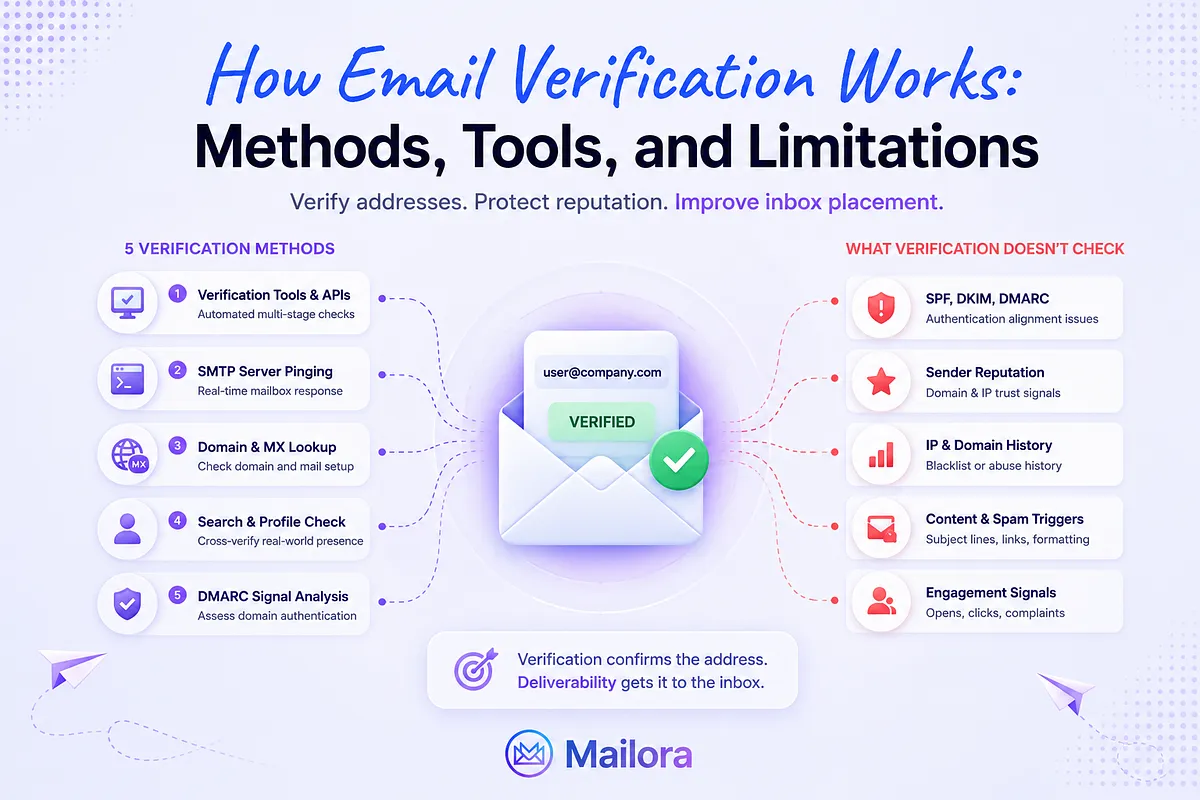
This guide breaks down how email verification works in practice, the five methods volume senders use, what verification catches under the hood, what it misses, and how teams at volume connect verification to the broader deliverability signals that decide inbox placement.
Why Email Verification Is the Baseline, Not the Finish Line
The cost of sending to a bad address compounds at every layer of the stack. One hard bounce costs you the send.
- A bounce rate above 2% costs you reputation at the major mailbox providers.
- A complaint rate above the 0.3% ceiling Gmail and Yahoo enforce for bulk senders costs you delivery to the consumer inbox entirely.
According to Google's sender guidelines, any domain sending 5,000 or more messages per day to Gmail accounts is subject to that 0.3% ceiling, the SPF/DKIM/DMARC authentication requirement, and the one-click unsubscribe rule, and as of November 2025, Google escalated enforcement from temporary delays to permanent SMTP-layer rejection.
A healthy verified list bounces under 1%. A typical unverified or stale list bounces between 5% and 15% on the first send, and once you cross the provider thresholds, the damage carries into every subsequent campaign because reputation does not reset overnight.
Verification answers one question, does this address exist and accept mail today?, but it does not tell you whether your SPF record aligns at the sending source, whether DMARC is parked at p=none while a third-party platform sends unauthenticated mail under your domain, whether the IP your ESP rotated you onto last week sits on a blocklist, or whether your subject line patterns are tripping the content classifier at Outlook.
If your goal is to confirm whether an individual email address is real before sending, using a dedicated email validator can help identify invalid, disposable, catch-all, and risky addresses before they affect deliverability.
A list of "valid" addresses with broken authentication still lands in spam. A list of "valid" addresses sent from a warming IP still gets throttled. Verification is necessary, but not sufficient.
Five Practical Methods to Verify an Email Address
The following five methods cover the operational range, from one-address spot checks to program-level monitoring.
1. Dedicated email verification tools and APIs
A modern verifier runs each address through a multi-stage pipeline:
- Syntax validation against RFC 5321 and 5322
- DNS resolution
- MX record lookup
- An SMTP handshake, and
- A mailbox-level probe that asks "does this local part accept mail at this domain" without actually sending.
A more comprehensive process involves over 30 discrete checks layered on top of the basic existence ping, syntax compliance, internationalised address handling, disposable address detection, SMTP diagnostic commands.
The major tools in this category, including ZeroBounce, NeverBounce, Bouncer, Kickbox, Emailable, run roughly the same pipeline with different accuracy claims and different handling of ambiguous results.
Pick one that:
- Exposes confidence tiers rather than binary results
- Treats catch-all as a separate risk category, and
- Integrates with your ESP or CRM through a real-time API rather than CSV uploads only.
2. Manual SMTP server pinging via Telnet
Open a Telnet connection to the recipient's MX server on port 25, issue HELO, MAIL FROM, then RCPT TO, and read the response code: 250 means accepted, 550 means rejected, 452 means rate-limited, and a hang usually means grey-listing.
Fine for a one-off check on a suspicious domain. Useless at scale, most ISPs rate-limit unknown probing IPs within a few attempts, several block IPs that pattern-match verification traffic outright, and catch-all domains return 250 OK regardless of whether the mailbox exists.
3. Domain and MX record lookup
A DNS-level check, dig, nslookup, or a tool like MxToolbox, confirms whether a domain has working MX records pointing to a real mail exchanger. A missing or broken MX record is often the first signal of a dead domain, a parked registration, or a typo on a corporate domain that no longer hosts mail.
It tells you the domain can receive mail in principle. It does not tell you whether the specific mailbox accepts the message. Treat it as a sanity check, not as verification.
4. Google search and social profile cross-referencing
For single-address manual research, verifying a specific prospect before an outbound send, or validating a contact form submission that looks suspicious, a web search across LinkedIn, the company's website, and historical mentions of the address confirms it belongs to a real person at a real organisation. Slow and unscalable, but the right tool for one-off high-value checks where an API would not catch a typo or an aliased address.
5. Continuous deliverability monitoring
Continuous monitoring treats verification as the first layer of a longer signal stack:
- Post-send bounce telemetry
- Complaint and engagement data fed back into the verification tier
- DMARC aggregate report parsing to catch authentication drift
- Sender reputation tracking, and
- Inbox placement testing that runs alongside the live program rather than as a quarterly audit.
This is not a replacement for methods one through four, verification still has to happen at the address level. The shift is that the verification result becomes one feed into a continuous decision layer instead of the final word.
Mailora's comprehensive deliverability testing is built around this layer: inbox placement testing across major providers, DMARC aggregate report parsing into prioritised actions, reputation tracking with alerting, and content diagnostics that connect verification outcomes to what the receiving server actually does with the message.
| Method | Reliability | Scalability | Cost | What It Catches | What It Misses |
| Dedicated verification tools | High | High | Per-address credits | Syntax, DNS, MX, SMTP, mailbox, DEA, traps | Authentication drift, post-send signal changes, content filtering |
| Manual SMTP ping | Medium | Very low | Free | Address existence at moment of check | Catch-all noise, rate-limited probes, anything beyond existence |
| DNS / MX lookup | Low (as standalone) | High | Free | Domain can receive mail | Whether mailbox accepts the message, content filtering |
| Manual search | Medium | Very low | Free / time | Address belongs to a real person | Whether the mailbox is active or accepts your mail |
| Continuous monitoring | High | High | Subscription | Verification + authentication + reputation + placement | (Designed to close gaps, not catch addresses) |
What Email Verification Actually Checks (and What It Misses)
Each address moves through a sequence of layers, and the verdict at the end is a composite of which layers passed cleanly, which produced warnings, and which failed outright.
Syntax validation
The address has to be parseable against the relevant RFCs, local part length under 64 characters, valid character set, a single @, a DNS-compliant domain. A surprising fraction of bad addresses fail here alone:
- Trailing whitespace
- Copy-paste errors that include a name
- Internationalised characters the sender's form did not normalise.
Domain and DNS resolution + MX record confirmation
The domain has to resolve and have a working MX record pointing to a mail exchanger. NXDOMAIN failures are hard rejects. Domains that resolve but lack MX records cannot receive mail at all. Newly expired domains, typo domains, and abandoned corporate domains surface here.
SMTP handshake
The verifier opens a connection to the MX server and walks the early stages of an SMTP transaction. The response codes tell the story:
- 250 OK is positive
- 550 is a hard mailbox reject
- 452 is a soft reject (usually temporary, sometimes a polite way for the server to say "you are being rate-limited").
Spam trap, honeypot, and disposable address detection
Verification tools maintain databases of known traps and recycled-trap addresses, and flag disposable mailboxes (Mailinator, Guerrilla Mail, 10MinuteMail) as valid-but-disposable so the sender can decide whether to suppress them.
Catch-all and accept-all handling
Some corporate domains accept mail to every local part, info@, anything@, typos@, all return 250 OK. Catch-all addresses are not verifiable through SMTP probing alone, and a good verifier returns "catch-all" as a separate risk category rather than rolling it into "valid" or "invalid."
That is what standard verification covers. The gaps are larger than most senders realise.
Authentication alignment on the sender's side
A verifier checks the recipient's infrastructure, but it does not validate if your SPF record includes the correct sending sources, your DKIM signature aligns with the From domain, or your DMARC policy is set to anything stricter than p=none. Two campaigns to the same verified list can produce wildly different inbox rates because the sender-side authentication state changed between sends, where a third-party platform was added without an SPF update, a DKIM key rotated without DNS updates, a DMARC policy moved to none during a temporary fix that never got reverted.
Mailora’s Email deliverability testing closes the gap by running the sender-side authentication checks verification skips by definition.
Address degradation over time
A "valid" address today can become a recycled spam trap in 90 days. Mailbox providers convert dormant consumer addresses into traps as a deliberate filtering signal, anyone still sending to the address after the conversion is, by definition, working from a stale list. Point-in-time verification cannot catch this. Continuous monitoring of post-send bounce and engagement signals catches it earlier.
Binary results on inherently ambiguous addresses
Catch-all, role-based (info@, support@, sales@), and accept-all configurations all return technically "valid" results that produce real deliverability problems. Tools have started exposing these as risk tiers rather than pass/fail, but most workflows still treat the binary output as authoritative. A list of 100,000 "valid" addresses that includes 12,000 catch-all results is not the same risk profile as 100,000 fully probeable mailboxes.
Correlation with actual send outcomes
Verification runs in isolation from the live program. A verified address that bounces on the actual campaign is information the verifier never sees and never learns from. Mature deliverability programs close the loop manually, feeding bounce telemetry back into the suppression list, re-verifying segments that show degradation, and watching complaint rates by acquisition source.
How to Verify Emails at Scale Without Impacting Your Workflow
There are three implementation patterns that work at volume. Pick the one (or the combination) that matches your acquisition model.
Bulk verification before campaign sends
- Export the list
- Run it through a verification API
- Suppress everything flagged as invalid or high-risk
- Send to the cleaned segment.
For active engaged lists, every 90 days is the floor. For lists with any cold or scraped sources, monthly is more defensible. For dormant segments, verify before any reactivation send, because the verification result on a six-month-dormant address tells you more about whether the mailbox is still maintained than about whether it was valid when it joined the list.
Real-time API validation at point of capture
- Block bad data at the door instead of cleaning it later.
- Drop a verification API call into the signup form, the lead-gen capture, the CRM import endpoint.
- Reject syntactically invalid addresses at submit time
- flag catch-all and disposable addresses for review
- Prompt for a typo correction when the verifier suggests the user meant @gmail.com instead of @gmial.com.
Always prioritize blocking over cleaning because every bad address that enters the database costs you both the storage and every downstream verification cycle.
CRM and marketing automation integration
Native verifier integrations with HubSpot, Salesforce, Marketo, and Klaviyo let you flag and re-verify addresses inside the system of record rather than in batch exports. Zapier workflows handle the cases the verifier does not natively connect to. Verification belongs in the data pipeline, not in a quarterly cleanup ritual.
For all three patterns, treat verification as the gate to send, and then run a deliverability test against the cleaned list before pressing send. Verification confirms the addresses are real.
A deliverability test confirms your infrastructure can actually reach them. How to test email deliverability covers the post-verification testing workflow in detail, what to send through the seed list, which authentication signals to validate, and what the results actually tell you about the live program.
Run your first deliverability test
Email Verification Best Practices That Actually Protect Your Reputation
The five practices below are the ones that show up in actual deliverability post-mortems.
1. Never send to an unverified list, regardless of source
Opt-in lists degrade over time. According to HubSpot's database decay simulation, roughly 22.5% of a typical B2B email database becomes invalid each year, about 2% per month on average, as people change jobs and abandon addresses.
The cleanest opt-in list from twelve months ago is not the same list today. Run a verification pass before any send to a segment you have not contacted in 60 to 90 days.
2. Treat catch-all domains as a separate risk segment
Catch-all results are not "valid," they are unverifiable through standard SMTP probing. Quarantine them, test small batches, monitor bounces and complaints, and promote to "safe to send" only when the engagement data supports it. A catch-all segment that bounces at 8% on the first batch is a segment to suppress.
3. Layer verification with sender-side authentication
An address can pass verification cleanly and still land in spam if your SPF record is missing a sending source, your DKIM signature is broken, or your DMARC policy is misconfigured. Every meaningful Gmail and Yahoo bulk-sender enforcement action since February 2024 has triggered on authentication state, not on list quality alone. The two have to be checked together.
4. Monitor post-send signals continuously
Bounce rate, complaint rate, and engagement decay are the lagging indicators that tell you a verified list is degrading. Set alerts on bounce-rate increases above 1%, complaint-rate creeps above 0.1%, and reputation-panel changes in Postmaster Tools.
5. Segment by verification confidence, not by binary valid/invalid
Build at least three tiers.
- "Safe to send"- fully probed mailboxes with clean SMTP responses.
- "Test with caution" - catch-all, role-based, and accept-all results that need engagement validation before scaling.
- "Suppress" - hard rejects, disposable addresses, known traps, and addresses that bounced on the last send.
Email deliverability best practices walks through the segmentation and authentication process in more depth.
The teams that hold inbox placement steady wire verification into the program at every layer, including capture, pre-send, post-send, monitoring, and treat any single point-in-time check as a snapshot, not a guarantee.
Beyond Verification: Understanding the Full Deliverability Picture
According to the EasyDMARC 2026 DMARC Adoption & Enforcement Report, 95% of Fortune 500 companies now have a DMARC record published, and more than 80% have moved their policy past p=none into quarantine or reject, a level of authentication discipline that did not exist three years ago and that mailbox providers are increasingly using as a baseline expectation for any sender claiming legitimacy. Most verification tools do not check the sender's DMARC configuration at all.
Mailora is built for the layer that sits underneath verification:
- Parsing DMARC aggregate reports into prioritised root-cause actions per third-party sending source
- Running inbox placement testing across Gmail, Outlook, Yahoo, and the regional providers
- Tracking sender reputation across IP and domain over time, and
- Connecting authentication diagnostics to actual placement outcomes.
Verification tools like ZeroBounce and NeverBounce solve the list-hygiene problem they were built for, and they belong in the stack. Mailora picks up where they end. Getting started with Mailora walks through how the platform reads the signals verification leaves behind and turns them into the next action.
Run your first deliverability test
FAQ
How often should I re-verify my email list?
For actively engaged lists, every 90 days is the standard. For lists with cold or third-party sources, monthly. For any segment dormant 90 days or longer, verify before the next send, at roughly 2% monthly decay, a stale list pushes you past the bounce-rate thresholds quickly, and that reputation hit carries into every subsequent campaign.
Can an email address pass verification and still bounce?
Often. Verification confirms the address exists at the moment of the check. Between the check and the send, the mailbox can deactivate, the domain can change MX records, the receiving server can rate-limit your IP, or a previously valid address can be converted into a recycled spam trap.
What's the difference between email verification and email validation?
The terms are used interchangeably by most vendors. When distinguished, "validation" usually refers to syntactic and DNS-level checks (is the address formatted correctly, does the domain resolve, does it have an MX record) and "verification" refers to the deeper SMTP and mailbox-level checks (does this local part accept mail).
How do catch-all domains affect email verification accuracy?
A catch-all domain accepts every RCPT TO at the SMTP layer, including ones for mailboxes that do not exist. Standard SMTP probing cannot distinguish a real mailbox from a non-existent one on a catch-all, both return 250 OK. Good verifiers expose catch-all as a separate result category. Treat these addresses as a higher-risk tier, test in small batches, and watch the bounce and complaint signals before scaling.
Does email verification protect my sender reputation on its own?
No. Verification reduces bounce risk on the addresses it checks. Sender reputation is influenced by the broader signals mailbox providers track, authentication state (SPF, DKIM, DMARC), complaint rates, engagement patterns, IP and domain history, content fingerprints, and bulk-sender compliance with Gmail and Yahoo's enforcement thresholds. A perfectly verified list sent from misconfigured infrastructure still lands in spam.
Stay in the loop
Deliverability insights, product updates, and early access to new features. No spam, unsubscribe anytime.
By subscribing, you agree to our Privacy Policy. Unsubscribe anytime.