Email Return Path: What It Is, Why It Matters, and How to Monitor It
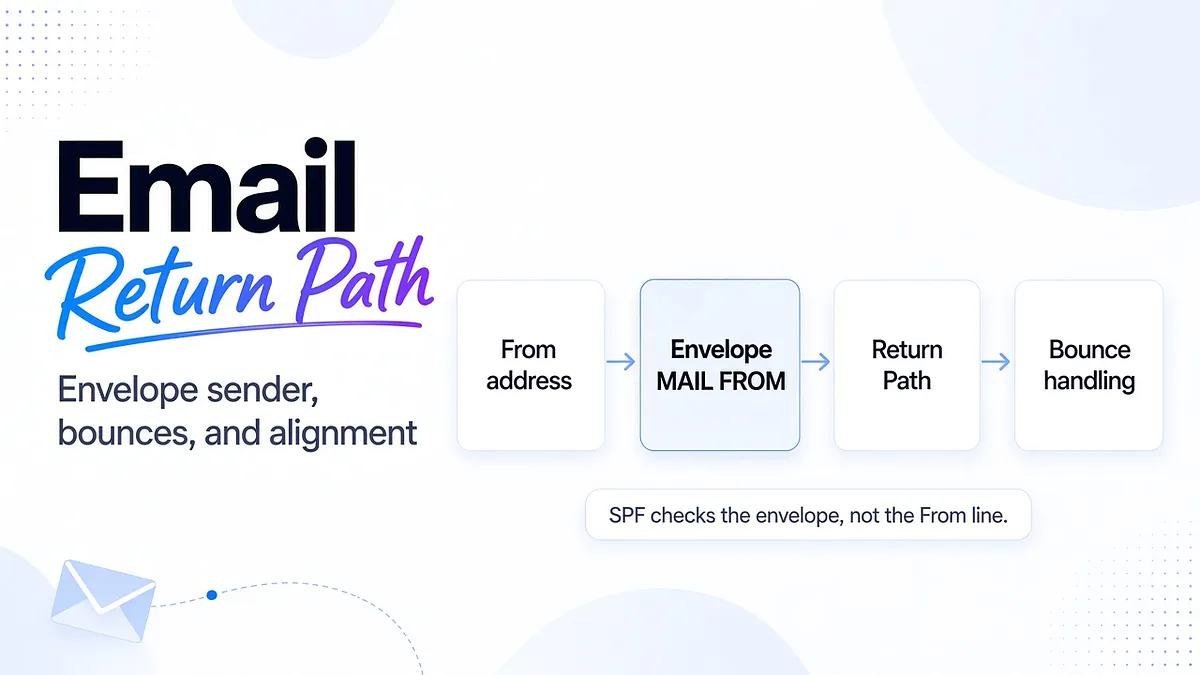
Your campaign can show the right From address while using a completely different address for delivery failures. That second identity is the email return path. It helps your sending system process bounces and provides an important clue when you investigate SPF and DMARC alignment.
A different Return-Path is not automatically a problem. An unverified one is.
For teams sending through several email services, the useful question is whether each service uses the identity you intended, handles delivery failures correctly, and continues to authenticate as expected. That is where configuration becomes an ongoing deliverability decision.
What Is the Email Return Path?
The return path is the address used to route delivery-failure notifications back toward the sender. You will also hear it called the bounce address, reverse path, envelope sender, or MAIL FROM address.
These terms describe closely related parts of the sending process. The sending server declares the envelope sender during the SMTP conversation. SMTP is the protocol mail servers use to transfer messages. The final receiving system records that address in a Return-Path header when it delivers the message.
For example, a delivered newsletter might contain:
From: Example News <news@example.com>
Return-Path: <bounce-8427@bounces.example.com>
Readers recognize news@example.com. Delivery-failure processing uses the envelope address associated with bounces.example.com.
The distinction keeps technical delivery notifications separate from the inbox where your team handles customer replies. It also gives your email service a way to associate failures with the messages it sent.
Return Path vs. From Address: The Envelope vs. the Header
Email has two layers of addressing.
The SMTP envelope tells servers where the message is going and where delivery failures should be reported. Message headers describe the content presented to the recipient, including the visible From address.
During an illustrative sending session, the envelope could include:
MAIL FROM:<bounce-8427@bounces.example.com>
RCPT TO:<reader@example.net>
The message itself can still say From: news@example.com. These addresses have different purposes, so they do not need to be identical character for character.
The SMTP specification, RFC 5321, defines how the final delivery system inserts Return-Path from the reverse path. The header is therefore a record of the envelope identity, not a substitute for configuring it in your email service.
Do not try to change bounce routing by typing a Return-Path line into a template. Configure the envelope sender through the sending platform instead. Multiple Return-Path headers in a delivered message warrant investigation because normal final delivery should leave one.
A special case is Return-Path: <>. Delivery-status notifications can use an empty reverse path to prevent one failed bounce notification from generating another indefinitely. An empty value on a bounce message is not automatically a configuration error.
How to Find the Return-Path Header
Inspect a message delivered through the actual sending service, preferably directly to a mailbox you control. A forwarded copy may reflect a changed delivery path.
The route to full headers varies by client:
- Gmail: Open the message, select the three-dot More menu, then Show original.
- Outlook.com or new Outlook: Use More actions, then View message source or View internet message headers, depending on the version.
- Classic Outlook: Open the message in its own window, then select File and Properties. Inspect the Internet headers field.
- Yahoo Mail: Open the three-dot More menu and select View raw message.
- Apple Mail: Select View, Message, then All Headers. Use Raw Source when you need the complete message.
Search for Return-Path, then inspect From, Authentication-Results, and DKIM-Signature. Mailora's email header analyzer guide explains how to read those fields together.
Save the send time, message identifier, and sending service with the headers. One unexplained address is much easier to investigate when you know which campaign produced it.
Why the Return Path Matters for Deliverability
Return-Path connects delivery handling and sender identity, but it does not determine inbox placement on its own.
First, correct bounce routing lets your sending service identify failed deliveries and update recipient status. If that processing breaks, your reports and suppression decisions can become incomplete.
Second, the envelope sender domain matters to SPF. A message may authenticate for an email vendor's domain while failing to connect that authentication to your visible From domain.
Third, a stable, documented sending identity gives you a useful comparison point. If a migration unexpectedly changes the bounce domain, that change deserves attention even before placement moves.
Separate these checks from the final outcome. A receiving server can accept an authenticated message and still place it in spam. Mailora's email deliverability test helps you compare authentication results with observed inbox placement across providers.
The goal is to know whether the identity is correct and whether the message reaches the intended folder. Neither answer replaces the other.
Return-Path, MAIL FROM, and SPF Alignment
SPF checks whether the sending server is authorized to use the envelope sender domain. For ordinary messages, that domain is the one you later see in Return-Path. SPF does not authenticate the visible From address merely because an SPF record exists there.
DMARC adds the connection to the visible identity. Under the DMARC specification, a message satisfies DMARC when at least one of these is true:
- SPF authenticates successfully and its domain aligns with the From domain.
- A valid DKIM signature has a signing domain that aligns with the From domain.
Consider this illustrative message:
From: offers@example.com
Return-Path: <bounce@mailer.example.net>
DKIM signing domain: example.com
SPF could authenticate successfully for mailer.example.net without aligning with example.com. But if the DKIM signature validates for example.com, DMARC can still succeed.
That is the critical distinction: SPF misalignment alone does not necessarily cause DMARC failure. It removes one possible route to satisfying DMARC. If aligned DKIM is also missing or invalid, the message has neither route.
With relaxed alignment, bounces.example.com can align with example.com when both share the same organizational domain. With strict SPF alignment, the domains must be identical, so that subdomain relationship is insufficient.
Check the policy's aspf setting and the actual identities in received messages. Review the SPF record example before changing DNS, especially if several services use different envelope domains.
Custom Return-Path and Bounce Domains
A custom return path lets an email service use a bounce domain under your control, such as bounces.example.com, instead of only a vendor-owned address.
The main authentication benefit is the possibility of SPF alignment under relaxed mode. It also makes the relationship between your sending streams and bounce handling easier to document.
The implementation depends on the service. Some ask for a CNAME pointing your bounce subdomain to their infrastructure. Others require MX and TXT records. Follow the provider's supported configuration rather than assuming every custom bounce domain uses the same record types.
A practical rollout is:
- Choose a dedicated bounce subdomain that is not already used by another service.
- Publish the records provided for that account and sending region.
- Complete the platform's domain-verification process.
- Activate the custom MAIL FROM or bounce-domain setting.
- Send a test and inspect the received Return-Path.
- Confirm SPF authorization, DMARC alignment, and bounce processing.
DNS verification alone does not establish that every campaign uses the new setting. Another workspace, stream, or region may still use the default domain.
Do not promise that a custom Return-Path will remove every “via” or “on behalf of” label. Mail clients can consider other headers and authentication details when displaying those labels. Treat visible branding and authentication as related checks, not interchangeable fixes.
Understanding VERP: Recipient-Specific Bounce Addresses
Variable Envelope Return Path, usually shortened to VERP, gives different recipients distinct envelope sender addresses. That helps the sending system connect a returned delivery failure to the intended recipient.
An illustrative address could look like:
bounce+campaign42+recipient781@bounces.example.com
The address identifies a send and recipient through tokens. It does not need to expose the recipient's email address in readable text.
This matters when bounce messages are difficult to parse consistently. The address itself supplies a mapping back to the sending record.
VERP is an implementation capability, not a DNS setting that every marketer must enable. Ask your provider how it identifies bounced recipients and whether its sending infrastructure supports the approach. The operational requirement is reliable attribution: the right failure must update the right recipient, without suppressing someone else or losing the event.
Hard Bounces vs. Soft Bounces: Read the Reason Before Acting
A hard bounce usually describes a permanent delivery failure. A soft bounce usually describes a temporary problem. SMTP replies beginning with 4 indicate temporary failure, while replies beginning with 5 indicate permanent failure for that attempt, as defined in RFC 5321.
The accompanying reason matters more than the label alone.
A confirmed nonexistent mailbox should be suppressed promptly. Do not keep sending until the same address fails repeatedly. A permanent authentication or policy rejection, however, does not prove the recipient address is invalid. Fixing the sender may be the right response.
For temporary failures, inspect whether the cause is rate limiting, mailbox capacity, or another provider condition. Follow controlled retry behavior and investigate persistent patterns instead of endlessly resending.
Use bounce-rate trends against your own established baseline and provider guidance. A universal percentage cannot distinguish a clean list from an authentication incident. In an illustrative campaign, a small cluster of new authentication rejections could require more urgent configuration work than a larger, familiar set of temporary deferrals.
Also remember that not every failure becomes an email sent to Return-Path. Some are returned directly during the SMTP exchange and recorded in the sending service's logs. Review both sources.
Return Path Under Google and Yahoo Bulk Sender Rules
Google and Yahoo introduced stronger bulk-sender requirements in 2024. Both require bulk senders to implement SPF and DKIM, publish DMARC, and align the visible From domain with an authenticated SPF or DKIM domain.
Google's guidance identifies senders reaching roughly 5,000 messages a day to personal Gmail accounts as bulk senders. Yahoo's requirements apply to bulk senders without publishing the same fixed numerical cutoff on that page.
Do not translate these requirements into “every Return-Path must exactly match From.” Relaxed alignment and aligned DKIM remain relevant. A vendor-owned bounce domain does not automatically make every message noncompliant.
Authentication is also only part of the requirement set. Marketing and subscribed messages need an easy unsubscribe mechanism, and providers expect low spam complaint rates.
For operations teams, the change is straightforward: include envelope sender identity in onboarding and migration reviews. Verify each service's received messages instead of assuming the domain-authentication screen covers every sending route.
From Configuration to Signal: Monitor the Return Path Over Time
A Return-Path header tells you an identity. It does not contain a bounce rate, complaint history, or an explanation for every placement change.
To make it useful over time, connect that identity to other evidence. Maintain a mapping between bounce domain, email service, visible From domain, message stream, and responsible team. Then compare:
- Authentication results from representative received messages.
- Bounce reasons and volumes from the sending service.
- Aggregate DMARC reports showing source activity and alignment.
- Provider complaint and reputation signals where available.
- Inbox placement tests before and after meaningful changes.
Not every source supports campaign-level or recipient-level detail. Aggregate DMARC reports should not be treated as a complete log of individual messages. Where precise attribution matters, use the sending service's message identifiers and event records.
Mailora brings authentication visibility, aggregate-report processing, reputation monitoring, and provider-level placement testing into that investigation. Its deliverability monitoring and alerting helps teams follow changes instead of relying on a single setup check.
If one bounce domain maps to one service, a change gives you a narrower starting point. If several services share the domain, investigate further before assigning blame. A useful alert identifies what changed; the next decision still depends on the evidence.
Troubleshooting Return-Path and DMARC Alignment Issues
Work from a real affected message and move through the identities in order.
Confirm the sending route. Record which service, account, campaign, and From domain produced the message. Compare it with a successful message from the same stream.
Inspect the envelope domain. Did the service use the intended custom Return-Path, or did it fall back to a vendor domain? Check activation settings as well as DNS records.
Check SPF and DKIM separately. Identify the domain SPF evaluated and the domain attached to each valid DKIM signature. Then assess alignment with From. Do not infer DMARC failure from one mismatched field.
Check the applicable policy. A subdomain may publish its own DMARC record. An unexpected policy change can explain a new handling outcome without any change to the email body.
Repair the specific cause and retest. Correct the provider's supported DNS records, activate the intended bounce domain, or restore aligned DKIM as the evidence requires.
In a hypothetical multi-service setup, newsletters might use a custom bounce domain while billing still uses a vendor default. If both authenticate through aligned DKIM, both can satisfy DMARC. If billing's DKIM breaks, investigate that route rather than weakening the policy for every sender.
Pre-send testing makes these differences visible before a larger campaign. Post-change tests help establish whether the repair changed authentication, placement, or both.
Frequently Asked Questions
What is the difference between the Return-Path and the From address?
From is the visible author address. Return-Path records the envelope sender used for delivery-failure routing at final delivery. They serve different purposes.
How do I find the Return-Path header in an email?
Open the message's full headers or raw source and search for Return-Path. In Gmail, use Show original. In Outlook, the option depends on the version.
Does the Return-Path affect SPF and DMARC?
Its underlying envelope sender domain is used for SPF. DMARC needs aligned SPF or aligned DKIM, so Return-Path misalignment alone does not necessarily cause DMARC failure.
Why should I set up a custom Return-Path or bounce domain?
It can support SPF alignment and make sending identities easier to manage. Confirm that the provider activates it and that actual messages use it correctly.
Can a misconfigured Return-Path cause emails to land in spam?
It can contribute to authentication or delivery-handling problems. Spam placement also depends on reputation, recipient response, and provider filtering. Investigate those signals together rather than attributing every issue to one header.
Turn the Next Header Check Into a Clear Decision
Before your next significant send, inspect one message from each active service. Confirm its envelope sender, SPF result, DKIM signing identity, and DMARC alignment. Keep that reference so future changes have something concrete to compare against.
Then test where those messages actually land. Mailora helps connect the authentication setup to provider-level placement and the next investigation worth making.
Run your first test. Send with confidence.
Stay in the loop
Deliverability insights, product updates, and early access to new features. No spam, unsubscribe anytime.
By subscribing, you agree to our Privacy Policy. Unsubscribe anytime.