DMARC Policy Not Enabled: Why You're Seeing It and How to Fix It the Right Way
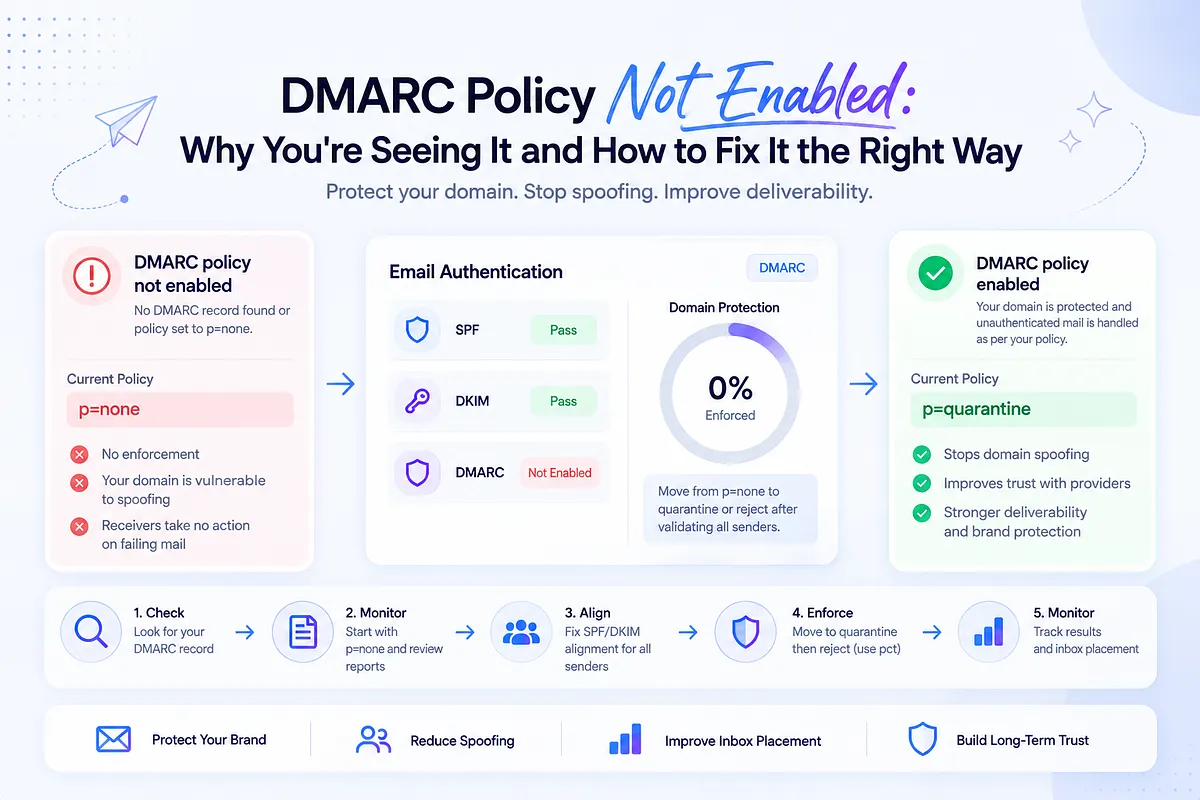
You ran a domain scan, or opened a deliverability report, and there it was: "DMARC policy not enabled." Maybe it read "DMARC quarantine/reject policy not enabled." Either way, you're now holding a warning with no severity attached, unsure whether this is a five-minute DNS fix or something that could quietly break revenue-critical email.
Here's the real risk, and it isn't the one the warning implies. Most guides tell you to "just move from p=none to quarantine." Do that blindly across a stack with a dozen sending tools (CRM, marketing automation, cold outreach, billing, support) and you can send perfectly legitimate transactional and marketing mail straight to spam.
This article explains exactly what the warning means, how to fix the record correctly, and the part most guides skip: how to decide when and for which senders to enforce without collateral damage. Mailora's perspective throughout: DMARC is a deliverability control, not a checkbox. High-volume senders should correlate DMARC signals with actual inbox placement so enforcement decisions are informed, not guessed. If you haven't measured where your mail is landing yet, run an email deliverability test first so you have a placement baseline before touching DNS.
What "DMARC Policy Not Enabled" Actually Means
The warning fires in exactly two situations:
- No DMARC record exists. There is no TXT record at _dmarc.yourdomain.com, so receiving servers have no instructions at all for handling mail that fails authentication. Some tools report this as "no DMARC record found."
- A record exists, but it's set to p=none. Your domain has DMARC, technically. But p=none is monitoring mode: it asks providers to send you reports and then explicitly tells them to take no action on failing mail.
Most scanners collapse both cases into "not enabled" or "quarantine/reject policy not enabled," which is the single biggest source of confusion around this warning. Teams see it, check DNS, find a DMARC record sitting right there, and conclude the tool is wrong. It isn't. A record with p=none exists without enforcing anything: it observes, it reports, and it protects nothing.
p=none has a legitimate purpose: it's the data-collection phase before enforcement, and every well-run DMARC rollout starts there. The problem is domains that enter monitoring mode and never leave. Staying there forever does not stop spoofing. That unprotected state is the cost of never leaving monitoring, not a documented mailbox-provider reputation grade.
Why This Warning Is a Deliverability Problem, Not Just a Security One
DMARC gets filed under security because that's where it started: a way to stop criminals from spoofing your domain. That framing undersells what's actually at stake for a sender.
Mailbox providers use authentication as one input among several when they decide placement. An unenforced domain is a weaker identity signal in two ways, without being a guaranteed inbox penalty:
Spoofing is not stopped. Without enforcement, receivers are not instructed to quarantine or reject unauthenticated mail using your From domain. Some of that mail can generate complaints or listings that providers may associate with your domain. That risk is real; it is not a documented rule that every spoofed campaign automatically tanks your legitimate mail.
Your own misaligned mail is still a configuration problem. A p=none domain often has legitimate senders failing alignment that nobody has noticed: a tool added last quarter that never made it into SPF, a DKIM signature signing with the ESP's domain instead of yours. Those failures do not, by themselves, prove Promotions-tab drift. They do mean you cannot distinguish spoofing from your own stack, which is why monitoring without a plan to enforce leaves the domain unprotected.
There is also a compliance floor: since 2024, Google and Yahoo require bulk senders to publish a DMARC record. Google's sender guidelines explicitly allow that policy to be p=none. Publishing DMARC is the bulk-sender requirement. Enforcement is not the entry fee to the inbox, and p=reject is not what Gmail or Yahoo currently demand for delivery. Enforcement is how you stop spoofing, and it is a prerequisite for programs such as BIMI. Treat any extra placement benefit as a possible side effect, not a published guarantee.
How DMARC Works: SPF, DKIM, and Alignment in Plain Terms
DMARC (introduced around 2012, later to the party than SPF and DKIM) is the enforcement layer built on top of those two protocols. It adds the thing both of them are missing: a connection to the From address your recipient actually sees.
- SPF says which servers may send mail for a domain, but it checks the Return-Path (MAIL FROM) domain, which is often your ESP's bounce domain, not your visible From domain.
- DKIM cryptographically signs the message, but the signature's d= domain can be the ESP's domain rather than yours.
- DMARC requires alignment: the domain in the visible From header must match the domain that passed SPF (SPF alignment) or the domain in the DKIM signature (DKIM alignment). One aligned pass is enough.
Alignment is where third-party senders routinely break. Your marketing platform passes SPF, but on its own bounce domain. It signs with DKIM, but with its own key. Both green checkmarks, zero alignment, DMARC fail. This is why "we already have SPF and DKIM" doesn't answer the DMARC question: without alignment, those passes never connect back to the domain your recipient sees, and the fix is usually a custom Return-Path and a custom DKIM key configured inside each sending tool.
Anatomy of a DMARC Record (With Example)
A DMARC record is a TXT record published at the _dmarc host of your domain. Here's a clean, adaptable example:
_dmarc.yourdomain.com TXT "v=DMARC1; p=quarantine; rua=mailto:dmarc@yourdomain.com; ruf=mailto:dmarc-forensic@yourdomain.com; pct=100; aspf=r; adkim=r"
What each tag controls:
Tag | What it does |
| v=DMARC1 | Version. Mandatory, always first. |
| p= | Your policy: what receivers should do with failing mail (none, quarantine, reject). |
| rua= | Where aggregate reports are sent: the daily XML summaries of who's sending as your domain and how they authenticate. |
| ruf= | Where forensic (per-message failure) reports go. Many providers no longer send these. |
| pct= | The percentage of failing mail the policy applies to, 0-100 (default 100). The staged-rollout dial. |
| aspf= | SPF alignment mode: r (relaxed, subdomains allowed) or s (strict, exact match). |
| adkim= | DKIM alignment mode, same options. |
Relaxed alignment is the sensible default for most senders; strict mode breaks the moment a subdomain enters the picture. For a deeper tag-by-tag reference, see our guide to DMARC tags explained.
The Three DMARC Policies: none, quarantine, reject
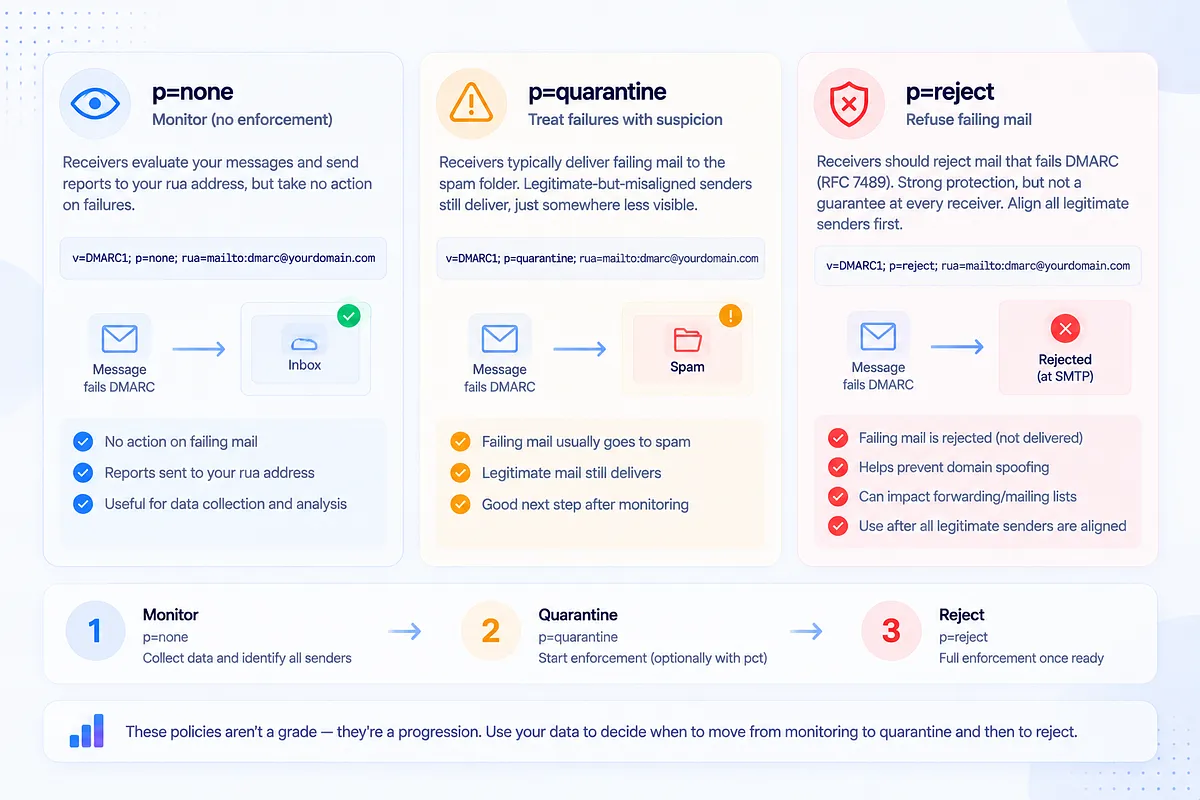
p=none is monitoring mode. Receivers evaluate every message and report the results to your rua address, but take no action on failures. This is why a domain with a published record still triggers "not enabled" warnings: the record exists, the enforcement doesn't.
p=quarantine means failing mail gets treated with suspicion, which in practice usually means the spam folder. Legitimate-but-misaligned senders keep technically delivering, just somewhere nobody looks.
p=reject asks receivers to refuse mail that fails DMARC. RFC 7489 uses SHOULD for applying the policy, so this is strong protection rather than a universal guarantee that every receiver will bounce every failure. It also has operational costs: forwarding and mailing-list traffic that breaks SPF, and sometimes DKIM, can fail at reject. Align every legitimate sender first.
The honest way to think about these isn't as a grade (none bad, reject good) but as stages of a journey whose pace should be set by your data. Enforcing before your senders are aligned punishes your own mail. Monitoring forever protects nothing. The skill is knowing when to move, which is the next section.
How to Fix "DMARC Policy Not Enabled" Step by Step
1. Check whether a record exists. Query the TXT record at _dmarc.yourdomain.com (any DMARC checker, or dig TXT _dmarc.yourdomain.com). You'll find either nothing or a p=none record; that tells you which trigger you're dealing with.
2. If no record exists, create one, starting at p=none with reporting on. Yes, p=none is what caused the warning, but going straight to enforcement on a domain with zero visibility is how you break your own mail. Publish:
v=DMARC1; p=none; rua=mailto:dmarc@yourdomain.com
This starts the flow of aggregate reports: your map of every source sending as your domain.
3. Get your legitimate senders aligned. Work through the reports: every real sending tool needs SPF and/or DKIM passing with alignment, which usually means configuring custom return-paths and custom DKIM signing in each platform.
4. Move to enforcement when the data supports it. Update p=none to p=quarantine, optionally starting with a pct ramp (10 → 25 → 50 → 75 → 100), then to p=reject once quarantine runs clean.
5. Publish the change in DNS. In your DNS host (Cloudflare, GoDaddy, Namecheap; the steps are equivalent), edit the existing _dmarc TXT record. Never add a second one.
6. Wait for propagation, then verify. DNS changes typically take effect within a few hours, up to 24-48 hours. Re-run the scan that flagged you, and confirm reports keep arriving.
Throughout the rollout, keep deliverability monitoring and DMARC visibility running so you can see whether each policy step moved your actual placement. That's the feedback loop that makes enforcement safe.
When Should You Actually Move Beyond p=none? (A Decision Framework)
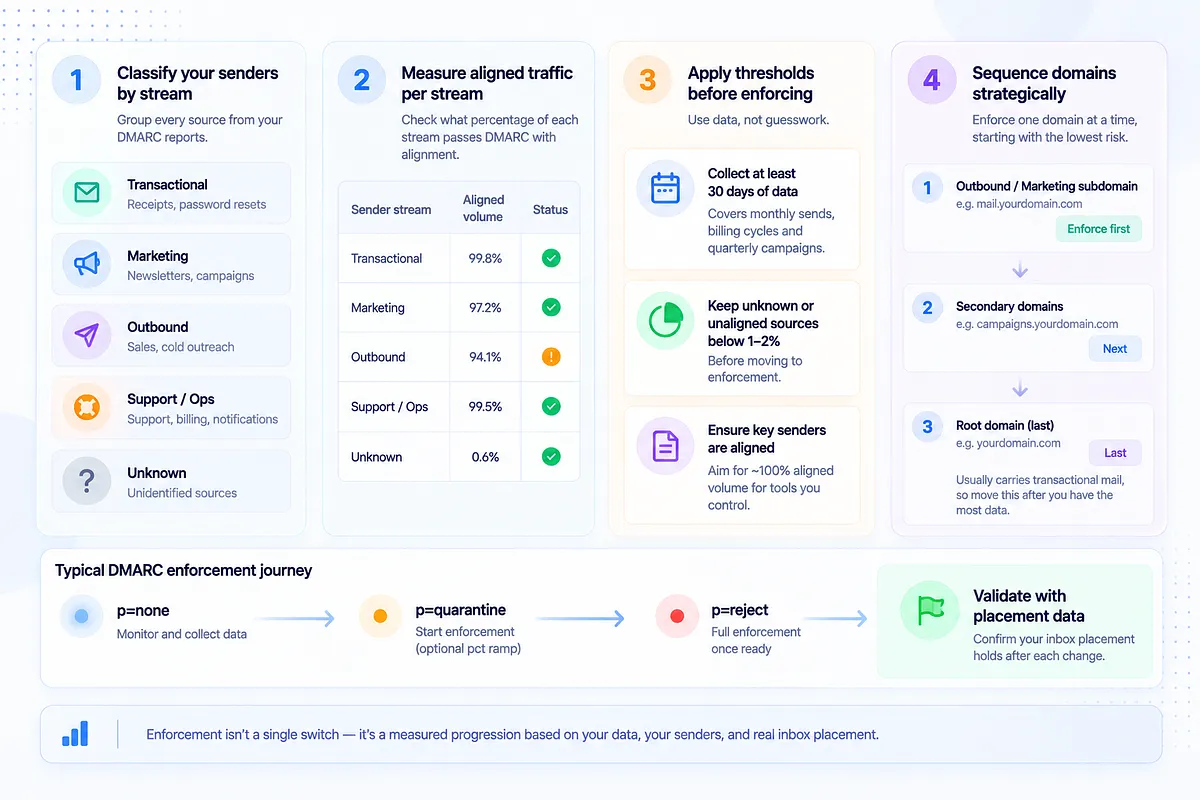
"Monitor first, then enforce" is where most guides stop. Here's the framework for the part they skip: when, and for which senders.
Classify your senders by stream. From your aggregate reports, bucket every source: transactional (receipts, password resets), marketing, outbound, support/ops, and unknown. Each stream has a different blast radius if enforcement goes wrong: quarantined password resets are an incident; quarantined spoofing is the goal.
Measure aligned traffic per stream. For each legitimate source, what percentage of its volume passes DMARC with alignment? Anything below ~100% for a tool you control means configuration work remains.
Apply thresholds before enforcing. These are Mailora recommendations, not mailbox-provider rules: collect at least 30 days of DMARC data across your key senders, and don't enforce until unknown or unaligned sources are below 1–2% of legitimate volume. Thirty days matters because monthly sends, billing cycles, and quarterly campaigns only reveal themselves over a full cycle. Enforce after a quiet week and the invoice run on the 1st becomes your first casualty.
Sequence domain by domain, not all at once. Enforce on your lowest-risk domain first (a dedicated outbound or marketing subdomain), verify placement holds, then move up. The root domain carrying transactional mail goes last, with the most data behind it.
This is exactly where correlating DMARC state with inbox placement pays off: a policy change should be followed by evidence that placement held, not by hoping nobody complains.
Common DMARC Errors and How to Troubleshoot Them
What you see | What it means | What to do |
| no DMARC record found | Nothing published at _dmarc | Create the record (step 2 above) |
| dmarc=fail action=none | Message failed alignment; your p=none policy told the receiver to deliver anyway | Identify the source in your aggregate reports and fix its alignment |
| dmarc=bestguesspass | No DMARC record, but the receiver inferred the mail would have passed | Publish a real record; you're one config change away from legitimacy |
| dmarc=temperror | Transient DNS failure during evaluation | Usually self-resolving; investigate if persistent (DNS host reliability, lookup timeouts) |
| dmarc=permerror | The record itself is malformed: syntax errors, duplicate records | Validate and fix the record; check for two _dmarc TXT entries |
Two patterns deserve special mention. Forwarding breaks SPF alignment by design (the forwarder becomes the sending server), which is why DKIM alignment, which survives forwarding, is your durable pass. And misaligned SaaS senders are the most common source of dmarc=fail on legitimate mail: the fix lives in that tool's authentication settings, not in your DMARC record. For the full diagnostic flow, see how to fix DMARC fail DNS authentication.
Managing DMARC Across Multiple Senders, Domains, and Tools
The single-domain, single-ESP picture in most DMARC guides doesn't survive contact with a real growth-stage stack. The reality is a CRM, a marketing platform, an outreach tool, a billing system, a support desk, and whatever sales connected last month, often across several domains, and for agencies, across client domains too.
At that scale, two failure modes dominate:
The new-tool regression. Someone onboards an ESP, sends from it before anyone configures alignment, and a formerly-clean domain starts logging DMARC failures. Under p=reject, that new tool's mail bounces from day one. The fix is procedural: make DMARC part of sender onboarding. Configure custom return-path and DKIM in the tool, verify aligned passes in aggregate reports, then route production volume through it.
The unowned domain. Secondary and client domains that nobody monitors drift to "not enabled" and stay there. Every domain that sends (or could be spoofed) needs a record, a report destination someone actually reads, and a place in the enforcement sequence. Parked domains that never send legitimately are the easy win: they can go straight to p=reject.
For agencies and RevOps teams, the operational answer is centralized: one reporting destination, one view across every domain and sender, and alerting when a new source appears, because at a dozen domains, nobody is reading raw XML per domain by hand.
From DMARC Reports to Decisions: What to Do With the Data
DMARC reporting comes in two forms. Aggregate reports (rua) arrive typically once daily from each participating provider: XML files listing source IPs, message counts, SPF/DKIM results, alignment outcomes, and the disposition applied. Forensic reports (ruf) are per-message failure samples, increasingly rare as most major providers have curtailed them for privacy reasons.
Aggregate reports are where the value lives, and raw XML is where that value goes to die. A single busy domain can generate dozens of reports a day, each an unreadable wall of IP addresses and result codes.
The questions the data should answer are decision-shaped:
- Which sources are legitimate, and are they fully aligned? This is your enforcement-readiness scorecard.
- Is anything new sending as my domain? A new source is either a tool someone just connected (align it) or spoofing (enforcement will handle it).
- Am I ready to move policy? Mailora's 30-day and 1–2%-unknown recommendations, checked against real numbers rather than gut feel.
- Did my last policy change hurt anything? Disposition data plus placement data, side by side.
That last pairing is the one no amount of XML reading gives you on its own. DMARC reports tell you what authenticated; they don't tell you where mail landed. Mailora correlates DMARC state with inbox placement, provider-level results, and infrastructure health, so "can we enforce?" and "did enforcement hurt us?" get answered with evidence instead of a shrug.
Keeping DMARC Healthy After You Enforce
Reaching p=quarantine or p=reject isn't the finish line; it's the point where drift starts costing you.
Set a review cadence. Weekly report reviews during rollout; monthly once stable. You're watching for new sources, fail-rate movement on known senders, and volume anomalies.
Alert on fail-rate spikes. A legitimate sender whose pass rate drops from 100% to 80% has a broken configuration (an expired DKIM key, an SPF change that didn't propagate), and under enforcement, that mail is now being quarantined or rejected. You want the alert before the support tickets.
Watch for DNS regressions. A depressingly common failure: someone troubleshooting an unrelated issue downgrades p=reject to p=none, and the domain silently loses its protection for months. Your DMARC record is production infrastructure; monitor it like one.
Gate new senders. Every new tool goes through the alignment-first onboarding runbook before it carries production volume. The domains that stay healthy aren't the ones that enforced hardest; they're the ones that kept watching after they did. Continuous monitoring beats set-and-forget here for the same reason it beats one-off spam checks everywhere else: the stack keeps changing, and every change is a chance to regress.
Ready to see what your DMARC posture is actually doing to your placement? Run your first deliverability test and get authentication, alignment, and inbox placement in one view.
FAQs
Does "DMARC policy not enabled" mean I have no DMARC record at all?
Not necessarily. The warning fires in two cases: no record exists at _dmarc.yourdomain.com, or a record exists but is set to p=none (monitoring mode). Many scanners treat both identically because neither one enforces anything. Check the record directly to see which case applies; the fix path differs.
Is p=none the same as not having DMARC enabled?
Functionally, from an enforcement standpoint, yes: p=none tells receivers to take no action on failing mail, which is why scanners flag it. But it isn't useless: it turns on aggregate reporting, which is the data you need before enforcing safely. Think of p=none as a necessary phase with an expiration date, not a destination.
Will moving from p=none to quarantine or reject hurt my email deliverability?
Only if legitimate senders aren't aligned first. Enforcement does not, by itself, improve inbox placement. It instructs receivers to quarantine or reject unauthenticated mail, which protects the domain from spoofing and is required for BIMI. Any extra "trust" from enforcement is a practitioner observation, not a published Gmail or Yahoo guarantee. The damage scenario is enforcing while a real sending tool still fails alignment, which routes that tool's mail to spam or rejection. That's why the sequence is: monitor, align every legitimate source, verify in reports, then enforce, optionally ramping with the pct tag.
How long should I monitor DMARC reports before enforcing a policy?
Mailora recommends at least 30 days across your key senders, and longer if your sending has monthly or quarterly cycles that haven't completed yet. These are operational thresholds, not a Google, Yahoo, or RFC requirement. The readiness test isn't the calendar alone: unknown or unaligned sources should be below 1–2% of your legitimate volume before you move, and every stream you can't afford to lose (transactional first among them) should show consistently aligned passes.
How do I keep DMARC enforced when adding a new ESP or outreach tool?
Make alignment part of onboarding, before production volume flows. Configure the tool's custom return-path (for SPF alignment) and custom DKIM signing on your domain, send test volume, and confirm aligned passes in your aggregate reports. Then route real sends through it. Keep monitoring afterward: new-sender regressions and DNS edits are the two most common ways enforced domains quietly break.
Stay in the loop
Deliverability insights, product updates, and early access to new features. No spam, unsubscribe anytime.
By subscribing, you agree to our Privacy Policy. Unsubscribe anytime.