DKIM CNAME: How It Works, When to Use It, and How to Keep It Healthy
Most teams treat DKIM CNAME as a one-time setup task. Paste a record, see a green check, move on. But a DKIM CNAME that resolves correctly today can silently break tomorrow: a DNS admin toggles a Cloudflare proxy, a provider rotates keys, a migration drops a selector. The first sign is usually a deliverability drop nobody can explain.
This article covers what DKIM CNAME records actually are, when to choose them over TXT, how to configure and troubleshoot them across your ESP stack, and, critically, how to keep them healthy over time. It's written from a deliverability practitioner's view: DKIM CNAME isn't a checkbox, it's an ongoing signal you need visibility into across every domain and sender you run. If you want to know where your authentication stands right now, an email deliverability test reads DKIM alongside placement in one pass, so you're starting from evidence.
What a DKIM CNAME record actually is
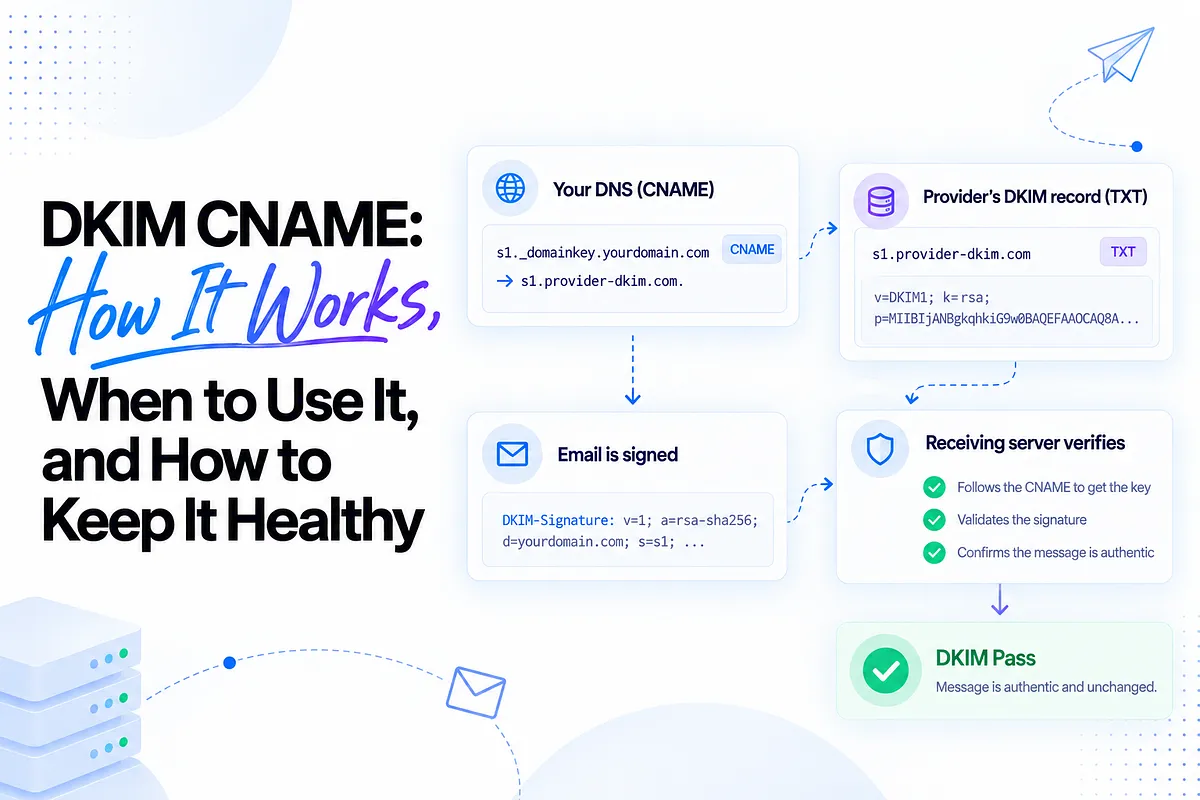
A DKIM CNAME record is a delegation pattern. Instead of publishing your DKIM public key directly in your DNS as a TXT record, you publish a CNAME at selector._domainkey.yourdomain.com that points to a TXT record your email provider hosts. When a receiving server looks up your key, DNS follows the chain: your CNAME resolves to the provider's record, and the provider's record contains the actual key.
One technical clarification worth getting right: the DKIM specification, RFC 6376, defines the key record as a TXT record. CNAME isn't a second kind of DKIM record; it's a practical delegation convention ESPs adopted so they can host and rotate the key themselves without asking you to touch DNS every time. The receiving server still ends up reading a TXT record. Your CNAME just tells it where to look.
That distinction matters because it explains everything else about CNAME behavior: who controls the key, who can rotate it, and what breaks when the chain between your DNS and the provider's record stops resolving.
DKIM fundamentals: selectors, keys, and the signature
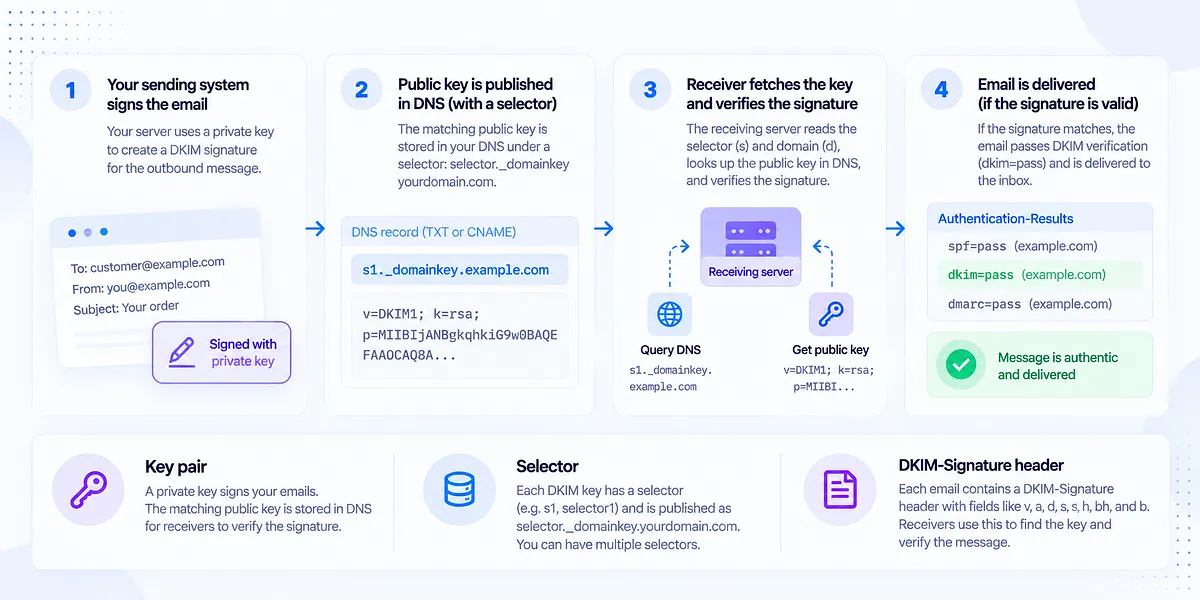
Three pieces make DKIM work, and the CNAME question touches all of them.
The key pair. Your sending system holds a private key and signs every outbound message with it. The matching public key lives in DNS, where any receiving server can fetch it and verify the signature.
The selector. A domain can have many DKIM keys at once, so each key gets a name: the selector. It's published as a subdomain under the _domainkey convention: s1._domainkey.example.com, selector1._domainkey.example.com, and so on. Multiple selectors are how one domain signs from several platforms simultaneously, and how keys rotate without downtime.
The signature header. Every signed message carries a DKIM-Signature header with fields the receiver uses to verify it: v (version), a (algorithm, which should be rsa-sha256, as rsa-sha1 is deprecated), d (the signing domain), s (the selector), h (which headers were signed), bh (body hash), and b (the signature itself). The receiver reads s and d, constructs s._domainkey.d, queries DNS, retrieves the public key, and checks the math.
That lookup path (selector plus domain resolving to a key) is exactly where CNAME and TXT diverge.
DKIM CNAME vs TXT: the real trade-off
The honest framing is control versus automation, not better versus worse.
Direct TXT means you generate the key pair (or your platform gives you one), and you paste the public key into your DNS as a TXT record at the selector hostname. You own the key. You see its full contents in your own zone. You also own every rotation: generating a new pair, publishing the new record, cutting over signing, and retiring the old key. Done on schedule, that's fine. Done never, which is what happens at most busy teams, it means keys age for years and a compromise or misconfiguration sits unnoticed.
CNAME delegation hands the key hosting to your provider. The provider generates, publishes, and rotates keys on its own infrastructure; your DNS just points at theirs. Rotation happens without you touching anything. The costs: you can't inspect the key directly from your own zone, you're trusting the provider's rotation discipline, and you've introduced a DNS chain with more links that can break. A CNAME that stops resolving (deleted, proxied, or pointed at a stale target) fails just as hard as a missing TXT record, and it fails more quietly, because your zone still looks configured.
Neither pattern wins outright. The right choice depends on who operates the sending system and what happens when a key needs to change.
When to use CNAME vs TXT
The practitioner decision, stream by stream:
Use TXT when you self-host mail or run infrastructure where you want direct key ownership: your own MTA, dedicated sending servers, or environments where compliance requires you to control cryptographic material. You accept the rotation burden in exchange for full visibility.
Use CNAME when you send through ESPs and SaaS platforms, which is most marketing, product, and outbound sending. The provider signs the mail, so the provider is the natural owner of the key, and automated rotation is a genuine security win: keys that rotate on schedule shrink the blast radius if one is ever compromised.
Two deliverability-first considerations most setup guides skip:
Blast radius. A single long-lived key signing everything means one compromise taints every stream. Separate selectors per platform, rotated regularly, contain damage to one sender.
Multi-ESP reality. Growth-stage senders don't have one answer; they have one answer per stream. A team running a transactional platform, a marketing ESP, a product-notifications service, and an outbound tool will typically end up with CNAME delegation for all four, each on its own selectors, possibly with a self-hosted TXT record for a legacy internal system. The question isn't "CNAME or TXT for my domain?" It's "who signs each stream, and who should own each key?"
DKIM CNAME record syntax and where it lives
The hostname side is the same for both patterns:
selector._domainkey.example.com
What differs is the record value. A direct TXT record holds the key material:
s1._domainkey.example.com TXT "v=DKIM1; k=rsa; p=MIIBIjANBgkqhkiG9w0BAQEFAAOCAQ8A..."
A CNAME record holds a pointer:
s1._domainkey.example.com CNAME s1.domainkey.u1234567.provider-dkim.com.
Three syntax details cause a disproportionate share of failures:
- Trailing dots. In zone-file terms, a trailing dot marks a fully qualified name. Some DNS consoles require it on the CNAME target; others add it silently. Get it wrong in a console that takes your input literally and the target becomes provider-dkim.com.example.com, which resolves to nothing.
- Auto-appended zones. Many DNS hosts append your domain to whatever you type in the host field. If the console expects s1._domainkey and you enter s1._domainkey.example.com, you've published s1._domainkey.example.com.example.com. Check the saved record, not the form you filled in.
- Underscores. A few DNS providers reject underscores in CNAME hostnames even though _domainkey requires one. The workarounds, in order: a support ticket (many providers allow it manually), moving the sending to a secondary domain hosted on friendlier DNS, or switching DNS providers if authentication records will keep fighting the console.
Keep TTL at 3600 seconds or higher. Very low TTLs increase lookup pressure and can surface as dkim=temperror when resolvers time out mid-verification.
Setting up DKIM CNAME on Microsoft 365 (worked example)
Microsoft 365 is the most instructive CNAME implementation because it uses the pattern to its fullest: two selectors, provider-hosted keys, and automated rotation.
M365 requires two CNAME records per custom domain, on the selectors selector1 and selector2. Two selectors exist so Microsoft can rotate keys with zero downtime: one selector signs while the other holds the next key, then they swap.
The records look like this for a domain example.com on a tenant whose initial domain is contoso.onmicrosoft.com:
selector1._domainkey.example.com CNAME selector1-example-com._domainkey.contoso.dkim.mail.microsoft
selector2._domainkey.example.com CNAME selector2-example-com._domainkey.contoso.dkim.mail.microsoft
Decoding the target structure: the first label is the selector plus your custom domain with dots replaced by dashes (example-com); after _domainkey comes your tenant's initial domain prefix (contoso); and the target zone ends in dkim.mail.microsoft. Some tenants include a partition character in the prefix that Microsoft assigns dynamically, which is why you should always copy the exact targets from your own admin center or from the Get-DkimSigningConfig PowerShell cmdlet rather than constructing them by hand. Enabling and rotating are handled with New-DkimSigningConfig, Set-DkimSigningConfig, and Rotate-DkimSigningConfig, or through the Defender portal UI.
One timing note that saves confusion: when Microsoft rotates keys, the new key takes effect after a window of up to 96 hours (four days). During that window, both old and new selectors must resolve. If one CNAME is missing, rotation is exactly when it will bite.
DKIM CNAME across your ESP stack
One provider is the easy case. Growth-stage senders typically run three to eight sending systems at once: transactional, marketing, product notifications, cold outbound, support, billing. Each wants its own DKIM setup, and each provider has its own selector conventions: some assign fixed selectors, some generate random ones per account, some let you choose, and CNAME target formats vary just as widely across platforms like SES, SendGrid, Klaviyo, and HubSpot.
At that scale, two disciplines pay off:
A selector naming convention. When you can choose selectors, encode meaning into them: platform, stream, environment. A convention like s1-app-prod._domainkey tells you instantly which system a failing selector belongs to. Random selector strings across eight platforms and forty domains tell you nothing at 2 a.m.
A selector inventory. For agencies managing dozens to hundreds of client domains, an authoritative list of which selectors exist on which domains, pointing at which providers, is the difference between a five-minute diagnosis and an afternoon of archaeology. Every entry should answer: who signs with this, what volume rides on it, and when was it last verified.
How to verify and test a DKIM CNAME record
Verification has two layers, and you need both.
Layer one: the DNS chain resolves. Use dig or nslookup to confirm the CNAME points where it should and the target returns a key:
dig CNAME s1._domainkey.example.com +short
s1.domainkey.u1234567.provider-dkim.com.
dig TXT s1.domainkey.u1234567.provider-dkim.com +short
"v=DKIM1; k=rsa; p=MIIBIjANBgkqhkiG9w0BAQEFAAOCAQ8A..."
A healthy lookup shows the full chain: your hostname, the provider target, and a v=DKIM1 key at the end of it.
Layer two: mail actually signs. A resolving record proves nothing about signing. Send a real message to a mailbox you control, open the raw headers, and check two things: a DKIM-Signature header whose s= matches your selector and whose d= matches your domain, and an Authentication-Results line showing dkim=pass with that domain. If the record resolves but mail arrives unsigned or signed by the provider's own domain, the problem is in the platform's signing configuration, not your DNS. Our guide to how to fix DKIM not verified walks the signing-side diagnosis in detail.
Run both layers after setup, after any DNS change, and before high-stakes sends.
DKIM CNAME troubleshooting: the failures that bite
The recurring failure modes, with symptom and fix. These cover most of the common DKIM failure causes we see in the wild:
- TXT and CNAME published for the same selector. Symptom: intermittent or permanent verification failures; resolvers can't return both. Fix: delete one. A hostname can't be a CNAME and hold other records at the same time.
- Wrong or doubled hostname. Symptom: the record exists in your console but lookups return nothing. Fix: query the exact hostname externally; if you see _domainkey.example.com.example.com, re-enter the host field without the domain suffix.
- Low TTL and lookup timeouts. Symptom: sporadic dkim=temperror results. Fix: raise TTL to at least 3600 seconds and confirm your DNS host is answering reliably.
- Missing selector2 on Microsoft 365. Symptom: everything passes for weeks, then fails after a rotation. Fix: publish both CNAMEs and verify both resolve, not just the one currently signing.
- Missing partition character in an M365 target. Symptom: the CNAME resolves to nothing. Fix: copy the exact target from your admin center or PowerShell output; never assemble it from a template.
- Trailing-dot errors. Symptom: target resolves to a nonsense concatenated hostname. Fix: check how your DNS console treats trailing dots and match its convention.
- Cloudflare proxy toggled on. Symptom: the record behaves strangely or the chain breaks after someone "cleaned up" DNS. Fix: authentication records must be DNS-only (grey cloud). Proxying a _domainkey hostname breaks the lookup.
Every one of these produces the same downstream effect: mail that signed yesterday doesn't sign today, and nothing in your sending platform announces it.
DKIM key rotation and why CNAME changes the game
Keys should rotate periodically for the same reason passwords do: the longer a credential lives, the larger the window for compromise, and 2048-bit keys rotated on schedule beat 1024-bit keys left alone for years.
CNAME delegation is what makes rotation painless. Because the provider hosts the key, it can swap in a new one without you touching DNS: Microsoft's dual-selector pattern, with its 96-hour activation window, is the canonical example. Your CNAMEs keep pointing at the same targets; the keys behind those targets change.
But delegation adds a silent risk that's easy to miss: the provider rotates, and your side of the chain doesn't cooperate. A CNAME someone deleted during a DNS cleanup, a selector that never got published, a proxy toggled on last month. None of it matters until rotation day, when the new key goes live behind a chain that no longer resolves. Signing fails, placement slides, and there's no error on your dashboard because, from your DNS console's perspective, nothing changed. The failure was in what stopped being true, not in what someone did that day.
That gap between "configured once" and "still working now" is precisely why DKIM belongs under monitoring, which is the next section's argument.
DKIM, DMARC alignment, and policy progression
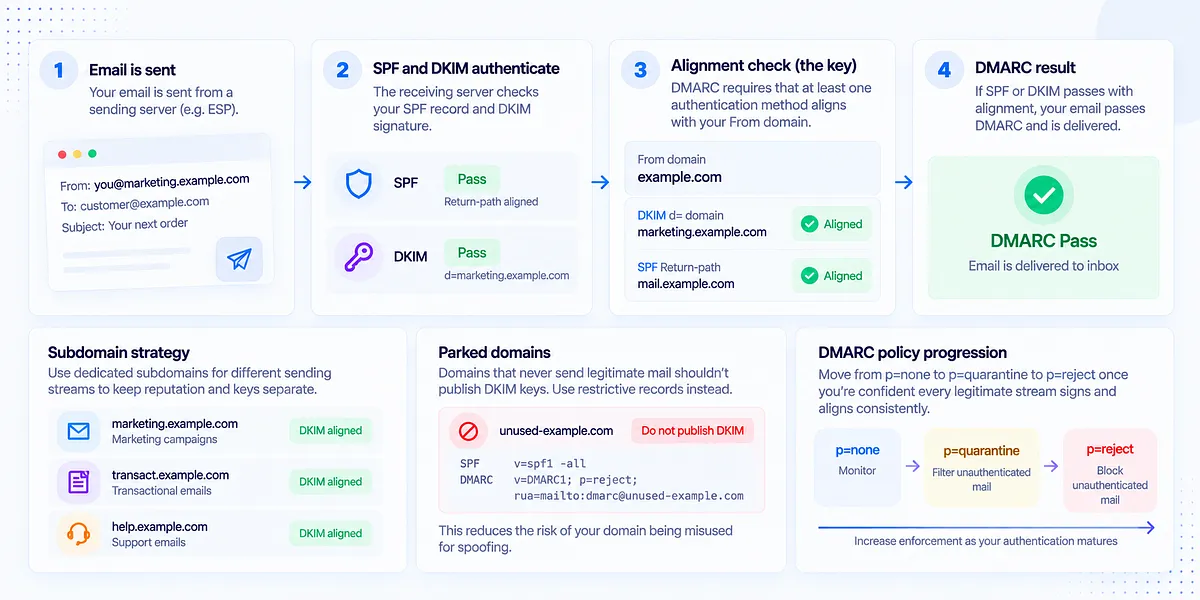
DKIM alone doesn't protect your domain. It's one leg of the authentication stack, alongside SPF and DMARC, and the leg that matters most for DMARC is alignment: the d= domain in your DKIM signature must match the From domain your recipient sees. A provider signing with its own domain produces a technically valid signature that does nothing for your DMARC pass.
Alignment shapes two structural decisions:
Subdomain strategy. Bulk and third-party mail commonly signs from a dedicated subdomain (marketing.example.com) so its reputation and its keys stay separate from the root domain. Alignment still holds under DMARC's default relaxed mode, and a problem in the marketing stream stays contained.
Parked domains. Domains that never send legitimate mail shouldn't publish DKIM keys at all. A key on a domain nobody monitors is an asset waiting to be misused; parked domains get a restrictive SPF record and a DMARC reject policy instead.
Your CNAME choices also feed DMARC policy progression. Moving from p=none through p=quarantine to p=reject requires confidence that every legitimate stream signs and aligns consistently. Reliable, provider-rotated CNAME setups get you there faster; fragile chains that break quietly are exactly what makes teams afraid to enforce.
From one-time setup to continuous DKIM health monitoring
Here's the uncomfortable truth about the green check: it certifies a moment. A DKIM check is a snapshot; DKIM health is a trend, and the events that break the trend are all routine. DNS migrations. Provider key rotations. A well-meaning cleanup that removes a record nobody recognized. A new platform someone connected without publishing its selectors. An M365 rotation landing on a domain missing selector2.
Continuous monitoring closes that gap in three specific ways: it catches broken CNAME chains within hours of a DNS change instead of weeks after placement drops; it catches silently non-signing selectors, where DNS looks fine but mail stopped carrying a valid signature; and it catches rotations DNS never caught up to, where the provider's new key sits behind a chain that stopped resolving.
This is where Mailora fits. Continuous DKIM and deliverability monitoring gives you a per-domain, per-selector health view: which selectors exist, which senders and how much volume each one carries, and how pass rates trend over time. Mailora's DMARC signal analysis clusters authentication failures by selector and CNAME target, so "DKIM is failing" becomes "this selector, feeding this platform, broke on this date." And its pre- and post-send visibility alerts you when a CNAME stops resolving or changes target, before the next campaign inherits the problem. The question shifts from "is my DKIM CNAME correct?" to "is my DKIM authentication resilient over time, across every sender I run?" That second question is the one that protects revenue.
What to do in the first 24 hours if your DKIM CNAME breaks mid-campaign
When DKIM breaks during an active send, panic changes five things at once and learns nothing. Work the decision tree instead:
1. Confirm the break. Run the two-layer verification: does the CNAME chain resolve, and does a live message carry a passing signature? Distinguish DNS failure (chain doesn't resolve) from signing failure (chain resolves, mail unsigned) — the fixes live in different systems.
2. Assess the blast radius. Which selectors, which platforms, which streams? A broken marketing selector with transactional mail signing fine is a contained problem. Every selector on the domain failing points at a zone-level event: check recent DNS changes first.
3. Decide what keeps sending. If your domain has an enforced DMARC policy and only DKIM was aligning a given stream, unsigned mail from that stream is now at quarantine or reject risk. Pause bulk and promotional sends on the affected stream; keep transactional mail flowing if it signs through an unaffected path. If DMARC is at p=none and SPF still aligns, the immediate placement risk is lower and you can often finish the send while fixing.
4. Fix the actual break. Republish the deleted CNAME, correct the hostname, turn off the proxy, or open the ticket with the DNS or email provider — whichever the diagnosis named.
5. Re-verify end to end, then watch. Chain resolution, a live signed message, and placement over the following sends. A fix that restores the record but not the signing hasn't fixed anything.
The teams that handle this well aren't faster typists; they knew within hours because monitoring told them, and they knew which streams were affected because their selectors map to senders. That's the difference between an incident and a mystery.
DKIM CNAME done right is a system: the right delegation choice per stream, exact syntax, verified signing, and standing visibility that outlives the setup ticket. Run your first deliverability test to see how your DKIM, alignment, and placement look together right now, and make the green check the beginning of the story instead of the end.
FAQ
What is the difference between a DKIM CNAME and a DKIM TXT record?
A TXT record publishes your DKIM public key directly in your own DNS zone; you own the key and every rotation. A CNAME record points your selector hostname at a TXT record your email provider hosts, delegating key management and rotation to them. Receiving servers end up reading a TXT record either way (RFC 6376 defines the key record as TXT); the CNAME is a delegation convention, not a different record standard.
Does DKIM have to be a CNAME, or can I use TXT instead?
Either works, but your provider usually decides. Platforms that host and rotate keys for you (Microsoft 365 and most ESPs) hand you CNAME records and expect delegation. Self-hosted mail and platforms that give you raw key material use direct TXT. The trade-off is control versus automation: TXT gives you key ownership and a manual rotation burden; CNAME gives you automated rotation and a longer DNS chain to keep healthy.
Why does Microsoft 365 require two DKIM CNAME records?
The two selectors (selector1 and selector2) enable zero-downtime key rotation. One selector signs while the other holds the next key; Microsoft swaps them on rotation, with the new key activating within a window of up to 96 hours. Both CNAMEs must resolve at all times, because a missing selector2 does no visible harm until rotation day, when signing fails on a domain that looked correctly configured for months.
How do I check if my DKIM CNAME record is working?
Verify both layers. First, DNS: dig CNAME selector._domainkey.yourdomain.com +short should return the provider's target, and querying that target for TXT should return a v=DKIM1 key. Second, signing: send a real message to a mailbox you control and confirm the headers show a DKIM-Signature with your selector and domain, plus dkim=pass in Authentication-Results. A resolving record with unsigned mail means the platform's signing config, not your DNS, needs attention.
What causes a DKIM CNAME to fail after it was working before?
The usual suspects are changes nobody connected to email: a DNS cleanup that deleted the record, a Cloudflare proxy toggled onto the _domainkey hostname, a migration that dropped a selector, a provider key rotation landing on a broken chain, or a TXT record added alongside the CNAME on the same hostname. None of these announce themselves; mail simply stops signing. Continuous monitoring of selector resolution and pass rates is how the break gets caught in hours instead of after a placement drop.
Stay in the loop
Deliverability insights, product updates, and early access to new features. No spam, unsubscribe anytime.
By subscribing, you agree to our Privacy Policy. Unsubscribe anytime.