Why Blaming Your ESP for Deliverability Issues Is Often Wrong
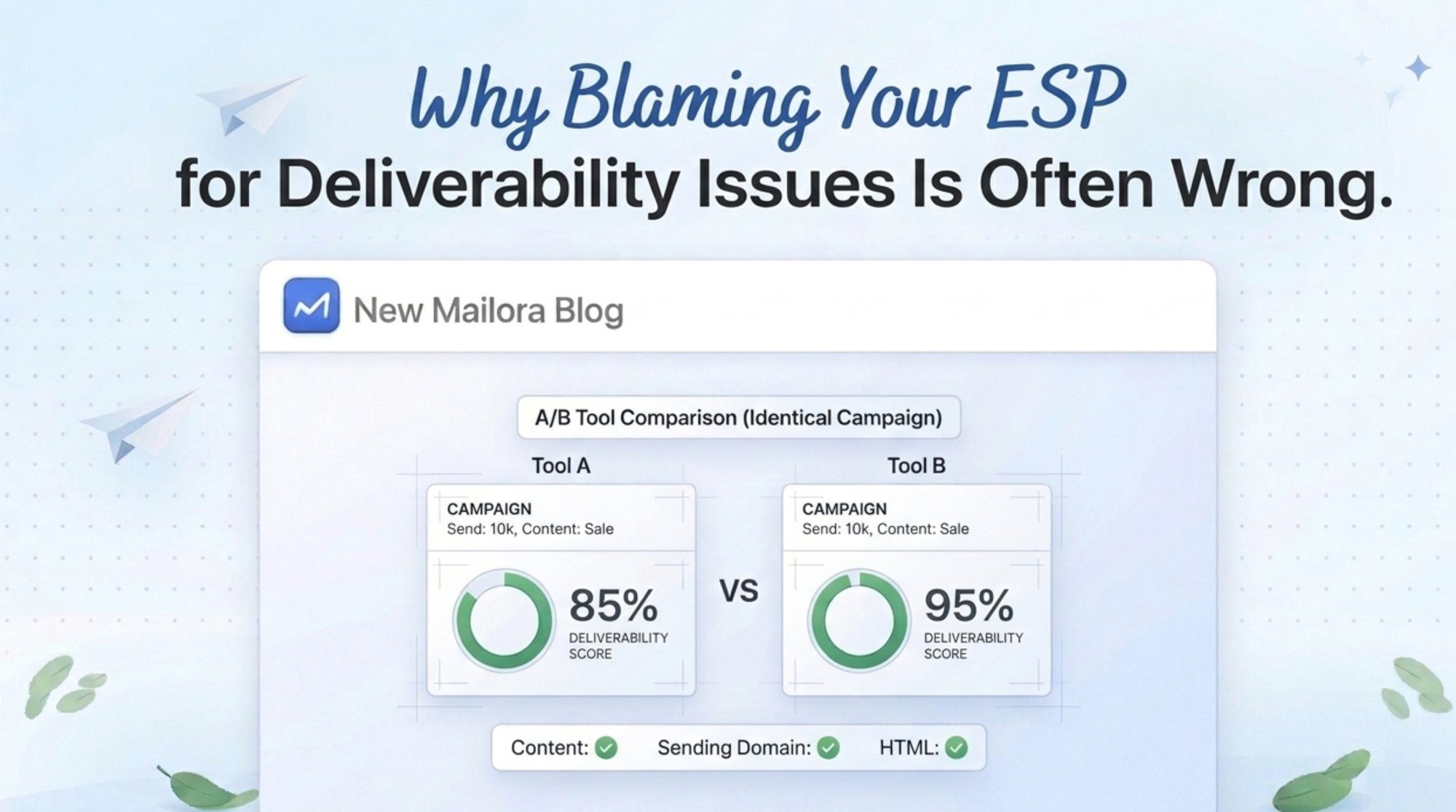
Email deliverability issues are often blamed on the email service provider because the ESP is the most visible part of the sending process. It is where campaigns are built, scheduled, sent, and measured.
That visibility creates a false conclusion: if inbox placement drops after a send, the platform must be responsible.
Most ESP deliverability problems are not platform failures. They are sender reputation problems, list quality problems, targeting problems, authentication gaps, engagement decay, or sending pattern changes that finally become visible inside the ESP dashboard.
A better question is not “Is my ESP bad?” The better question is “Which part of the sending system produced the signal that mailbox providers reacted to?”
Why ESPs Get the Blame First
ESPs get blamed first for two reasons.
First, marketers see the ESP dashboard before they see the mailbox provider decision layer. If open rates fall, bounce rates rise (including high bounce rates), or spam placement increases, the ESP becomes the visible object of frustration.
Second, teams apply a last touch assumption. The ESP touched the message last before delivery, so it appears responsible for the outcome. That logic is incomplete.
Mailbox providers evaluate more than the sending platform. They evaluate sender identity, authentication, reputation, user engagement, complaints (including high spam complaints), list quality, historical behavior, content signals (including spammy content), link domains, sending velocity, and recipient level feedback across different email accounts.
That means email platform issues can exist, but they are only one category inside a larger diagnostic system, and a single email delivery failure is often just a symptom of deeper signals.
What ESPs Actually Control
An ESP controls the sending environment and parts of the email infrastructure. It does not fully control how mailbox providers judge the sender.
An ESP can create real deliverability risk when infrastructure fails, authentication is misconfigured by the platform, a shared IP address reputation is damaged, throttling is mishandled, sending limit rules are applied incorrectly, or bounce logic breaks.
Those are real ESP deliverability problems. They are also less common than sender controlled causes.
What ESPs Do Not Control
Your ESP does not control whether recipients want your emails or whether your message gets routed to the inbox, spam folder, or Promotions tab.
It does not repair weak consent, low engagement, poor segmentation, stale lists, misleading subject lines, sudden volume spikes (or sudden spikes in complaints), or a damaged sending domain.
It cannot make mailbox providers trust a sender with poor sender reputation (or low sender reputation) that repeatedly sends to unengaged contacts. It cannot protect reputation if email campaigns attract complaints. It cannot turn poor targeting into positive engagement or exceptional brand experiences.
This is why sender reputation problems are usually strategic and operational, not only technical—and why “ESP deliverability” is a common problem framing that hides the true owner.
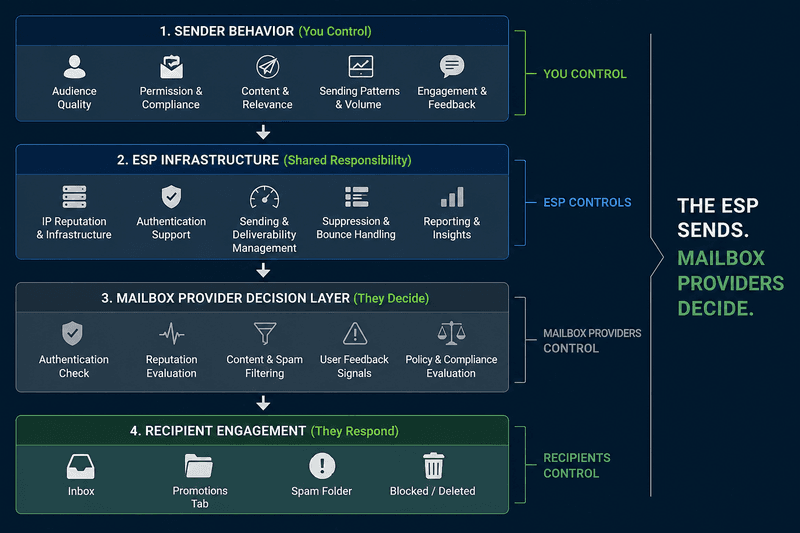
The Real Causes of Deliverability Issues
The most common root causes sit outside the ESP. These are the common causes behind most email deliverability issues and other common email delivery issues.
- Poor targeting
Sending the same message to broad segments causes weak engagement. Mailbox providers interpret repeated lack of engagement as a quality signal. - Low engagement
Declining opens, clicks, replies, saves, and positive interactions can reduce inbox confidence. Open data is imperfect, so use it as a directional signal rather than a final verdict. - List quality decay
Old contacts, purchased lists, scraped contacts, role accounts, and invalid addresses increase bounce and complaint risk, and often indicate deeper problems in the email list lifecycle. - Sending pattern changes
Sudden volume increases, irregular cadence, new domains, new IPs, and aggressive campaign bursts can trigger filtering by spam filters. - Authentication gaps
SPF, DKIM, and DMARC must pass and align. Authentication does not guarantee inbox placement, but failure creates avoidable risk and can look like authentication problems at the mailbox/provider layer. - Content and link reputation
The body copy is not the only content signal. Link domains, redirects, image hosts, tracking domains, and attachment patterns can affect filtering, especially when spam usage patterns are detected. - Compliance weakness
Missing sender identity, unclear consent, weak unsubscribe access, and poor preference management increase complaint risk.
How to Diagnose Email Deliverability Issues
Use a signal based sequence before blaming the ESP.
Do not treat one metric as the answer. Email performance troubleshooting works best when multiple signals point to the same cause, because many deliverability dips are individual issues at the mailbox or recipient level, not a platform-wide outage.
When It Actually Is the ESP
It can be the ESP when there is evidence of platform level failure.
Examples include incorrect DKIM signing, broken return path setup, shared IP reputation collapse, unplanned sending delays, outage related failures, incorrect suppression handling, missing bounce processing, mail server queue failures, or support confirmed infrastructure incidents.
The key is evidence. A deliverability drop after switching platforms does not automatically prove the new platform is bad. It may expose a change in authentication, IP warming, tracking domains, suppression rules, or sending cadence, and in some cases, issues from a self-hosted email server or other upstream mail server changes can surface only after the switch.
Tool Comparison: Mailora, GlockApps, and ESP Reports
GlockApps is useful for visibility. The content gap many teams miss is interpretation. Placement data matters, but the stronger resource explains why placement changed, who owns the cause, and what action should happen next.
Mailora should be positioned as the diagnostic layer that helps teams avoid false blame and choose the next corrective step, including whether poor email delivery is driven by reputation, content, authentication, or infrastructure.
For related compliance context, see Mailora on CNIL email tracking rules.
ROI Impact of Correct Diagnosis
Blaming the ESP too early creates waste.
Teams may migrate platforms, rebuild templates, rotate IPs, or pause campaigns without fixing the actual issue. If the cause is weak consent, poor targeting, low engagement, or authentication failure, a platform move only relocates the same risk.
Correct diagnosis protects revenue by reducing wasted engineering time, shortening investigation cycles, and preventing reputation damage from repeated poor sends.
No universal verified percentage exists for how often ESPs are the true cause of deliverability failures. Any article that gives one without a cited data source should be treated carefully.
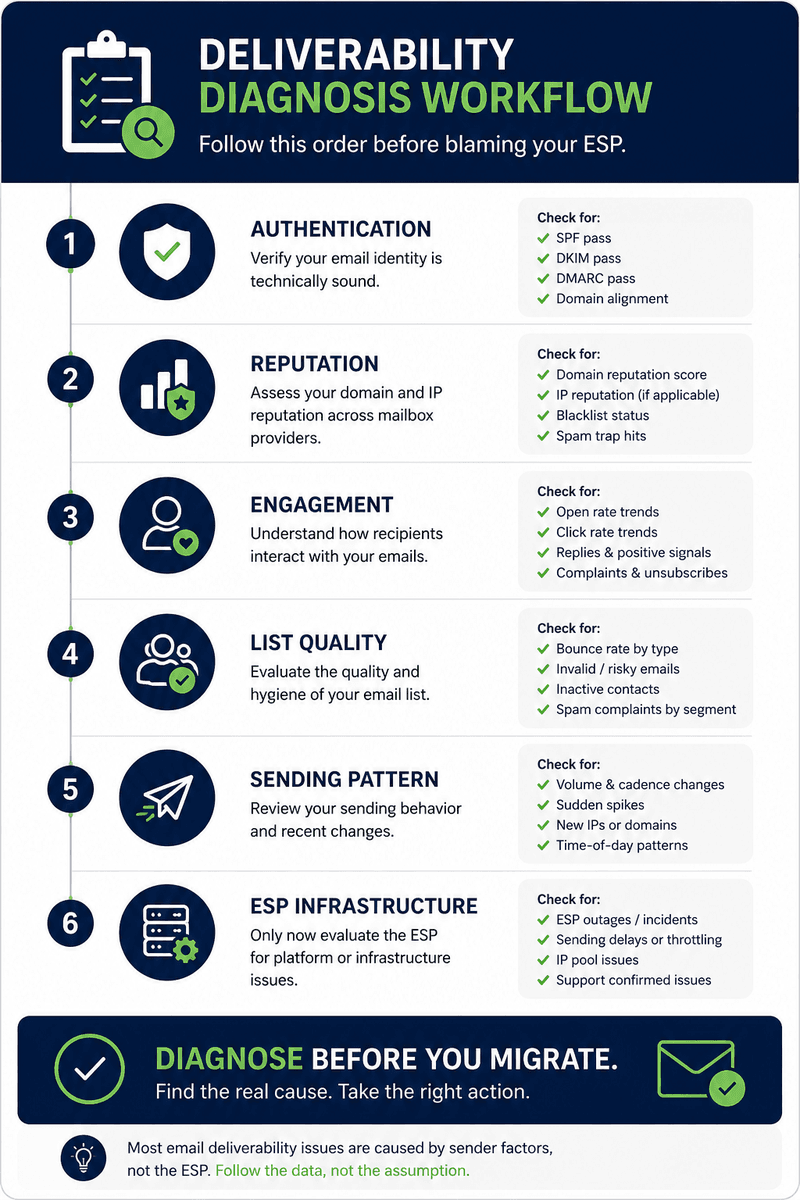
Diagnostic Checklist
Use this before opening an ESP blame thread.
- Do SPF, DKIM (dkim), and DMARC pass and align (proper authentication)?
- Did volume, cadence, segment size, or domain usage change recently?
- Are bounces concentrated by mailbox provider or by a single mailbox?
- Are complaints increasing in a specific segment or for a specific subscriber cohort?
- Are inactive contacts still receiving campaigns from the same email list?
- Did link domains, tracking domains, or templates change?
- Did spam placement increase across all providers or only one (for example, only Gmail recipients inboxes vs. only Microsoft recipients inboxes)?
- Did the ESP confirm an incident or configuration failure?
- Can the issue be reproduced with controlled inbox placement testing?
- Does the evidence point to infrastructure, reputation, engagement, or list quality?
- Are you seeing any spam blacklist flags (for example, SORBS DUHL blacklist or Suomispam reputation blacklist) tied to your sending IP or domain?
- Are there signs the message is failing at the destination (provider) level vs. being rejected earlier by a mail server?
Enterprise Versus SMB Perspective
SMB teams often blame the ESP because they lack enough diagnostic visibility. Their priority should be simple: authenticate correctly, remove weak contacts, control sending cadence, and test placement before changing tools.
Enterprise teams need governance. They should separate platform incidents from sender behavior, maintain domain level monitoring, enforce segmentation rules, document consent sources, and review reputation signals before campaign expansion.
Myth Corrections
Myth: A better ESP fixes deliverability.
Reality: A better ESP helps execution and visibility. Reputation still follows sender behavior.
Myth: Passing SPF, DKIM, and DMARC guarantees inbox placement.
Reality: Authentication is required for trust, but engagement and reputation still matter—and spam filters still apply policy and behavioral scoring.
Myth: Open rate drops prove spam placement.
Reality: Open data is affected by privacy changes and image loading behavior. Validate with placement tests and mailbox signals.
Myth: Dedicated IPs always improve deliverability.
Reality: A dedicated IP helps only when volume, warming, and sender behavior support it.
FAQ
Why do marketers blame ESPs for deliverability issues?
Because the ESP is the visible sending system. It shows the campaign outcome, but not always the root cause.
What are ESP deliverability problems?
They are platform related issues such as infrastructure failure, broken authentication support, poor IP pool health, queue delays, incorrect bounce handling, or other email delivery failure scenarios tied to the platform layer.
Can my ESP control sender reputation?
No. The ESP can support reputation management, but sender reputation is shaped by authentication, engagement, complaints, list quality, and sending behavior.
What are common email platform issues?
Common issues include sending delays, configuration errors, tracking domain problems, authentication setup gaps, and reporting discrepancies.
How do I know if the ESP is actually the cause?
Look for platform wide failures, confirmed incidents, authentication errors caused by the platform, abnormal queue delays, or consistent failures across unrelated campaigns.
What should I check first when inbox placement drops?
Check authentication, bounce codes, mailbox provider patterns, complaint rates, segment quality, recent volume changes, and reputation signals.
Does changing ESPs fix email deliverability issues?
Not by itself. If the cause is list quality, engagement, consent, or reputation, the issue can follow you to the next platform.
Is GlockApps enough for troubleshooting?
GlockApps can provide useful placement and spam testing visibility. It should be paired with root cause analysis across reputation, list quality, authentication, and sending behavior.
Where does Mailora fit?
Mailora fits as a decision layer for teams that need deliverability testing, reputation monitoring, predictive analysis, and content testing before making platform or campaign changes—especially when you need to separate common reasons (sender behavior) from true platform failures.
Soft CTA
Before replacing your ESP, diagnose the system around it. Mailora helps email marketers, SaaS teams, and agencies separate real email platform issues from sender reputation problems, list quality issues, and campaign strategy failures so the next action is based on evidence, not assumption.
Stay in the loop
Deliverability insights, product updates, and early access to new features. No spam, unsubscribe anytime.
By subscribing, you agree to our Privacy Policy. Unsubscribe anytime.