What actually happens after you hit send (real flow)
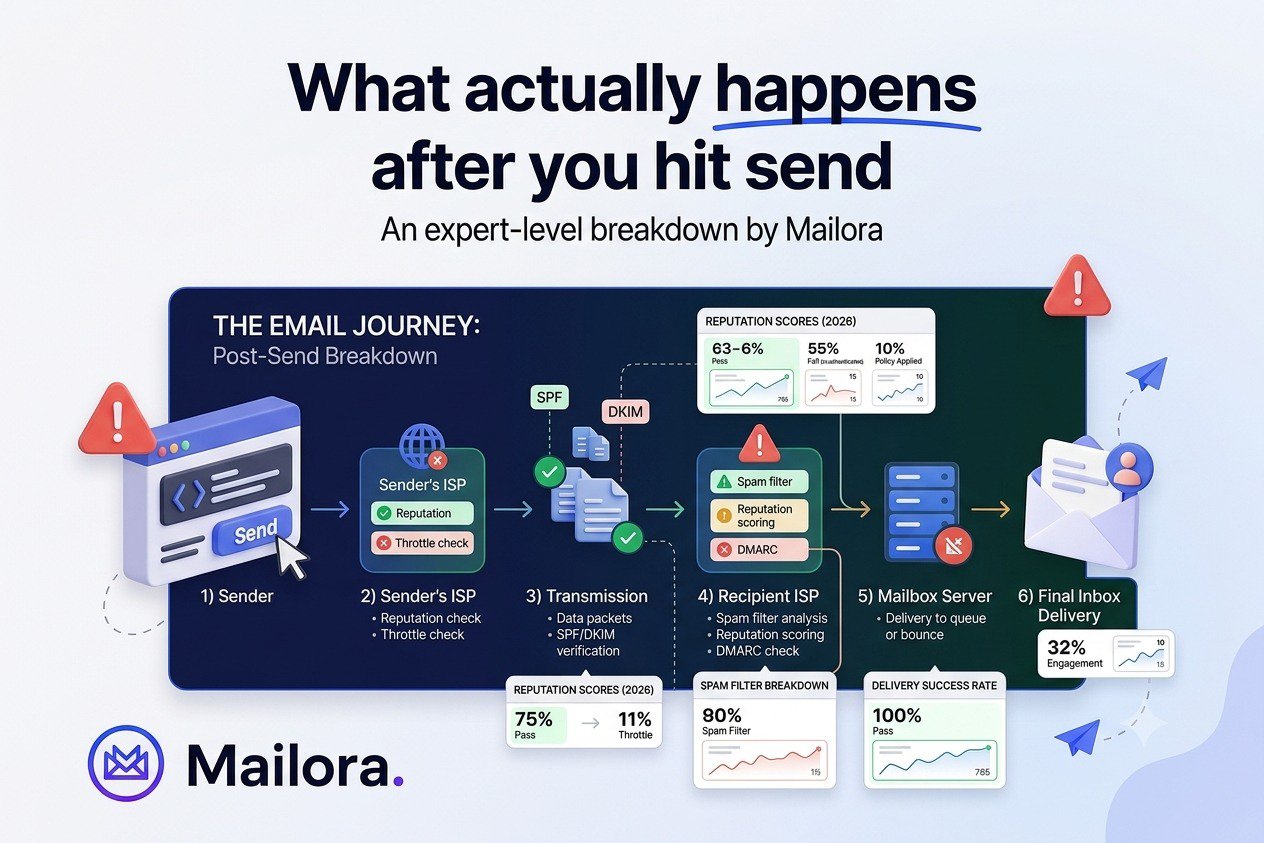
Most marketers think of sending an email as a single action: click send, and the message arrives. But what actually happens after you hit send is a much longer, more layered process than that single click suggests. In the fraction of a second between clicking send and a message landing somewhere in a recipient's account, a chain of technical checks, reputation evaluations, and content assessments runs its course, and the outcome of that chain decides whether the message ends up in the inbox, the promotions tab, the spam folder, or gets rejected entirely.
Understanding what actually happens after you hit send is not just a technical curiosity. It explains why two campaigns with nearly identical content can perform completely differently, and it gives marketing teams a framework for diagnosing problems instead of guessing at them. It also helps marketers understand the full email delivery chain, from the email marketing platform or email marketing provider to the recipient email server and, ultimately, the receiver's inbox.
What Actually Happens After You Hit Send: The Journey in Five Stages
Before breaking down each stage in detail, it helps to see the full sequence at a glance. What actually happens after you hit send can be summarized as five checkpoints, each one gating whether a message moves forward to the next.
Stage | What Happens | What Gets Evaluated
- Connection | Sending server contacts the receiving mail server | IP reputation, connection history
- Authentication | SPF, DKIM, and DMARC are checked | Domain identity, message integrity
- Reputation | Sender and domain history are assessed | Complaints, bounces, spam trap hits
- Content and context | Message structure and relevance are analyzed | Links, formatting, engagement patterns
- Placement decision | Inbox, tab, spam, or rejection is decided | All signals combined
Each of these stages is worth understanding on its own, since a message has to clear all of them favorably to land where the sender intends. These layers also explain why post-send monitoring is more useful than treating delivery as a single event.
The Journey Begins When You Click Send
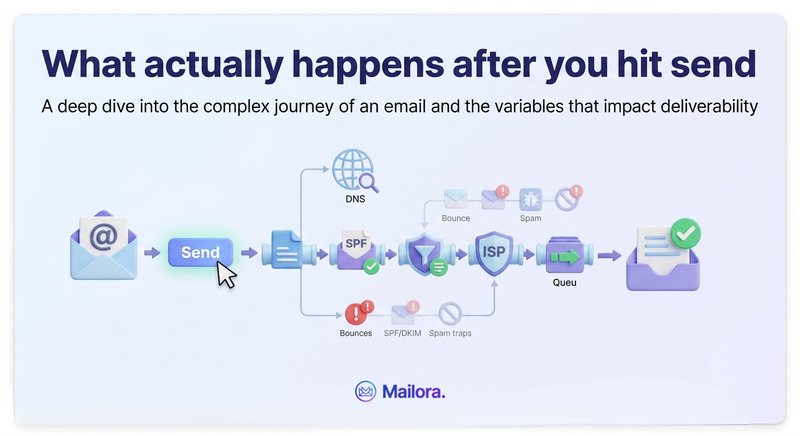
When a message is sent, it doesn't travel directly to the recipient's inbox. It first goes to the sending server, typically your email service provider's infrastructure, which packages the email message and places it in a queue before initiating a connection with the recipient's mail server using SMTP, the protocol that governs how email is transmitted between servers.
Behind the scenes, the sending server acts as a mail transfer agent (MTA), also known as a mail transfer agent, while the recipient's mail system uses a mail delivery agent to place accepted messages into the appropriate mailbox. The recipient's mail user agent (MUA), such as a webmail interface or mobile mail app, is what the user eventually uses to read the email body.
To find the correct recipient mail server, the sending system can use the recipient domain's MX records. The receiving server, sometimes called the recipient email server, then has to decide whether to accept the connection at all. This is where IP reputation starts to matter immediately, before a single word of the message content has been evaluated by any filtering system. If the sending IP has a history of high complaint rates, spam trap hits, or blacklisting, the receiving server may throttle the connection, delay acceptance, or reject it outright.
Authentication Checks: What Actually Happens After You Hit Send at the DNS Level
Once the connection is accepted, the message moves into authentication, one of the most technical parts of what actually happens after you hit send. The receiving server runs through a short sequence of checks:
- SPF verification: the server compares the sending IP against the domain's published list of authorized senders.
- DKIM verification: the server validates the cryptographic signature attached to the message, confirming both sender identity and that the message wasn't altered in transit.
- DMARC evaluation: if a DMARC policy is published, the server checks whether the message aligns with SPF and DKIM, and applies whatever action the domain owner has specified for messages that fail, whether that's quarantine, rejection, or monitoring only.
These checks happen almost instantly, but they're foundational to everything that follows. A message that fails authentication may be rejected immediately, routed straight to spam regardless of other signals, or, under a lenient DMARC policy, allowed through with reduced trust. Passing this stage doesn't guarantee good placement. It simply means the message is allowed to proceed to the next evaluation.
Reputation Evaluation
With authentication confirmed, the receiving server evaluates sender reputation, drawing on a combination of IP reputation and domain reputation. This includes:
- Historical sending patterns across recent weeks and months
- Complaint rates from past campaigns
- Bounce rates, both hard and soft
- Spam trap hits, which indicate outdated or poorly sourced lists
Reputation is not evaluated in isolation for a single message. It reflects a pattern built over time, which is why a single well-crafted email can't instantly fix a reputation problem, and why a single mistake rarely destroys an otherwise strong reputation overnight. Gmail, Outlook, and Yahoo each weigh these signals somewhat differently, using proprietary algorithms that aren't publicly documented in detail, which is part of why the same message can be placed differently across providers even when the underlying infrastructure is identical.
Content and Context Analysis
With identity and reputation established, the receiving server evaluates the message itself. Modern filtering systems have moved well past simple keyword scanning for "spam words." What they assess instead includes:
- The ratio of text to images in the message
- The number of links and whether they point to domains with poor reputations
- Formatting patterns that resemble previous messages reported as spam
- How closely the message resembles content that historically drove opens, replies, and time spent reading, versus content associated with quick deletion or complaints
These content and context spam checks can also consider whether the message is a promotional offer email, a transactional update, or another type of communication. They may evaluate which emails a recipient regularly opens, deletes, archives, or marks as spam, making placement increasingly personalized.
This stage is also where Gmail's tabbed inbox system makes its categorization decision, sorting messages into Primary, Promotions, or Social, separate from the inbox-versus-spam decision itself.
Inbox, Promotions, or Spam? The Final Answer to What Actually Happens After You Hit Send
All of these signals, authentication, reputation, and content, feed into a final placement decision made independently by each receiving mail server. There's no single universal score that determines the outcome. Gmail decides independently. So does Outlook. So does Yahoo. This is why monitoring inbox placement across multiple providers matters more than looking at a single aggregate delivery number.
The outcome generally falls into one of four categories:
- Primary inbox: signals high trust and relevance.
- Secondary tab (such as Promotions): still delivered, but with lower visibility and lower typical engagement.
- Spam folder: combined signals fell below the provider's trust threshold.
- Rejection: the message never reaches any folder, typically indicating a serious reputation or authentication problem.
This decision isn't always final or uniform across an entire send. Individual recipient behavior, such as a specific user's past interactions with the sender, can shift placement for that particular recipient even when the aggregate trend points elsewhere. This is part of why deliverability exists on a spectrum rather than as a binary pass-or-fail outcome.
The same principle applies to other messaging channels. Push messages and push notifications may travel through Apple APNs for iOS devices or a Google FCM transfer for Android devices, while SMS messages can pass through an SMS aggregator before reaching cell phones. In-app messages are delivered through an application rather than an inbox, but they still depend on their own delivery flow and receiver-side rules.
Why Understanding What Actually Happens After You Hit Send Matters for Troubleshooting
Knowing this sequence gives marketing teams a far more useful mental model than simply asking "why did my email go to spam." Instead, the more productive questions become sequential:
- Was the connection accepted, or was there a delivery failure at the infrastructure level?
- Did the message pass authentication cleanly?
- What does reputation look like across recent sends?
- Does the content and engagement pattern align with what has historically performed well for this list?
- Are incoming emails being accepted by the recipient mail server, or is the issue occurring later in the mailbox through MDA software?
This sequence also explains why fixing one layer, like authentication, doesn't automatically resolve problems rooted in another layer, like reputation or content. Each stage is a distinct checkpoint, and because this process runs continuously, campaign after campaign, deliverability is never really "solved" in a permanent sense. Every send is a new opportunity to reinforce or erode reputation, and monitoring how a domain performs across this full sequence over time provides far more insight than testing a single message before it goes out.
Frequently Asked Questions
What actually happens after you hit send, in simple terms?
The message moves through a connection request, an authentication check (SPF, DKIM, DMARC), a reputation evaluation, a content and context analysis, and finally a placement decision, all within seconds.
Why does an email sometimes reach the inbox for some recipients and spam for others?
Because each receiving mail server, and in some cases individual mailbox algorithms, evaluates signals independently. A recipient's personal engagement history with a sender can influence placement even when broader account-level reputation trends point in a different direction.
Does passing authentication guarantee inbox placement?
No. Authentication is a required checkpoint early in the process, but reputation and content evaluation happen afterward and carry significant weight in the final placement decision.
How long does the full process, from send to placement, actually take?
Typically just seconds. The speed can create a false impression that email delivery is a simple, instant action, when in fact multiple evaluations are happening behind the scenes.
See what actually happens after you hit send for your own campaigns. Learn how Mailora helps monitor deliverability across every stage of the email delivery process.
Stay in the loop
Deliverability insights, product updates, and early access to new features. No spam, unsubscribe anytime.
By subscribing, you agree to our Privacy Policy. Unsubscribe anytime.