IP Reputation Attack: How to Detect, Survive, and Recover as an Email Sender
Key Takeaways
|
When inbox placement drops unexpectedly, most teams look at the email first.
They review subject lines, content, segmentation, and authentication records. It's also common to blame your ESP for deliverability issues when inbox placement suddenly drops, but in many cases the underlying cause is a damaged IP or domain reputation rather than the sending platform itself. Sometimes those are the problems, but sometimes the real issue is the reputation of the IP sending the mail.
IP reputation influences how mailbox providers evaluate your messages before content is even considered. If that reputation becomes compromised, inbox placement can decline quickly even when authentication is configured correctly and the email itself hasn't changed.
This guide explains how IP reputation attacks happen, how to identify them, how to assess the damage, and the recovery steps that help restore trust with mailbox providers.
What Is an IP Reputation Attack?
An IP reputation attack is any action, intentional or incidental, that degrades the trust score assigned to a sending IP address by mailbox providers, resulting in inbox placement loss rather than a network or firewall problem.
Mailbox providers such as Gmail, Outlook, and Yahoo maintain real-time reputation scores for every sending IP, factoring in spam complaint rates, spam trap hits, bounce rates, blocklist status, and authentication alignment.
When those scores drop past defined thresholds, providers filter, throttle, or reject mail from the affected IP. For email senders, the damage is measured in inbox placement rates and lost revenue, not network packets, and the tools for detecting and recovering from it are deliverability tools, not security software.
Why Do Legitimate Senders Get Hit?
The four mechanisms that drive reputation attacks on legitimate senders are:
- Botnet-driven spam abuse: A compromised server on shared infrastructure sends spam under your IP without your knowledge.
- Shared IP contamination: A co-tenant on your shared sending pool damages the pool's collective reputation, and every sender on it absorbs the consequence.
- Spoofing-based attacks: A bad actor sends from a lookalike or spoofed version of your domain. Without DMARC enforcement, this compounds IP damage with domain reputation damage simultaneously.
- List bombing and complaint manipulation: A targeted influx of fake sign-ups or coordinated spam complaints designed to push your complaint rate past ISP thresholds.
How IP Reputation Is Scored: What ISPs Actually Measure
ISPs score your sending IP based on behavioral signals accumulated over time, and those signals tell them whether to trust the mail coming from your server before a single word of your campaign is evaluated.
Understanding what gets scored is how you know which problems are fixable and which ones compound.
Spam Complaint Rate
Gmail warns at 0.10% and enforces at 0.30% for bulk senders sending 5,000 or more messages per day. Cross that line and inbox placement degrades regardless of how clean everything else looks.
Spam Trap Hits
Spam trap hits signal list hygiene failure. They include:
- Recycled addresses that were once real but have since been repurposed as traps.
- Purchased lists.
- Segments you stopped engaging but never suppressed.
- Hitting a spam trap tells ISPs your list acquisition or hygiene practices are broken, and the damage compounds over time.
Hard Bounce Rate
Hard bounces signal list quality and validation gaps. A high bounce rate tells ISPs you are sending to addresses without sufficient verification, which correlates with poor list acquisition practices.
Blocklist Status
Blocklist status, particularly Spamhaus, is factored into ISP filtering decisions in real time. A Spamhaus SBL or XBL listing does not wait until tomorrow's reputation refresh to affect your delivery. It is queried on every inbound email at major ISPs simultaneously. The listing event and the inbox impact are effectively simultaneous.
Authentication Alignment
Failing SPF, DKIM, or DMARC is an exploitable attack surface. A missing or unenforced DMARC policy means a bad actor can send from a spoofed version of your domain with no technical barrier. That unauthorized sending compounds IP reputation damage with domain reputation damage at the same time.
Sending Consistency
Sudden volume spikes, long pauses followed by large sends, and frequent IP or domain switching all raise filtering pressure, even when every other signal is clean. ISPs weigh behavioral consistency as a proxy for legitimacy. Erratic patterns look like infrastructure abuse regardless of whether they are.
The Postmaster Tools Tiers: What They Actually Mean
Google Postmaster Tools surfaces IP reputation across four tiers. Each tier has direct inbox consequences:
Tier | What It Signals | Inbox Impact |
| High | Strong reputation. ISP trusts your mail | Normal inbox routing |
| Medium | Moderate reputation. Some filtering may apply | Potential Promotions routing; watch trend direction |
| Low | Weak reputation. Active filtering in place | High spam folder rate across Gmail |
| Bad | Very poor reputation. Near-complete filtering | Most mail rejected or blocked at delivery |
[Table: Postmaster Tools Tiers What each reputation tier actually means for inbox delivery and why trend direction matters more than the tier itself. ]
A Medium score dropping from High three weeks ago means active decay. A Medium score that has been flat for six months means a stable floor. Same tier, completely different problem, completely different response.
How to Detect an IP Reputation Attack Before It Hits Your Inbox Rates
Most senders discover a reputation attack when open rates drop or a client escalates. By that point, the damage has been active for days, sometimes longer.
The earliest indicators appear in ISP-native tools, not third-party score aggregators. By the time a Sender Score number moves, inbox placement has already degraded. Postmaster Tools and SNDS signal before that, often before you appear on any public blocklist.
Google Postmaster Tools
Open the IP Reputation dashboard. Look at two things:
The current tier and the 28-day trend. A drop from High to Medium is an early warning. A drop to Low or Bad means filtering is already active and your next send is already affected.
Cross-reference the spam rate trend at the same time. If the complaint rate is rising alongside the tier drop, the cause is behavioral, meaning your own sending is driving it.
If the complaint rate is stable and volume is unchanged, the cause is more likely external, such as shared IP contamination, spoofing, or a botnet event. The diagnosis changes the response entirely.
Microsoft SNDS
SNDS reports Green, Yellow, or Red filter status specific to Outlook and Hotmail.
- Green is clean.
- Yellow is an elevated risk.
- Red means active blocking is in place.
SNDS also surfaces complaint rates and spam trap hit counts from within the Microsoft mail ecosystem, data that Postmaster Tools will never show you because Google and Microsoft are measuring separately.
If your Postmaster Tools tier looks clean but Outlook placement is degrading, SNDS is where you find out why.
Is This External or Self-Inflicted?
Stable complaint rate, unchanged volume, tier drop in Postmaster Tools → likely external. Shared IP contamination, a spoofing attempt, or a botnet event on your infrastructure.
Rising complaint rate alongside the reputation drop → behavioral. Your own sending is the cause. Address it before touching anything else, a new IP or a warm-up strategy will not fix a complaint rate problem.
Tool | What It Shows | When It Signals | Limitation |
| Google Postmaster Tools | IP reputation tier, domain reputation, spam rate trends | Before blocklisting, early decay signal | Gmail only; no Outlook or Yahoo coverage |
| Microsoft SNDS | Green/Yellow/Red IP filter status, complaint rates, spam trap hits | Before blocklisting, Outlook/Hotmail early signal | Requires SNDS enrollment; no Gmail coverage |
| Third-party aggregators | Aggregated reputation score | After damage has occurred | Lags ISP-native signals by days to weeks |
[Table: Detection Tools Comparison (Postmaster Tools / SNDS / Third-party aggregators) The tools available to detect a reputation attack, when each one signals, and where each one goes blind.]
ISP-native tools are your early-warning layer. Third-party scores confirm damage that has already happened.
Manual spot-checks are how teams find out through customer complaints instead of monitoring alerts. By the time the complaint arrives, the listing has been active for days and at least one campaign has already underperformed.
Mailora monitors your sending IPs and domains across 40+ blocklists continuously, and tracks IP and domain reputation trends together, so you find out when a listing appears, not when revenue drops. Try Mailora’s IP Blocklist Check for Free
The IP Reputation Attack Recovery Playbook
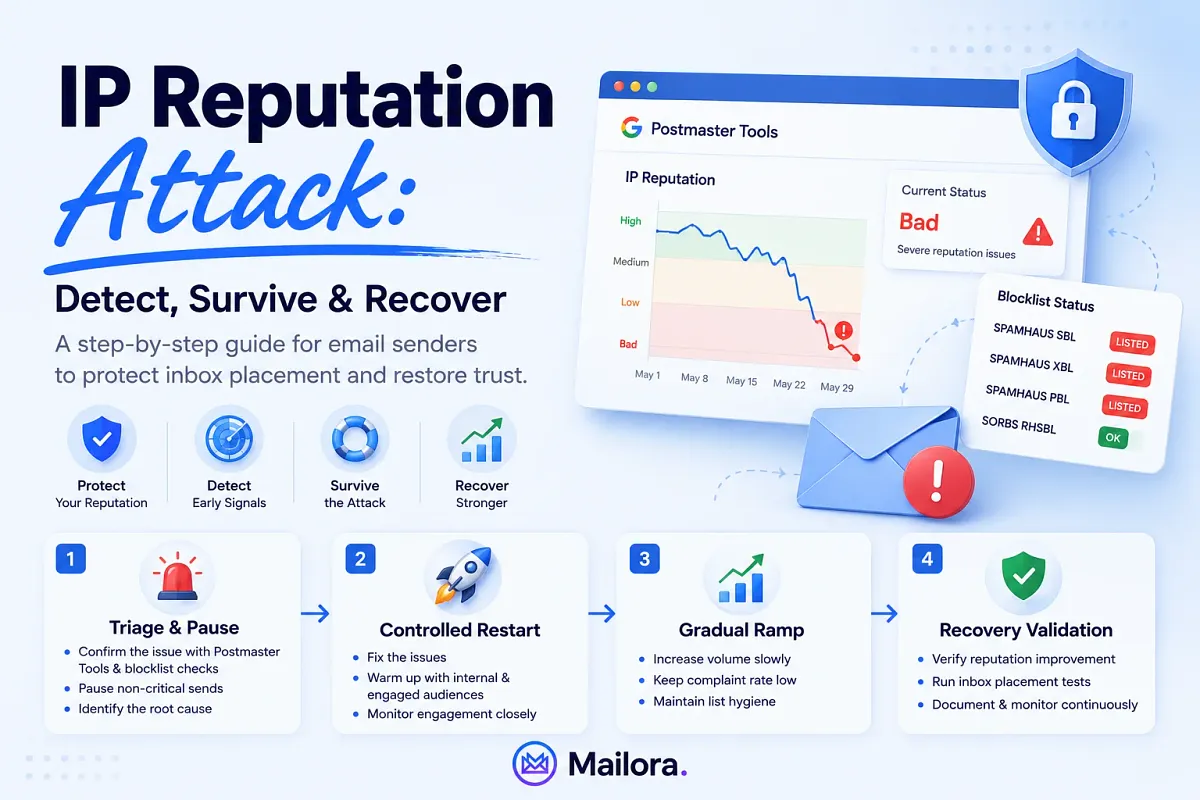
IP reputation recovery requires four sequential phases:
- Immediate triage and sending pause
- Controlled restart with high-engagement segments
- Gradual volume ramp with daily monitoring
- Recovery validation through inbox placement testing
Phase 1: Triage and Pause (Days 1–3)
- Stop all non-essential sending immediately.
- Suppress all unengaged segments, like anyone who has not opened or clicked in 90 or more days.
- Run an inbox placement test across Gmail, Outlook, and Yahoo to establish a damage baseline.
- Check Google Postmaster Tools IP reputation tier and spam rate trend.
- Check Microsoft SNDS status for all sending IPs.
- Run a blocklist check across all sending domains and IPs
- Audit SPF, DKIM, and DMARC alignment across all sending sources.
- Document what changed in the two to four weeks before the drop, such as new ESP, new sending source, volume spike, template change, list import.
Phase 2: Controlled Restart (Days 4–14)
- Send only to your highest-engagement segment, like subscribers who opened or clicked in the last 30 days.
- Volume: 10 to 20 percent of your normal sending cadence.
- Monitor Postmaster Tools IP reputation tier daily. Do not advance to the next phase if the tier is still dropping.
- Submit delisting requests for all Tier 1 blocklist listings
- Keep content simple and clean. Do not experiment with a new template or a promotional push.
Phase 3: Gradual Ramp (Days 15–30)
- Increase volume 20 to 30 percent per week if Postmaster Tools shows a stable or improving reputation tier.
- Expand to broader engaged segments: 60-day, then 90-day active subscribers.
- Continue daily Postmaster Tools monitoring.
- Check SNDS weekly for Outlook-side recovery signals.
Phase 4: Recovery Validation (Day 30+)
- Run a full inbox placement test across Gmail, Outlook, and Yahoo.
- Compare results to the damage baseline established in Phase 1.
- Confirm spam complaint rate is below 0.10% (Gmail warning threshold).
- Confirm Postmaster Tools shows High or Medium reputation tier.
- Document the recovery timeline and milestones for stakeholder reporting.
Measure recovery with placement data
A Postmaster Tools tier improvement tells you Gmail is responding, but it does not tell you whether Outlook or Yahoo placement has recovered. Only a cross-ISP inbox placement test answers that question. Run placement tests at the start of Phase 1 and again at the end of Phase 4 to quantify actual recovery progress.
Run a placement test to measure your recovery progress
Blocklist Triage: Which Lists to Prioritize and How to Get Delisted
Not all blocklists affect inbox placement equally. Spamhaus listings, such as SBL, XBL, and PBL, carry the broadest commercial mail filter impact globally and should always be resolved first. Barracuda and SURBL are secondary priorities. Many smaller lists have minimal direct ISP filtering impact and can be monitored without immediate action.
Most blocklist checkers display binary listed or not-listed status across every list with equal visual weight. This is misleading. Not all listings carry the same filtering consequence, and prioritizing them in the wrong order wastes time during an active incident.
Tier 1: Immediate Priority - Spamhaus
Spamhaus listings are queried in real time by the majority of commercial mail filters globally. Know the difference between the four lists:
- SBL (Spamhaus Block List): Known spam source IPs. Most common for senders who triggered complaint thresholds.
- XBL (Exploits Block List): Hijacked and botnet-controlled IPs. The list is most directly associated with external attacks on legitimate senders.
- PBL (Policy Block List): ISP-defined ranges not authorized for direct mail. Often a false positive for senders who moved to a new IP range.
- DBL (Domain Block List): Domain-based reputation. Check alongside IP listings, domain and IP can be listed independently.
Tier 2: High Priority
- Barracuda BRBL: Significant impact on corporate mail filters.
- SURBL and URIBL: URL-based lists that affect link reputation inside email content, not just the sending IP.
Tier 3: Monitor Only
Smaller regional and specialty lists have variable ISP filtering impact. They are worth monitoring for trend awareness, but a listing on a Tier 3 list is not grounds for stopping a send or initiating an emergency response.
| Blocklist | Covers | Typical Cause | Self-Service Delisting |
| Spamhaus SBL | Known spam source IPs | Complaint threshold exceeded | No — requires ISP/network operator to contact Spamhaus
|
| Spamhaus XBL | Hijacked / botnet-controlled IPs | External attack on sending infrastructure | Yes |
| Spamhaus PBL | ISP-policy ranges | New IP range, not authorized for direct mail | Yes (via ISP) |
| Spamhaus DBL | Domain reputation | Domain associated with spam activity | Yes |
| Barracuda BRBL | IP-based corporate filters | Complaint volume, spam trap hits | Yes (24–48h) |
| SURBL / URIBL | URLs inside email content | Links to flagged domains | Limited |
[Table: Blocklist Triage (Spamhaus / Barracuda / SURBL). What each one covers, what typically causes it, and whether self-service delisting is available. ]
How to Write a Spamhaus Delisting Request That Gets Approved
A successful delisting request documents three things:
- What the listing event was
- What you believe caused it
- What specific remediation steps you have taken.
Generic requests asking to be removed without evidence of remediation are rejected.
Spamhaus self-service can resolve in hours to days if the listing cause is already addressed. Barracuda typically delists within 24 to 48 hours. Smaller lists vary widely.
MXToolbox shows you whether you're listed. It does not show you which listings are actually affecting your Gmail, Outlook, or Yahoo placement, or whether a new one appeared overnight. Mailora checks your domains and IPs across 50+ blocklists, prioritizes findings by real ISP filtering impact, and alerts you the moment something changes. Run a free blocklist check
Authentication Hardening: Closing the Attack Surface
SPF, DKIM, and DMARC are the most important authentication stack that closes the spoofing attack surface. Without DMARC enforcement at p=quarantine or p=reject, nothing technically prevents a bad actor from sending as your domain.
It results in IP and domain reputation degrading simultaneously from a source you never authorized and cannot directly control.
Most teams treat authentication as a one-time setup. However, it often drifts because of the following reasons:
- New ESPs get added without SPF record updates.
- DKIM keys rotate without the new key being verified.
- DMARC policies sit at p=none indefinitely because moving to enforcement feels like a risk no one wants to own.
ISPs see the misalignment earlier than you and they act on it before you find out.
What to Audit in Each Authentication Layer
- SPF: Is every sending source authorized? Is the 10-lookup limit respected? Exceeding it causes silent SPF failures that are difficult to diagnose post-incident.
- DKIM: Are signatures present and passing on all sending streams? Are keys rotated on a defined schedule?
- DMARC: p=none provides zero enforcement against spoofing. It allows reports to flow, which is useful for discovery, but it does not stop unauthorized sending from your domain. p=quarantine or p=reject is where the attack surface actually closes.
- Alignment: DKIM or SPF identifier alignment must pass for DMARC to enforce. Subdomains used for transactional mail need their own policy coverage.
DMARC aggregate reports (rua) surface unauthorized sending from your domain in real time. If someone is spoofing your domain, your rua reports will show it usually before it appears in blocklist activity or Postmaster Tools signals. This is your earliest possible warning for a spoofing-based IP reputation attack.
Authentication Audit Checklist SPF
DKIM
DMARC
Alignment
|


Dedicated vs. Shared IP: Which Should You Use After a Reputation Attack?
A dedicated IP concentrates all reputation risk onto a single sender's behavior, which is an advantage at sufficient volume but a liability below it. Below roughly 50,000 to 100,000 emails per month, a dedicated IP has thin sending history that can make reputation more volatile. The decision depends on volume and attack type, not reflexive infrastructure switching.
The real benefit of a dedicated IP is full control over your IP's reputation, with no co-tenant contamination risk, but that control cuts both ways:
- Every mistake is yours alone
- A low-volume dedicated IP has a thin history that ISPs weigh less confidently, making it more vulnerable under filtering pressure
The benefit of a well-managed shared pool is aggregate reputation history that a low-volume sender could not build alone. The risk is co-tenant contamination. If that contamination is what caused your attack, moving to dedicated IP is a right choice. If the attack was complaint manipulation or list bombing, a new IP does not fix the underlying problem.
The Post-Attack Decision Framework
Attacks originated from shared IP contamination → dedicated IP is worth evaluating.
Attack was complaint manipulation or list bombing → address the root cause first because a new IP alone will not fix it.
Any new dedicated IP requires a structured warm-up. Switching IPs without resolving the root cause resets warm-up progress and often triggers additional ISP scrutiny.
The right first question before committing to an IP migration is whether your current IP's reputation is actually recoverable, and the answer to that requires reputation trend data, not guesswork.
Start Monitoring Before the Next Attack
Continuous reputation monitoring across IP and domain signals, blocklist coverage weighted by ISP filtering impact, and cross-ISP inbox placement testing are not nice-to-haves for deliverability teams. They are the difference between discovering a problem through a customer complaint and catching it three days earlier, before a revenue-critical send goes out.
Mailora gives you unified IP and domain reputation trend monitoring, 50+ blocklist coverage with ISP-weighted severity, and inbox placement testing across Gmail, Outlook, and Yahoo, all in one view, with continuous alerting instead of manual spot-checks.
Run your first blocklist test for free
FAQs
What causes an IP reputation attack on a legitimate email sender?
Shared IP pool contamination, botnet-driven spam through a compromised server, spoofing attacks enabled by a missing DMARC policy, and complaint manipulation through list bombing.
How long does IP reputation recovery take?
A minor dip with no blocklist events can recover in one to two weeks. A severe attack with Spamhaus listings may take four to eight weeks of phased warm-up.
Can I check my IP reputation for free?
Yes. Google Postmaster Tools shows IP reputation tiers and spam rate trends. Microsoft SNDS shows Outlook-specific filter status, complaint rates, and spam trap hits. MXToolbox offers free blocklist spot-checks.
What is the difference between IP reputation and domain reputation?
IP reputation scores the sending server's IP address. Domain reputation scores the From: address domain. Both are scored independently by major ISPs. An IP can recover while a domain remains damaged, and vice versa, which is why both need to be monitored separately.
How do I write a Spamhaus delisting request that gets approved?
Document the listing event, explain what caused it, and show evidence of remediation already taken. Generic removal requests without proof of remediation are often rejected.
Stay in the loop
Deliverability insights, product updates, and early access to new features. No spam, unsubscribe anytime.
By subscribing, you agree to our Privacy Policy. Unsubscribe anytime.