Email Deliverability Diagnosis: Is the Problem Content, Reputation, or Infrastructure?

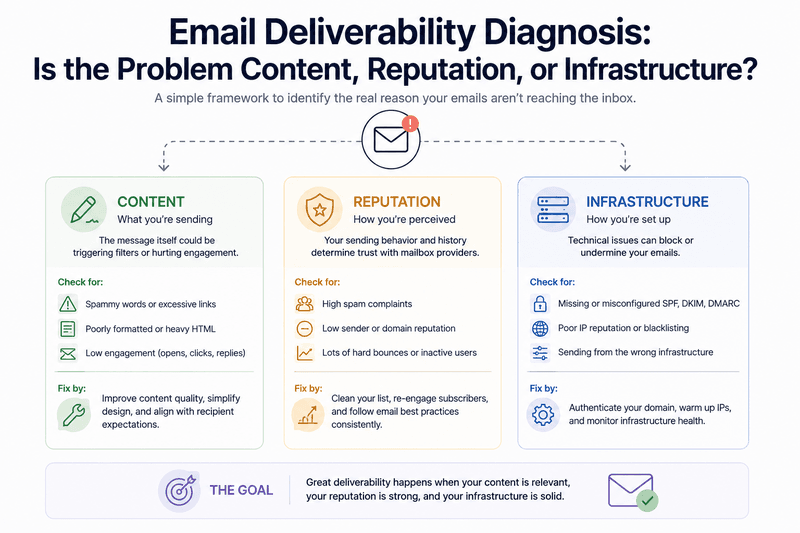
When deliverability problems show up, the instinct is usually to fix something fast, but a rushed fix without a proper email deliverability diagnosis often targets the wrong cause and wastes time while the real issue keeps compounding. Email deliverability problems tend to have a high number of plausible causes at once, and a more useful first step is diagnosis: figuring out whether the root cause sits in content, reputation, or infrastructure, since each requires a different kind of fix. This process can also reveal email security issues, poor outreach deliverability, or broader email deliverability issues affecting your subscriber database.
Why Most Teams Get Email Deliverability Diagnosis Wrong
Confirmation bias plays a bigger role in email deliverability diagnosis than most teams realize. If the last change made before a drop was a subject line tweak, it's natural to assume the subject line caused the problem, even when the timing is coincidental. If someone recently read an article about "spam trigger words," content becomes the default suspect, regardless of whether the evidence actually supports it. A legitimate sender can even be mistaken for a spammer when filtering systems detect unusual patterns.
This tendency is reinforced by a simple asymmetry:
- Content is visible. Anyone on a marketing team can look at an email and have an opinion about its wording, links, or formatting.
- Reputation and infrastructure are not visible. Far fewer people can look at a sender reputation trend or a DNS configuration and immediately spot what changed.
That asymmetry often pushes teams toward content fixes even when the actual cause lies elsewhere. The result is a familiar pattern: a team spends days rewriting copy, sees no improvement in open rates or reply rates, and only then starts looking at reputation or infrastructure, having lost valuable time chasing the wrong lead. A structured email deliverability diagnosis, applied from the start, avoids that detour and gives teams more control over the problem.
The Three Categories at a Glance
Before going deeper into each category, it helps to see how they typically differ in symptoms and speed of onset. This comparison is the starting point for any email deliverability diagnosis and can guide an email deliverability audit.
Category | Typical Onset | Common Cause | How to Confirm
Infrastructure | Sudden, sharp | Broken SPF/DKIM, DNS misconfiguration | Authentication checker, DNS lookup
Reputation | Gradual, over weeks | Rising complaints, list decay, spam traps | Trend review across recent sends
Content | Inconsistent by campaign | Formatting, links, structure | Compare similar campaigns
Infrastructure Problems
Infrastructure issues tend to be the most technical and, once identified, often the most fixable. These include:
- Authentication failures, such as a broken SPF record, an expired or misconfigured DKIM key, or a DMARC policy rejecting more messages than intended. Reviewing DMARC policies and gaining more DMARC experience can help legitimate senders spot configuration problems before they affect inbox placement.
- DNS misconfigurations, like an incorrect PTR record or a missing reverse DNS entry, both of which mailbox providers check when evaluating sender legitimacy.
Infrastructure problems often produce a distinctive signature: a sudden, sharp drop in delivery or a spike in bounces or outright rejections, frequently correlated with a specific change, like a domain migration, a new sending IP, or a DNS update. If a deliverability problem appeared abruptly and coincides with a technical change, infrastructure should be the first place any email deliverability diagnosis looks.
The good news is that infrastructure problems are usually the most straightforward to confirm. Authentication status can be checked directly using tools that validate SPF, DKIM, and DMARC records, and DNS configuration can be verified against documentation from the sending platform. Inbox placement tests, a Litmus test, or a short email testing series can provide additional visibility into how messages perform across email servers. If these checks come back clean, infrastructure is less likely to be the primary cause, and attention should shift elsewhere.
Reputation Problems
Reputation issues are less immediately visible than infrastructure problems but tend to be more common as an underlying cause of gradual deliverability decline. These stem from patterns built over time:
- Rising complaint rates across recent campaigns
- An increase in bounces from an aging list, reflected in a higher bounce rate
- Spam trap hits from purchased or poorly sourced contacts, including contacts found on spam lists
- Inconsistent sending volume that filtering systems interpret as suspicious behavior
Reputation problems typically show a gradual pattern rather than a sudden cliff. Engagement metrics, including open rates, reply rates, and positive replies, decline slowly over several campaigns, and inbox placement rates drift downward over weeks rather than dropping overnight. This gradual signature is one of the clearest ways to distinguish a reputation issue from an infrastructure issue in an email deliverability diagnosis, since infrastructure issues tend to produce sharper, more immediate effects.
Diagnosing a reputation problem requires looking at trends rather than single data points: has complaint rate crept upward over the last several sends? Has the proportion of engaged recipients been shrinking as a share of total list size? Has list growth relied on tactics known to introduce lower-quality contacts? Is the sender developing a blacklist reputation or appearing on email blocklists? These questions require historical context that a single snapshot can't provide, which is why ongoing monitoring is more useful here than a one-time check.
Content Problems
Content issues are real, but they're more nuanced than the popular idea of "avoiding spam trigger words" suggests. Modern filtering systems evaluate content holistically rather than scanning for a blacklist of forbidden words. What actually matters includes:
- An unusually high image-to-text ratio
- A large number of links, especially links pointing to domains with weak or unfamiliar reputations
- Formatting that resembles patterns commonly associated with spam campaigns
- A mismatch between what a subject line promises and what the body delivers
- Email content that creates a high chance of low engagement or negative recipient signals
Content problems often show up as inconsistent performance across similar campaigns. If one email template performs noticeably worse than another sent to the same audience around the same time, with reputation and infrastructure held constant, content-related factors become a more likely explanation. Testing the message in Litmus or another email testing platform can help identify rendering and formatting issues before they affect a larger mailing list.
It's worth being cautious here. Content is often blamed prematurely because it's the most visible and easiest variable to change. Before concluding a content problem is the cause, rule out reputation and infrastructure first, since those are more common root causes of broad, list-wide performance drops. A problem limited to one campaign is different from a problem affecting every email account and mailbox provider.
A Practical Email Deliverability Diagnosis Framework
A structured approach works better than guessing, and it can be applied in this order:
- Check infrastructure. Confirm SPF, DKIM, and DMARC are correctly configured and passing. Verify DNS records, including reverse DNS, are set up properly, and review the key technical factors that influence email security.
- Review reputation trends. Look at complaint rate, bounce rate, open rates, reply rates, and engagement over the past several sends, not just the most recent one.
- Examine timing and correlation. Did the drop coincide with a new sending domain, a list import, a change in sending frequency, or a new campaign template? Check whether the affected subscriber segment came from a new database source or marketing automation platform such as HubSpot.
- Evaluate content. Only after infrastructure and reputation have been reviewed, compare performance across similar campaigns to isolate whether content variables are actually associated with the difference in outcomes. Use a test message, inbox placement tests, and a controlled email testing series where appropriate.
- Segment findings by mailbox provider. A problem isolated to one provider, like Outlook specifically, points toward a narrower and often more specific cause than a problem showing up uniformly across Gmail, Outlook, and Yahoo alike. This segmentation can help diagnose deliverability problems and determine whether messages are landing in the spam folder or being rejected before delivery.
Working through infrastructure, then reputation, then content, in that order, reflects how these factors typically compound. Infrastructure failures can mask or worsen reputation issues. Reputation issues can make content problems more visible than they'd otherwise be. Starting with the most technical, most verifiable layer and working outward tends to produce a faster, more accurate email deliverability diagnosis than jumping straight to a content rewrite. It also helps teams protect good sender reputation and create exceptional brand experiences for humans, not just filtering systems.
Frequently Asked Questions
How long does an email deliverability diagnosis usually take?
It depends on the complexity of the sending setup, but infrastructure checks can often be completed within an hour. Reputation trend analysis benefits from having historical data on hand, which is why teams with ongoing monitoring in place tend to diagnose problems faster than those starting from scratch after a drop is already noticed. An ESP or marketing automation platform may provide some of this data, although additional testing can still be necessary.
Can more than one of these categories be responsible at the same time?
Yes, and this is common. A domain migration, for example, can introduce both an infrastructure issue, if authentication wasn't properly transferred, and a reputation issue, since a new sending domain starts without established history. An accurate diagnosis usually requires addressing both separately rather than assuming a single fix will resolve everything.
Is it possible to have a content problem even if reputation and infrastructure are fine?
Yes. Content-related placement issues can occur even with strong reputation and clean infrastructure, though they tend to be more isolated in scope, often affecting one campaign type or template rather than causing broad, list-wide declines. Testing email content with tools such as Litmus can help confirm whether rendering, links, or formatting are contributing to the problem.
What's the best way to avoid having to run a diagnosis after the fact?
Continuous monitoring of infrastructure status, reputation trends, and engagement metrics allows issues to be caught while they're still small, rather than after a significant drop has already occurred and diagnosis becomes more urgent and more complicated. Regular inbox placement tests, bounce-rate reviews, and monitoring for email blocklists or spam-folder placement can provide an early warning.
Learn how Mailora helps you monitor infrastructure, reputation, and engagement continuously, so your next email deliverability diagnosis takes minutes, not days.
Stay in the loop
Deliverability insights, product updates, and early access to new features. No spam, unsubscribe anytime.
By subscribing, you agree to our Privacy Policy. Unsubscribe anytime.